
QtGui.QColorDialog
he QtGui.QColorDialog provides a dialog widget for selecting colour values.
#!/usr/bin/python

# -*- coding: utf-8 -*-

"""

ZetCode PyQt4 tutorial

In this example, we select a colour value

from the QtGui.QColorDialog and change the background

colour of a QtGui.QFrame widget.

author: Jan Bodnar

website: zetcode.com

last edited: October 2011

"""

import sys

from PyQt4 import QtGui

class Example(QtGui.QWidget):

    def __init__(self):

        super(Example, self).__init__()

        self.initUI()

    def initUI(self):

        col = QtGui.QColor(0, 0, 0)

        self.btn = QtGui.QPushButton('Dialog', self)

        self.btn.move(20, 20)

        self.btn.clicked.connect(self.showDialog)

        self.frm = QtGui.QFrame(self)

        self.frm.setStyleSheet("QWidget { background-color: %s }"

            % col.name())

        self.frm.setGeometry(130, 22, 100, 100)

        self.setGeometry(300, 300, 250, 180)

        self.setWindowTitle('Color dialog')

        self.show()

    def showDialog(self):

        col = QtGui.QColorDialog.getColor()

        if col.isValid():

            self.frm.setStyleSheet("QWidget { background-color: %s }"

                % col.name())

def main():

    app = QtGui.QApplication(sys.argv)

    ex = Example()

    sys.exit(app.exec_())

if __name__ == '__main__':

    main()
The application example shows a push button and a QtGui.QFrame. The widget background is set to black colour. Using the QtGui.QColorDialog, we can change its background.
col = QtGui.QColor(0, 0, 0)
This is an initial colour of the QtGui.QFrame background.
col = QtGui.QColorDialog.getColor()
This line will pop up the QtGui.QColorDialog.
if col.isValid():

    self.frm.setStyleSheet("QWidget { background-color: %s }"

        % col.name())
We check if the colour is valid. If we click on the Cancel button, no valid colour is returned. If the colour is valid, we change the background colour using style sheets.
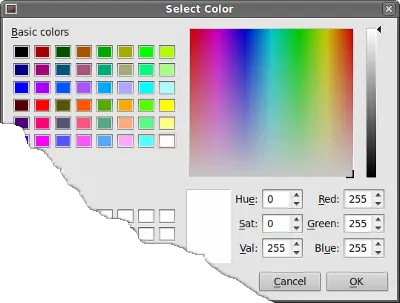 Figure: Color dialog
QtGui.QColorDialog的更多相关文章
- PyQt4颜色对话框QColorDialog
QColorDialog提供了用于显示颜色的对话框. #!/usr/bin/python # -*- coding: utf-8 -*- import sys from PyQt4 import Qt ...
- PyQt4入门学习笔记(五)
PyQt4里的对话框 对话框是大多数GUI应用中不可分割的一部分.一个对话框是两者或多者的会话.在GUI内,对话框是应用向人说话的方式.一个对话框可以用来输入数据,修改数据,改变应用设置等等. QtG ...
- Qt: 内建对话框(各种对话框都有了,且用到了qobject_cast解析sender的技术)
#include "BuiltinDialog.h" #include <QtGui/QTextEdit> #include <QtGui/QPushButton ...
- Python -- Gui编程 -- Qt库的使用 -- 菜单与对话框
1.菜单 import sys from PyQt4 import QtCore, QtGui class MyWindow(QtGui.QMainWindow): def __init__(self ...
- QDialog:输入对话框、颜色对话框、字体对话框、文件对话框
# _*_ coding:utf-8 _*_ import sys from PyQt4 import QtCore,QtGui class Example(QtGui.QWidget): def _ ...
- ZetCode PyQt4 tutorial Dialogs
#!/usr/bin/python # -*- coding: utf-8 -*- """ ZetCode PyQt4 tutorial In this example, ...
- PyQt4 颜色选择,字体选择代码
# -*- coding: utf-8 -*- """ ------------------------------------------------- File Na ...
- 读Pyqt4教程,带你入门Pyqt4 _005
对话框窗体或对话框是现代GUI应用不可或缺的一部分.dialog定义为两个或多个人之间的交谈.在计算机程序中dialog是一个窗体,用来和程序“交谈”.对话框用来输入数据.修改数据.改变程序设置等等. ...
- 六、pyqt5对话框——QInputDialog、QColorDialog、QFontDialog、QMessageBox、QFileDialog
目录: 一.对话框综合示例 二.QDialog 三.QInputDialog 四.QMessageDialog 五.QFileDialog pyqt5的对话框有多种类型,比如输入对话框(QInput ...
随机推荐
- CodeForces 1063B. Labyrinth 性质
给定$n *m$的格子 询问从$(r, c)$开始最多向左走$x$步,向右走$y$步 询问有多少个格子可以从$(r, c)$到达 有障碍物,$n, m \leqslant 2 * 10^3$ 对于一个 ...
- 【递推】hdu5927 Auxiliary Set
题意:给你一棵树.q次询问,每次给你一些非关键点,其他的点都是关键点,让你输出树中既不是关键点,也不是关键点的lca的点的数量. 对每次询问的非关键点按照深度从深到浅排序,依次处理,最开始每个点受到的 ...
- 【可持久化并查集】BZOJ3673-可持久化并查集 by zky
颓了十多天别问我再干嘛,在补学校作业 啊,开学了……我的夏天…… [题目大意] n个集合 m个操作 操作: 1 a b 合并a,b所在集合 2 k 回到第k次操作之后的状态(查询算作操作) 3 a b ...
- 记一次初步Linux提权
前言. 提权这么久了 还是头一次提下Linux的服务器... 由于之前一直钻研的win服务器 要不是前些日子爆出来Struts2-045漏洞 估计还没时间接触Linux提权.... 正文. st2 ...
- 2017-2018-1 JAVA实验站 冲刺 day06
2017-2018-1 JAVA实验站 冲刺 day06 各个成员今日完成的任务 小组成员 今日工作 完成进度 张韵琪 进行工作总结.博客.小组成员头像 100% 齐力锋 找背按钮声音 100% 张浩 ...
- --whole-archive和--no-whole-archive
--whole-archive选项解决的是编译中常遇到的问题.在代码中定义的符号(如函数名)还未使用到之前,链接器并不会把它加入到连接表中. 如下面这个例子: a.cpp: void func(){p ...
- 使用Spring配置shiro时,自定义Realm中属性无法使用注解注入解决办法
先来看问题 纠结了几个小时终于找到了问题所在,因为shiro的realm属于Filter,简单说就是初始化realm时,spring还未加载相关业务Bean,那么解决办法就是将springmvc ...
- HDU 4696 Answers (2013多校10,1001题 )
Answers Time Limit: 2000/1000 MS (Java/Others) Memory Limit: 131072/131072 K (Java/Others)Total S ...
- 降压转换器 (Buck)
降压转换器 (Buck) 切换式降压转换器 (Buck) 能提供高效率.高度弹性.高压降比.高负载能力的降压转换. 多数降压转换器 (Buck) 包含上桥 MOSFET 和同步整流 MOSFET,根据 ...
- Constant-on-time buck-boost regulator converts a positive input to a negative output
Buck regulators find wide application as step-down regulators for converting large positive input vo ...