
使用Nginx搭建图片服务器(windows)
知识点:在windows系统中,搭建图片上传服务器
参考博客:http://blog.csdn.net/u010942834/article/details/72953441
1.进入官网下载nginx压缩包,解压后目录如下
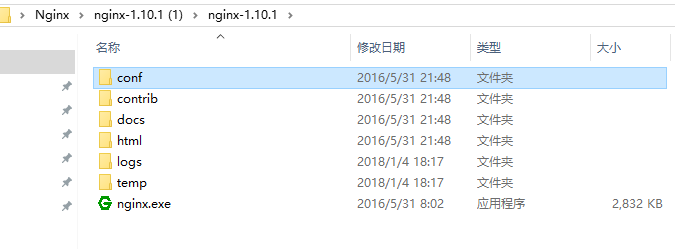
2.在解压后的conf/nginx.conf配置文件中,添加添加或者修改带有颜色地方的代码
#user nobody;
worker_processes 1;
#error_log logs/error.log;
#error_log logs/error.log notice;
#error_log logs/error.log info;
#pid logs/nginx.pid;
events {
worker_connections 1024;
}
http {
include mime.types;
default_type application/octet-stream;
#log_format main '$remote_addr - $remote_user [$time_local] "$request" '
# '$status $body_bytes_sent "$http_referer" '
# '"$http_user_agent" "$http_x_forwarded_for"';
#access_log logs/access.log main;
sendfile on;
#tcp_nopush on;
#keepalive_timeout 0;
keepalive_timeout 65;
#gzip on;
server {
listen ;
server_name localhost;
#charset utf-8;
#access_log logs/host.access.log main;
#添加博客的代码
location ~ .*\.(gif|jpg|jpeg|png)$ {
expires 24h;
root G:/images/;#指定图片存放路径
access_log G:/images/log;#图片路径
proxy_store on;
proxy_store_access user:rw group:rw all:rw;
proxy_temp_path G:/images/;#图片路径
proxy_redirect off;
proxy_set_header Host 127.0.0.1;
proxy_set_header X-Real-IP $remote_addr;
proxy_set_header X-Forwarded-For $proxy_add_x_forwarded_for;
client_max_body_size 10m;
client_body_buffer_size 1280k;
proxy_connect_timeout 900;
proxy_send_timeout 900;
proxy_read_timeout 900;
proxy_buffer_size 40k;
proxy_buffers 40 320k;
proxy_busy_buffers_size 640k;
proxy_temp_file_write_size 640k;
if ( !-e $request_filename)
{
proxy_pass http://169.254.140.133:8089; #代理访问地址
}
}
location / {
root html;
index index.html index.htm;
}
#error_page 404 /404.html;
# redirect server error pages to the static page /50x.html
#
error_page 500 502 503 504 /50x.html;
location = /50x.html {
root html;
}
# proxy the PHP scripts to Apache listening on 127.0.0.1:80
#
#location ~ \.php$ {
# proxy_pass http://127.0.0.1;
#}
# pass the PHP scripts to FastCGI server listening on 127.0.0.1:9000
#
#location ~ \.php$ {
# root html;
# fastcgi_pass 127.0.0.1:9000;
# fastcgi_index index.php;
# fastcgi_param SCRIPT_FILENAME /scripts$fastcgi_script_name;
# include fastcgi_params;
#}
# deny access to .htaccess files, if Apache's document root
# concurs with nginx's one
#
#location ~ /\.ht {
# deny all;
#}
}
# another virtual host using mix of IP-, name-, and port-based configuration
#
#server {
# listen 8000;
# listen somename:8080;
# server_name somename alias another.alias;
# location / {
# root html;
# index index.html index.htm;
# }
#}
# HTTPS server
#
#server {
# listen 443 ssl;
# server_name localhost;
# ssl_certificate cert.pem;
# ssl_certificate_key cert.key;
# ssl_session_cache shared:SSL:1m;
# ssl_session_timeout 5m;
# ssl_ciphers HIGH:!aNULL:!MD5;
# ssl_prefer_server_ciphers on;
# location / {
# root html;
# index index.html index.htm;
# }
#}
}
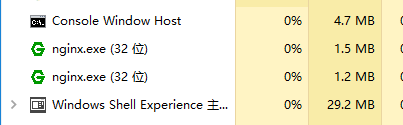
3.点击绿色的nginx.exe图标,启动服务器,在任务管理器看到如下,则启动成功
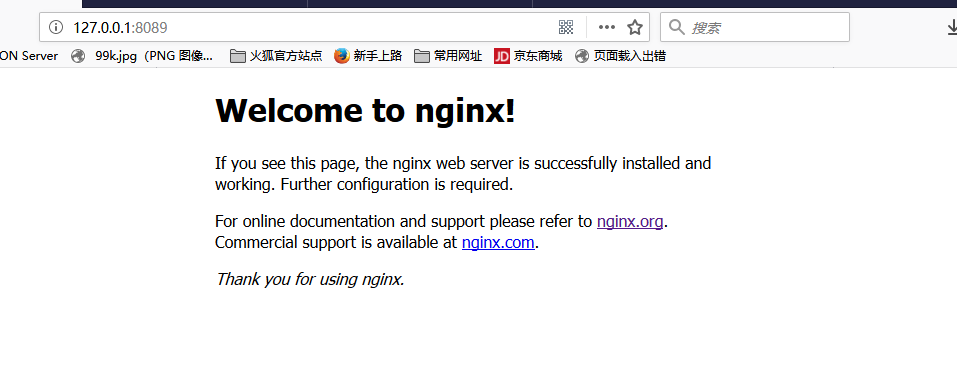
4.在浏览器中输入http://127.0.0.1:8089可以看到
5.在G:/images/下,放一个图片,在浏览器地址栏输入http://127.0.0.1:8089/img.jpg,就可以访问到服务器上的图片

使用Nginx搭建图片服务器(windows)的更多相关文章
- nginx 搭建图片服务器(windows 下,linux 下原理应该一样)
作者的心声:很多知道的.用过的东西,不写下来,下次还要百度查询,浪费时间和精力,故本次写下学习笔记,方便下次查阅. 题外话:如有读者通过我这篇博客解决了工作上的难题,可以给个评论,让我一起分享你的喜悦 ...
- Nginx,Nginx 搭建图片服务器
Nginx Nginx 概述 反向代理 工作流程 优点 1:保护了真实的web服务器,保证了web服务器的资源安全 2:节约了有限的IP地址资源 3:减少WEB服务器压力,提高响应速度 4:其他优点 ...
- Nginx 搭建图片服务器
Nginx 搭建图片服务器 本章内容通过Nginx 和 FTP 搭建图片服务器.在学习本章内容前,请确保您的Linux 系统已经安装了Nginx和Vsftpd. Nginx 安装:http://www ...
- Nginx搭建图片服务器
Nginx搭建图片服务器 标签(空格分隔): linux,nginx Nginx常用命令 ./nginx 启动 ./nginx -s reload 重载配置文件 ./nginx -s stop|sta ...
- nginx+ftp搭建图片服务器(Windows Server服务器环境下)
几种图片服务器的对比 1.直接使用ftp服务器,访问图片路径为 ftp://账户:密码@192.168.0.106/31275-105.jpg 不采用这种方式,不安全容易暴露ftp账户信息 2.直接使 ...
- ftp&nginx搭建图片服务器
下面使用ftp+nginx搭建一个简单的服务器 ftp用于文件的传输 nginx提供http服务 nginx服务器的安装和配置可以参照之前的教程:nginx安装及其配置详细教程 下面介绍ftp服务的安 ...
- 二、nginx搭建图片服务器
接上篇:Nginx安装手册 cd /usr/local/nginx/conf/ 配置图片服务器 方法一.在配置文件server{}中location /{} 修改配置: #默认请求 location ...
- ubuntu16.06+vsftpd+nginx搭建图片服务器
安装vsftpd 注:以下指令都在root账户下操作 # apt安装vsftpd apt-get install vsftpd #启动vsftpd service vsftpd start #新建用户 ...
- 【nginx】解决nginx搭建图片服务器访问图片404
图片通过ftp服务上传到/home/ftpuser/www/images目录下后访问 http://192.168.128.128/images/xxx.jpg 还是 404 NOT FOUND ,解 ...
随机推荐
- Spark源码分析 – DAGScheduler
DAGScheduler的架构其实非常简单, 1. eventQueue, 所有需要DAGScheduler处理的事情都需要往eventQueue中发送event 2. eventLoop Threa ...
- 剑指Offer——复杂链表的复制
题目描述: 输入一个复杂链表(每个节点中有节点值,以及两个指针,一个指向下一个节点,另一个特殊指针指向任意一个节点),返回结果为复制后复杂链表的head.(注意,输出结果中请不要返回参数中的节点引用, ...
- Amr and Chemistry---cf558C(暴力,加技巧)
题目链接:http://codeforces.com/problemset/problem/558/C 题意:有n个数,每个数都可以进行两个操作 *2 或者 /2,求最小的操作次数和,使得所有的数都相 ...
- Python在向CSV文件写中文时乱码的处理办法
前言 python2最大的坑在于中文编码问题,遇到中文报错首先加u,再各种encode.decode.当list.tuple.dict里面有中文时,打印出来的是Unicode编码,这个是无解的.对中文 ...
- intel EPT 机制详解
2016-11-08 在虚拟化环境下,intel CPU在处理器级别加入了对内存虚拟化的支持.即扩展页表EPT,而AMD也有类似的成为NPT.在此之前,内存虚拟化使用的一个重要技术为影子页表. 背景: ...
- BBS项目部署
1.准备 项目架构为:LNM+Python+Django+uwsgi+Redis (L:linux,N:nginx,M:mysql) 将bbs项目压缩上传到: /opt 在shell中直接拖拽 ...
- 3类数据库的联动:mysql、mongodb、redis
3类数据库的联动:mysql.mongodb.redis from pymysql import * from pymongo import * from redis import * class M ...
- C的指针疑惑:C和指针8数组
]; ]; 上面申明两个数组,不能进行以下赋值 b = a; 你不能使用赋值符把一个数组的所有元素复制给另一个数组,必须使用一个循环,每次复制一个元素 数组和指针 ]; int *b; 声明一个数组, ...
- jmeter接口测试实战
请求方法:get/post 接口请求地址:http://172.22.24.26:8080/fundhouse/external/getdata?name=xxxx &fund_udid=35 ...
- A simple windows programm in c
A simple windows programm in c The following programm is a minimal windows program. It opens ...