
Spring Boot+BootStrap fileInput 多图片上传
<link rel="stylesheet" type="text/css" th:href="@{/js/bootstrap/css/bootstrap.css}">

<link rel="stylesheet" type="text/css" th:href="@{/js/bootstrap/fileinput/css/fileinput.css}">

<!-- 加入FileInput -->

<script th:src="@{/js/jquery-3.3.1.min.js}"></script>

<script th:src="@{/js/bootstrap/js/bootstrap.js}"></script>

<script th:src="@{/js/bootstrap/fileinput/js/fileinput.js}"></script>

<script th:src="@{/js/bootstrap/fileinput/js/zh.js}"></script>/*语言环境*/
二、表单
<form class="form" action="#" method="post" enctype="multipart/form-data"  id="pollutionForm">

    <!-- 注意事项:Input type类型为file class为样式 id随意 name随意

         multiple(如果是要多图上传一定要加上,不加的话每次只能选中一张图)-->

    图片:<input type="file" class="file" id="img" multiple name="images"><br>

</form>
三、JavaScript代码
<script>/**/

    var imageData = []; //多图上传返回的图片属性接受数组  这里是因为我在做表单其他属性提交的时候使用,在这里我没有将别的input写出来

    $("#img").fileinput({

        language : 'zh',

        uploadUrl : "/image/save-test",

        showUpload: true, //是否显示上传按钮

        showRemove : true, //显示移除按钮

        showPreview : true, //是否显示预览

        showCaption: false,//是否显示标题

        autoReplace : true,

        minFileCount: 0,

        uploadAsync: true,

        maxFileCount: 10,//最大上传数量

        browseOnZoneClick: true,

        msgFilesTooMany: "选择上传的文件数量 超过允许的最大数值!",

        enctype: 'multipart/form-data',

        // overwriteInitial: false,//不覆盖已上传的图片

        allowedFileExtensions : [ "jpg", "png", "gif" ],

        browseClass : "btn btn-primary", //按钮样式

        previewFileIcon : "<i class='glyphicon glyphicon-king'></i>"

    }).on("fileuploaded", function(e, data) {//文件上传成功的回调函数,还有其他的一些回调函数,比如上传之前...

        var res = data.response;

        console.log(res)

        imageData.push({

            "path": res.data.path,

            "date":res.data.date

        });

        console.log(imageData);

    });

</script>
四、后台代码
//图片类

import java.util.Date;

/**

 * 图片类

 */

public class Img {

    private String name;

    private String path;

    private Date date;

    public Img() {

    }

    public Img(String path, Date date) {

        this.path = path;

        this.date = date;

    }

    public Img(String name, String path, Date date) {

        this.name = name;

        this.path = path;

        this.date = date;

    }

    public String getName() {

        return name;

    }

    public void setName(String name) {

        this.name = name;

    }

    public String getPath() {

        return path;

    }

    public void setPath(String path) {

        this.path = path;

    }

    public Date getDate() {

        return date;

    }

    public void setDate(Date date) {

        this.date = date;

    }

    @Override

    public String toString() {

        return "Img{" +

                "name='" + name + '\'' +

                ", path='" + path + '\'' +

                ", date=" + date +

                '}';

    }

}

//图片上传Controller

public class UploadController {

    //fileinput 其实每次只会上传一个文件  多图上传也是分多次请求,每次上传一个文件 所以不需要循环

@RestController

    //@RequestParam("images") 这里的images对应表单中name 然后MultipartFile 参数名就可以任意了

@RequestMapping(value = "/image/save-test",method = RequestMethod.POST)

    public UploadResponseData saveImg(@RequestParam("images") MultipartFile file) throws IOException {

        String pathname = "";

        String returnPath = "";

        if (!file.isEmpty()){

            String fileName = file.getOriginalFilename();

            File path = new File(ResourceUtils.getURL("classpath:").getPath());//获取Spring boot项目的根路径,在开发时获取到的是/target/classes/

            System.out.println(path.getPath());//如果你的图片存储路径在static下,可以参考下面的写法

            File uploadFile = new File(path.getAbsolutePath(), "static/images/upload/");//开发测试模式中 获取到的是/target/classes/static/images/upload/

            if (!uploadFile.exists()){

                uploadFile.mkdirs();

            }

            //获取文件后缀名

            String end = FilenameUtils.getExtension(file.getOriginalFilename());

            DateFormat df = new SimpleDateFormat("yyyyMMddHHmmssSSS");

            //图片名称 采取时间拼接随机数

            String name = df.format(new Date());

            Random r = new Random();

            for(int i = 0 ;i < 3 ;i++){

                name += r.nextInt(10);

            }

            String diskFileName = name + "." +end; //目标文件的文件名

            pathname = uploadFile.getPath()+ "/" + diskFileName;

            System.out.println(pathname);

            returnPath = "images/upload/" + diskFileName;//这里是我自己做返回的字符串

            file.transferTo(new File(pathname));//文件转存

        }//UploadResponseData 自定义返回数据类型实体{int code, String msg, Object data}

        return new UploadResponseData(CodeEnum.SUCCESS.getCode(),MsgEnum.SUCCESS.getMsg(),new Img(returnPath,new Date()));

    }

}
五、总结吧
最后在这里想说一些问题
1、spring boot路径获取问题:
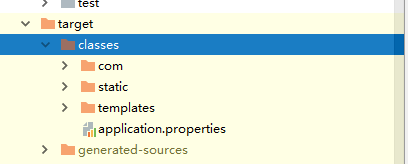
ResourceUtils.getURL("classpath:").getPath(); 在开发环境下获取到的是项目根路径/target/class/

Spring Boot+BootStrap fileInput 多图片上传的更多相关文章
- bootstrap fileinput +springmvc图片上传-krajee
引入的文件 <link href="https://cdnjs.cloudflare.com/ajax/libs/bootstrap-fileinput/4.4.9/css/filei ...
- BootStrap fileinput.js文件上传组件实例代码
1.首先我们下载好fileinput插件引入插件 ? 1 2 3 <span style="font-size:14px;"><link type="t ...
- Bootstrap FileInput 多图上传插件 文档属性说明
Bootstrap FileInput 多图上传插件 原文链接:http://blog.csdn.net/misterwho/article/details/72886248?utm_source ...
- spring boot下MultipartHttpServletRequest如何提高上传文件大小的默认值
前言: 上传下载功能算是一个非常常见的功能,如果使用MultipartHttpServletRequest来做上传功能. 不配置上传大小的话,默认是2M.在有些场景,这个肯定不能满足条件. 上传代码: ...
- 从零开始的Spring Boot(3、Spring Boot静态资源和文件上传)
Spring Boot静态资源和文件上传 写在前面 从零开始的Spring Boot(2.在Spring Boot中整合Servlet.Filter.Listener的方式) https://www. ...
- Spring Boot 2.X 实现文件上传(三)
使用 SpringBoot 项目完成单个.多个文件的上传处理,并将上传的文件保存到指定目录下. 代码演示案例 所有的 HTML 页面文件 index.html <!DOCTYPE html> ...
- Bootstrap fileinput:文件上传插件的基础用法
官网地址:http://plugins.krajee.com/ 官网提供的样例:http://plugins.krajee.com/file-input/demo 基础用法一 导入核心CSS及JS文件 ...
- Spring Boot会员管理系统——处理文件上传
温馨提示 Spring Boot会员管理系统的中,需要涉及到Spring框架,SpringMVC框架,Hibernate框架,thymeleaf模板引擎.所以,可以学习下这些知识.当然,直接入门的话使 ...
- Spring Boot 静态资源映射与上传文件路由配置
默认静态资源映射目录 默认映射路径 在平常的 web 开发中,避免不了需要访问静态资源,如常规的样式,JS,图片,上传文件等;Spring Boot 默认配置对静态资源映射提供了如下路径的映射 /st ...
随机推荐
- 在线制作logo
logoko:http://www.logoko.com.cn/ markmarker:http://emblemmatic.org/markmaker/#/ logomaker:https://lo ...
- JS-实时修改在textarea里面的span(实际输入的文字)
解决办法: 在开发中,多少会遇到一些界面,输入限制字数. 例如: //页面加载完毕 $(function() { //descrip是textarea的id $("#descrip" ...
- C# 图片识别技术(支持21种语言,提取图片中的文字)
图片识别的技术到几天已经很成熟了,只是相关的资料很少,为了方便在此汇总一下(C#实现),方便需要的朋友查阅,也给自己做个记号. 图片识别的用途:很多人用它去破解网站的验证码,用于达到自动刷票或者是批量 ...
- 【BZOJ2797】[Poi2012]Squarks 暴力乱搞
[BZOJ2797][Poi2012]Squarks Description 设有n个互不相同的正整数{X1,X2,...Xn},任取两个Xi,Xj(i≠j),能算出Xi+Xj.现在所有取法共n*(n ...
- Storm基础概念与单词统计示例
Storm基本概念 Storm是一个分布式的.可靠地.容错的数据流处理系统.Storm分布式计算结构称为Topology(拓扑)结构,顾名思义,与拓扑图十分类似.该拓扑图主要由数据流Stream.数据 ...
- maven web框架搭建
前面我们描述了如何使用maven搭建一个最基本的Java Project 框架.在实际生产应用中,一般不会仅仅建立一个最基本的Java Project项目,目前 Java Web 开发已经成为Java ...
- 170420、maven内置常量
Maven工程插件配置中通常会用到一些Maven变量,因此需要找个地方对这些变量进行统一定义,下面介绍如何定义自定义变量. 在根节点project下增加properties节点,所有自定义变量均可以定 ...
- base64图片解析
大家可能注意到了,网页上有些图片的src或css背景图片的url后面跟了一大串字符,比如:data:image/png;base64, iVBORw0KGgoAAAANSUhEUgAAAAEAAAAk ...
- PAT 甲级 1021 Deepest Root (并查集,树的遍历)
1021. Deepest Root (25) 时间限制 1500 ms 内存限制 65536 kB 代码长度限制 16000 B 判题程序 Standard 作者 CHEN, Yue A graph ...
- [iOS微博项目 - 4.5] - 每条微博的底部工具条
github: https://github.com/hellovoidworld/HVWWeibo A.每条微博的底部工具条 1.需求 每条微博底部都有一个工具条 显示3个按钮:评论.转发.赞 按钮 ...