
【Qt开发】Qt在QLabel(QWidget)鼠标绘制直线和矩形框
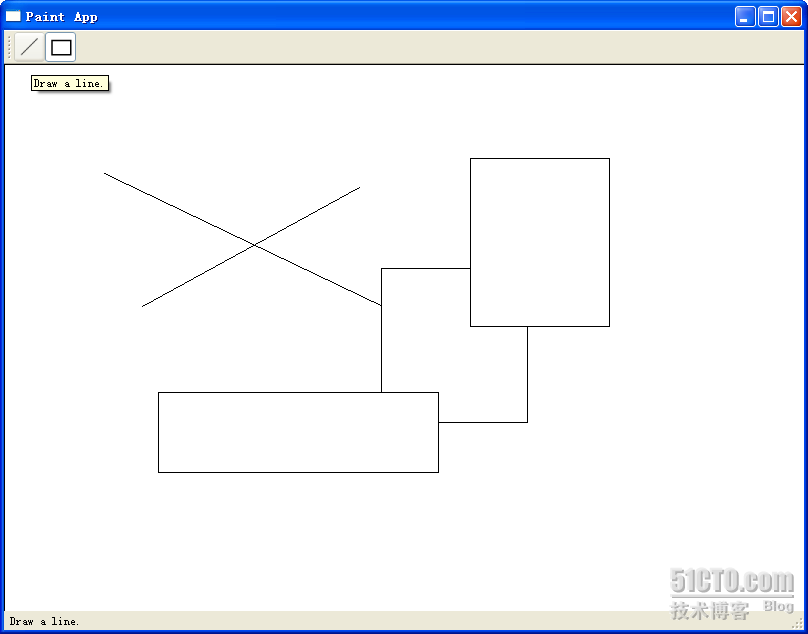
 #ifndef MAINWINDOW_H #define MAINWINDOW_H #include <QtGui> #include "shape.h" #include "paintwidget.h" class MainWindow : public QMainWindow { Q_OBJECT public: MainWindow(QWidget *parent = 0); signals: void changeCurrentShape(Shape::Code newShape); private slots: void drawLineActionTriggered(); void drawRectActionTriggered(); }; #endif // MAINWINDOW_H#include "mainwindow.h" MainWindow::MainWindow(QWidget *parent) : QMainWindow(parent) { QToolBar *bar = this->addToolBar("Tools"); QActionGroup *group = new QActionGroup(bar); QAction *drawLineAction = new QAction("Line",
bar);
drawLineAction->setIcon(QIcon(":/line.png")); drawLineAction->setToolTip(tr("Draw a line.")); drawLineAction->setStatusTip(tr("Draw a line.")); drawLineAction->setCheckable(true); drawLineAction->setChecked(true); group->addAction(drawLineAction); bar->addAction(drawLineAction); QAction *drawRectAction = new QAction("Rectangle",bar);
drawRectAction->setIcon(QIcon(":/rect.png")); drawRectAction->setToolTip(tr("Draw a rectangle.")); drawRectAction->setStatusTip(tr("Draw a rectangle.")); drawRectAction->setCheckable(true); group->addAction(drawRectAction); bar->addAction(drawRectAction); QLabel *statusMsg = new QLabel; statusBar()->addWidget(statusMsg); PaintWidget *paintWidget = new PaintWidget(this); setCentralWidget(paintWidget); connect(drawLineAction, SIGNAL(triggered()), this, SLOT(drawLineActionTriggered())); connect(drawRectAction, SIGNAL(triggered()), this, SLOT(drawRectActionTriggered())); connect(this, SIGNAL(changeCurrentShape(Shape::Code)), paintWidget, SLOT(setCurrentShape(Shape::Code))); } void MainWindow::drawLineActionTriggered() { emit changeCurrentShape(Shape::Line); } void MainWindow::drawRectActionTriggered() { emit changeCurrentShape(Shape::Rect); } #ifndef PAINTWIDGET_H #define PAINTWIDGET_H #include <QtGui> #include <QDebug> #include "shape.h" #include "line.h" #include "rect.h" class PaintWidget : public QWidget { Q_OBJECT public: PaintWidget(QWidget *parent = 0); public slots: void setCurrentShape(Shape::Code s) { if(s != currShapeCode) { currShapeCode = s; } } protected: void paintEvent(QPaintEvent *event); void mousePressEvent(QMouseEvent *event); void mouseMoveEvent(QMouseEvent *event); void mouseReleaseEvent(QMouseEvent *event); private: Shape::Code currShapeCode; Shape *shape; bool perm; QList<Shape*> shapeList; }; #endif // PAINTWIDGET_H #include "paintwidget.h" PaintWidget::PaintWidget(QWidget *parent) : QWidget(parent), currShapeCode(Shape::Line), shape(NULL), perm(false) { setSizePolicy(QSizePolicy::Expanding, QSizePolicy::Expanding); } void PaintWidget::paintEvent(QPaintEvent *event) { QPainter painter(this); painter.setBrush(Qt::white); painter.drawRect(0, 0, size().width(), size().height()); foreach(Shape * shape, shapeList) { shape->paint(painter); } if(shape) { shape->paint(painter); } } void PaintWidget::mousePressEvent(QMouseEvent*event)
{ switch(currShapeCode) { case Shape::Line: { shape = new Line; break; } case Shape::Rect: { shape = new Rect; break; } } if(shape != NULL) { perm = false; shapeList<<shape; shape->setStart(event->pos()); shape->setEnd(event->pos()); } } void PaintWidget::mouseMoveEvent(QMouseEvent *event) { if(shape && !perm) { shape->setEnd(event->pos()); update(); } } void PaintWidget::mouseReleaseEvent(QMouseEvent*event)
{ perm = true; } #ifndef SHAPE_H #define SHAPE_H #include <QtGui> class Shape { public: enum Code { Line, Rect }; Shape(); void setStart(QPoint s) { start = s; } void setEnd(QPoint e) { end = e; } QPoint startPoint() { return start; } QPoint endPoint() { return end; } void virtual paint(QPainter& painter) = 0;
protected: QPoint start; QPoint end; }; #endif // SHAPE_H #include "shape.h" Shape::Shape() { } #ifndef LINE_H #define LINE_H #include "shape.h" class Line : public Shape { public: Line(); void paint(QPainter &painter); }; #endif // LINE_H #include "line.h" Line::Line() { } void Line::paint(QPainter &painter) { painter.drawLine(start, end); } #ifndef RECT_H #define RECT_H #include "shape.h" class Rect : public Shape { public: Rect(); void paint(QPainter &painter); }; #endif // RECT_H #include "rect.h" Rect::Rect() { } void Rect::paint(QPainter &painter) { painter.drawRect(start.x(), start.y(), end.x() - start.x(), end.y() - start.y()); } 【Qt开发】Qt在QLabel(QWidget)鼠标绘制直线和矩形框的更多相关文章
- Qt 为QPushButton、QLabel添加鼠标移入移出事件
QT 为QPushButton.QLabel添加鼠标移入移出事件**要实现的效果:**鼠标移入QPushButton时与移出时按钮变换字体颜色,鼠标移入QLabel时显示上面的文字,移出时不显示.** ...
- c#在pictureBox控件上绘制多个矩形框及删除绘制的矩形框
在pictureBox上每次只绘制一个矩形框,绘制下一个矩形框时上次绘制的矩形框取消,代码如链接:https://www.cnblogs.com/luxiao/p/5625196.html 在绘制矩形 ...
- 【Qt开发】在QLabel已经显示背景图片后绘制图形注意事项
主要是要解决图形覆盖的问题,通常的办法就是对QLabel进行子类化,并重载函数: void myLabel::paintEvent(QPaintEvent *event) { QLab ...
- QT笔记 -- (3) 为QLabel添加鼠标响应方法1
参考 http://qt-project.org/wiki/Make-a-QLabel-Clickable 1.首先重载QLabel的mousePressEvent,这样点击QLabel时就能发出cl ...
- QT笔记 -- (4) 为QLabel添加鼠标响应方法2
1.实现 bool eventFilter(QObject *target,QEvent *event) 函数内容如下: bool eventFilter(QObject *target,QEvent ...
- opencv鼠标绘制直线 C++版
因为需要在图片上标记直线,所以从网上找了相应的参考资料.但大多都是c风格的,于是自己就写了一个c++风格的. opencv2.4.11,win8.1,vs2013 #include <cv.h& ...
- OpenCV绘制直线,矩形和园
首先导入我们所需要的库: import numpy as np import cv2 import matplotlib.pyplot as plt 自定义显示图像的函数: def show(imag ...
- Java基础之在窗口中绘图——绘制直线和矩形(Sketcher 2 drawing lines and rectangles)
控制台程序. import javax.swing.JComponent; import java.util.*; import java.awt.*; import java.awt.geom.*; ...
- Qt开发Activex笔记(一):环境搭建、基础开发流程和演示Demo
前言 使用C#开发动画,绘图性能跟不上,更换方案使用Qt开发Qt的控件制作成OCX以供C#调用,而activex则是ocx的更高级形式. QtCreator是没有Active控件项目的,所有需要 ...
随机推荐
- 使用Vue自定义组件时,报did you register the component correctly? For recursive components, make sure to provide the "name" option.(未注册组件)的原因之一
错误信息: [Vue warn]: Unknown custom element: <list> - did you register the component correctly? F ...
- qt5--自定义控件封装
视频教程地址:https://www.bilibili.com/video/av51766541/?p=30
- Wpf自动滚动效果
一.思路 1.使用ScrollView的Scroll.ScrollToVerticalOffset(offset)方法进行滚动 2.ScrollView中放置2个ListView,第一个滚动出边界后, ...
- Make文件(一)
基本规则: 目标:依赖 (tab)规则 目标:需要生成的目标文件 依赖:生成该目标所需的一些文件 规则:由依赖文件生成目标文件的手段 tab:每条规则前必须以tab开头,使用空格不行. 例如: /** ...
- Misha and Permutations Summation
A - Misha and Permutations Summation 首先这个 mod n! 因为数量级上的差别最多只会对康拓展开的第一项起作用所以这个题并不需要把 ord (p) 和 ord ( ...
- crontab 常见 /dev/null 2>&1 详解
大部分在 crontab 计划任务中都会年到未尾带 >/dev/null 2>&1,是什么意思呢? > 是重定向 /dev/null 代表空设备文件 1 表示stdout标准 ...
- BeanCopier对象复制学习
BeanCopier是Cglib包中的一个类,用于对象的复制. 注意:目标对象必须先实例化 而且对象必须要有setter方法 初始化例子: BeanCopier copier = BeanCop ...
- win7系统安装Mysql5.7
1.下载mysql的zip包 把zip包解压到指定的目录,目录不能有中文和空格 2.进入%mysql%目录(注:%mysql%是解压目录,我的是:D:\JavaTool\mysql) 在%mysql% ...
- Linux上python3的安装和使用
centos7默认是装有python的,咱们先看一下 #检查python版本 [root@oldboy_python ~ 17:23:54]#python -V Python 2.7.5 但是 pyt ...
- Oracle三种分页?
①select * from (select employee.*, rownum r from employee) where r between 2 and 5; ②select * from ( ...