
JavaWeb-SpringBoot_使用H2数据库实现用户注册登录
使用Gradle编译项目 传送门
前端资源同:使用MySQL数据库实现用户管理_demo 传送门
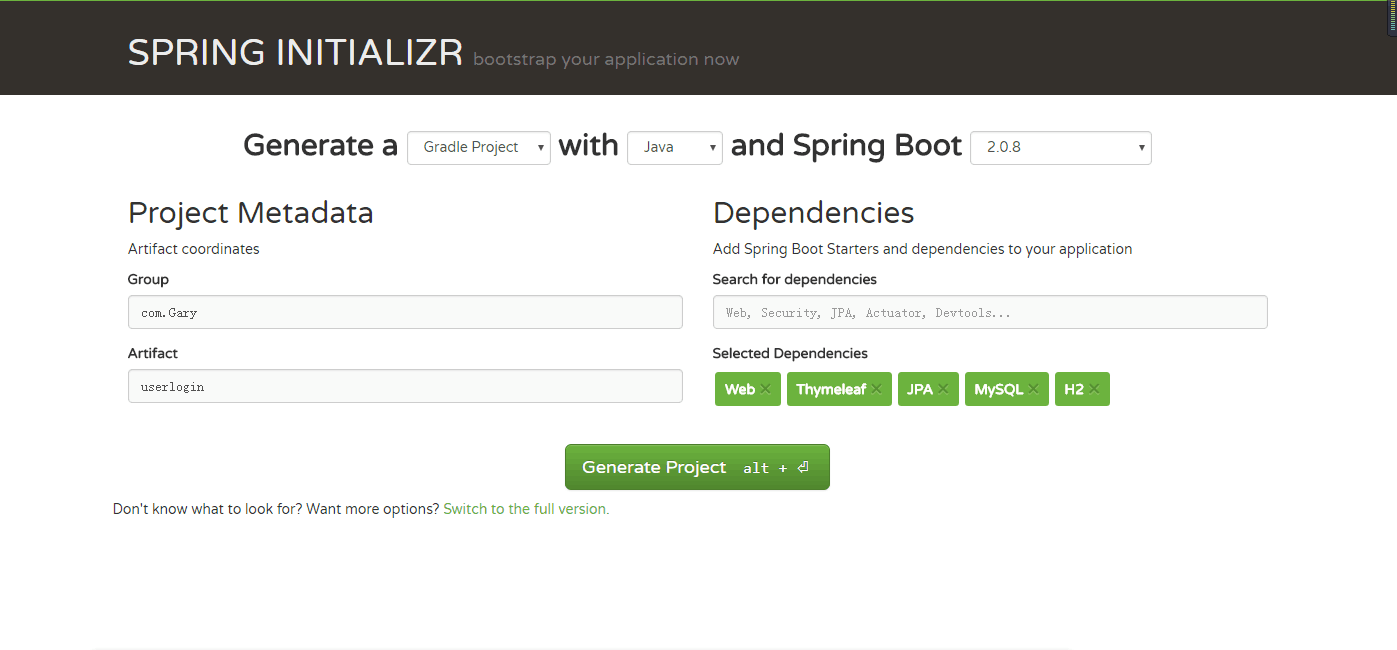
H2:SpringBoot内置持久化数据库
使用H2数据库实现用户注册登录
用户可以在index.html点击“注册”按钮将信息存储到h2数据库中,当点击“登录”按钮时,如果用户输入的是正确的账号密码,跳转到welcome.html页面,用户输入账号密码与和h2数据库中的不匹配时,重定向到index.html页面

<!DOCTYPE html>
<html xmlns:th="http://www.thymeleaf.org" xmlns:layout="http://www.ultraq.net.nz/thymeleaf/layout"> <head>
<meta charset="utf-8"> <link rel="stylesheet" href="bootstrap/css/bootstrap.min.css">
<link rel="stylesheet" href="css/login.css" />
<script src="js/jquery.min.js"></script>
<script src="bootstrap/js/bootstrap.min.js"></script> <script>
$(document).ready(function() {
//打开会员登录
$("#Login_start_").click(function() {
$("#regist_container").hide();
$("#_close").show();
$("#_start").animate({
left : '350px',
height : '520px',
width : '400px'
}, 500, function() {
$("#login_container").show(500);
$("#_close").animate({
height : '40px',
width : '40px'
}, 500);
});
});
//打开会员注册
$("#Regist_start_").click(function() {
$("#login_container").hide();
$("#_close").show();
$("#_start").animate({
left : '350px',
height : '520px',
width : '400px'
}, 500, function() {
$("#regist_container").show(500);
$("#_close").animate({
height : '40px',
width : '40px'
}, 500);
});
});
//关闭
$("#_close").click(function() { $("#_close").animate({
height : '0px',
width : '0px'
}, 500, function() {
$("#_close").hide(500);
$("#login_container").hide(500);
$("#regist_container").hide(500);
$("#_start").animate({
left : '0px',
height : '0px',
width : '0px'
}, 500);
});
});
//去 注册
$("#toRegist").click(function() {
$("#login_container").hide(500);
$("#regist_container").show(500);
});
//去 登录
$("#toLogin").click(function() {
$("#regist_container").hide(500);
$("#login_container").show(500);
});
});
</script>
</head> <body style="background-color: #DCDCDC;"> <a id="Login_start_" class="btn btn-danger" style="width: 100px; height: 40px; border-radius: 0;">登陆</a>
<a id="Regist_start_" class="btn btn-success" style="width: 100px; height: 40px; border-radius: 0;">注册</a> <!-- 会员登录 -->
<!--<div id='Login_start' style="position: absolute;" >-->
<div id='_start'>
<div id='_close' style="display: none;">
<span class="glyphicon glyphicon-remove"></span>
</div>
<br />
<!--登录框-->
<div id="login_container">
<div id="lab1">
<span id="lab_login">登录</span>
<span id="lab_toRegist">
 还没有账号
<span id='toRegist' style="color: #EB9316; cursor: pointer;">立即注册</span>
</span>
</div>
<div style="width: 330px;">
<span id="lab_type1">手机号/账号登陆</span>
</div> <form action="" th:action="@{~/user/login.action}" method="POST">
<div id="form_container1">
<br />
<input type="text" class="form-control" placeholder="手机号/用户名" id="login_number" value="Gary" name="username"/>
<input type="password" class="form-control" placeholder="密码" id="login_password" name="password" />
<input type="submit" value="登录" class="btn btn-success" id="login_btn" />
<span id="rememberOrfindPwd">
<span>
<input id="remember" type="checkbox" style="margin-bottom: -1.5px;" />
</span>
<span style="color: #000000"> 记住密码     </span>
<span style="color: #000000"> 忘记密码 </span>
</span>
</div>
</form> <div style="display: block; width: 330px;">
<span id="lab_type2">使用第三方直接登陆</span>
</div>
<div style="width: 330px; height: 100px; border-bottom: 1px solid #FFFFFF;">
<br />
<button id="login_QQ" type="button" class="btn btn-info">
<img src="img/qq32.png" style="width: 20px; margin-top: -4px;" />
 QQ登录
</button>
<button id="login_WB" type="button" class="btn btn-danger">
<img src="img/sina32.png" style="width: 20px; margin-top: -4px;" />
 微博登录
</button>
</div>
</div>
<!-- 注册 -->
<form action="" th:action="@{~/user/register.action}" method="POST">
<div id='regist_container' style="display: none;">
<div id="lab1">
<span id="lab_login">注册</span>
<span id="lab_toLogin">
 已有账号
<span id='toLogin' style="color: #EB9316; cursor: pointer;">立即登录</span>
</span>
</div> <div id="form_container2" style="padding-top: 25px;"> <input type="text" class="form-control" value="Gary" placeholder="用户名" id="regist_account" name="username" />
<input type="password" class="form-control" placeholder="密码" id="regist_password1" name="password" />
<input type="password" class="form-control" placeholder="确认密码" id="regist_password2" />
<input type="text" class="form-control" placeholder="手机号" id="regist_phone" name="telephone" />
<input type="text" class="form-control" placeholder="验证码" id="regist_vcode" />
<!--<button id="getVCode" type="button" class="btn btn-success" >获取验证码</button>-->
<input id="getVCode" type="button" class="btn btn-success" value="点击发送验证码" onclick="sendCode(this)" /> </div>
<input type="submit" value="注册" class="btn btn-success" id="regist_btn" />
</div>
</form>
</div> </body>
<script type="text/javascript">
var clock = '';
var nums = 30;
var btn;
function sendCode(thisBtn) {
btn = thisBtn;
btn.disabled = true; //将按钮置为不可点击
btn.value = '重新获取(' + nums + ')';
clock = setInterval(doLoop, 1000); //一秒执行一次
} function doLoop() {
nums--;
if (nums > 0) {
btn.value = '重新获取(' + nums + ')';
} else {
clearInterval(clock); //清除js定时器
btn.disabled = false;
btn.value = '点击发送验证码';
nums = 10; //重置时间
}
} $(document).ready(function() {
$("#login_QQ").click(function() {
alert("暂停使用!");
});
$("#login_WB").click(function() {
alert("暂停使用!");
});
});
</script> </html>
index.html
<!DOCTYPE html>

<html>

<head>

<meta charset="UTF-8">

<title>Insert title here</title>

</head>

<body>

<h1>登录成功!</h1>

</body>

</html>
welcome.html
#Tymeleaf 编码

spring.thymeleaf.encoding=UTF-8

#热部署静态文件

spring.thymeleaf.cache =false

#使用HTML5标准

spring.thymeleaf.mode=HTML5

#使用h2控制台

spring.h2.console.enabled=true
application.properties
package com.Gary.userlogin;

import org.springframework.boot.SpringApplication;

import org.springframework.boot.autoconfigure.SpringBootApplication;

@SpringBootApplication

public class UserloginApplication {

    public static void main(String[] args) {

        SpringApplication.run(UserloginApplication.class, args);

    }

}
UserloginApplication.java
package com.Gary.userlogin.domain;

import javax.persistence.Entity;

import javax.persistence.GeneratedValue;

import javax.persistence.GenerationType;

import javax.persistence.Id;

@Entity

public class User {

//    设置一个主键id    主键自增策略

    @Id

    @GeneratedValue(strategy=GenerationType.IDENTITY)

    private Long id;

    private String username;

    private String password;

    private String telephone;

    protected User() {

    }

    public User(Long id,String username,String password,String telephone) {

        this.id=id;

        this.password=password;

        this.username=username;

        this.telephone=telephone;

    }

    public Long getId() {

        return id;

    }

    public void setId(Long id) {

        this.id = id;

    }

    public String getUsername() {

        return username;

    }

    public void setUsername(String username) {

        this.username = username;

    }

    public String getPassword() {

        return password;

    }

    public void setPassword(String password) {

        this.password = password;

    }

    public String getTelephone() {

        return telephone;

    }

    public void setTelephone(String telephone) {

        this.telephone = telephone;

    }

}
User.java
package com.Gary.userlogin.controller;

import org.springframework.beans.factory.annotation.Autowired;

import org.springframework.web.bind.annotation.RequestMapping;

import org.springframework.web.bind.annotation.RestController;

import org.springframework.web.servlet.ModelAndView;

import com.Gary.userlogin.domain.User;

import com.Gary.userlogin.repository.UserRepository;

@RestController

public class UserController {

    @Autowired

    private UserRepository UserRepository;

    //模型视图

    @RequestMapping("/index.action")

    public ModelAndView index() {

        return new ModelAndView("/index.html");

    }

    @RequestMapping("/user/register.action")

    public ModelAndView register(User user) {

        UserRepository.save(user);

        return new ModelAndView("redirect:/index.action");

    }

    @RequestMapping("/user/login.action")

    public ModelAndView login(User user) {

        //获得用户登录名和密码

        User loginUser = UserRepository.findByUsernameAndPassword(user.getUsername(),user.getPassword());

        if(loginUser == null) {

            return new ModelAndView("redirect:/index.action");

        }else {

            return new ModelAndView("/welcome.html");

        }

    }

}
UserController.java
package com.Gary.userlogin.repository;

import org.springframework.data.repository.CrudRepository;

import com.Gary.userlogin.domain.User;

//用户注册登录接口

public interface UserRepository extends CrudRepository<User,Long>{

    //遵循spring data jpa命名标准

    User findByUsernameAndPassword(String username,String password);

}
UserRepository.java
目录结构
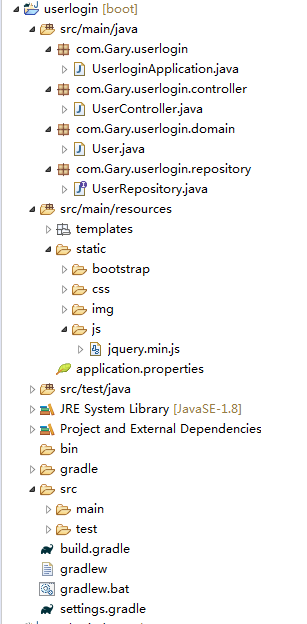
分注册和登录两部分实现
各个功能模块的默认配置文件application.properties 传送门
#Tymeleaf 编码

spring.thymeleaf.encoding=UTF-8

#热部署静态文件

spring.thymeleaf.cache =false

#使用HTML5标准

spring.thymeleaf.mode=HTML5

#使用h2控制台

spring.h2.console.enabled=true
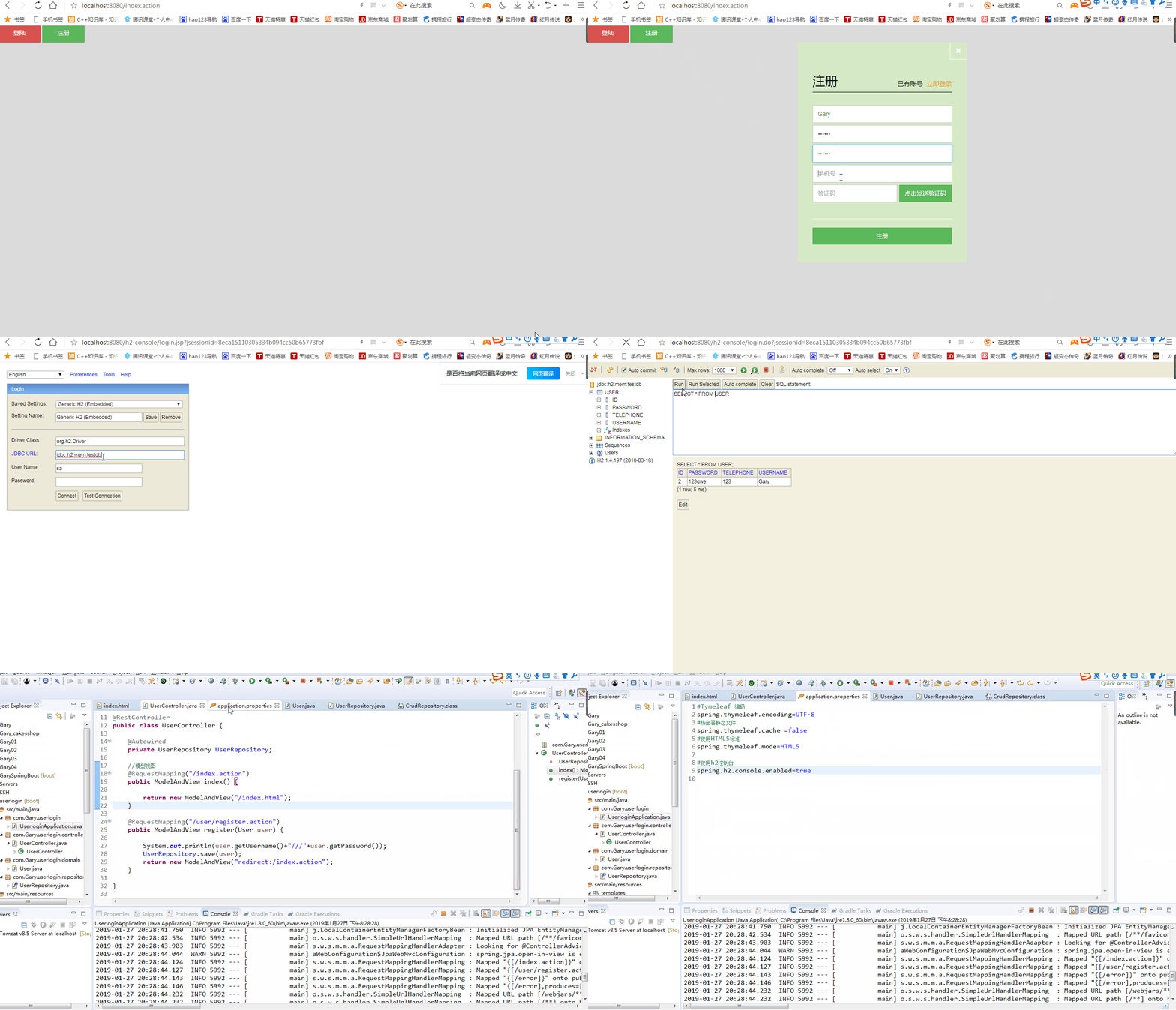
H2数据库中注册用户
<!DOCTYPE html>
<html xmlns:th="http://www.thymeleaf.org" xmlns:layout="http://www.ultraq.net.nz/thymeleaf/layout"> <head>
<meta charset="utf-8"> <link rel="stylesheet" href="bootstrap/css/bootstrap.min.css">
<link rel="stylesheet" href="css/login.css" />
<script src="js/jquery.min.js"></script>
<script src="bootstrap/js/bootstrap.min.js"></script> <script>
$(document).ready(function() {
//打开会员登录
$("#Login_start_").click(function() {
$("#regist_container").hide();
$("#_close").show();
$("#_start").animate({
left : '350px',
height : '520px',
width : '400px'
}, 500, function() {
$("#login_container").show(500);
$("#_close").animate({
height : '40px',
width : '40px'
}, 500);
});
});
//打开会员注册
$("#Regist_start_").click(function() {
$("#login_container").hide();
$("#_close").show();
$("#_start").animate({
left : '350px',
height : '520px',
width : '400px'
}, 500, function() {
$("#regist_container").show(500);
$("#_close").animate({
height : '40px',
width : '40px'
}, 500);
});
});
//关闭
$("#_close").click(function() { $("#_close").animate({
height : '0px',
width : '0px'
}, 500, function() {
$("#_close").hide(500);
$("#login_container").hide(500);
$("#regist_container").hide(500);
$("#_start").animate({
left : '0px',
height : '0px',
width : '0px'
}, 500);
});
});
//去 注册
$("#toRegist").click(function() {
$("#login_container").hide(500);
$("#regist_container").show(500);
});
//去 登录
$("#toLogin").click(function() {
$("#regist_container").hide(500);
$("#login_container").show(500);
});
});
</script>
</head> <body style="background-color: #DCDCDC;"> <a id="Login_start_" class="btn btn-danger" style="width: 100px; height: 40px; border-radius: 0;">登陆</a>
<a id="Regist_start_" class="btn btn-success" style="width: 100px; height: 40px; border-radius: 0;">注册</a> <!-- 会员登录 -->
<!--<div id='Login_start' style="position: absolute;" >-->
<div id='_start'>
<div id='_close' style="display: none;">
<span class="glyphicon glyphicon-remove"></span>
</div>
<br />
<!--登录框-->
<div id="login_container">
<div id="lab1">
<span id="lab_login">会员登录</span>
<span id="lab_toRegist">
 还没有账号
<span id='toRegist' style="color: #EB9316; cursor: pointer;">立即注册</span>
</span>
</div>
<div style="width: 330px;">
<span id="lab_type1">手机号/账号登陆</span>
</div>
<div id="form_container1">
<br />
<form action="" th:action="@{~/login.action}">
<input type="text" class="form-control" placeholder="手机号/用户名" id="login_number" value="admin" name="username"/>
<input type="password" class="form-control" placeholder="密码" id="login_password" name="password" />
<input type="submit" value="登录" class="btn btn-success" id="login_btn" />
</form>
<span id="rememberOrfindPwd">
<span>
<input id="remember" type="checkbox" style="margin-bottom: -1.5px;" />
</span>
<span style="color: #000000"> 记住密码     </span>
<span style="color: #000000"> 忘记密码 </span>
</span>
</div> <div style="display: block; width: 330px;">
<span id="lab_type2">使用第三方直接登陆</span>
</div>
<div style="width: 330px; height: 100px; border-bottom: 1px solid #FFFFFF;">
<br />
<button id="login_QQ" type="button" class="btn btn-info">
<img src="img/qq32.png" style="width: 20px; margin-top: -4px;" />
 QQ登录
</button>
<button id="login_WB" type="button" class="btn btn-danger">
<img src="img/sina32.png" style="width: 20px; margin-top: -4px;" />
 微博登录
</button>
</div>
</div>
<!-- 注册 -->
<form action="" th:action="@{~/user/register.action}" method="POST">
<div id='regist_container' style="display: none;">
<div id="lab1">
<span id="lab_login">注册</span>
<span id="lab_toLogin">
 已有账号
<span id='toLogin' style="color: #EB9316; cursor: pointer;">立即登录</span>
</span>
</div> <div id="form_container2" style="padding-top: 25px;"> <input type="text" class="form-control" value="Gary" placeholder="用户名" id="regist_account" name="username" />
<input type="password" class="form-control" placeholder="密码" id="regist_password1" name="password" />
<input type="password" class="form-control" placeholder="确认密码" id="regist_password2" />
<input type="text" class="form-control" placeholder="手机号" id="regist_phone" name="telephone" />
<input type="text" class="form-control" placeholder="验证码" id="regist_vcode" />
<!--<button id="getVCode" type="button" class="btn btn-success" >获取验证码</button>-->
<input id="getVCode" type="button" class="btn btn-success" value="点击发送验证码" onclick="sendCode(this)" /> </div>
<input type="submit" value="注册" class="btn btn-success" id="regist_btn" />
</div>
</form>
</div> </body>
<script type="text/javascript">
var clock = '';
var nums = 30;
var btn;
function sendCode(thisBtn) {
btn = thisBtn;
btn.disabled = true; //将按钮置为不可点击
btn.value = '重新获取(' + nums + ')';
clock = setInterval(doLoop, 1000); //一秒执行一次
} function doLoop() {
nums--;
if (nums > 0) {
btn.value = '重新获取(' + nums + ')';
} else {
clearInterval(clock); //清除js定时器
btn.disabled = false;
btn.value = '点击发送验证码';
nums = 10; //重置时间
}
} $(document).ready(function() {
$("#login_QQ").click(function() {
alert("暂停使用!");
});
$("#login_WB").click(function() {
alert("暂停使用!");
});
});
</script> </html>
index.html
#Tymeleaf 编码

spring.thymeleaf.encoding=UTF-8

#热部署静态文件

spring.thymeleaf.cache =false

#使用HTML5标准

spring.thymeleaf.mode=HTML5

#使用h2控制台

spring.h2.console.enabled=true
application.properties
package com.Gary.userlogin.domain;

import javax.persistence.Entity;

import javax.persistence.GeneratedValue;

import javax.persistence.GenerationType;

import javax.persistence.Id;

@Entity

public class User {

//    设置一个主键    主键自增策略

    @Id

    @GeneratedValue(strategy=GenerationType.IDENTITY)

    private Long id;

    private String username;

    private String password;

    private String telephone;

    protected User() {

    }

    public User(Long id,String username,String password,String telephone) {

        this.id=id;

        this.password=password;

        this.username=username;

        this.telephone=telephone;

    }

    public Long getId() {

        return id;

    }

    public void setId(Long id) {

        this.id = id;

    }

    public String getUsername() {

        return username;

    }

    public void setUsername(String username) {

        this.username = username;

    }

    public String getPassword() {

        return password;

    }

    public void setPassword(String password) {

        this.password = password;

    }

    public String getTelephone() {

        return telephone;

    }

    public void setTelephone(String telephone) {

        this.telephone = telephone;

    }

}
User.java
package com.Gary.userlogin.domain;

import javax.persistence.Entity;

import javax.persistence.GeneratedValue;

import javax.persistence.GenerationType;

import javax.persistence.Id;

@Entity

public class User {

//    设置一个主键    主键自增策略

    @Id

    @GeneratedValue(strategy=GenerationType.IDENTITY)

    private Long id;

    private String username;

    private String password;

    private String telephone;

    protected User() {

    }

    public User(Long id,String username,String password,String telephone) {

        this.id=id;

        this.password=password;

        this.username=username;

        this.telephone=telephone;

    }

    public Long getId() {

        return id;

    }

    public void setId(Long id) {

        this.id = id;

    }

    public String getUsername() {

        return username;

    }

    public void setUsername(String username) {

        this.username = username;

    }

    public String getPassword() {

        return password;

    }

    public void setPassword(String password) {

        this.password = password;

    }

    public String getTelephone() {

        return telephone;

    }

    public void setTelephone(String telephone) {

        this.telephone = telephone;

    }

}
UserController.java
package com.Gary.userlogin.repository;

import org.springframework.data.repository.CrudRepository;

import com.Gary.userlogin.domain.User;

//用户注册登录接口

public interface UserRepository extends CrudRepository<User,Long>{

}
UserRepository.java
注册表单:用户点击注册后发送请求到"@{~/user/register.action}"
<!-- 注册 -->
<form action="" th:action="@{~/user/register.action}" method="POST">
<div id='regist_container' style="display: none;">
<div id="lab1">
<span id="lab_login">注册</span>
<span id="lab_toLogin">
 已有账号
<span id='toLogin' style="color: #EB9316; cursor: pointer;">立即登录</span>
</span>
</div> <div id="form_container2" style="padding-top: 25px;"> <input type="text" class="form-control" value="Gary" placeholder="用户名" id="regist_account" name="username" />
<input type="password" class="form-control" placeholder="密码" id="regist_password1" name="password" />
<input type="password" class="form-control" placeholder="确认密码" id="regist_password2" />
<input type="text" class="form-control" placeholder="手机号" id="regist_phone" name="telephone" />
<input type="text" class="form-control" placeholder="验证码" id="regist_vcode" />
<!--<button id="getVCode" type="button" class="btn btn-success" >获取验证码</button>-->
<input id="getVCode" type="button" class="btn btn-success" value="点击发送验证码" onclick="sendCode(this)" /> </div>
<input type="submit" value="注册" class="btn btn-success" id="regist_btn" />
</div>
</form>
创建一个User.java作为存储User的实体
//    设置一个主键id    主键自增策略

    @Id

    @GeneratedValue(strategy=GenerationType.IDENTITY)

    private Long id;

    private String username;

    private String password;

    private String telephone;
通过Spring提供的JPA Hibernate实现将用户注册的信息快速放入h2中,进行快速CRUD操作
读取数据库的方法封装在CrudRepository中,UserRepository继承CrudRepository<User,Long>接口
//用户注册接口

public interface UserRepository extends CrudRepository<User,Long>{

}
UserController,java中@RequestMapping("/user/register.action")接受用户提交的表单请求并实现用户注册模块【控制逻辑】
    @RequestMapping("/user/register.action")

    public ModelAndView register(User user) {

        UserRepository.save(user);

        return new ModelAndView("redirect:/index.action");

    }
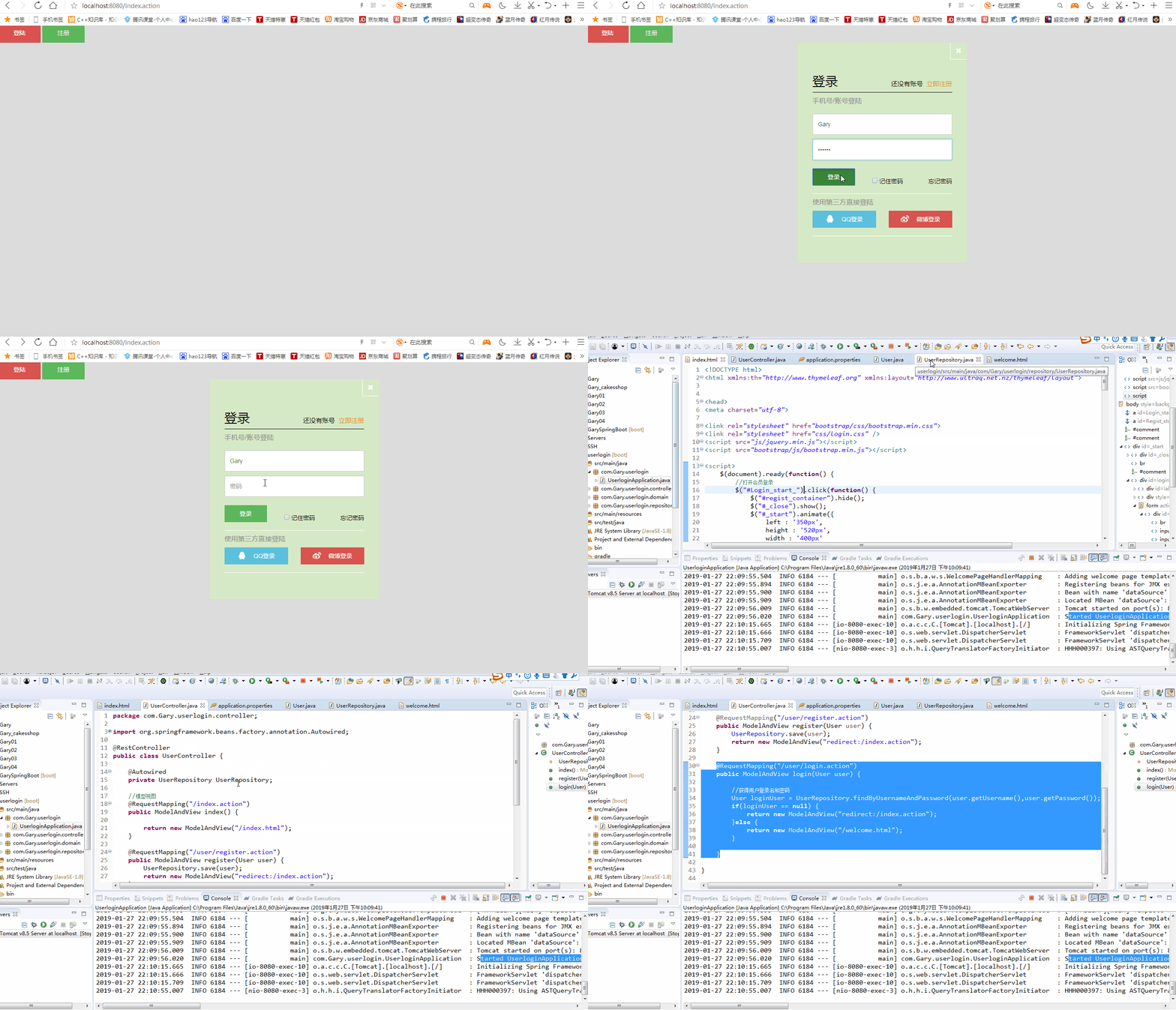
H2数据库中用户登录
<!DOCTYPE html>
<html xmlns:th="http://www.thymeleaf.org" xmlns:layout="http://www.ultraq.net.nz/thymeleaf/layout"> <head>
<meta charset="utf-8"> <link rel="stylesheet" href="bootstrap/css/bootstrap.min.css">
<link rel="stylesheet" href="css/login.css" />
<script src="js/jquery.min.js"></script>
<script src="bootstrap/js/bootstrap.min.js"></script> <script>
$(document).ready(function() {
//打开会员登录
$("#Login_start_").click(function() {
$("#regist_container").hide();
$("#_close").show();
$("#_start").animate({
left : '350px',
height : '520px',
width : '400px'
}, 500, function() {
$("#login_container").show(500);
$("#_close").animate({
height : '40px',
width : '40px'
}, 500);
});
});
//打开会员注册
$("#Regist_start_").click(function() {
$("#login_container").hide();
$("#_close").show();
$("#_start").animate({
left : '350px',
height : '520px',
width : '400px'
}, 500, function() {
$("#regist_container").show(500);
$("#_close").animate({
height : '40px',
width : '40px'
}, 500);
});
});
//关闭
$("#_close").click(function() { $("#_close").animate({
height : '0px',
width : '0px'
}, 500, function() {
$("#_close").hide(500);
$("#login_container").hide(500);
$("#regist_container").hide(500);
$("#_start").animate({
left : '0px',
height : '0px',
width : '0px'
}, 500);
});
});
//去 注册
$("#toRegist").click(function() {
$("#login_container").hide(500);
$("#regist_container").show(500);
});
//去 登录
$("#toLogin").click(function() {
$("#regist_container").hide(500);
$("#login_container").show(500);
});
});
</script>
</head> <body style="background-color: #DCDCDC;"> <a id="Login_start_" class="btn btn-danger" style="width: 100px; height: 40px; border-radius: 0;">登陆</a>
<a id="Regist_start_" class="btn btn-success" style="width: 100px; height: 40px; border-radius: 0;">注册</a> <!-- 会员登录 -->
<!--<div id='Login_start' style="position: absolute;" >-->
<div id='_start'>
<div id='_close' style="display: none;">
<span class="glyphicon glyphicon-remove"></span>
</div>
<br />
<!--登录框-->
<div id="login_container">
<div id="lab1">
<span id="lab_login">登录</span>
<span id="lab_toRegist">
 还没有账号
<span id='toRegist' style="color: #EB9316; cursor: pointer;">立即注册</span>
</span>
</div>
<div style="width: 330px;">
<span id="lab_type1">手机号/账号登陆</span>
</div> <form action="" th:action="@{~/user/login.action}" method="POST">
<div id="form_container1">
<br />
<input type="text" class="form-control" placeholder="手机号/用户名" id="login_number" value="Gary" name="username"/>
<input type="password" class="form-control" placeholder="密码" id="login_password" name="password" />
<input type="submit" value="登录" class="btn btn-success" id="login_btn" />
<span id="rememberOrfindPwd">
<span>
<input id="remember" type="checkbox" style="margin-bottom: -1.5px;" />
</span>
<span style="color: #000000"> 记住密码     </span>
<span style="color: #000000"> 忘记密码 </span>
</span>
</div>
</form> <div style="display: block; width: 330px;">
<span id="lab_type2">使用第三方直接登陆</span>
</div>
<div style="width: 330px; height: 100px; border-bottom: 1px solid #FFFFFF;">
<br />
<button id="login_QQ" type="button" class="btn btn-info">
<img src="img/qq32.png" style="width: 20px; margin-top: -4px;" />
 QQ登录
</button>
<button id="login_WB" type="button" class="btn btn-danger">
<img src="img/sina32.png" style="width: 20px; margin-top: -4px;" />
 微博登录
</button>
</div>
</div>
<!-- 注册 -->
<form action="" th:action="@{~/user/register.action}" method="POST">
<div id='regist_container' style="display: none;">
<div id="lab1">
<span id="lab_login">注册</span>
<span id="lab_toLogin">
 已有账号
<span id='toLogin' style="color: #EB9316; cursor: pointer;">立即登录</span>
</span>
</div> <div id="form_container2" style="padding-top: 25px;"> <input type="text" class="form-control" value="Gary" placeholder="用户名" id="regist_account" name="username" />
<input type="password" class="form-control" placeholder="密码" id="regist_password1" name="password" />
<input type="password" class="form-control" placeholder="确认密码" id="regist_password2" />
<input type="text" class="form-control" placeholder="手机号" id="regist_phone" name="telephone" />
<input type="text" class="form-control" placeholder="验证码" id="regist_vcode" />
<!--<button id="getVCode" type="button" class="btn btn-success" >获取验证码</button>-->
<input id="getVCode" type="button" class="btn btn-success" value="点击发送验证码" onclick="sendCode(this)" /> </div>
<input type="submit" value="注册" class="btn btn-success" id="regist_btn" />
</div>
</form>
</div> </body>
<script type="text/javascript">
var clock = '';
var nums = 30;
var btn;
function sendCode(thisBtn) {
btn = thisBtn;
btn.disabled = true; //将按钮置为不可点击
btn.value = '重新获取(' + nums + ')';
clock = setInterval(doLoop, 1000); //一秒执行一次
} function doLoop() {
nums--;
if (nums > 0) {
btn.value = '重新获取(' + nums + ')';
} else {
clearInterval(clock); //清除js定时器
btn.disabled = false;
btn.value = '点击发送验证码';
nums = 10; //重置时间
}
} $(document).ready(function() {
$("#login_QQ").click(function() {
alert("暂停使用!");
});
$("#login_WB").click(function() {
alert("暂停使用!");
});
});
</script> </html>
index.html
#Tymeleaf 编码

spring.thymeleaf.encoding=UTF-8

#热部署静态文件

spring.thymeleaf.cache =false

#使用HTML5标准

spring.thymeleaf.mode=HTML5

#使用h2控制台

spring.h2.console.enabled=true
application.properties
package com.Gary.userlogin.domain;

import javax.persistence.Entity;

import javax.persistence.GeneratedValue;

import javax.persistence.GenerationType;

import javax.persistence.Id;

@Entity

public class User {

//    设置一个主键id    主键自增策略

    @Id

    @GeneratedValue(strategy=GenerationType.IDENTITY)

    private Long id;

    private String username;

    private String password;

    private String telephone;

    protected User() {

    }

    public User(Long id,String username,String password,String telephone) {

        this.id=id;

        this.password=password;

        this.username=username;

        this.telephone=telephone;

    }

    public Long getId() {

        return id;

    }

    public void setId(Long id) {

        this.id = id;

    }

    public String getUsername() {

        return username;

    }

    public void setUsername(String username) {

        this.username = username;

    }

    public String getPassword() {

        return password;

    }

    public void setPassword(String password) {

        this.password = password;

    }

    public String getTelephone() {

        return telephone;

    }

    public void setTelephone(String telephone) {

        this.telephone = telephone;

    }

}
User.java
package com.Gary.userlogin.controller;

import org.springframework.beans.factory.annotation.Autowired;

import org.springframework.web.bind.annotation.RequestMapping;

import org.springframework.web.bind.annotation.RestController;

import org.springframework.web.servlet.ModelAndView;

import com.Gary.userlogin.domain.User;

import com.Gary.userlogin.repository.UserRepository;

@RestController

public class UserController {

    @Autowired

    private UserRepository UserRepository;

    //模型视图

    @RequestMapping("/index.action")

    public ModelAndView index() {

        return new ModelAndView("/index.html");

    }

    @RequestMapping("/user/register.action")

    public ModelAndView register(User user) {

        UserRepository.save(user);

        return new ModelAndView("redirect:/index.action");

    }

    @RequestMapping("/user/login.action")

    public ModelAndView login(User user) {

        //获得用户登录名和密码

        User loginUser = UserRepository.findByUsernameAndPassword(user.getUsername(),user.getPassword());

        if(loginUser == null) {

            return new ModelAndView("redirect:/index.action");

        }else {

            return new ModelAndView("/welcome.html");

        }

    }

}
UserController.java
package com.Gary.userlogin.repository;

import org.springframework.data.repository.CrudRepository;

import com.Gary.userlogin.domain.User;

//用户注册登录接口

public interface UserRepository extends CrudRepository<User,Long>{

    //遵循spring data jpa命名标准

    User findByUsernameAndPassword(String username,String password);

}
UserRepository.java
登录表单:用户点击登录后发送请求到"@{~/user/login.action}"
<form action="" th:action="@{~/user/login.action}" method="POST">
<div id="form_container1">
<br />
<input type="text" class="form-control" placeholder="手机号/用户名" id="login_number" value="Gary" name="username"/>
<input type="password" class="form-control" placeholder="密码" id="login_password" name="password" />
<input type="submit" value="登录" class="btn btn-success" id="login_btn" />
<span id="rememberOrfindPwd">
<span>
<input id="remember" type="checkbox" style="margin-bottom: -1.5px;" />
</span>
<span style="color: #000000"> 记住密码     </span>
<span style="color: #000000"> 忘记密码 </span>
</span>
</div>
</form>
添加Spring Data JPA中CrudRepository方法
  //遵循spring data jpa命名标准

    User findByUsernameAndPassword(String username,String password);
同理注册
    @RequestMapping("/user/login.action")

    public ModelAndView login(User user) {

        //获得用户登录名和密码

        User loginUser = UserRepository.findByUsernameAndPassword(user.getUsername(),user.getPassword());

        if(loginUser == null) {

            return new ModelAndView("redirect:/index.action");

        }else {

            return new ModelAndView("/welcome.html");

        }

    }
JavaWeb-SpringBoot_使用H2数据库实现用户注册登录的更多相关文章
- Java嵌入式数据库H2学习总结(三)——在Web应用中嵌入H2数据库
H2作为一个嵌入型的数据库,它最大的好处就是可以嵌入到我们的Web应用中,和我们的Web应用绑定在一起,成为我们Web应用的一部分.下面来演示一下如何将H2数据库嵌入到我们的Web应用中. 一.搭建测 ...
- 传智播客JavaWeb day07、day08-自定义标签(传统标签和简单标签)、mvc设计模式、用户注册登录注销
第七天的课程主要是讲了自定义标签.简单介绍了mvc设计模式.然后做了案例 1. 自定义标签 1.1 为什么要有自定义标签 前面所说的EL.JSTL等技术都是为了提高jsp的可读性.可维护性.方便性而取 ...
- 超全面的JavaWeb笔记day14<用户注册登录>
案例:用户注册登录 要求:3层框架,使用验证码 1 功能分析 l 注册 l 登录 1.1 JSP页面 l regist.jsp Ø 注册表单:用户输入注册信息: Ø 回显错误信息:当注册失败时,显示错 ...
- Java嵌入式数据库H2学习总结(二)——在Web应用程序中使用H2数据库
一.搭建测试环境和项目 1.1.搭建JavaWeb测试项目 创建一个[H2DBTest]JavaWeb项目,找到H2数据库的jar文件,如下图所示: H2数据库就一个jar文件,这个Jar文件里面包含 ...
- express框架+jade+bootstrap+mysql开发用户注册登录项目
完整的项目代码(github):https://github.com/suqinhui/express-demo express是基于Node.js平台的web应用开发框架,用express框架开发w ...
- Django实现用户注册登录
学习Django中:试着着写一个用户注册登录系统,开始搞事情 =====O(∩_∩)O哈哈~===== ================= Ubuntu python 2.7.12 Django 1. ...
- Java嵌入式数据库H2学习总结(一)——H2数据库入门
一.H2数据库介绍 常用的开源数据库有:H2,Derby,HSQLDB,MySQL,PostgreSQL.其中H2和HSQLDB类似,十分适合作为嵌入式数据库使用,而其它的数据库大部分都需要安装独立的 ...
- redis实践:用户注册登录功能
本节将使用PHP和Redis实现用户注册登录功能,下面分模块来介绍具体实现方法. 1.注册 需求描述:用户注册时需要提交邮箱.登录密码和昵称.其中邮箱是用户的唯一标识,每个用户的邮箱不能重复,但允许用 ...
- h2数据库的简单使用
1.登录H2数据库的WebConsole控制台 2.设置数据库连接 3.连接测试通过之后,点击[连接]按钮,登录到test数据库的webConsole 4.创建表 复制H2数据库提供的样例SQL脚本, ...
随机推荐
- 从入门到自闭之Python while如何使用
while 循环 while 条件: 循环体 终止循环的两种办法: 改变条件 break break和continue的用法: break 用法:打破当前循环,(终止当前循环),所处位置在循环 ...
- python-day37(正式学习)
前景回顾 抢票系统的代码优化,使用了Lock类 from multiprocessing import Process,Lock import os,time,json with open('user ...
- 移动端、pc端通用点击复制
点击复制 function copyArticle(event){ const range = document.createRange(); range.selectNode(document.ge ...
- CSS3鼠标悬停翻转按钮
在线演示 本地下载
- P3586 [POI2015]LOG
传送门 对于询问,首先如果正数数量不到 $c$ 个显然无解 然后如果大于等于 $s$ 的数大于等于 $c$ 个,那么显然有解 否则,考虑贪心地取数,首先初始大于等于 $s$ 的哪些数我们每次取都可以取 ...
- Intellij IDEA 配置 Code Style
前言 昨天自说自话,闲扯了界面设计和代码规范.设计确实需要一些经验,也不一定能取悦所有人.而代码规范却是程序员所起码应当做到的,多人协作中,杂乱的代码就好像批阅潦草的作文,可读性极差. 然而这是个懒人 ...
- @RequestMapping-占位符映射
占位符映射
- Eclipse设置模板codetemplates
在Window->Preferences->Java->Code Style->Code Templates,点击"Import",导入模板codetemp ...
- jdbc 占位符插入null值 NullPointerException
如果变量flag 为空 ,那么executeUpdate 后面的参数 bookCollect.getFlag() 就会被executeUpdate()方法忽略掉,程序会报错. String addSq ...
- 【HDU5890】Eighty seven
题目大意:给定 N 个数,M 个询问,每次询问如果去掉三个数(可能相同),能否选择恰好 10 个数字,凑出 87 这个数. 题解:骚操作.. 集合凑数问题是一个很经典的模型,即:背包问题. 先进行预处 ...