
Network基础(五):配置静态路由、配置浮动路由、配置多路由的静态路由、配置默认路由
一、配置静态路由
目标:
配置路由接口IP地址并通过静态路由的配置实现全网的互通。
方案:
按如下网络拓扑配置接口IP地址并通过静态路由的配置实现全网的互通如下图所示:
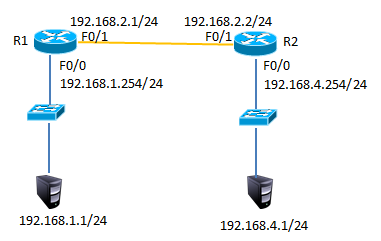
步骤:
步骤一:配置静态路由
1)R1上配置接口IP
R1(config)#interface fastEthernet 0/0
R1(config-if)#ip address 192.168.1.254 255.255.255.0
R1(config-if)#no shutdown
R1(config-if)#exit
R1(config)#interface fastEthernet 0/1
R1(config-if)#ip address 192.168.2.1 255.255.255.0
R1(config-if)#no shutdown
2)R2上配置接口IP
R2(config)#interface fastEthernet 0/1
R2(config-if)#ip address 192.168.2.2 255.255.255.0
R2(config-if)#no shutdown
R2config-if)#exit
R2(config)#interface fastEthernet 0/0
R2(config-if)#ip address 192.168.4.254 255.255.255.0
R2(config-if)#no shutdown
3)R1上添加静态路由
R1(config)#ip route 192.168.4.0 255.255.255.0 192.168.2.2
4)R1上查看路由表
R1#show ip route
Codes: C - connected, S - static, I - IGRP, R - RIP, M - mobile, B - BGP
D - EIGRP, EX - EIGRP external, O - OSPF, IA - OSPF inter area
N1 - OSPF NSSA external type 1, N2 - OSPF NSSA external type 2
E1 - OSPF external type 1, E2 - OSPF external type 2, E - EGP
i - IS-IS, L1 - IS-IS level-1, L2 - IS-IS level-2, ia - IS-IS inter area
* - candidate default, U - per-user static route, o - ODR
P - periodic downloaded static route
Gateway of last resort is not set
C 192.168.1.0/24 is directly connected, FastEthernet0/0
C 192.168.2.0/24 is directly connected, FastEthernet0/1
S 192.168.4.0/24 [1/0] via 192.168.2.2 //S表示静态路由
5)R2上添加静态路由
R2(config)#ip route 192.168.1.0 255.255.255.0 192.168.2.1
6)R2上查看路由条目
R2#show ip route
Codes: C - connected, S - static, I - IGRP, R - RIP, M - mobile, B - BGP
D - EIGRP, EX - EIGRP external, O - OSPF, IA - OSPF inter area
N1 - OSPF NSSA external type 1, N2 - OSPF NSSA external type 2
E1 - OSPF external type 1, E2 - OSPF external type 2, E - EGP
i - IS-IS, L1 - IS-IS level-1, L2 - IS-IS level-2, ia - IS-IS inter area
* - candidate default, U - per-user static route, o - ODR
P - periodic downloaded static route
Gateway of last resort is not set
S 192.168.1.0/24 [1/0] via 192.168.2.1 //S表示静态路由
C 192.168.2.0/24 is directly connected, FastEthernet0/1
C 192.168.3.0/24 is directly connected, FastEthernet0/0
7)配置PC1的IP地址为192.168.1.1,网关为192.168.1.254
8)配置PC2的IP地址为192.168.4.1,网关为192.168.4.254
9)测试网络连通性,PC1 ping 192.168.4.1
PC>ping 192.168.4.1
Pinging 192.168.4.1 with 32 bytes of data:
Reply from 192.168.4.1: bytes=32 time=1ms TTL=126
Reply from 192.168.4.1: bytes=32 time=11ms TTL=126
Reply from 192.168.4.1: bytes=32 time=10ms TTL=126
Reply from 192.168.4.1: bytes=32 time=11ms TTL=126
Ping statistics for 192.168.4.1:
Packets: Sent = 4, Received = 4, Lost = 0 (0% loss),
Approximate round trip times in milli-seconds:
Minimum = 1ms, Maximum = 11ms, Average = 8ms
二、配置浮动路由
目标:
配置浮动静态路由
方案:
按如下网络拓扑配置接口IP地址配置浮动路由实现链路的冗余,如下图所示
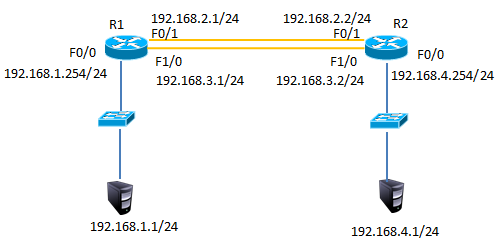
步骤:
步骤一:配置静态路由并添加模块
1)R1上配置接口IP
在以上静态路由实验的基础上,先分别进入R1与R2的特权模式输入write命令保存配置信息,然后分别进入R1与R2的物理配置界面,点击开关按钮关闭路由器,添加NM-1FE-TX模块并再次点击开关按钮,如下图所示。
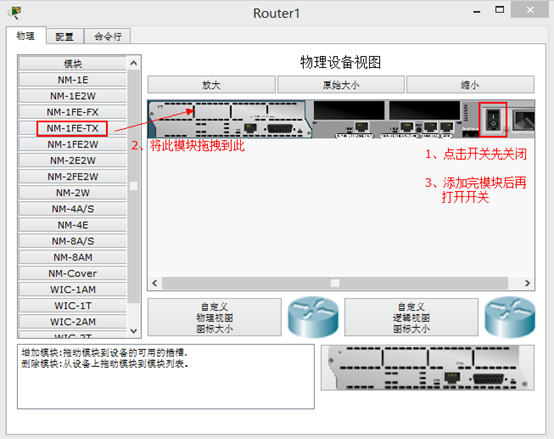
2)添加模块后将R1的F1/0接口连接到R2的F1/0接口修改拓扑如下图所示:
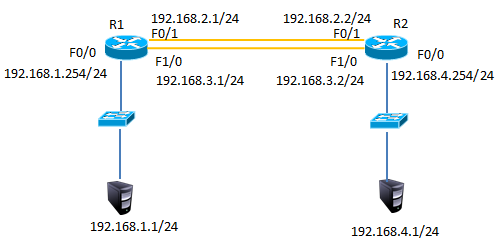
3)配置R1的F1/0接口IP
R1(config)#interface fastEthernet 1/0
R1(config-if)#ip address 192.168.3.1 255.255.255.0
R1(config-if)#no shutdown
4)配置R2的F1/0接口IP
R2(config)#interface fastEthernet 1/0
R2(config-if)#ip address 192.168.3.2 255.255.255.0
R2(config-if)#no shutdown
5)R1上添加静态浮动路由
R1(config)#ip route 192.168.4.0 255.255.255.0 192.168.3.2 50 //管理距离50
6)R2上添加静态浮动路由
R2(config)#ip route 192.168.1.0 255.255.255.0 192.168.3.1 50 //管理距离50
7)R1上查看路由表
R1#show ip route
Codes: C - connected, S - static, I - IGRP, R - RIP, M - mobile, B - BGP
D - EIGRP, EX - EIGRP external, O - OSPF, IA - OSPF inter area
N1 - OSPF NSSA external type 1, N2 - OSPF NSSA external type 2
E1 - OSPF external type 1, E2 - OSPF external type 2, E - EGP
i - IS-IS, L1 - IS-IS level-1, L2 - IS-IS level-2, ia - IS-IS inter area
* - candidate default, U - per-user static route, o - ODR
P - periodic downloaded static route
Gateway of last resort is not set
C 192.168.1.0/24 is directly connected, FastEthernet0/0
C 192.168.2.0/24 is directly connected, FastEthernet0/1
C 192.168.3.0/24 is directly connected, FastEthernet1/0
S 192.168.4.0/24 [1/0] via 192.168.2.2 //只有下一跳为192.168.2.2的静态路由
8)禁用F/01接口
R1(config)#interface fastEthernet 0/1
R1(config-if)#shutdown
9)R1上查看路由表
C 192.168.1.0/24 is directly connected, FastEthernet0/0
S 192.168.4.0/24 [50/0] via 192.168.3.2//下一跳接口为192.168.4.2的路由生效
C 192.168.4.0/24 is directly connected, FastEthernet1/0
10)测试网络连通性,PC1 ping 192.168.4.1
PC>ping 192.168.4.1
Pinging 192.168.4.1 with 32 bytes of data:
Reply from 192.168.4.1: bytes=32 time=0ms TTL=126
Reply from 192.168.4.1: bytes=32 time=10ms TTL=126
Reply from 192.168.4.1: bytes=32 time=11ms TTL=126
Reply from 192.168.4.1: bytes=32 time=1ms TTL=126
Ping statistics for 192.168.4.1:
Packets: Sent = 4, Received = 4, Lost = 0 (0% loss),
Approximate round trip times in milli-seconds:
Minimum = 0ms, Maximum = 11ms, Average = 5ms
三、配置多路由的静态路由
目标:
配置多路由的静态路由
方案:
网络环境及IP地址规划,如下图所示
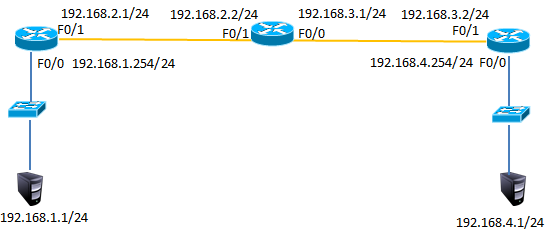
步骤:
步骤一:配置路由IP和静态路由
1) R1上配置接口IP
Router(config)#interface fastEthernet 0/0
R1(config-if)#ip address 192.168.1.254 255.255.255.0
R1(config-if)#no shutdown
R1(config-if)#exit
R1(config)#interface fastEthernet 0/1
R1(config-if)#ip address 192.168.2.1 255.255.255.0
R1(config-if)#no shutdown
2)R2上配置接口IP
R2(config)#interface f0/1
R2(config-if)#ip address 192.168.2.2 255.255.255.0
R2(config-if)#no shutdown
R2(config-if)#exit
R2(config)#interface fastEthernet 0/0
R2(config-if)#ip address 192.168.3.1 255.255.255.0
R2(config-if)#no shutdown
3)R3上配置接口IP
R3(config)#interface fastEthernet 0/1
R3(config-if)#ip address 192.168.3.2 255.255.255.0
R3(config-if)#no shutdown
R3(config-if)#exit
R3(config)#interface fastEthernet 0/0
R3(config-if)#ip address 192.168.4.254 255.255.255.0
R3(config-if)#no shutdown
4)R1、R2、R3上分别添加静态路由
R1(config)#ip route 192.168.3.0 255.255.255.0 192.168.2.2
R1(config)#ip route 192.168.4.0 255.255.255.0 192.168.2.2
R2(config)#ip route 192.168.1.0 255.255.255.0 192.168.2.1
R2(config)#ip route 192.168.4.0 255.255.255.0 192.168.3.2
R3(config)#ip route 192.168.1.0 255.255.255.0 192.168.3.1
R3(config)#ip route 192.168.2.0 255.255.255.0 192.168.3.1
5)R1上查看路由表
R1#show ip route
Codes: C - connected, S - static, I - IGRP, R - RIP, M - mobile, B - BGP
D - EIGRP, EX - EIGRP external, O - OSPF, IA - OSPF inter area
N1 - OSPF NSSA external type 1, N2 - OSPF NSSA external type 2
E1 - OSPF external type 1, E2 - OSPF external type 2, E - EGP
i - IS-IS, L1 - IS-IS level-1, L2 - IS-IS level-2, ia - IS-IS inter area
* - candidate default, U - per-user static route, o - ODR
P - periodic downloaded static route
Gateway of last resort is not set
C 192.168.1.0/24 is directly connected, FastEthernet0/0
C 192.168.2.0/24 is directly connected, FastEthernet0/1
S 192.168.3.0/24 [1/0] via 192.168.2.2 //静态路由
S 192.168.4.0/24 [1/0] via 192.168.2.2 //静态路由
6)R2上查看路由表
R2#show ip route
Codes: C - connected, S - static, I - IGRP, R - RIP, M - mobile, B - BGP
D - EIGRP, EX - EIGRP external, O - OSPF, IA - OSPF inter area
N1 - OSPF NSSA external type 1, N2 - OSPF NSSA external type 2
E1 - OSPF external type 1, E2 - OSPF external type 2, E - EGP
i - IS-IS, L1 - IS-IS level-1, L2 - IS-IS level-2, ia - IS-IS inter area
* - candidate default, U - per-user static route, o - ODR
P - periodic downloaded static route
Gateway of last resort is not set
S 192.168.1.0/24 [1/0] via 192.168.2.1 //静态路由
C 192.168.2.0/24 is directly connected, FastEthernet0/1
C 192.168.3.0/24 is directly connected, FastEthernet0/0
S 192.168.4.0/24 [1/0] via 192.168.3.2 //静态路由
7)R3上查看路由表
R3#show ip route
Codes: C - connected, S - static, I - IGRP, R - RIP, M - mobile, B - BGP
D - EIGRP, EX - EIGRP external, O - OSPF, IA - OSPF inter area
N1 - OSPF NSSA external type 1, N2 - OSPF NSSA external type 2
E1 - OSPF external type 1, E2 - OSPF external type 2, E - EGP
i - IS-IS, L1 - IS-IS level-1, L2 - IS-IS level-2, ia - IS-IS inter area
* - candidate default, U - per-user static route, o - ODR
P - periodic downloaded static route
Gateway of last resort is not set
S 192.168.1.0/24 [1/0] via 192.168.3.1 //静态路由
S 192.168.2.0/24 [1/0] via 192.168.3.1 //静态路由
C 192.168.3.0/24 is directly connected, FastEthernet0/1
C 192.168.4.0/24 is directly connected, FastEthernet0/0
8)按图-4配置PC的IP地址
9)测试网络连通性,PC1 ping 192.168.2.2、192.168.3.1、192.168.3.2、192.168.4.1
PC>ping 192.168.2.2 //ping 192.168.2.2
Pinging 192.168.2.2 with 32 bytes of data:
Reply from 192.168.2.2: bytes=32 time=0ms TTL=254
Reply from 192.168.2.2: bytes=32 time=0ms TTL=254
Reply from 192.168.2.2: bytes=32 time=0ms TTL=254
Reply from 192.168.2.2: bytes=32 time=0ms TTL=254
Ping statistics for 192.168.2.2:
Packets: Sent = 4, Received = 4, Lost = 0 (0% loss),
Approximate round trip times in milli-seconds:
Minimum = 0ms, Maximum = 0ms, Average = 0ms
PC>ping 192.168.3.1 //ping 192.168.3.1
Pinging 192.168.3.1 with 32 bytes of data:
Reply from 192.168.3.1: bytes=32 time=0ms TTL=254
Reply from 192.168.3.1: bytes=32 time=3ms TTL=254
Reply from 192.168.3.1: bytes=32 time=0ms TTL=254
Reply from 192.168.3.1: bytes=32 time=0ms TTL=254
Ping statistics for 192.168.3.1:
Packets: Sent = 4, Received = 4, Lost = 0 (0% loss),
Approximate round trip times in milli-seconds:
Minimum = 0ms, Maximum = 3ms, Average = 0ms
PC>ping 192.168.3.2 //ping 192.168.3.2
Pinging 192.168.3.2 with 32 bytes of data:
Reply from 192.168.3.2: bytes=32 time=0ms TTL=253
Reply from 192.168.3.2: bytes=32 time=12ms TTL=253
Reply from 192.168.3.2: bytes=32 time=0ms TTL=253
Reply from 192.168.3.2: bytes=32 time=12ms TTL=253
Ping statistics for 192.168.3.2:
Packets: Sent = 4, Received = 4, Lost = 0 (0% loss),
Approximate round trip times in milli-seconds:
Minimum = 0ms, Maximum = 12ms, Average = 6ms
PC>ping 192.168.4.1 //ping 192.168.4.1
Pinging 192.168.4.1 with 32 bytes of data:
Reply from 192.168.4.1: bytes=32 time=0ms TTL=125
Reply from 192.168.4.1: bytes=32 time=10ms TTL=125
Reply from 192.168.4.1: bytes=32 time=0ms TTL=125
Reply from 192.168.4.1: bytes=32 time=22ms TTL=125
Ping statistics for 192.168.4.1:
Packets: Sent = 4, Received = 4, Lost = 0 (0% loss),
Approximate round trip times in milli-seconds:
Minimum = 0ms, Maximum = 22ms, Average = 8ms
四、配置默认路由
目标:
配置默认路由
方案:
网络环境及IP地址规划,如下图所示
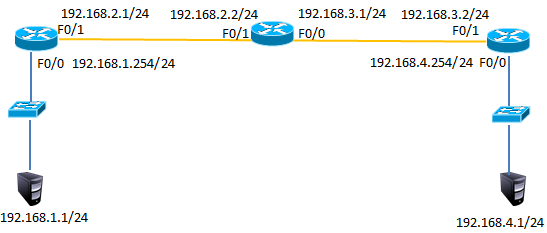
步骤:
1)在案例3基础上删除R1与R3的静态路由
R1(config)#no ip route 192.168.3.0 255.255.255.0 192.168.2.2
R1(config)#no ip route 192.168.4.0 255.255.255.0 192.168.2.2
R3(config)#no ip route 192.168.1.0 255.255.255.0 192.168.3.1
R3(config)#no ip route 192.168.2.0 255.255.255.0 192.168.3.1
2)R1、R3添加默认路由
R1(config)#ip route 0.0.0.0 0.0.0.0 192.168.2.2
R3(config)#ip route 0.0.0.0 0.0.0.0 192.168.3.1
12)R1上查看路由表
R1#show ip route
Codes: C - connected, S - static, I - IGRP, R - RIP, M - mobile, B - BGP
D - EIGRP, EX - EIGRP external, O - OSPF, IA - OSPF inter area
N1 - OSPF NSSA external type 1, N2 - OSPF NSSA external type 2
E1 - OSPF external type 1, E2 - OSPF external type 2, E - EGP
i - IS-IS, L1 - IS-IS level-1, L2 - IS-IS level-2, ia - IS-IS inter area
* - candidate default, U - per-user static route, o - ODR
P - periodic downloaded static route
Gateway of last resort is 192.168.2.2 to network 0.0.0.0
C 192.168.1.0/24 is directly connected, FastEthernet0/0
C 192.168.2.0/24 is directly connected, FastEthernet0/1
S* 0.0.0.0/0 [1/0] via 192.168.2.2 //默认路由
3)R1、R3上查看路由表
R1#show ip route
Codes: C - connected, S - static, I - IGRP, R - RIP, M - mobile, B - BGP
D - EIGRP, EX - EIGRP external, O - OSPF, IA - OSPF inter area
N1 - OSPF NSSA external type 1, N2 - OSPF NSSA external type 2
E1 - OSPF external type 1, E2 - OSPF external type 2, E - EGP
i - IS-IS, L1 - IS-IS level-1, L2 - IS-IS level-2, ia - IS-IS inter area
* - candidate default, U - per-user static route, o - ODR
P - periodic downloaded static route
Gateway of last resort is 192.168.3.1 to network 0.0.0.0
C 192.168.1.0/24 is directly connected, FastEthernet0/0
C 192.168.2.0/24 is directly connected, FastEthernet0/1
S* 0.0.0.0/0 [1/0] via 192.168.2.2 //默认路由
R3#show ip route
Codes: C - connected, S - static, I - IGRP, R - RIP, M - mobile, B - BGP
D - EIGRP, EX - EIGRP external, O - OSPF, IA - OSPF inter area
N1 - OSPF NSSA external type 1, N2 - OSPF NSSA external type 2
E1 - OSPF external type 1, E2 - OSPF external type 2, E - EGP
i - IS-IS, L1 - IS-IS level-1, L2 - IS-IS level-2, ia - IS-IS inter area
* - candidate default, U - per-user static route, o - ODR
P - periodic downloaded static route
Gateway of last resort is 192.168.3.1 to network 0.0.0.0
C 192.168.3.0/24 is directly connected, FastEthernet0/1
C 192.168.4.0/24 is directly connected, FastEthernet0/0
S* 0.0.0.0/0 [1/0] via 192.168.3.1 //默认路由
4)测试网络连通性,PC1 ping 192.168.4.1
PC>ping 192.168.4.1
Pinging 192.168.4.1 with 32 bytes of data:
Reply from 192.168.4.1: bytes=32 time=1ms TTL=125
Reply from 192.168.4.1: bytes=32 time=0ms TTL=125
Reply from 192.168.4.1: bytes=32 time=14ms TTL=125
Reply from 192.168.4.1: bytes=32 time=14ms TTL=125
Ping statistics for 192.168.4.1:
Packets: Sent = 4, Received = 4, Lost = 0 (0% loss),
Approximate round trip times in milli-seconds:
Minimum = 0ms, Maximum = 14ms, Average = 7ms = 0ms,平均 = 0ms
Network基础(五):配置静态路由、配置浮动路由、配置多路由的静态路由、配置默认路由的更多相关文章
- Go的http包中默认路由匹配规则
# 一.执行流程 首先我们构建一个简单http server: ```go package main import ( "log" "net/http" ) f ...
- Cisco基础(五):配置静态NAT、配置端口映射、配置动态NAT、PAT配置、办公区Internet的访问
一.配置静态NAT 目标: 随着接入Internet的计算机数量的不断猛增,IP地址资源也就愈加显得捉襟见肘.事实上,除了中国教育和科研计算机网(CERNET)外,一般用户几乎申请不到整段的C类IP地 ...
- IT菜鸟之路由器基础配置(静态、动态、默认路由)
路由器:连接不同网段的设备 企业级路由和家用级路由的区别: 待机数量不同(待机量) 待机量:同时接通的终端设备的数量 待机量的值越高,路由的性能越好 别墅级路由,表示信号好,和性能无关 交换机:背板带 ...
- Linux基础五:网络配置与管理
五.网络配置与管理 1.网络知识 2.命令 ifconfig命令 <=> ip addr show 命令--查看本地所有网卡配置信息 ens32:本地以太网网卡,lo:本地回环网卡 ...
- Network基础(三):网线的制作、交换机基本命令模式、交换机命令行基本配置、交换机的密码设置
一.网线的制作 目标: 在常见的计算机网络中,网线主要用来连接计算机与交换机(或宽带路由器).交换机与交换机.交换机与路由器,以及需要连网的其他各种设备.网线的制作与测试是作为网络管理员的一个入门技能 ...
- 默认路由、RIPv2、OSPF、EIGRP配置(全网全通)
1:默认路由 遇到问题:给r2配置向右的单项默认路由,通过PC1去ping主机PC2,一直显示Request timed out, 解决方法:r2配置如下: r2(config)#ip route 0 ...
- 【网络】默认路由、RIPv2、OSPF、EIGRP配置(全网全通)
1:默认路由 遇到问题:给r2配置向右的单项默认路由,通过PC1去ping主机PC2,一直显示Request timed out, 解决方法:r2配置如下: r2(config)#ip route 0 ...
- 并发编程概述 委托(delegate) 事件(event) .net core 2.0 event bus 一个简单的基于内存事件总线实现 .net core 基于NPOI 的excel导出类,支持自定义导出哪些字段 基于Ace Admin 的菜单栏实现 第五节:SignalR大杂烩(与MVC融合、全局的几个配置、跨域的应用、C/S程序充当Client和Server)
并发编程概述 前言 说实话,在我软件开发的头两年几乎不考虑并发编程,请求与响应把业务逻辑尽快完成一个星期的任务能两天完成绝不拖三天(剩下时间各种浪),根本不会考虑性能问题(能接受范围内).但随着工 ...
- Centos双网卡配置默认路由
Centos6.5 双网卡,我们只需要一个默认路由,如果两个都有或都没有会有一系列的问题 [root@centos]# vi /etc/sysconfig/network修改以下内容NETWORKIN ...
随机推荐
- POJ3233]Matrix Power Series && [HDU1588]Gauss Fibonacci
题目:Matrix Power Series 传送门:http://poj.org/problem?id=3233 分析: 方法一:引用Matrix67大佬的矩阵十题:这道题两次二分,相当经典.首先我 ...
- (转)Docker入门——Dockerfile详解
转:https://www.cnblogs.com/sorex/p/6481407.html 基本示例 FROM MAINTAINER LABEL RUN ADD COPY CMD ENTRYPOIN ...
- PHP解码unicode编码的中文字符
问题背景:晚上在抓取某网站数据,结果在数据包中发现了这么一串编码的数据:"......\u65b0\u6d6a\u5fae\u535a......www.jinyuanbao.cn" ...
- Python笔记(四)_字符串的方法
字符串的方法 []表示该参数时可选的,start和end参数表示范围 count(sub[, start[, end]]) 返回sub在字符串里边出现的次数 find(sub[, start[, en ...
- CPU的架构:x86、arm、mips、龙芯等
在公司经常听其他工程师讲x86,arm平台啥的,作为一个算法工程师,我听过却不知道这是啥!!!(汗颜) 现在偷偷学起: x86,arm,mips等这些都是CPU的架构,不管是手机电脑还是一些嵌入式的设 ...
- VLAN基础配置及Access接口
一.实验目的 二.实验拓扑图 三.实验编址 四.实验步骤 1.基础配置 按照PC1的方式依次配好IP 打开所有设备 用ping命令测试连通性 更改主机名称 2.创建VLAN 在S1上使用两条命令创建V ...
- Visual Studio Code 键盘参考表
2019年4月6日,对照中英翻译. 一般 Ctrl+Shift+P, F1 显示命令调色板 Ctrl+P 快速打开,转到文件… Ctrl+Shift+N 新建窗口/实例 Ctrl+Shift+W ...
- 基于第二次数独游戏,添加GUI界面
高级软件工程第三次作业:基于第二次数独游戏,添加GUI界面.GUI界面代码如下: package firstGui; import java.awt.*; import java.awt.event. ...
- js 中的深拷贝与浅拷贝
在面试中经常会问到js的深拷贝和浅拷贝,也常常让我们手写,下面我们彻底搞懂js的深拷贝与浅拷贝. 在js中 Array 和 Object 这种引用类型的值,当把一个变量赋值给另一个变量时,这个值得副 ...
- SqlServer 查询所有字段要写说明
查询出所有未写说明的字段: SELECT IC.table_name TableName, ColName=C.name, PFD.[value] FROM sys.columns C INNER J ...