
Java大文件上传详解及实例代码
1,项目调研
因为需要研究下断点上传的问题。找了很久终于找到一个比较好的项目。
在GoogleCode上面,代码弄下来超级不方便,还是配置hosts才好,把代码重新上传到了github上面。
https://github.com/freewebsys/java-large-file-uploader-demo
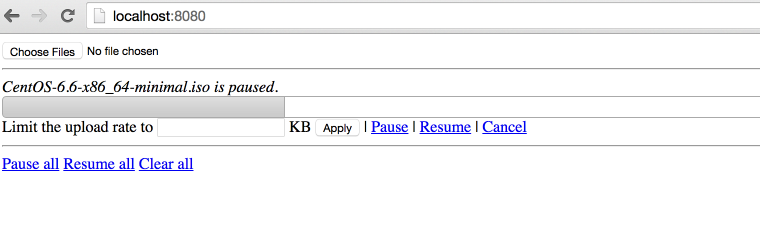
效果:
上传中,显示进度,时间,百分比。
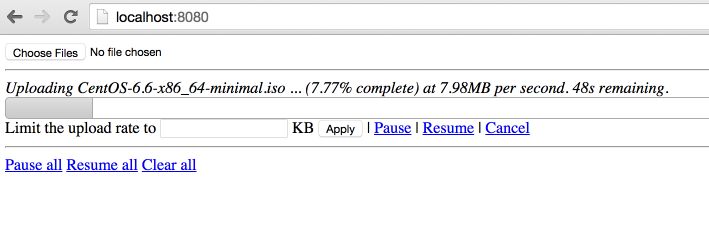
点击【Pause】暂停,点击【Resume】继续。
2,代码分析
原始项目:
https://code.google.com/p/java-large-file-uploader/
这个项目最后更新的时间是 2012 年,项目进行了封装使用最简单的方法实现了http的断点上传。
因为html5 里面有读取文件分割文件的类库,所以才可以支持断点上传,所以这个只能在html5 支持的浏览器上面展示。
同时,在js 和 java 同时使用 cr32 进行文件块的校验,保证数据上传正确。
代码在使用了最新的servlet 3.0 的api,使用了异步执行,监听等方法。
上传类UploadServlet
@Component("javaLargeFileUploaderServlet")
@WebServlet(name = "javaLargeFileUploaderServlet", urlPatterns = { "/javaLargeFileUploaderServlet" })
public class UploadServlet extends HttpRequestHandlerServlet
implements HttpRequestHandler {
private static final Logger log = LoggerFactory.getLogger(UploadServlet.class);
@Autowired
UploadProcessor uploadProcessor;
@Autowired
FileUploaderHelper fileUploaderHelper;
@Autowired
ExceptionCodeMappingHelper exceptionCodeMappingHelper;
@Autowired
Authorizer authorizer;
@Autowired
StaticStateIdentifierManager staticStateIdentifierManager;
@Override
public void handleRequest(HttpServletRequest request, HttpServletResponse response)
throws IOException {
log.trace("Handling request");
Serializable jsonObject = null;
try {
// extract the action from the request
UploadServletAction actionByParameterName =
UploadServletAction.valueOf(fileUploaderHelper.getParameterValue(request, UploadServletParameter.action));
// check authorization
checkAuthorization(request, actionByParameterName);
// then process the asked action
jsonObject = processAction(actionByParameterName, request);
// if something has to be written to the response
if (jsonObject != null) {
fileUploaderHelper.writeToResponse(jsonObject, response);
}
}
// If exception, write it
catch (Exception e) {
exceptionCodeMappingHelper.processException(e, response);
}
}
private void checkAuthorization(HttpServletRequest request, UploadServletAction actionByParameterName)
throws MissingParameterException, AuthorizationException {
// check authorization
// if its not get progress (because we do not really care about authorization for get
// progress and it uses an array of file ids)
if (!actionByParameterName.equals(UploadServletAction.getProgress)) {
// extract uuid
final String fileIdFieldValue = fileUploaderHelper.getParameterValue(request, UploadServletParameter.fileId, false);
// if this is init, the identifier is the one in parameter
UUID clientOrJobId;
String parameter = fileUploaderHelper.getParameterValue(request, UploadServletParameter.clientId, false);
if (actionByParameterName.equals(UploadServletAction.getConfig) && parameter != null) {
clientOrJobId = UUID.fromString(parameter);
}
// if not, get it from manager
else {
clientOrJobId = staticStateIdentifierManager.getIdentifier();
}
// call authorizer
authorizer.getAuthorization(
request,
actionByParameterName,
clientOrJobId,
fileIdFieldValue != null ? getFileIdsFromString(fileIdFieldValue).toArray(new UUID[] {}) : null);
}
}
private Serializable processAction(UploadServletAction actionByParameterName, HttpServletRequest request)
throws Exception {
log.debug("Processing action " + actionByParameterName.name());
Serializable returnObject = null;
switch (actionByParameterName) {
case getConfig:
String parameterValue = fileUploaderHelper.getParameterValue(request, UploadServletParameter.clientId, false);
returnObject =
uploadProcessor.getConfig(
parameterValue != null ? UUID.fromString(parameterValue) : null);
break;
case verifyCrcOfUncheckedPart:
returnObject = verifyCrcOfUncheckedPart(request);
break;
case prepareUpload:
returnObject = prepareUpload(request);
break;
case clearFile:
uploadProcessor.clearFile(UUID.fromString(fileUploaderHelper.getParameterValue(request, UploadServletParameter.fileId)));
break;
case clearAll:
uploadProcessor.clearAll();
break;
case pauseFile:
List<UUID> uuids = getFileIdsFromString(fileUploaderHelper.getParameterValue(request, UploadServletParameter.fileId));
uploadProcessor.pauseFile(uuids);
break;
case resumeFile:
returnObject =
uploadProcessor.resumeFile(UUID.fromString(fileUploaderHelper.getParameterValue(request, UploadServletParameter.fileId)));
break;
case setRate:
uploadProcessor.setUploadRate(UUID.fromString(fileUploaderHelper.getParameterValue(request, UploadServletParameter.fileId)),
Long.valueOf(fileUploaderHelper.getParameterValue(request, UploadServletParameter.rate)));
break;
case getProgress:
returnObject = getProgress(request);
break;
}
return returnObject;
}
List<UUID> getFileIdsFromString(String fileIds) {
String[] splittedFileIds = fileIds.split(",");
List<UUID> uuids = Lists.newArrayList();
for (int i = 0; i < splittedFileIds.length; i++) {
uuids.add(UUID.fromString(splittedFileIds[i]));
}
return uuids;
}
private Serializable getProgress(HttpServletRequest request)
throws MissingParameterException {
Serializable returnObject;
String[] ids =
new Gson()
.fromJson(fileUploaderHelper.getParameterValue(request, UploadServletParameter.fileId), String[].class);
Collection<UUID> uuids = Collections2.transform(Arrays.asList(ids), new Function<String, UUID>() {
@Override
public UUID apply(String input) {
return UUID.fromString(input);
}
});
returnObject = Maps.newHashMap();
for (UUID fileId : uuids) {
try {
ProgressJson progress = uploadProcessor.getProgress(fileId);
((HashMap<String, ProgressJson>) returnObject).put(fileId.toString(), progress);
}
catch (FileNotFoundException e) {
log.debug("No progress will be retrieved for " + fileId + " because " + e.getMessage());
}
}
return returnObject;
}
private Serializable prepareUpload(HttpServletRequest request)
throws MissingParameterException, IOException {
// extract file information
PrepareUploadJson[] fromJson =
new Gson()
.fromJson(fileUploaderHelper.getParameterValue(request, UploadServletParameter.newFiles), PrepareUploadJson[].class);
// prepare them
final HashMap<String, UUID> prepareUpload = uploadProcessor.prepareUpload(fromJson);
// return them
return Maps.newHashMap(Maps.transformValues(prepareUpload, new Function<UUID, String>() {
public String apply(UUID input) {
return input.toString();
};
}));
}
private Boolean verifyCrcOfUncheckedPart(HttpServletRequest request)
throws IOException, MissingParameterException, FileCorruptedException, FileStillProcessingException {
UUID fileId = UUID.fromString(fileUploaderHelper.getParameterValue(request, UploadServletParameter.fileId));
try {
uploadProcessor.verifyCrcOfUncheckedPart(fileId,
fileUploaderHelper.getParameterValue(request, UploadServletParameter.crc));
}
catch (InvalidCrcException e) {
// no need to log this exception, a fallback behaviour is defined in the
// throwing method.
// but we need to return something!
return Boolean.FALSE;
}
return Boolean.TRUE;
}
}
异步上传UploadServletAsync
@Component("javaLargeFileUploaderAsyncServlet")
@WebServlet(name = "javaLargeFileUploaderAsyncServlet", urlPatterns = { "/javaLargeFileUploaderAsyncServlet" }, asyncSupported = true)
public class UploadServletAsync extends HttpRequestHandlerServlet
implements HttpRequestHandler {
private static final Logger log = LoggerFactory.getLogger(UploadServletAsync.class);
@Autowired
ExceptionCodeMappingHelper exceptionCodeMappingHelper;
@Autowired
UploadServletAsyncProcessor uploadServletAsyncProcessor;
@Autowired
StaticStateIdentifierManager staticStateIdentifierManager;
@Autowired
StaticStateManager<StaticStatePersistedOnFileSystemEntity> staticStateManager;
@Autowired
FileUploaderHelper fileUploaderHelper;
@Autowired
Authorizer authorizer;
/**
* Maximum time that a streaming request can take.<br>
*/
private long taskTimeOut = DateUtils.MILLIS_PER_HOUR;
@Override
public void handleRequest(final HttpServletRequest request, final HttpServletResponse response)
throws ServletException, IOException {
// process the request
try {
//check if uploads are allowed
if (!uploadServletAsyncProcessor.isEnabled()) {
throw new UploadIsCurrentlyDisabled();
}
// extract stuff from request
final FileUploadConfiguration process = fileUploaderHelper.extractFileUploadConfiguration(request);
log.debug("received upload request with config: "+process);
// verify authorization
final UUID clientId = staticStateIdentifierManager.getIdentifier();
authorizer.getAuthorization(request, UploadServletAction.upload, clientId, process.getFileId());
//check if that file is not paused
if (uploadServletAsyncProcessor.isFilePaused(process.getFileId())) {
log.debug("file "+process.getFileId()+" is paused, ignoring async request.");
return;
}
// get the model
StaticFileState fileState = staticStateManager.getEntityIfPresent().getFileStates().get(process.getFileId());
if (fileState == null) {
throw new FileNotFoundException("File with id " + process.getFileId() + " not found");
}
// process the request asynchronously
final AsyncContext asyncContext = request.startAsync();
asyncContext.setTimeout(taskTimeOut);
// add a listener to clear bucket and close inputstream when process is complete or
// with
// error
asyncContext.addListener(new UploadServletAsyncListenerAdapter(process.getFileId()) {
@Override
void clean() {
log.debug("request " + request + " completed.");
// we do not need to clear the inputstream here.
// and tell processor to clean its shit!
uploadServletAsyncProcessor.clean(clientId, process.getFileId());
}
});
// then process
uploadServletAsyncProcessor.process(fileState, process.getFileId(), process.getCrc(), process.getInputStream(),
new WriteChunkCompletionListener() {
@Override
public void success() {
asyncContext.complete();
}
@Override
public void error(Exception exception) {
// handles a stream ended unexpectedly , it just means the user has
// stopped the
// stream
if (exception.getMessage() != null) {
if (exception.getMessage().equals("Stream ended unexpectedly")) {
log.warn("User has stopped streaming for file " + process.getFileId());
}
else if (exception.getMessage().equals("User cancellation")) {
log.warn("User has cancelled streaming for file id " + process.getFileId());
// do nothing
}
else {
exceptionCodeMappingHelper.processException(exception, response);
}
}
else {
exceptionCodeMappingHelper.processException(exception, response);
}
asyncContext.complete();
}
});
}
catch (Exception e) {
exceptionCodeMappingHelper.processException(e, response);
}
}
}
3,请求流程图:
主要思路就是将文件切分,然后分块上传。
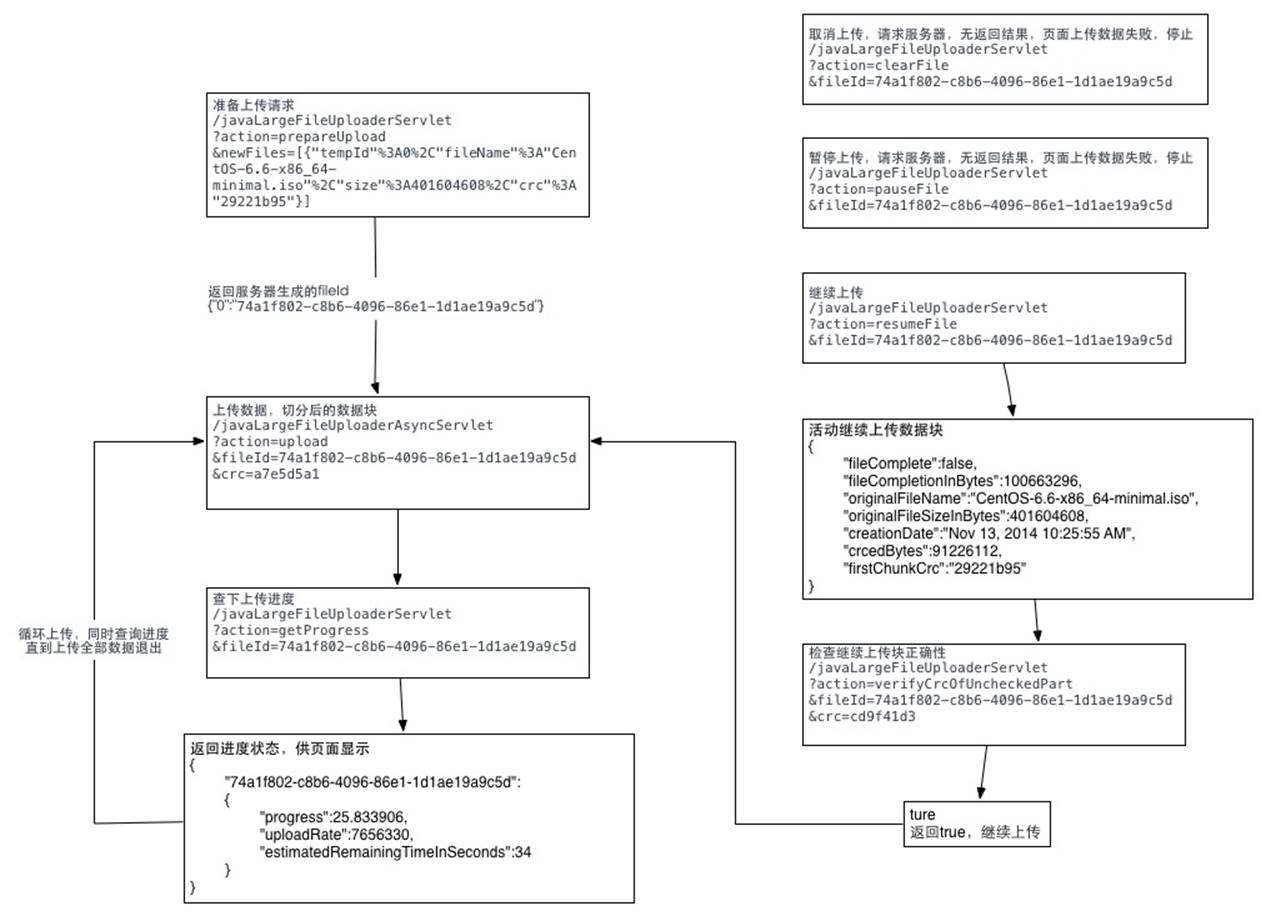
详细代码可以参照我写的这篇文章:
Java大文件上传详解及实例代码的更多相关文章
- java 大文件上传 断点续传 完整版实例 (Socket、IO流)
ava两台服务器之间,大文件上传(续传),采用了Socket通信机制以及JavaIO流两个技术点,具体思路如下: 实现思路: 1.服:利用ServerSocket搭建服务器,开启相应端口,进行长连接操 ...
- Multipart/form-data POST文件上传详解
Multipart/form-data POST文件上传详解 理论 简单的HTTP POST 大家通过HTTP向服务器发送POST请求提交数据,都是通过form表单提交的,代码如下: <form ...
- Multipart/form-data POST文件上传详解(转)
Multipart/form-data POST文件上传详解 理论 简单的HTTP POST 大家通过HTTP向服务器发送POST请求提交数据,都是通过form表单提交的,代码如下: <form ...
- java大文件上传解决方案
最近遇见一个需要上传百兆大文件的需求,调研了七牛和腾讯云的切片分段上传功能,因此在此整理前端大文件上传相关功能的实现. 在某些业务中,大文件上传是一个比较重要的交互场景,如上传入库比较大的Excel表 ...
- java+大文件上传解决方案
众所皆知,web上传大文件,一直是一个痛.上传文件大小限制,页面响应时间超时.这些都是web开发所必须直面的. 本文给出的解决方案是:前端实现数据流分片长传,后面接收完毕后合并文件的思路. 实现文件夹 ...
- 【转】JSch - Java实现的SFTP(文件上传详解篇)
JSch是Java Secure Channel的缩写.JSch是一个SSH2的纯Java实现.它允许你连接到一个SSH服务器,并且可以使用端口转发,X11转发,文件传输等,当然你也可以集成它的功能到 ...
- JSch - Java实现的SFTP(文件上传详解篇)
JSch是Java Secure Channel的缩写.JSch是一个SSH2的纯Java实现.它允许你连接到一个SSH服务器,并且可以使用端口转发,X11转发,文件传输等,当然你也可以集成它的功能到 ...
- JSch - Java实现的SFTP(文件上传详解篇) [转载]
文章来源:http://www.cnblogs.com/longyg/archive/2012/06/25/2556576.html JSch是Java Secure Channel的缩写.JSch是 ...
- JSch - Java实现的SFTP(文件上传详解篇)(转)
JSch是Java Secure Channel的缩写.JSch是一个SSH2的纯Java实现.它允许你连接到一个SSH服务器,并且可以使用端口转发,X11转发,文件传输等,当然你也可以集成它的功能到 ...
随机推荐
- eslint 修改规则 函数形参不使用报错
函数再定义形参以后未使用就会出现报错的问题,需要设置一项eslint 规则 再.eslintrc.js rules里面添加 "no-unused-vars": "of ...
- 安卓和IOS抓包工具
安卓手机抓包软件:Packet Capture,抓包精灵…… 1.Packet Capture又名无root抓包(一款依托安卓系统自身VPN来达到免Root抓取数据包的应用程序) 功能特点: 捕获网络 ...
- Go语言入门篇-环境准备
一.GO语言特点 静态类型:首先要明确变量类型,如上所示. 编译型:指GO语言要被编译成机器能识别机器代码. GO语言开源. 编程范式:支持“函数式”和“面向对象” GO语言原生的支持并发编程:即GO ...
- linux rz上传-sz下载
yum install lrzsz -y rz 上传文件 不能传目录 如果要传目录需要打包成文件再上传 需要往哪里传东西,先进入哪个目录 rz -y 上传覆盖 sz -y 文件名 ...
- librdkafka 安装
1,Git clone git clone https://github.com/edenhill/librdkafka.git 2,cd librdkafka/ 3,./configure 4,ma ...
- ubuntu 虚拟机安装
ubuntu16.04.5 LTS 安装 1.下载ubuntu镜像 打开ubuntu官网镜像地址https://launchpad.net/ubuntu/+cdmirrors 在上面中搜索chin ...
- uboot 主Makefile分析
一. Makefile 配置 1.1. make xxx_config 1.1.1. 笔者实验时是make x210_sd_config a. x210_sd_config是Makefile下的一个目 ...
- python如何安装第三方模块
系统 Windows 10 方法一,通过在命令行中通过pip命令安装 1. 打开cmd 2. 输入命令:pip install 目标模块的名字,例如, pip install numpy 3. 按回车 ...
- HNUSTOJ 1516:Loky的烦恼
1516: Loky的烦恼 时间限制: 1 Sec 内存限制: 128 MB 提交: 242 解决: 66 [提交][状态][讨论版] 题目描述 loky喜欢上一个女孩,女孩在loky眼中绝对是1 ...
- 【NOI2007】项链工厂 ——老题新做.jpg
第一次是用 ODT 过的...(虽说跑得飞慢但它就是能过) 而且还写了发题解... 第二次是在考场上碰到了这道题,然后居然打了线段树,各种 bug 直接让代码爆零 但还是补好了代码重新交了一发,发现跑 ...