
Oracle Grid,ASM,Database on Redhat 7.5
Oracle安装包
登陆Oracle账户(无须服务号)方可下载。
Oracle官方文档
Typical Installation for Oracle Grid Infrastructure for a Cluster
Advanced Installation Oracle Grid Infrastructure for a Cluster Preinstallation Tasks
Blog
Oracle Grid Installation Process
用户、组、目录
# groupadd -r -g 500 oinstall

# groupadd -r -g 501 dba

# groupadd -r -g 502 asmadmin

# groupadd -r -g 503 asmdba

# useradd -r -u 500 -g oinstall -G dba,asmadmin,asmdba -m -d /home/oracle oracle

# useradd -r -u 501 -g oinstall -G dba,asmadmin,asmdba -m -d /home/grid grid

# mkdir -p  /u01/app/oraInventory

# mkdir -p  /u01/app/grid

# mkdir -p  /u01/app/11.2.0/grid

# mkdir -p  /u01/app/oracle

# chown -R grid:oinstall /u01

# chown grid:oinstall /u01/app/oraInventory

# chown grid:oinstall /u01/app/grid

# chown grid:oinstall /u01/app/11.2.0/grid

# chown oracle:oinstall /u01/app/oracle

# chmod -R 775 /u01/

# chmod -R 775 /u01/app/oraInventory

# chmod -R 775 /u01/app/grid

# chmod -R 775 /u01/app/11.2.0

# chmod -R 775 /u01/app/oracle
[root@rhel750 ~]# cat /etc/group

root:x:0:

......

jn:x:1000:

oinstall:x:500:

dba:x:501:oracle,grid

asmadmin:x:502:oracle,grid

asmdba:x:503:oracle,grid

[root@rhel750 ~]# cat /etc/passwd

root:x:0:0:root:/root:/bin/bash

......

jn:x:1000:1000:jn:/home/jn:/bin/bash

oracle:x:500:500::/home/oracle:/bin/bash

grid:x:501:500::/home/grid:/bin/bash

[root@rhel750 ~]#
Oracleasm 创建 ASM 磁盘
[root@rhel750 ~]# yum list installed | grep oracle

kmod-oracleasm.x86_64                     2.0.8-21.el7             @rhel750DVD

oracleasm-support.x86_64                  2.1.11-2.el7             installed

oracleasmlib.x86_64                       2.0.12-1.el7             installed

[root@rhel750 ~]# fdisk /dev/sd

/dev/sda  /dev/sdb  /dev/sdc

[root@rhel750 ~]# fdisk -l | grep dev | grep -v mapper

Disk /dev/sda: 42.9 GB, 42949672960 bytes, 83886080 sectors

/dev/sda1   *        2048     2099199     1048576   83  Linux

/dev/sda2         2099200    83886079    40893440   8e  Linux LVM

Disk /dev/sdb: 21.5 GB, 21474836480 bytes, 41943040 sectors

Disk /dev/sdc: 21.5 GB, 21474836480 bytes, 41943040 sectors

[root@rhel750 ~]# fdisk /dev/sdb

Welcome to fdisk (util-linux 2.23.2).

Changes will remain in memory only, until you decide to write them.

Be careful before using the write command.

Device does not contain a recognized partition table

Building a new DOS disklabel with disk identifier 0x9c36ed90.

Command (m for help): m

Command action

   a   toggle a bootable flag

   b   edit bsd disklabel

   c   toggle the dos compatibility flag

   d   delete a partition

   g   create a new empty GPT partition table

   G   create an IRIX (SGI) partition table

   l   list known partition types

   m   print this menu

   n   add a new partition

   o   create a new empty DOS partition table

   p   print the partition table

   q   quit without saving changes

   s   create a new empty Sun disklabel

   t   change a partition's system id

   u   change display/entry units

   v   verify the partition table

   w   write table to disk and exit

   x   extra functionality (experts only)

Command (m for help): n

Partition type:

   p   primary (0 primary, 0 extended, 4 free)

   e   extended

Select (default p): p

Partition number (1-4, default 1):

First sector (2048-41943039, default 2048):

Using default value 2048

Last sector, +sectors or +size{K,M,G} (2048-41943039, default 41943039): 6G

Value out of range.

Last sector, +sectors or +size{K,M,G} (2048-41943039, default 41943039): +5G

Partition 1 of type Linux and of size 5 GiB is set

Command (m for help): n

Partition type:

   p   primary (1 primary, 0 extended, 3 free)

   e   extended

Select (default p): p

Partition number (2-4, default 2):

First sector (10487808-41943039, default 10487808):

Using default value 10487808

Last sector, +sectors or +size{K,M,G} (10487808-41943039, default 41943039): +5G

Partition 2 of type Linux and of size 5 GiB is set

Command (m for help): w

The partition table has been altered!

Calling ioctl() to re-read partition table.

Syncing disks.

[root@rhel750 ~]# /sbin/partprobe

[root@rhel750 ~]# lsblk

NAME          MAJ:MIN RM  SIZE RO TYPE MOUNTPOINT

sda             8:0    0   40G  0 disk

├─sda1          8:1    0    1G  0 part /boot

└─sda2          8:2    0   39G  0 part

  ├─rhel-root 253:0    0   37G  0 lvm  /

  └─rhel-swap 253:1    0    2G  0 lvm  [SWAP]

sdb             8:16   0   20G  0 disk

├─sdb1          8:17   0    5G  0 part

└─sdb2          8:18   0    5G  0 part

sdc             8:32   0   20G  0 disk

sr0            11:0    1  4.3G  0 rom  /mnt/iso
配置oracleasm
[root@rhel750 opt]# oracleasm configure -i

Configuring the Oracle ASM library driver.

This will configure the on-boot properties of the Oracle ASM library

driver.  The following questions will determine whether the driver is

loaded on boot and what permissions it will have.  The current values

will be shown in brackets ('[]').  Hitting <ENTER> without typing an

answer will keep that current value.  Ctrl-C will abort.

Default user to own the driver interface []: oracle

Default group to own the driver interface []: dba

Start Oracle ASM library driver on boot (y/n) [n]: y

Scan for Oracle ASM disks on boot (y/n) [y]: y

Writing Oracle ASM library driver configuration: done

[root@rhel750 opt]#

[root@rhel750 ~]# oracleasm --help

Usage: oracleasm [--exec-path=<exec_path>] <command> [ <args> ]

       oracleasm --exec-path

       oracleasm -h

       oracleasm -V

The basic oracleasm commands are:

    configure        Configure the Oracle Linux ASMLib driver

    init             Load and initialize the ASMLib driver

    exit             Stop the ASMLib driver

    scandisks        Scan the system for Oracle ASMLib disks

    status           Display the status of the Oracle ASMLib driver

    listdisks        List known Oracle ASMLib disks

    listiids         List the iid files

    deleteiids       Delete the unused iid files

    querydisk        Determine if a disk belongs to Oracle ASMlib

    createdisk       Allocate a device for Oracle ASMLib use

    deletedisk       Return a device to the operating system

    renamedisk       Change the label of an Oracle ASMlib disk

    update-driver    Download the latest ASMLib driver

[root@rhel750 ~]# oracleasm createdisk data01 /dev/sdb1

Writing disk header: done

Instantiating disk: done

[root@rhel750 ~]# oracleasm createdisk data02 /dev/sdb2

Writing disk header: done

Instantiating disk: done

[root@rhel750 dev]# ls -ld oracleasm/

drwxr-xr-x. 4 root root 0 May  1 20:04 oracleasm/

[root@rhel750 dev]# ls -l oracleasm/

total 0

drwxr-xr-x. 1 root root 0 May  1 20:04 disks

drwxrwx---. 1 root root 0 May  1 20:04 iid

[root@rhel750 dev]# ls -l /dev/oracleasm/disks/

total 0

brw-rw----. 1 oracle dba 8, 17 May  1 20:10 DATA01

brw-rw----. 1 oracle dba 8, 18 May  1 20:10 DATA02

[root@rhel750 dev]#
ERROR:ASM磁盘的权限(用户:用户组)要留意,可能造成后续asmcmd(或 [grid @rhel750] $ sqlplus / as sysasm)管理磁盘时无法发现ASM磁盘或是asmca创建磁盘组时无法发现asm磁盘或是dbca建库时选择数据文件存放位置时无法发现ASM磁盘组。
目前的 brw-rw----. 1 oracle dba 8, 17 May 1 20:10 DATA01 权限似乎是不对的,或许是 brw-rw----. 1 grid asmadmin 8, 18 May 6 12:32 DATA01,后续再行研究(目前grid:asmadmin工作正常)

# xhost +

# su - grid

$ export DISPLAY=192.168.1.1:0.0

$./runInstaller

或者

以Xmanager连接主机,解压软件

# su – grid

$ unzip linuxx64_12201_grid_home.zip –d $HOME

$ export DISPLAY=本地hostname:0.0

$ cd ¥HOME/grid

$ ./gridSetup.sh
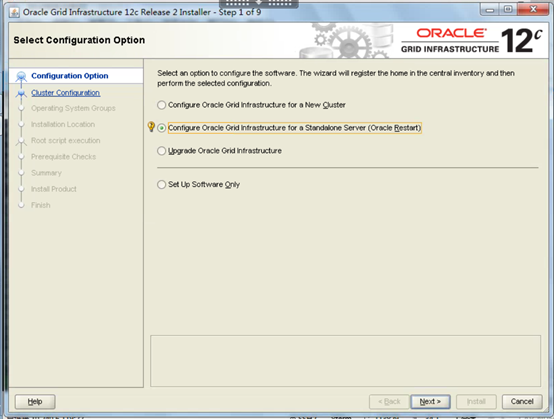
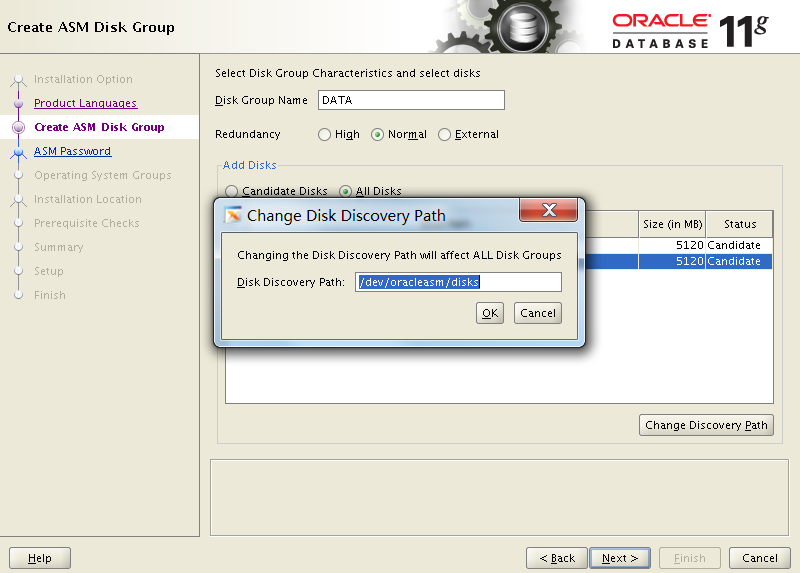
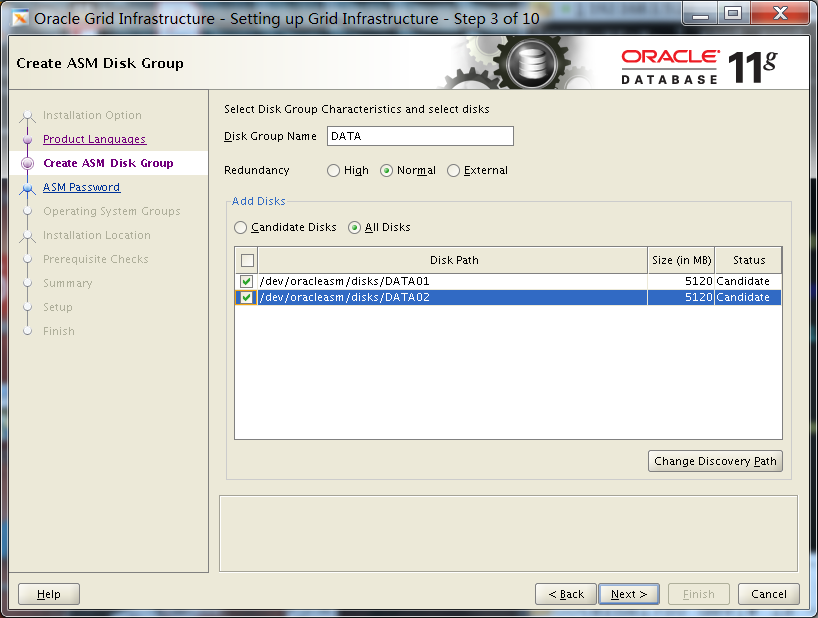

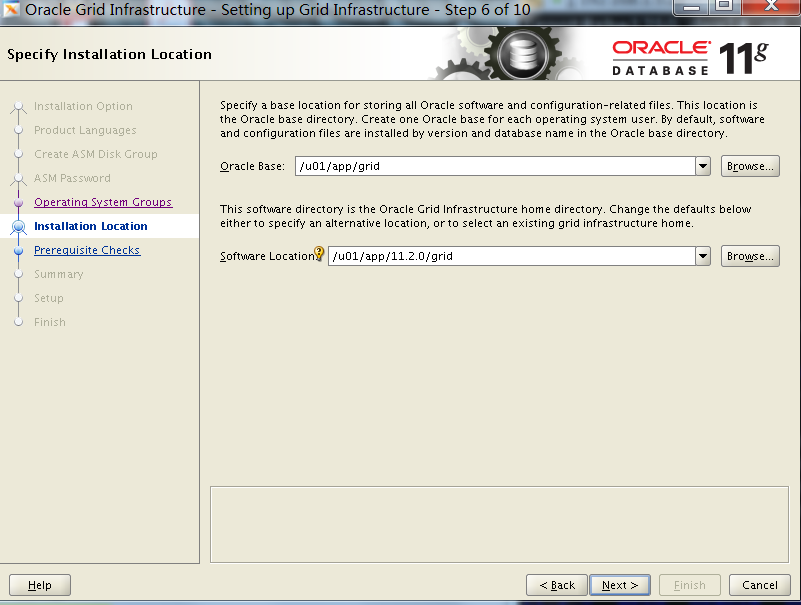
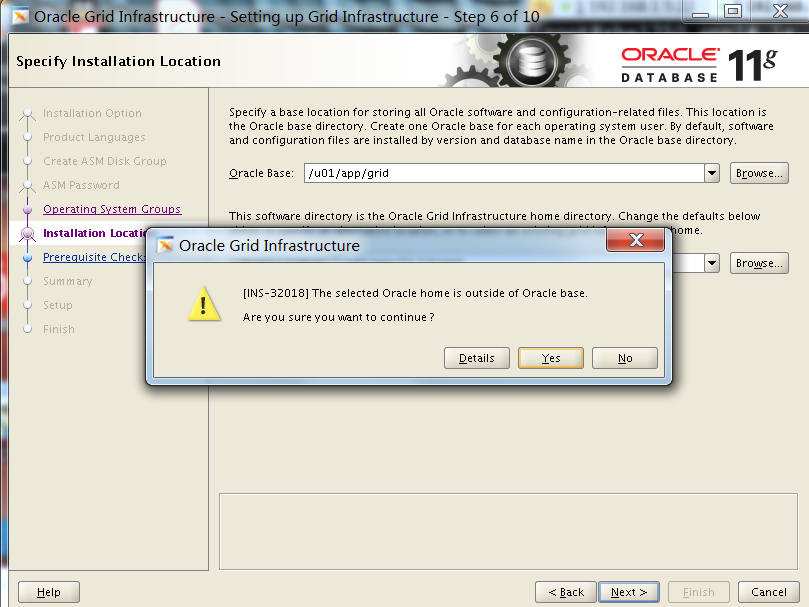

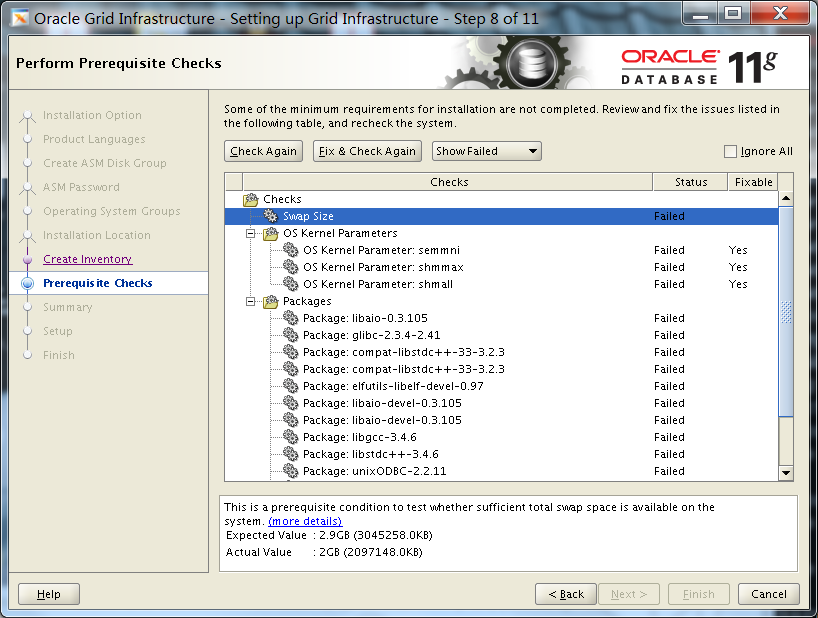
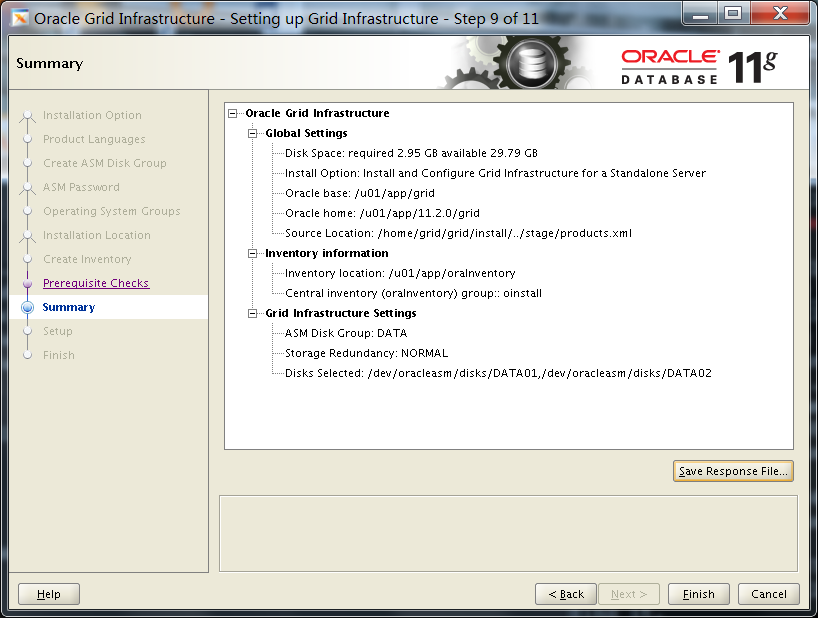
Click "Fix & Check Again"
Run "runfixup.sh"
以 ' root' 身份执行缺失安装包的安装
yum install -y binutils-* compat-libstdc++-* elfutils-libelf-* elfutils-libelf-devel-static-0.125 gcc-4.1.2 gcc-c++-4.1.2 glibc-2.5-24 glibc-common-2.5 glibc-devel-2.5 glibc-headers-2.5 ksh-20060214 libaio-0.3.106 libaio-devel-0.3.106 libgcc-4.1.2 libgomp-4.1.2 libstdc++-4.1.2 libstdc++-devel-4.1.2 make-3.81 sysstat-7.0.2

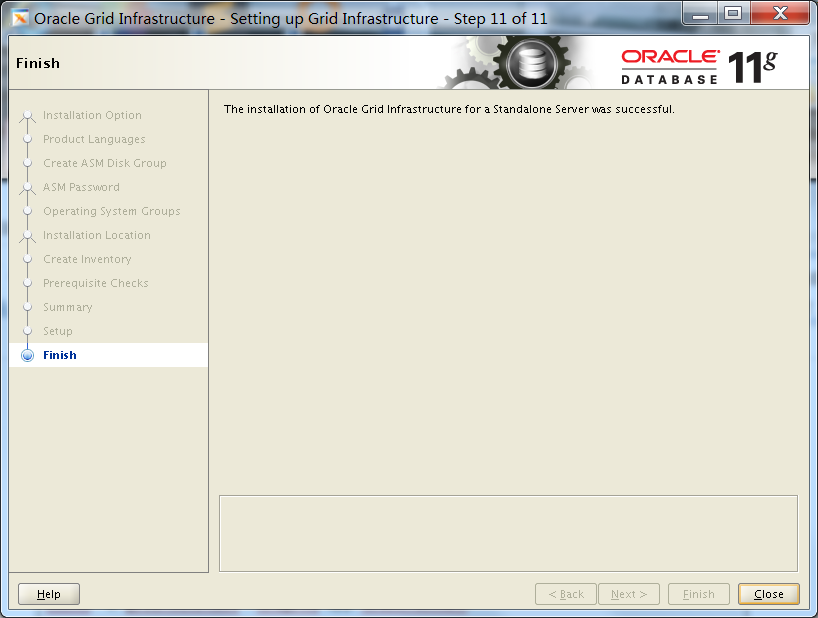
Run "/u01/app/oraInventory/orainstRoot.sh"
Run "/u01/app/11.2.0/grid/root.sh"
[root@rhel750 oraInventory]# ./orainstRoot.sh

Changing permissions of /u01/app/oraInventory.

Adding read,write permissions for group.

Removing read,write,execute permissions for world.

Changing groupname of /u01/app/oraInventory to oinstall.

The execution of the script is complete.

[root@rhel750 grid]# ./root.sh

Running Oracle 11g root.sh script...

The following environment variables are set as:

    ORACLE_OWNER= grid

    ORACLE_HOME=  /u01/app/11.2.0/grid

Enter the full pathname of the local bin directory: [/usr/local/bin]:

   Copying dbhome to /usr/local/bin ...

   Copying oraenv to /usr/local/bin ...

   Copying coraenv to /usr/local/bin ...

Creating /etc/oratab file...

Entries will be added to the /etc/oratab file as needed by

Database Configuration Assistant when a database is created

Finished running generic part of root.sh script.

Now product-specific root actions will be performed.

2019-05-01 22:03:10: Checking for super user privileges

2019-05-01 22:03:10: User has super user privileges

2019-05-01 22:03:10: Parsing the host name

Using configuration parameter file: /u01/app/11.2.0/grid/crs/install/crsconfig_params

Creating trace directory

LOCAL ADD MODE

Creating OCR keys for user 'grid', privgrp 'oinstall'..

Operation successful.

CRS-4664: Node rhel750 successfully pinned.

Adding daemon to inittab

CRS-4124: Oracle High Availability Services startup failed.

CRS-4000: Command Start failed, or completed with errors.

ohasd failed to start: Inappropriate ioctl for device

ohasd failed to start: Inappropriate ioctl for device at /u01/app/11.2.0/grid/crs/install/roothas.pl line 296.
发生失败现象。
第一种解决办法:
删除配置:[root@rhel750]$ /u01/app/11.2.0/grid/crs/install/roothas.pl -deconfig -force-verbose

更改文件权限:[root@rhel750]$ chown root:oinstall /var/tmp/.oracle/npohasd
第二种解决办法:
[root@rhel750]$ /u01/app/11.2.0/grid/crs/install/roothas.pl

一般出现Adding daemon to inittab这条信息的时候(或执行roothas.pl的同时)另开一个terminal执行dd命令

[root@rhel750]$ /bin/dd if=/var/tmp/.oracle/npohasd of=/dev/null bs=1024 count=1

如果出现 /bin/dd: opening`/var/tmp/.oracle/npohasd': No such file or directory 的时候文件还没生成就继续执行,直到能执行为止
[root@rhel750 grid]# /u01/app/11.2.0/grid/crs/install/roothas.pl -deconfig -force -verbose

defined(@array) is deprecated at /u01/app/11.2.0/grid/crs/install/crsconfig_lib.pm line 1702.

	(Maybe you should just omit the defined()?)

defined(@array) is deprecated at /u01/app/11.2.0/grid/crs/install/crsconfig_lib.pm line 1702.

	(Maybe you should just omit the defined()?)

defined(@array) is deprecated at /u01/app/11.2.0/grid/crs/install/crsconfig_lib.pm line 1780.

	(Maybe you should just omit the defined()?)

2019-05-01 22:10:59: Checking for super user privileges

2019-05-01 22:10:59: User has super user privileges

2019-05-01 22:10:59: Parsing the host name

Using configuration parameter file: /u01/app/11.2.0/grid/crs/install/crsconfig_params

CRS-4639: Could not contact Oracle High Availability Services

CRS-4000: Command Stop failed, or completed with errors.

CRS-4639: Could not contact Oracle High Availability Services

CRS-4000: Command Delete failed, or completed with errors.

CRS-4544: Unable to connect to OHAS

CRS-4000: Command Stop failed, or completed with errors.

/u01/app/11.2.0/grid/bin/acfsdriverstate: line 51: /lib/acfstoolsdriver.sh: No such file or directory

Successfully deconfigured Oracle Restart stack

[root@rhel750 grid]# ./root.sh

Running Oracle 11g root.sh script...

The following environment variables are set as:

    ORACLE_OWNER= grid

    ORACLE_HOME=  /u01/app/11.2.0/grid

Enter the full pathname of the local bin directory: [/usr/local/bin]:

The file "dbhome" already exists in /usr/local/bin.  Overwrite it? (y/n)

[n]: y

   Copying dbhome to /usr/local/bin ...

The file "oraenv" already exists in /usr/local/bin.  Overwrite it? (y/n)

[n]: y

   Copying oraenv to /usr/local/bin ...

The file "coraenv" already exists in /usr/local/bin.  Overwrite it? (y/n)

[n]: y

   Copying coraenv to /usr/local/bin ...

Entries will be added to the /etc/oratab file as needed by

Database Configuration Assistant when a database is created

Finished running generic part of root.sh script.

Now product-specific root actions will be performed.

2019-05-01 22:13:16: Checking for super user privileges

2019-05-01 22:13:16: User has super user privileges

2019-05-01 22:13:16: Parsing the host name

Using configuration parameter file: /u01/app/11.2.0/grid/crs/install/crsconfig_params

LOCAL ADD MODE

Creating OCR keys for user 'grid', privgrp 'oinstall'..

Operation successful.

CRS-4664: Node rhel750 successfully pinned.

Adding daemon to inittab

CRS-4123: Oracle High Availability Services has been started.

ohasd is starting

ADVM/ACFS is not supported on redhat-release-server-7.5-8.el7.x86_64

rhel750     2019/05/01 22:13:37     /u01/app/11.2.0/grid/cdata/rhel750/backup_20190501_221337.olr

Successfully configured Oracle Grid Infrastructure for a Standalone Server

Updating inventory properties for clusterware

Starting Oracle Universal Installer...

Checking swap space: must be greater than 500 MB.   Actual 2024 MB    Passed

The inventory pointer is located at /etc/oraInst.loc

The inventory is located at /u01/app/oraInventory

'UpdateNodeList' was successful.

[root@rhel750 grid]#
Database Software Installation Process
数据库软件的安装过程,较为平稳,一般无问题发生。
dbca建库语句
$ su - oracle

$ cd /u01/app/oracle/product/11.2.0/dbhome_1/bin

$ ./dbca
Oracle Grid,ASM,Database on Redhat 7.5的更多相关文章
- Oracle-11g-R2(11.2.0.3.x)RAC Oracle Grid & Database 零宕机方式回滚 PSU(自动模式)
回滚环境: 1.源库版本: Grid Infrastructure:11.2.0.3.15 Database:11.2.0.3.15 2.目标库版本: Grid Infrastructure:11.2 ...
- Oracle-11g-R2(11.2.0.3.x)RAC Oracle Grid & Database 零宕机方式升级 PSU(自动模式)
升级环境: 1.源库版本: Grid Infrastructure:11.2.0.3.13 Database:11.2.0.3.13 2.目标库版本: Grid Infrastructure:11.2 ...
- oracle 11g rac R2 for linux change(public,vip)IP ,hostname (oracle 11g rac R2 修改公有,虚拟,私有IP,网卡)
结构如下: 说明: 节点IP,主机名的修改步骤来自ORACLE support文档: 如何修改集群的公网信息(包括 VIP) (文档 ID 1674442.1) 实验环境情况如下: 实验 节点名称 数 ...
- WPF根据Oracle数据库的表,生成CS文件小工具
开发小工具的原因: 1.我们公司的开发是客户端用C#,服务端用Java,前后台在通讯交互的时候,会用到Oracle数据库的字段,因为服务器端有公司总经理开发的一个根据Oracle数据库的表生成的cla ...
- oracle组建:ODAC112021Xcopy_x64,在开发机上,不用安装oracle的客户端等开发
以下解决方案是为了连接远程服务器上的oracle 11g 的解决方案. 下载地址:http://www.oracle.com/technetwork/database/windows/download ...
- asm磁盘组,asm磁盘状态学习
说明:在数据库中巡检,发现,数据库某个磁盘组状态为mount,其余磁盘组均为CONNECTED状态,排除是否异常 文档流程: 1.实际环境查询校验 2.官方文档视图中对磁盘组,磁盘状态的解释说明 3. ...
- 区分Oracle的数据库,实例,服务名,SID
文章摘自:http://www.zhetao.com/content240 感谢分享O(∩_∩)O~ 在实际的开发应用中,关于Oracle数据库,经常听见有人说建立一个数据库,建立一个Instance ...
- Spring,SpringMVC,MyBatis,Hibernate,Servlet的生命周期,jsp有哪些内置对象,Tomcat,Cookie和Session的作用以及区别,oracle,MYSQL等面试题总结
1. 什么是Spring,谈谈你对Spring的理解 Spring是我们JAVA开发人员在搭建后台时选用的一个轻量级的开源框架,Spring框架目前也是功能丰富,十分优秀企业级采用最多的一个框架. S ...
- Oracle安装部署,版本升级,应用补丁快速参考
一.Oracle安装部署 1.1 单机环境 1.2 Oracle RAC环境 1.3 Oracle DataGuard环境 1.4 主机双机 1.5 客户端部署 二.Oracle版本升级 2.1 单机 ...
随机推荐
- Codeforces Round #579 (Div. 3) 套题 题解
A. Circle of Students 题目:https://codeforces.com/contest/1203/problem/A 题意:一堆人坐成一个环,问能否按逆时针或者顺时针 ...
- python新动态执行 文件头标识 禁止断言
1.exec “python语句” 2. 3.禁止断言
- 给字体和元素加阴影text-shadow和box-shadow
1.语法: 对象选择器 {text-shadow:X轴偏移量 Y轴偏移量 阴影模糊半径 阴影颜色} 注:text-shadow可以使用一个或多个投影,如果使用多个投影时必须需要用逗号“,”分开. 2 ...
- C# 很久以前几个常用类
Base64加密解密 using System; using System.Collections.Generic; using System.Linq; using System.Text; nam ...
- goroutine 分析 协程的调度和执行顺序 并发写
package main import ( "fmt" "runtime" "sync" ) const N = 26 func main( ...
- 【opencv使用笔记】一:Python版本安装与测试
安装完opencv3.4.1并且Cmake后,发现Python不能import,又装了Python版本的opencv; 由于是在conda环境下安装,opencv-python-4.0.1.24,最终 ...
- curl 使用 post 请求,传递 json 参数,下载文件
curl -X POST http://ip:8888/nacos/v1/cs/file/download -H "Accept: application/octet-stream" ...
- javascript实现保留两位小数的多种方法
第一种方法:javascript实现保留两位小数一位自动补零代码实例:第一种方法介绍一下如何实现对数字保留两位小数效果,如果数字的原本小数位数不到两位,那么缺少的就自动补零,这个也是为了统一的效果,先 ...
- Linux-部署ftp
通过外部window ftp 客户端 访问linux 有两种方法 方法一:Linux系统未安装vsftp 服务 这个是本人使用的ftp客户端的版本号 启动ftp客户端,填写ip ,账号,密码 问题:当 ...
- Bootstrap 学习笔记 项目实战 响应式轮播图
左右两个箭头可以随浏览器缩放进行移动 保持在图片中间 Html代码: <!DOCTYPE html> <html lang="zh-cn"> <hea ...