
android studio 设计任务内容和识别内容界面 (android stuido design task layout)
本人android studio版本是 3.4.1,设计了一个任务内容和识别内容的界面,欢迎大家品尝。
界面显示如下图所示:
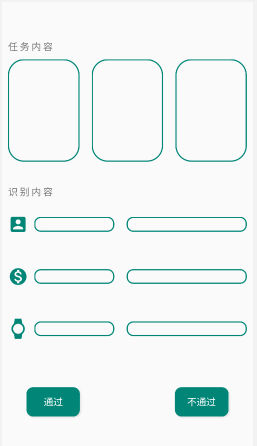
实现代码如下:
<?xml version="1.0" encoding="utf-8"?>

<LinearLayout xmlns:android="http://schemas.android.com/apk/res/android"

    xmlns:app="http://schemas.android.com/apk/res-auto"

    xmlns:tools="http://schemas.android.com/tools"

    android:layout_width="match_parent"

    android:layout_height="match_parent"

    android:orientation="vertical"

    >

    <LinearLayout

        android:layout_width="match_parent"

        android:layout_height="wrap_content"

        android:layout_weight="2"

        android:orientation="horizontal"

        >

        <LinearLayout

            android:layout_width="match_parent"

            android:layout_height="match_parent"

            android:orientation="vertical"

            >

            <TextView

                android:layout_width="wrap_content"

                android:layout_height="wrap_content"

                android:layout_weight="1"

                android:text="任 务 内 容"

                android:textSize="16sp"

                android:gravity="bottom"

                android:layout_marginLeft="10dp"

                />

            <LinearLayout

                android:layout_width="match_parent"

                android:layout_height="0dp"

                android:orientation="horizontal"

                android:layout_weight="3"

                android:gravity="center"

                android:padding="0dp"

                >

                <TextView

                    android:id="@+id/show1"

                    android:layout_weight="1"

                    android:layout_width="0dp"

                    android:layout_height="match_parent"

                    android:layout_margin="10dp"

                    android:background="@drawable/shapeshow"

                    android:textColor="@color/colortheme" />

                <TextView

                    android:id="@+id/show2"

                    android:layout_weight="1"

                    android:layout_width="0dp"

                    android:layout_height="match_parent"

                    android:layout_margin="10dp"

                    android:background="@drawable/shapeshow"

                    android:textColor="@color/colortheme" />

                <TextView

                    android:id="@+id/show3"

                    android:layout_weight="1"

                    android:layout_width="0dp"

                    android:layout_height="match_parent"

                    android:layout_margin="10dp"

                    android:background="@drawable/shapeshow"

                    android:textColor="@color/colortheme" />

            </LinearLayout>

        </LinearLayout>

    </LinearLayout>

    <LinearLayout

        android:layout_width="match_parent"

        android:layout_height="wrap_content"

        android:layout_weight="2"

        android:orientation="horizontal"

        >

        <LinearLayout

            android:layout_width="match_parent"

            android:layout_height="match_parent"

            android:orientation="vertical"

            >

            <TextView

                android:layout_width="wrap_content"

                android:layout_height="wrap_content"

                android:layout_weight="1"

                android:text="识 别 内 容"

                android:textSize="16sp"

                android:gravity="bottom"

                android:layout_marginLeft="10dp"

                />

            <LinearLayout

                android:layout_width="match_parent"

                android:layout_height="0dp"

                android:orientation="horizontal"

                android:layout_weight="3"

                android:gravity="center"

                >

                <ImageView

                    android:layout_weight="0.5"

                    android:layout_width="0dp"

                    android:layout_height="match_parent"

                    android:layout_marginLeft="10dp"

                    android:src="@drawable/ic_account_box_black_24dp"

                    />

                <EditText

                    android:layout_weight="2"

                    android:layout_width="0dp"

                    android:layout_height="wrap_content"

                    android:background="@drawable/shapesinput"

                    android:layout_marginLeft="10dp"

                    android:layout_marginRight="10dp"

                    />

                <EditText

                    android:layout_weight="3"

                    android:layout_width="0dp"

                    android:layout_height="wrap_content"

                    android:background="@drawable/shapesinput"

                    android:layout_marginLeft="10dp"

                    android:layout_marginRight="10dp"

                    />

            </LinearLayout>

            <LinearLayout

                android:layout_width="match_parent"

                android:layout_height="0dp"

                android:orientation="horizontal"

                android:layout_weight="3"

                android:gravity="center"

                >

                <ImageView

                    android:layout_weight="0.5"

                    android:layout_width="0dp"

                    android:layout_height="match_parent"

                    android:layout_marginLeft="10dp"

                    android:src="@drawable/ic_monetization_on_black_24dp"

                    />

                <EditText

                    android:layout_weight="2"

                    android:layout_width="0dp"

                    android:layout_height="wrap_content"

                    android:background="@drawable/shapesinput"

                    android:layout_marginLeft="10dp"

                    android:layout_marginRight="10dp"

                    />

                <EditText

                    android:layout_weight="3"

                    android:layout_width="0dp"

                    android:layout_height="wrap_content"

                    android:background="@drawable/shapesinput"

                    android:layout_marginLeft="10dp"

                    android:layout_marginRight="10dp"

                    />

            </LinearLayout>

            <LinearLayout

                android:layout_width="match_parent"

                android:layout_height="0dp"

                android:orientation="horizontal"

                android:layout_weight="3"

                android:gravity="center"

                >

                <ImageView

                    android:layout_weight="0.5"

                    android:layout_width="0dp"

                    android:layout_height="match_parent"

                    android:layout_marginLeft="10dp"

                    android:src="@drawable/ic_watch_black_24dp"

                    />

                <EditText

                    android:layout_weight="2"

                    android:layout_width="0dp"

                    android:layout_height="wrap_content"

                    android:background="@drawable/shapesinput"

                    android:layout_marginLeft="10dp"

                    android:layout_marginRight="10dp"

                    />

                <EditText

                    android:layout_weight="3"

                    android:layout_width="0dp"

                    android:layout_height="wrap_content"

                    android:background="@drawable/shapesinput"

                    android:layout_marginLeft="10dp"

                    android:layout_marginRight="10dp"

                    />

            </LinearLayout>

        </LinearLayout>

    </LinearLayout>

    <LinearLayout

        android:layout_width="wrap_content"

        android:layout_height="wrap_content"

        android:layout_weight="1"

        >

        <RelativeLayout

            android:layout_width="match_parent"

            android:layout_height="match_parent"

            >

            <Button

                android:id="@+id/pass"

                android:layout_width="wrap_content"

                android:layout_height="wrap_content"

                android:layout_centerVertical="true"

                android:layout_marginLeft="40dp"

                android:text="通过"

                android:textSize="16dp"

                android:textColor="#fff"

                android:background="@drawable/shapesbutton"

                />

            <Button

                android:id="@+id/not_pass"

                android:layout_width="wrap_content"

                android:layout_height="wrap_content"

                android:layout_alignParentEnd="true"

                android:layout_alignParentRight="true"

                android:layout_centerVertical="true"

                android:layout_marginEnd="40dp"

                android:layout_marginRight="40dp"

                android:background="@drawable/shapesbutton"

                android:text="不通过"

                android:textColor="#fff"

                android:textSize="16dp" />

        </RelativeLayout>

    </LinearLayout>

</LinearLayout>
其中, 以下是 shapesbutton.xml 的代码, 而其他的shape代码大同小异, 只要修改其中的参数就可以变成想要的形状和颜色
<?xml version="1.0" encoding="utf-8"?>

<shape xmlns:android="http://schemas.android.com/apk/res/android"

    android:shape="rectangle">

    <solid

        android:color="#008577">

    </solid>

    <corners

        android:radius="10dp">

    </corners>

    <stroke

        android:width="2dp"

        android:color="#008577">

    </stroke>

    <padding

        android:top="0dp"

        android:right="20dp"

        android:left="20dp"

        android:bottom="0dp">

    </padding>

</shape>
其中,关于图标文件的创建,右击 drawable, 选择 new, 选择 Vector Asset 进入界面, 再点击 Clip Art 选择自己想要的图标, 点击 next 和 finish 即可.若想要修改图标的颜色, 则可以打开图标文件, 修改 fillColor即可.
android studio 设计任务内容和识别内容界面 (android stuido design task layout)的更多相关文章
- Android Studio软件技术基础 —Android项目描述---1-类的概念-android studio 组件属性-+标志-Android Studio 连接真机不识别其他途径
学习android对我来说,就是兴趣,所以我以自己的兴趣写出的文章,希望各位多多支持!多多点赞,评论讨论加关注. 最近有点忙碌,对于我来说,学习Android开发,是对于我的考验,最近一位大佬发给我一 ...
- 【Android Studio安装部署系列】二十一、Android studio将项目上传到github中
版权声明:本文为HaiyuKing原创文章,转载请注明出处! 概述 两个相关概念:git和github Git是一个开源的分布式版本控制系统,用以有效.高速的处理从很小到非常大的项目版本管理.Git ...
- Android studio 使用心得(三)—从Eclipse迁移到Android studio
断断续续的也算是把eclipse上的代码成功迁移到android studio上来了,现在,我同事继续用eclipse,我用android studio,svn上还是之前eclipse的项目,迁移成功 ...
- 【Android Studio探索之路系列】之中的一个:Android Studio开篇
作者:郭孝星 微博:郭孝星的新浪微博 邮箱:allenwells@163.com 博客:http://blog.csdn.net/allenwells github:https://github.co ...
- Android Studio 连接真机不识别
本人也是初学..写错的请大神多多批评指正! 不胜荣幸!! 强烈推荐使用真机测试..除非是最后关头要测试各个Android系统版本.. 本人遇到的连不上的原因有以下几种: 1 -- 手机设置问题. ...
- 【Android Studio安装部署系列】十九、Android studio使用SVN
版权声明:本文为HaiyuKing原创文章,转载请注明出处! 概述 在AndroidStudio中开发版本控制,除了Git就是SVN,和Eclipse不同,Android Studio没有提供单独的插 ...
- 【Android Studio安装部署系列】四十、Android Studio安装Statistic插件(统计项目总行数)
版权声明:本文为HaiyuKing原创文章,转载请注明出处! 概述 Android Studio 是没有提提供统计代码全部行数的功能的,但是对于开发者来说,这个功能确实必备的,Statistic统计代 ...
- [Unity][安卓]Unity和Android Studio 3.0 交互通讯(1)Android Studio 3.0 设置
[安卓]Android Studio 3.0 JDK安卓环境配置(2017.10) http://blog.csdn.net/bulademian/article/details/78387052 [ ...
- Android Studio 使用笔记:[转] Mac下修改Android Studio 所用的JDK版本
原文链接:http://www.jianshu.com/p/d8d1d72d0248# 最近项目从Eclipse+Ant构建模式转移到了Android Studio+Gradle构建模式,自然的JDK ...
随机推荐
- 力扣 — Rotate List()
题目描述: 中文: 给定一个链表,旋转链表,将链表每个节点向右移动 k 个位置,其中 k 是非负数. 示例 1: 输入: 1->2->3->4->5->NULL, k = ...
- numpy 数组中添加新元素
import numpy as npnew_array = np.empty(shape=[0, 3]) # 3列n行for i in range(10): x = i+1 y = i+2 z = i ...
- Nginx是什么?为什么选择Nginx做服务器软件?有什么优势?
代理服务器基础知识 Nginx是什么? 为什么选择Nginx 1.代理服务器基础知识 a.代理服务器 一般是指局域网内部的机器通过代理服务器发送请求到互联网上的服务器,代理服务器一般作用在客户端.应用 ...
- setattr(object, name, value)
This is the counterpart of getattr(). The arguments are an object, a string and an arbitrary value. ...
- docker 运行jenkins及vue项目与springboot项目(五.jenkins打包springboot服务且在docker中运行)
docker 运行jenkins及vue项目与springboot项目: 一.安装docker 二.docker运行jenkins为自动打包运行做准备 三.jenkins的使用及自动打包vue项目 四 ...
- ajaxfileupload异步上传
=====================upload.html======================= <!DOCTYPE html PUBLIC "-//W3C//DTD X ...
- 旋转屏幕导致Activity重建问题的解决办法
Android开发文档上专门有一小节解释这个问题.简单来说,Activity是负责与用户交互的最主要机制,任何"设置"(Configuration)的改变都可能对Activity的 ...
- win10 解决telnet不是内部或外部命令的方案
1.Telnet用于远程操作互联网中的设备或终端计算机服务器,可以有效的减少现场操作的麻烦.因为设备或终端是遍布整个省或市,有的甚至是国外,如何高效的处理问题是当务之急,除了telnet还可以ssh使 ...
- winserver安装zabbixAgent
zabbix 布署实践[8 监控windows server] 参考http://www.cnblogs.com/likehua/p/3968689.html的思路,我安装的是zabbix 3.0 ...
- Android开发时包名、签名、渠道和版本号的易坑点(转)
本文中总结一下 Android 开发中容易被忽视的一些注意事项吧: 一.谨慎选择包名 包名 (Package Name) 就相当于一款应用在户口本上登记的名字,是系统用来区分不同应用的字段.重复的包名 ...