
[Unity2d系列教程] 005.Unity如何使用外部触控插件FingerGuesture
用过Unity的都知道自带的Input.touches并不支持鼠标输入,给我们的调试带来很大的不方便。那么我们会发现其实有很多触控方面的插件,如inputtouches,easy touch,fingerGesture等。
下面我主要讲解FingerGesture的使用,这个插件不是免费的,可以自行购买
1.导入插件

导入后的插件会在Assets/Plugins下面
2.拖动Assets/Plugins/FingerGestures/Prefabs/FingerGestures到你的Hierarchy中,如下图
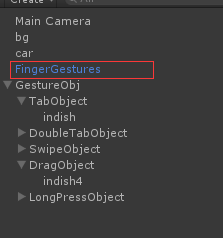
3.创建空节点GestureObj,然后绑定脚本TestGesture.cs
using UnityEngine;

using System.Collections;

public class testGestures : MonoBehaviour

{

    // Use this for initialization

    void Start () {

    }

    // Update is called once per frame

    void Update () {

    }

    // 单击

    void OnTap(TapGesture gesture)

    {

        if (gesture.Selection == tapObject)

        {

            Debug.Log("Tab!!!!!!!!!!!");

        }

    }

    // 双击

    void OnDoubleTap(TapGesture gesture)

    {

        if (gesture.Selection == doubleTapObject)

        {

            Debug.Log("Double Tab!!!!!!!!!!!");

        }

    }

    void OnSwipe(SwipeGesture gesture)

    {

        // make sure we started the swipe gesture on our swipe object

        //   we use the object the swipe started on, instead of the current one

        GameObject selection = gesture.StartSelection;

        if (selection == swipeObject)

        {

            Debug.Log("Swipe!!!!!!!");

        }

    }

    int dragFingerIndex = -;

    void OnDrag(DragGesture gesture)

    {

        // 获取起始点

        FingerGestures.Finger finger = gesture.Fingers[];

        if (gesture.Phase == ContinuousGesturePhase.Started)

        {

            // dismiss this event if we're not interacting with our drag object

            if (gesture.Selection != dragObject)

                return;

            // remember which finger is dragging dragObject

            dragFingerIndex = finger.Index;

        }

        else if (finger.Index == dragFingerIndex)  // gesture in progress, make sure that this event comes from the finger that is dragging our dragObject

        {

            if (gesture.Phase == ContinuousGesturePhase.Updated)

            {

                // update the position by converting the current screen position of the finger to a world position on the Z = 0 plane

                dragObject.transform.position = GetWorldPos(gesture.Position);

            }

            else

            {

                // reset our drag finger index

                dragFingerIndex = -;

            }

        }

    }

    // 长按

    void OnLongPress(LongPressGesture gesture)

    {

        if (gesture.Selection == longPressObject)

        {

            Debug.Log("Long press!!!!!!");

        }

    }

    // 定义变量,用来操作

    public GameObject longPressObject;

    public GameObject tapObject;

    public GameObject doubleTapObject;

    public GameObject swipeObject;

    public GameObject dragObject;

    // 公共方法

    public static Vector3 GetWorldPos(Vector2 screenPos)

    {

        Ray ray = Camera.main.ScreenPointToRay(screenPos);

        // we solve for intersection with z = 0 plane

        float t = -ray.origin.z / ray.direction.z;

        return ray.GetPoint(t);

    }

}
4.添加指定的触控对象

5.添加Component
6.添加Screen Raycaster
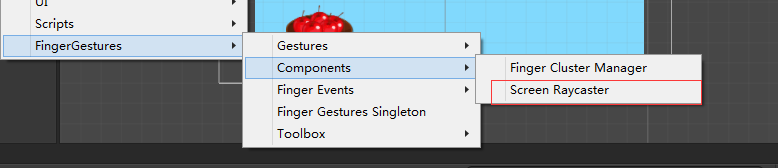
7.要为对象添加2D物理碰撞区域。不然的话点击没有效果。
[Unity2d系列教程] 005.Unity如何使用外部触控插件FingerGuesture的更多相关文章
- [Unity2d系列教程] 003.Unity如何调用android的方法
Unity开发的时候很多时候我们需要用到底层的一些功能,比如摄像,录音,震动等等,我们在Unity的层面是无法完成的.那么我们考虑到Unity是否可以直接调用到android方面的方法,替我们去完成我 ...
- [Unity2d系列教程] 006.Unity如何根据图片自动生成Animator
Unity制作2D产品的时候,我们在制作动画的时候,要不断的生成Animation,Animator等等资源,如果动画一多的话,就变得麻烦.由于Unity是支持插件开发的,我们可以添加一个Editor ...
- [Unity2d系列教程] 004.Unity如何调用ios的方法(SDK集成相关)
和上一篇类似,我们同样希望Unity能够直接调用IOS底层的代码,那么我们就需要研究怎么去实现它.下面让我来带大家看一个简单的例子 1.创建.h和.m文件如下 .h // // myTest.m // ...
- 黄聪:Microsoft Enterprise Library 5.0 系列教程(八) Unity Dependency Injection and Interception
原文:黄聪:Microsoft Enterprise Library 5.0 系列教程(八) Unity Dependency Injection and Interception 依赖注入容器Uni ...
- [Unity2d系列教程] 002.引用外部DLL - C
上一篇我们学习了Unity调用C#生成的外部DLL,但是有时候我们需要访问底层,不能不适用C生成的DLL.下面就让我们一起学习下,C如何生成. 1.创建一个C的控制台程序 2.点击确定->点击下 ...
- [Unity2d系列教程] 001.引用外部DLL - C#
众所周知,Unity可以支持多种语言开发, C#, JS, Boo三种方式的开发, 能够很方便的集成一些外部插件,以便调用现有的动态链接库.学过C#的都知道C#可以生成一个dll供给其他的程序调用.那 ...
- Enterprise Library 5.0 系列教程
1. Microsoft Enterprise Library 5.0 系列教程(一) Caching Application Block (初级) 2. Microsoft Enterprise L ...
- Fastify 系列教程一(路由和日志)
介绍 Fastify是一个高度专注于以最少开销和强大的插件架构,为开发人员提供最佳体验的Web框架. 它受到了 Hapi 和 Express 的启发,是目前最快的 Node 框架之一. Fastify ...
- Fastify 系列教程二 (中间件、钩子函数和装饰器)
Fastify 系列教程: Fastify 系列教程一 (路由和日志) Fastify 系列教程二 (中间件.钩子函数和装饰器) 中间件 Fastify 提供了与 Express 和 Restify ...
随机推荐
- python——remove,del,pop三种删除元素方式的区别
记性不好,整理出来以作保存 1.remove ①直接删除元素,remove(obj),顺序删除第一个遇到的,所以想要全部删除 ,需要遍历 aList = [123, 'xyz', 'zara', 'a ...
- 题目分享D 二代目
题意:给定一个T条边的无向图,求S到E恰好经过N条边的最短路径 T≤100 N≤1000000 分析:(据说好像假期学长讲过) 首先很容易想到的是dp[i][j][k]表示从i到j经过k条边的最短路径 ...
- java权限设计思考
1.粗粒度权限设计与细粒度权限设计 粗粒度(Coarse-graind) 表示类别级,即仅考虑对象的类别(the type of object),不考 ...
- C. Helga Hufflepuff's Cup 树形dp 难
C. Helga Hufflepuff's Cup 这个题目我感觉挺难的,想了好久也写了很久,还是没有写出来. dp[i][j][k] 代表以 i 为根的子树中共选择了 j 个特殊颜色,且当前节点 i ...
- SpringBoot:静态资源映射、定制404、配置icon
目录 静态资源映射规则 定制首页 定制错误页面 配置 icon 静态资源映射规则.定制首页.定制404页面.配置网站的图标 静态资源映射规则 SpringBoot中对于静态资源(css,js,img. ...
- 远程登陆与数据CP
1 SSH登陆原理 SSH,Secure Shell,是一套协议标准,可以用来实现两台机器之间的安全登陆以及安全的数据传送,其保证数据安全的原理是非对称加密. 传统的对称加密方式使用的是一套密 ...
- 前端自适应样式reset.css
@charset "utf-8"; /* CSS Document */ html, body, ul, li, ol, dl, dd, dt, p, h1, h2, h3, h4 ...
- Quartus II 中参数化模块库(LPM)的使用
Quartus II 的LPM库所在的目录是\altera\11.0\quartus\libraries\megafunctions 现以LPM_MULT为例进行演示: 思路:1.首先创建一个pro ...
- 【疑问】SQLServer_DNS注入数据库因为点号不能显示数据库的库名的方法[语音和音乐]
你好,欢迎关注我的网站: www.leosec.net
- 【SMB源码解析系列】——002.RESET中断
跟随代码结尾处的中断向量,我们可以看到RESET中断所在地址为Start标签处. 这部分代码比较简单,从字面便可基本理解. 1.(682~683)状态寄存器设置,sei指令用于禁用IRQ中断,SMB中 ...