
Flume(二) —— 自定义拦截器、Source、Sink
自定义拦截器
自定义Source
自定义Sink
引入依赖
        <dependency>

            <groupId>org.apache.flume</groupId>

            <artifactId>flume-ng-core</artifactId>

            <version>1.7.0</version>

        </dependency>
代码
/**

 * @author Michael Fang

 * @since 2019-12-30

 */

public class MySink extends AbstractSink implements Configurable {

    Logger logger = LoggerFactory.getLogger(MySink.class);

    private String prefix;

    private String subfix;

    @Override

    public synchronized void start() {

        super.start();

    }

    @Override

    public synchronized void stop() {

        super.stop();

    }

    public Status process() throws EventDeliveryException {

        Status status = null;

        // Start transaction

        Channel ch = getChannel();

        Transaction txn = ch.getTransaction();

        txn.begin();

        try {

            // This try clause includes whatever Channel operations you want to do

            Event event = ch.take();

            // Send the Event to the external repository.

            // storeSomeData(e);

            if(event != null){

                String body = new String(event.getBody());

                logger.info(prefix + " " + body + " " + subfix);

            }

            txn.commit();

            status = Status.READY;

        } catch (Throwable t) {

            txn.rollback();

            // Log exception, handle individual exceptions as needed

            status = Status.BACKOFF;

            // re-throw all Errors

            if (t instanceof Error) {

                throw (Error) t;

            }

        } finally {

            txn.close();

        }

        return status;

    }

    public void configure(Context context) {

        prefix = context.getString("prefix");

        subfix = context.getString("subfix", "bigdata---");

    }

}
编译好的jar上传到flume/lib下
创建配置文件mysink.conf
# Name the components on this agent

a1.sources = r1

a1.sinks = k1

a1.channels = c1

# Describe/configure the source

a1.sources.r1.type = netcat

a1.sources.r1.bind = localhost

a1.sources.r1.port = 44444

# Describe the sink

a1.sinks.k1.type = com.fonxian.bigdata.flume.MySink

a1.sinks.k1.prefix = thinkhard

a1.sinks.k1.subfix = flume

# Use a channel which buffers events in memory

a1.channels.c1.type = memory

## 事件容量

a1.channels.c1.capacity = 1000

a1.channels.c1.transactionCapacity = 100

# Bind the source and sink to the channel

a1.sources.r1.channels = c1

## channel 与 sink 的关系是 1对多 的关系。1个sink只可以绑定1个channel,1个channel可以绑定多个sink。

a1.sinks.k1.channel = c1
运行
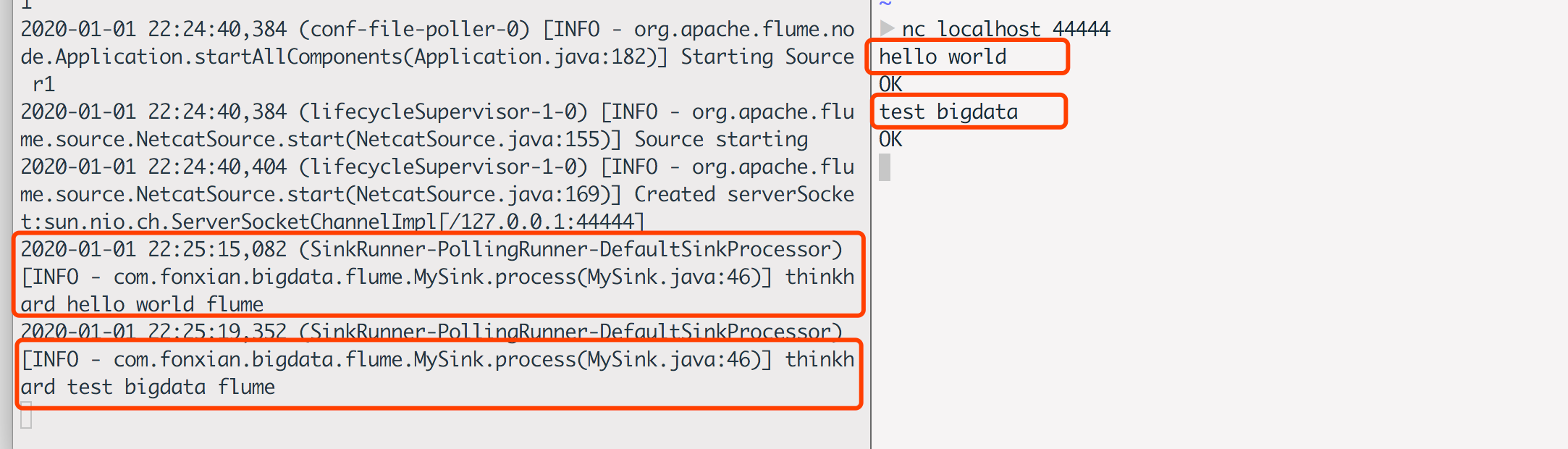
./flume-ng agent --conf ../conf --conf-file ../job/mysink.conf --name a1 -Dflume.root.logger=INFO,console

nc localhost 44444
运行结果
Flume(二) —— 自定义拦截器、Source、Sink的更多相关文章
- Flume自定义拦截器(Interceptors)或自带拦截器时的一些经验技巧总结(图文详解)
不多说,直接上干货! 一.自定义拦截器类型必须是:类全名$内部类名,其实就是内部类名称 如:zhouls.bigdata.MySearchAndReplaceInterceptor$Builder 二 ...
- Hadoop生态圈-Flume的组件之自定义拦截器(interceptor)
Hadoop生态圈-Flume的组件之自定义拦截器(interceptor) 作者:尹正杰 版权声明:原创作品,谢绝转载!否则将追究法律责任. 本篇博客只是举例了一个自定义拦截器的方法,测试字节传输速 ...
- Flume 自定义拦截器 多行读取日志+截断
前言: Flume百度定义如下: Flume是Cloudera提供的一个高可用的,高可靠的,分布式的海量日志采集.聚合和传输的系统,Flume支持在日志系统中定制各类数据发送方,用于收集数据:同时,F ...
- web开发(二十一)之自定义拦截器的使用
转自博客:http://blog.csdn.net/pkgk2013/article/details/51985817 拦截器的作用 拦截器,在AOP(Aspect-Oriented Programm ...
- SpringMVC系列(十二)自定义拦截器
Spring MVC也可以使用拦截器对请求进行拦截处理,用户可以自定义拦截器来实现特定的功能,自定义的拦截器必须实现HandlerInterceptor接口– preHandle():这个方法在业务处 ...
- flume中的拦截器
Flume中的拦截器(interceptor),用户Source读取events发送到Sink的时候,在events header中加入一些有用的信息,或者对events的内容进行过滤,完成初步的数据 ...
- Struts2入门(二)——配置拦截器
一.前言 之前便了解过,Struts 2的核心控制器是一个Filter过滤器,负责拦截所有的用户请求,当用户请求发送过来时,会去检测struts.xml是否存在这个action,如果存在,服务器便会自 ...
- 【Java EE 学习 35 下】【struts2】【struts2文件上传】【struts2自定义拦截器】【struts2手动验证】
一.struts2文件上传 1.上传文件的时候要求必须使得表单的enctype属性设置为multipart/form-data,把它的method属性设置为post 2.上传单个文件的时候需要在Act ...
- SpringMVC——自定义拦截器、异常处理以及父子容器配置
自定义拦截器: 一.若想实现自定义拦截器,需要实现 org.springframework.web.servlet.HandlerInterceptor 接口. 二.HandlerIntercepto ...
随机推荐
- logrotate+crond日志切割、轮询
logrotate 在工作中经常会有需求去查看日志,无论是通过应用或者系统error日志去查找问题或者通过nginx的访问日志统计站点日均PV.UV.所以体现了日志的重要性,但是通常当业务越来越大的时 ...
- C#里的async和await的使用
1. await指令调起线程执行异步方法和方法内后面的代码 2. await指令会阻塞当前方法后面的代码,但是不会阻塞外部调用 3. await必须搭配async使用,而async不一定需要有awai ...
- matplotlib画图实例-day1
matplotlib主要用于根据数据画各种图表 官网:https://matplotlib.org/gallery/index.html 例1:画一天中每个两个小时温度变化趋势图 #!/usr/bin ...
- Maven - 构建生命周期、阶段、目标
版权所有,未经授权,禁止转载 章节 Maven – 简介 Maven – 工作原理 Maven – Repository(存储库) Maven – pom.xml 文件 Maven – 依赖管理 Ma ...
- PyMySQL学习笔记
一些常用函数及解释 db = pymysql.connect('host','user','password','database') # 连接数据库 cursor = db.cursor() # 创 ...
- 2020/1/30 PHP代码审计之文件上传漏洞
0x00 漏洞简介 文件上传漏洞是指用户上传了一个可执行的脚本文件,并通过此脚本文件获得了执行服务器端命令的能力.这种攻击是最为直接和有效的,"文件上传"本身是没有问题,有问题的是 ...
- 使用Object类为实例定义方法和属性
1.1 可以使用 Object 类直接定义个实例,并且为该对象赋属性和方法,例如: var person_1 = { nickName:"xiaowu", age:28, show ...
- Java集合--list接口
list是一个接口,实现类:Arraylist,Vector,Linkedlist list接口(有序): 常用方法 排除Collection中具有的之外的 添加功能 void add(int ind ...
- 洛谷 P2341 [HAOI2006]受欢迎的牛|【模板】强连通分量
题目传送门 解题思路: 先求强联通分量,缩点,然后统计新图中有几个点出度为0,如果大于1个,则说明这不是一个连通图,答案即为0.否则入度为0的那个强连通分量的点数即为答案 AC代码: #include ...
- windows下使用mysqlbinlog做数据恢复时出现mysqlbinlog: File 'D:\MariaDB' not found (Errcode: 2)
出现如下这种情况是因为为找到bin-log日志,但为什么没有查到了??? 从图中可以看出系统只到到了D:\MariaDB但路径并没有查全,默认在windows下是以空格为分隔符的,所以他把D:\Mar ...