
Jenkins 主题:jenkins-theme-v2
说明
本次样式是基于 Jenkins ver. 2.235.1 写的,所有对于之前的版本可能样式不兼容,好像变化挺大的。个人测试了在用的 Jenkins ver. 2.190.1,完全不行,所有建议想要使用的安装最新版本的 Jenkins。
当然,这个项目给就是给大家一个思路,这个页面可以长这样子,你只需要照抄就能重新根据自己版本设计属于你自己的 Jenkins 主题。
配置说明
1. 更换 Logo
我这里使用的 war 包,所以很好找到他的目录结构:在解压出来的 Jenkins 目录中:
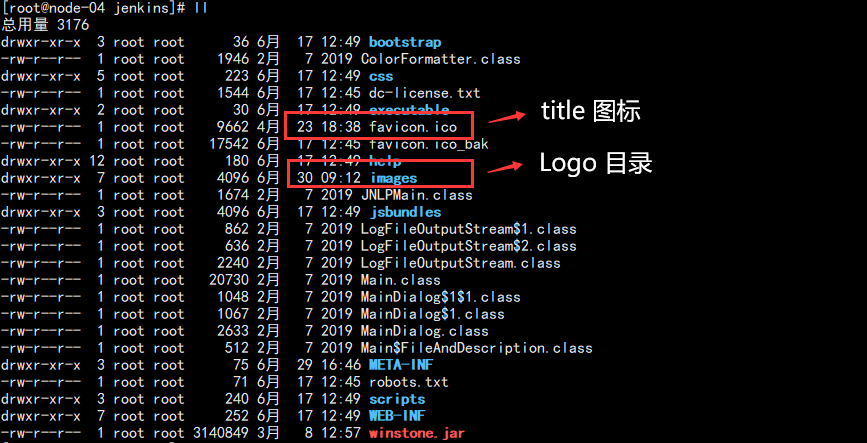
配置标题和名称:

2. 安装 Jenkins 插件
配置主题需要插件:Simple Theme Plugin
具体配置方式可以参考我的博客:
3. 粘贴 CSS
代码如下:
*{font-size:12px !important;letter-spacing:1px;font-weight:normal !important;border-radius:0 !important;color:#333333;}body{margin:;padding:;background-color:#F2F2F2;}a{color:#333333 !important;text-decoration:none !important;}a:link{text-decoration:none !important;color:#333333 !important;}a:visited{text-decoration:none !important;color:#333333 !important;}a:hover{text-decoration:none !important;color:#009688 !important;}a:active{text-decoration:none !important;color:#333333 !important;}a:focus{text-decoration:none !important;color:#333333 !important;}.page-header{position:fixed;height:50px;line-height:50px;top:;width:100%;background-color:white;z-index:;}#header .logo{width:300px !important;background-color:#20222A;margin-left:;padding:0 15px;}#jenkins-head-icon{width:30px;height:30px;}#jenkins-name-icon{height:30px;}#searchform{height:30px;}.searchbox{position:absolute;left:300px;padding:0 20px;}#search-box.main-search__input{padding:2px 5px 2px 30px;margin:;line-height:30px;border:none;}#search-box.main-search__input:focus{border:none;outline:none;}.main-search__icon-leading{height:30px;width:30px;padding:4px;}.main-search__icon-trailing{display:none;}.page-header__hyperlinks A{padding:0 10px;}.page-header__hyperlinks .svg-icon{display:none;}.page-header__hyperlinks A:hover,.page-header__hyperlinks A:focus,.page-header__hyperlinks A.mouseIsOverMenuSelector{background:none;}#visible-am-container.visible #visible-am-button{background:none;}#breadcrumbs{height:30px !important;line-height:30px !important;min-height:30px !important;}#breadcrumbs LI{height:30px !important;line-height:30px !important;min-height:30px !important;}#breadcrumbs LI A{height:30px !important;line-height:30px !important;min-height:30px !important;}.breadcrumbs__wrapper{line-height:30px !important;min-height:30px !important;background-color:white !important;position:fixed;top:50px;left:;right:;padding:0 20px 0 320px !important;border-top:1px solid #eeeeee;border-bottom:1px solid #eeeeee;}.top-sticker-inner{border:none;}#side-panel{background-color:#20222A;position:fixed;top:50px;bottom:;left:;padding:30px 0;z-index:;}body.two-column #side-panel{width:300px;}#tasks{width:300px;margin-bottom:;}#tasks .task{margin-bottom:;max-width:300px;padding:0 15px;line-height:40px;display:block;}#tasks .task:hover{background-color:#009688;cursor:pointer;}#tasks .task *{letter-spacing:2px !important;color:#ffffff !important;}#tasks .task .task-link{height:40px;line-height:40px;}#side-panel .container-fluid{margin:20px 15px;}#side-panel .pane-header{padding:5px !important;}#side-panel td.pane{padding:5px;}#side-panel td{float:left;color:#ffffff;}#side-panel #tasks .task-icon-link{display:none;}#description{display:none;}body.two-column #main-panel{margin-left:310px;}#main-panel{position:relative;top:80px;left:;right:;background-color:#ffffff;margin:10px;padding:15px;}#main-panel > h1{height:50px !important;line-height:20px !important;font-size:14px !important;letter-spacing:2px;margin:-15px -15px 10px -15px;padding:15px;border-bottom:1px solid #f2f2f2;}h1{margin:15px 0;}#main-panel .call-to-action{width:100%;margin:15px 0;padding:10px 10px;background-color:#F2F2F2;border-left:4px solid #009688;}.col-md-offset-2{margin:;padding:;}.col-md-20{width:100%;}.container{margin:;padding:0 290px;width:100%;}.h3{font-weight:bolder !important;font-size:19px !important;}.j-item-options .icon-xlg{height:48px !important;width:48px !important;}#add-item-panel .icon:before{background:none;}#add-item-panel .icon{border:none;background:none;}h1 img{height:20px !important;line-height:20px !important;width:20px !important;}.tabBar .tab:first-child{margin-left:;}.manage-option .icon{width:40px;height:40px;}.manage-option dl{min-height:40px;}.manage-option dl dt{font-size:14px;height:40px;line-height:40px;}.manage-option dl dd{display:none;}#main-panel h2{border-left:4px solid #009688;padding-left:10px;height:35px;line-height:35px;background-color:#f2f2f2;margin:20px 0;}.yui-button button,input[type="button"],input[type="reset"],input[type="submit"],a.yui-button:link,a.yui-button:visited{border:1px solid !important;padding:3px 1rem !important;min-height:28px !important;margin-left:0 !important;}.section-header{margin-top:20px !important;font-weight:bold !important;font-size:14px !important;}table,td,th,form,input,textarea,select{font-size:12px !important;text-align:left !important;}.manage-page__category:not(:last-child){margin-bottom:15px;}.setting-input{padding:5px 15px;}input:focus{outline:none !important;}.hidden-password-legend > svg{height:20px;}.icon-xlg{width:20px !important;height:20px !important;margin-right:10px;}.icon-lg{width:20px !important;height:20px !important;}.icon-md{width:20px !important;height:20px !important;}.icon-sm{height:12px;width:12px;}.build-row{background-color:#20222A !important;}.build-row a{color:#ffffff !important;}#buildHistory td{width:100%;}#buildHistory td:hover{background-color:#20222A !important;}#buildHistory a:hover{background-color:#20222A !important;}.pane-footer{display:none;}.build-row.model-link-active{background:#20222A !important;}td{vertical-align:middle !important;}.page-headline{max-width:100% !important;}#projectstatus th{padding:5px;}.bigtable td{padding:5px;}.permalinks-list{padding-left:20px;}.permalink-item{margin:5px 15px;}#filter-container{margin-left:0 !important;}.plugin-manager__icon-leading{padding:5px !important;}a.yui-button.primary{color:#fff !important;}footer{display:none;}
当然,最新的代码可以参考我的 GITHUB:
不定期修复显示 BUG!
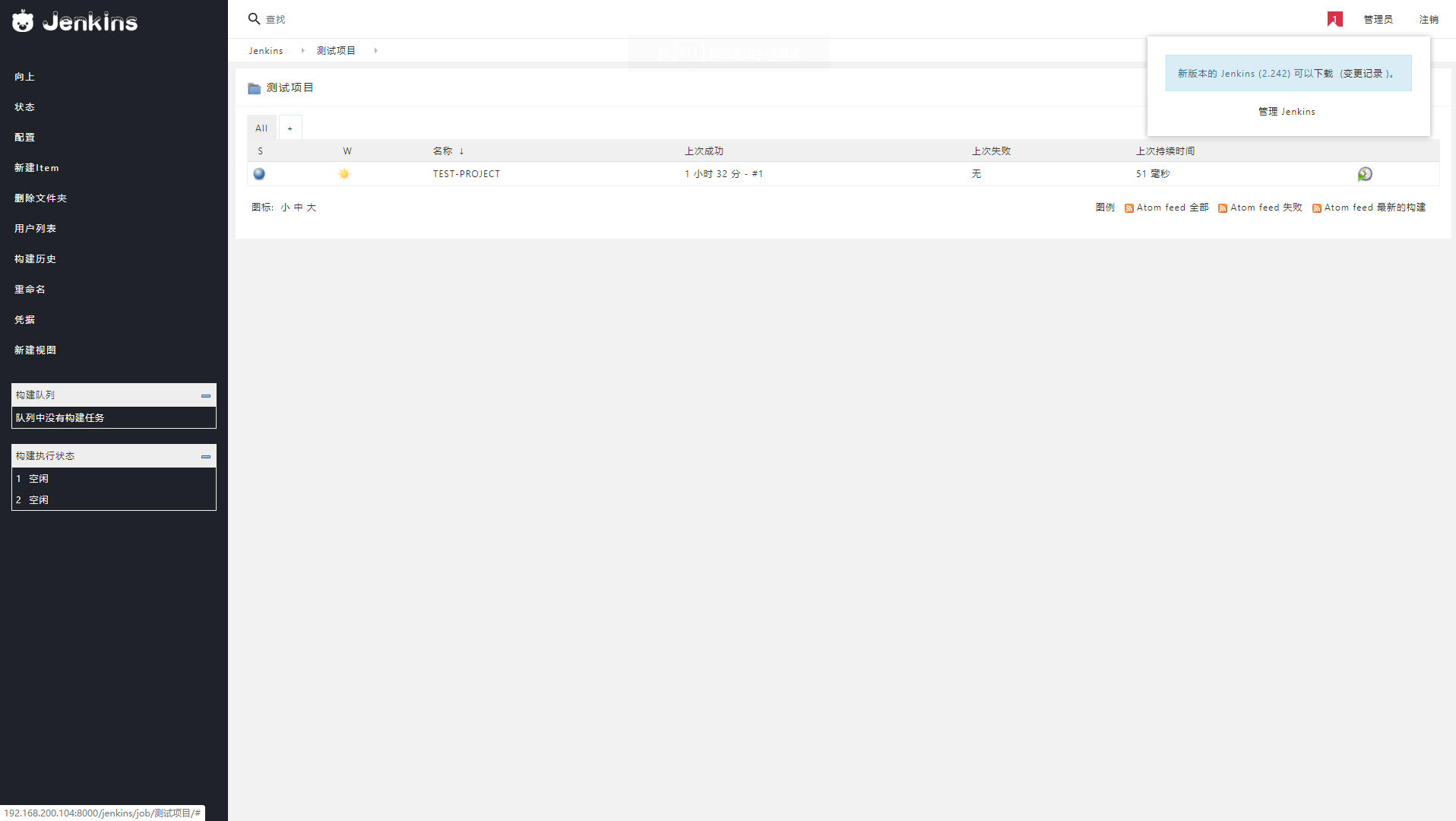
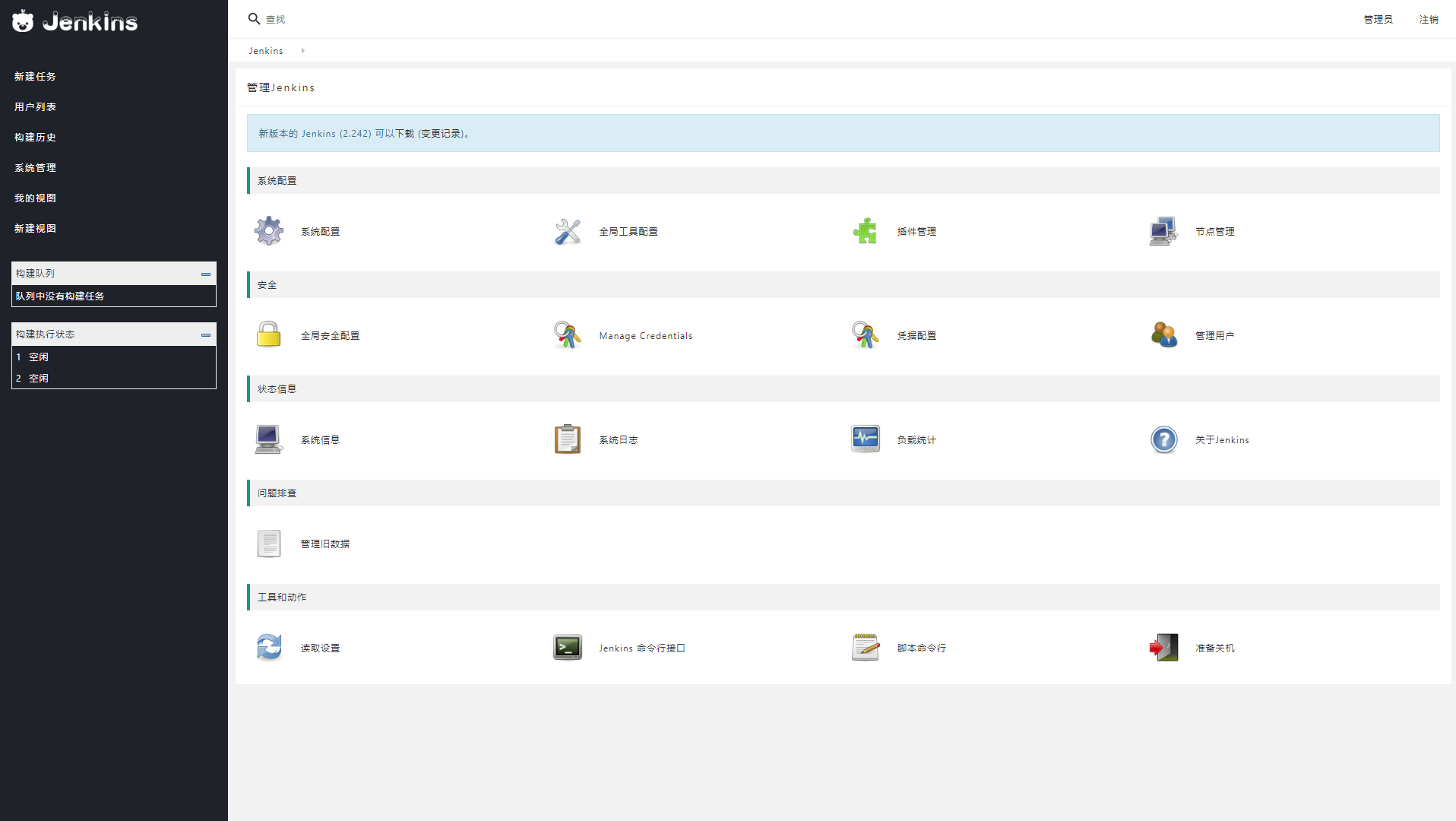
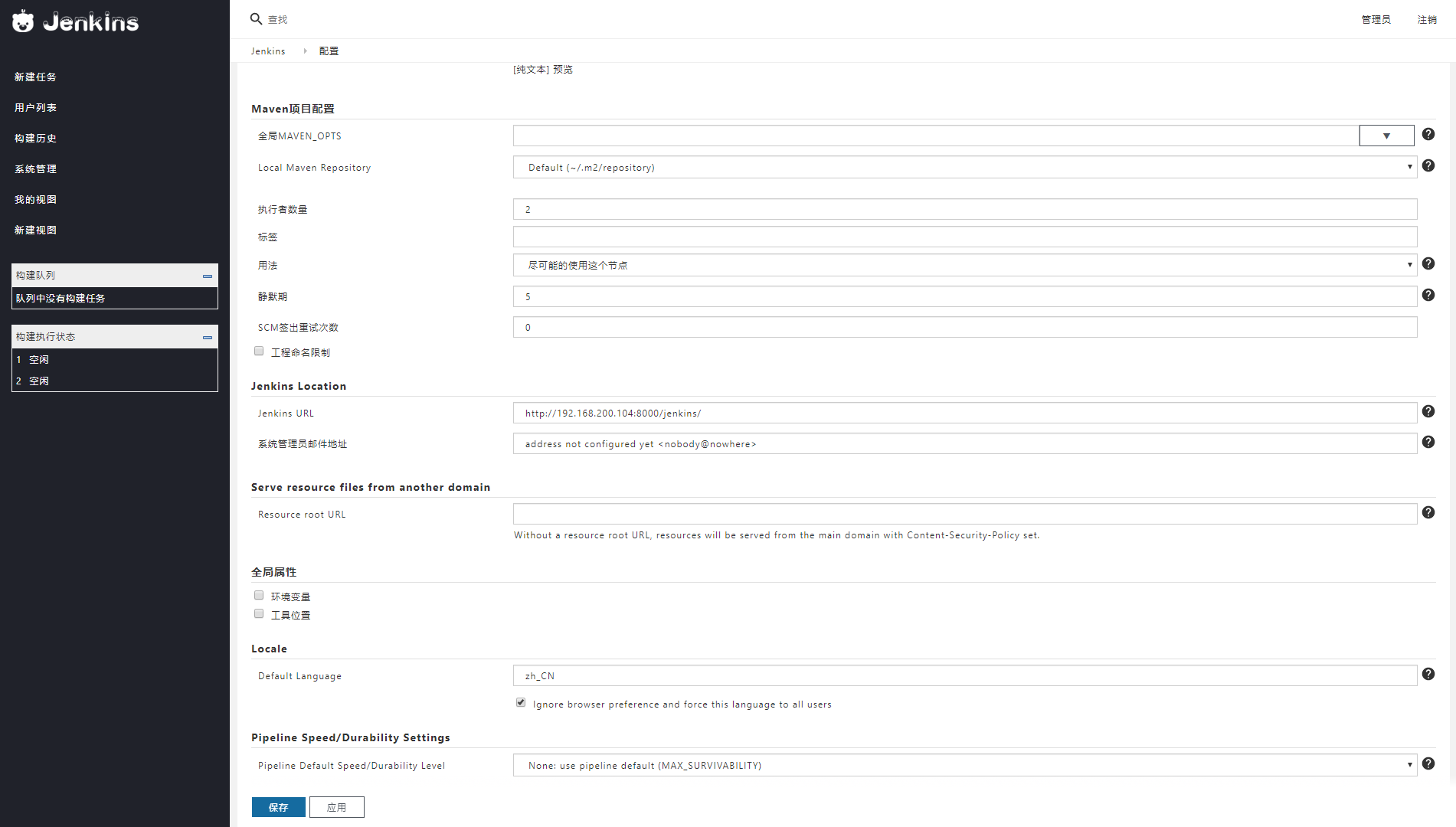
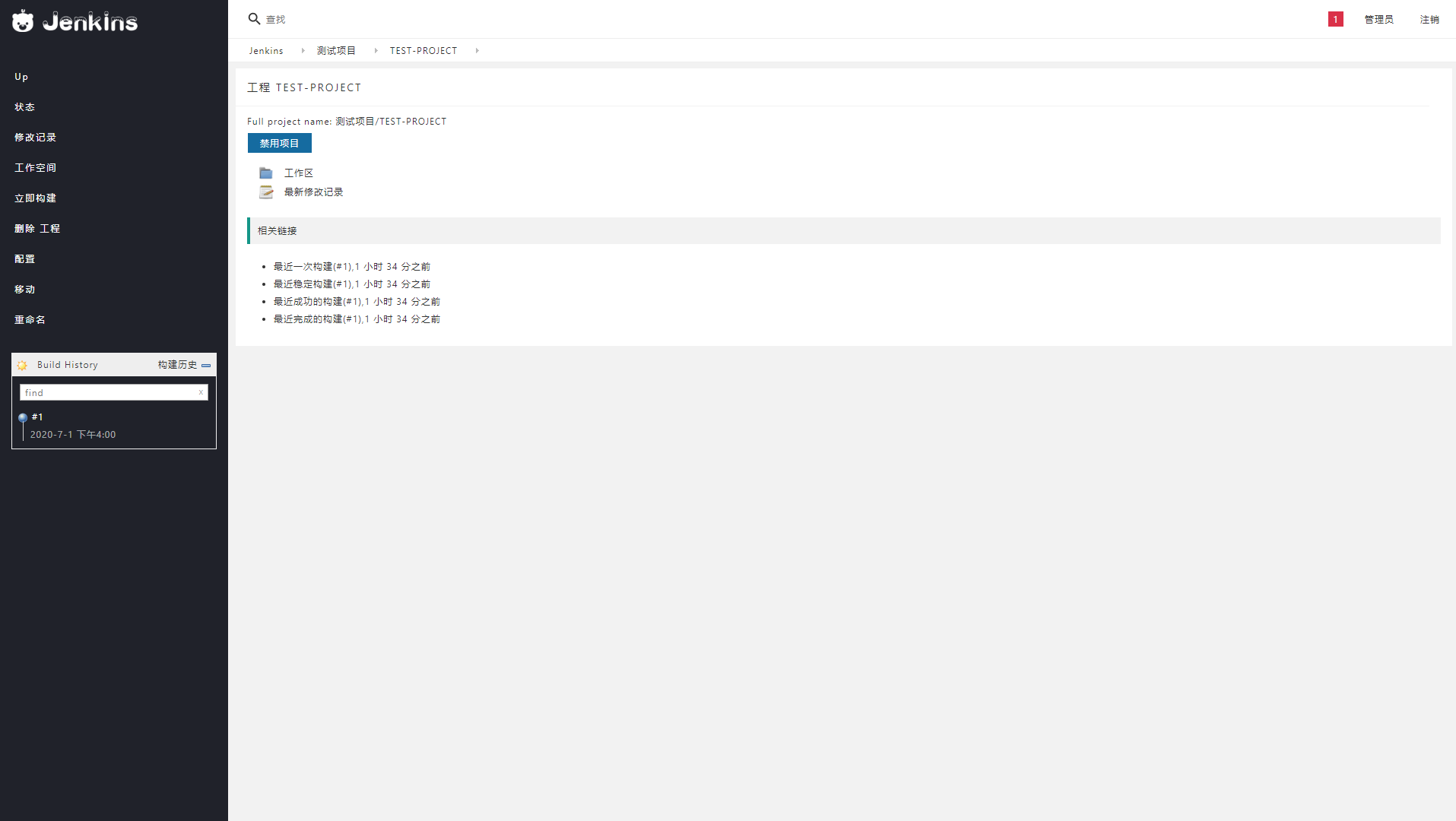
4.效果预览:
主页效果:
设置界面:
设置详情:
构建历史:
人很忙,样式不定期更新,如果喜欢,可以博客园推荐,也可以 GITHUB star!
Jenkins 主题:jenkins-theme-v2的更多相关文章
- [原]jenkins(五)---jenkins添加项目
/** * lihaibo * 文章内容都是根据自己工作情况实践得出. http://www.cnblogs.com/horizonli/p/5332258.html 版权声明:本博客欢迎转发,但请保 ...
- Jenkins系列-Jenkins介绍与部署
Jenkins是什么? Jenkins是一个功能强大的应用程序,允许持续集成和持续交付项目,无论用的是什么平台.这是一个免费的源代码,可以处理任何类型的构建或持续集成.集成Jenkins可以用于一些测 ...
- CD 基金会、Jenkins、Jenkins X、Spinnaker 和 Tekton 的常问问题
转载:https://mp.weixin.qq.com/s/bQLqGrCM9NZYI0Njlu4N-w FAQ 什么是持续交付(CD)? CD是一种软件工程方法,团队在短周期内生成软件,确保软件可以 ...
- Yii2创建多界面主题(Theme)
Yii2界面主题上的设计总体上和Yii1.x保持一致,区别在于两个地方: 1. 由于Yii2引入了独立的视图(View)类,因此界面主题(Theme)也交由视图来管理: 2. 视图文件和Web资源在目 ...
- 【Jenkins】jenkins简单搭建并执行任务
part 1 jenkins用户名的配置(gerrit 2.11) #安装jenkins $ sudo apt-get install jenkins #为jenkins用户设定密码 $ sudo ...
- Jenkins 解决Jenkins下java无法运行slave-agent jnlp程序连接Windows Slave主机
解决Jenkins下java无法运行slave-agent jnlp程序连接Windows Slave主机 by:授客 QQ:1033553122 测试环境 java下载地址:http://www ...
- [原]Jenkins(二)---jenkins之Git+maven+jdk+tomcat
/** * lihaibo * 文章内容都是根据自己工作情况实践得出. *版权声明:本博客欢迎转发,但请保留原作者信息! http://www.cnblogs.com/horizonli/p/5331 ...
- [原]Jenkins(三)---Jenkins初始配置和插件配置
/** * lihaibo * 文章内容都是根据自己工作情况实践得出. *版权声明:本博客欢迎转发,但请保留原作者信息! http://www.cnblogs.com/horizonli/p/5331 ...
- [原]Jenkins(四)---Jenkins添加密钥对
/** * lihaibo * 文章内容都是根据自己工作情况实践得出. *版权声明:本博客欢迎转发,但请保留原作者信息! http://www.cnblogs.com/horizonli/p/5332 ...
随机推荐
- Java实现 LeetCode 832 翻转图像(位运算)
832. 翻转图像 给定一个二进制矩阵 A,我们想先水平翻转图像,然后反转图像并返回结果. 水平翻转图片就是将图片的每一行都进行翻转,即逆序.例如,水平翻转 [1, 1, 0] 的结果是 [0, 1, ...
- Java写算法题中那些影响你效率的细节(关于暴力破解算法题的细节处理)
QQ讨论群:99979568 多交流才能进步 暂时写到这里,有不懂的欢迎评论, 如果有什么其他提高效率的细节,欢迎评论或者私信我,小编一定努力学习,争取早日分享给大家 如果大家嫌三连累的话,可以看看这 ...
- Java实现蓝桥杯VIP算法训练 预测身高
试题 算法训练 预测身高 资源限制 时间限制:1.0s 内存限制:256.0MB 问题描述: 生理卫生老师在课堂上娓娓道来: 你能看见你未来的样子吗?显然不能.但你能预测自己成年后的身高,有公式: 男 ...
- SQL Server实现 LeetCode 176 第二高的薪水
176. 第二高的薪水 SQL架构 编写一个 SQL 查询,获取 Employee 表中第二高的薪水(Salary) . +----+--------+ | Id | Salary | +----+- ...
- Java实现 LeetCode 127 单词接龙
127. 单词接龙 给定两个单词(beginWord 和 endWord)和一个字典,找到从 beginWord 到 endWord 的最短转换序列的长度.转换需遵循如下规则: 每次转换只能改变一个字 ...
- Java实现 LeetCode 32 最长有效括号
32. 最长有效括号 给定一个只包含 '(' 和 ')' 的字符串,找出最长的包含有效括号的子串的长度. 示例 1: 输入: "(()" 输出: 2 解释: 最长有效括号子串为 & ...
- 使用dotnet Cli向nuget发布包
长话短说, 今天分享如何在nuget.org创建并发布.NET Standard package. 前置 安装勾选.NET Core开发套件的Visual Studio; 安装dotnet Cli 从 ...
- vscode的个人配置
前言 此篇只是为了记录自己vscode的设置,防止以后配置丢失,无实际意义 { "files.autoSave": "afterDelay", "ed ...
- 去摆摊吧,落魄的Java程序员
真的,我也打算去摆摊,宣传语我都想好了.沉默王二,一枚有颜值却靠才华苟且的程序员,<Web 全栈开发进阶之路>作者,CSDN 明星博主,周排名第 4,总排名 40,这数据在众多互联网大咖面 ...
- 全网最全测试点总结:N95 口罩应该如何测试?
引言 随着”新冠疫情“慢慢地消散,各大企业都开始恢复正常的运行,因为疫情造成很多工作人员的流失,企业也开始疯狂的招聘新鲜的人才,这对于莘莘求职者无疑是个机会,但是因为求职者众多,很多面试官也开始想方设 ...