
java web实现在线编辑word,并将word导出(二)
前一篇文章介绍了后台将前台html转为word文档的一种方式,但却有一个问题是没法讲图片放置在生成的word报告中。我在网上找了很多方法,甚至将图片转换成base64编码的方式也不成功。效果如下:

由于本人的水平有限,因此使用其他的实现方式。
首先介绍一下前台呈现图片的原理:前台ueditor编辑框呈现的图片实际上是一个img变迁,呈现的图片的原始文件是存在服务器上的(甚至在udeitor中直接粘贴图片也是想服务器上传了该图片)。

对应服务器文件为: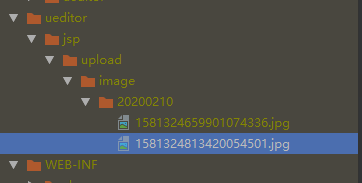
因此,我的视线思路是先将页面传回后台的html内容中的img标签使用特定的字符替换,直接生成一个文本文档,然后在在对应img标签的位置替换为相应的图片。因为在看网上说不能直接操作doc文档插入图片,需要生成docx文档,于是我又参考网上实现了生成docx的后台代码。
这次生成word文档使用的是docx4j,插入图片需要引入poi的另一个依赖,所需依赖如下:
        <dependency>

            <groupId>com.deepoove</groupId>

            <artifactId>poi-tl</artifactId>

            <version>1.3.1</version>

        </dependency>

        <dependency>

            <groupId>org.docx4j</groupId>

            <artifactId>docx4j</artifactId>

            <version>3.3.6</version>

        </dependency>

        <dependency>

            <groupId>org.docx4j</groupId>

            <artifactId>docx4j-ImportXHTML</artifactId>

            <version>3.3.6</version>

        </dependency>
代码实现如下:
   @RequestMapping("/defectV2/defect/analysis/tranformHtmlToWord")

    @ResponseBody

    public MessageBean tranformHtmlToWordDocx(@RequestParam Map params,HttpServletRequest request, HttpServletResponse response) {

        try {

//            params包含前台传回的html内容

            analysisService.tranformHtmlToWordDocx(params,request,response);

            return new MessageBean("success", "生成报告成功!", null);

        } catch (Exception e) {

            e.printStackTrace();

            utils.WriteSystemLog(sls, "ERROR", "生成报告", "生成报告失败!" + e.getCause());

            return new MessageBean("error", "生成报告失败!", null);

        }

    }
public String tranformHtmlToWordDocx(Map params, HttpServletRequest request, HttpServletResponse response) throws Exception {
String body = (String) params.get("editorValue");
List<String> imgList = new ArrayList<String>();
String imgTag = "";//img标签
String imgRegex = "<img[^>]+/>";
Pattern imgPattern = Pattern.compile(imgRegex,Pattern.CASE_INSENSITIVE);
Matcher imgMatcher = imgPattern.matcher(body);
int count = 1;
while (imgMatcher.find()){
imgTag = imgMatcher.group(); //获取img标签
String srcStr = "";
//获取匹配img标签中的src内容
Matcher srcMatcher = Pattern.compile("src\\s*=\\s*\"?(.*?)(\"|>|\\s+)").matcher(imgTag);
while (srcMatcher.find()){
srcStr = srcMatcher.group(1);
}
String contextPath = request.getContextPath();
String imagePath = ExportWord.getRealPath() + srcStr.substring(srcStr.indexOf(contextPath) + contextPath.length() +1);
imgList.add(imagePath);
body = body.replace(imgTag,"${img" + count + "}");
count ++;
}
//html内容( 需要被替换,否则导出会报错)
String unescaped ="<!DOCTYPE html><html><head><title>导出word</title></head><body>" + body.replaceAll(" "," ")
+"</body></html>";
if (unescaped.contains("</") ) {
unescaped = StringEscapeUtils.unescapeHtml(unescaped);
}
// 创建一个空的docx对象
WordprocessingMLPackage wordMLPackage = WordprocessingMLPackage.createPackage();
XHTMLImporter importer = new XHTMLImporterImpl(wordMLPackage);
importer.setTableFormatting(FormattingOption.IGNORE_CLASS);
importer.setParagraphFormatting(FormattingOption.IGNORE_CLASS);
NumberingDefinitionsPart ndp = new NumberingDefinitionsPart();
wordMLPackage.getMainDocumentPart().addTargetPart(ndp);
ndp.unmarshalDefaultNumbering();
// 转换XHTML,并将其添加到我们制作的空docx中
XHTMLImporterImpl XHTMLImporter = new XHTMLImporterImpl(wordMLPackage);
XHTMLImporter.setHyperlinkStyle("Hyperlink");
wordMLPackage.getMainDocumentPart().getContent().addAll(
XHTMLImporter.convert(unescaped,null));
//ExportWord.getWordPath()是获取项目文件路径
String wordPath = ExportWord.getWordPath() + new Date().getTime() + "问题分析统计.docx";
wordMLPackage.save(new File(wordPath));
Map<String, Object> testMap = new HashMap<String, Object>();
WordUtils wordUtil=new WordUtils();
if (imgList!=null && imgList.size()>0){
for (int i=0;i<imgList.size();i++){
String imagePath = imgList.get(i);
Map map = new HashMap();
//封装的单个图片信息
map = WordUtils.packageImgMessage(imagePath);
testMap.put("${img" + (i+1) + "}",map);
}
}
wordUtil.getWord(wordPath,testMap,new ArrayList<String[]>(),"质量分析统计报告.docx",response);
return null;
}
WordUtil.java实现代码(参考了网上的)
public class WordUtils {

    /**

     * 根据模板生成word

     * @param path     模板的路径

     * @param params   需要替换的参数

     * @param tableList   需要插入的参数

     * @param fileName 生成word文件的文件名

     * @param response

     */

    public void getWord(String path, Map<String, Object> params, List<String[]> tableList, String fileName, HttpServletResponse response) throws Exception {

        File file = new File(path);

        InputStream is = new FileInputStream(file);

        CustomXWPFDocument doc = new CustomXWPFDocument(is);

        this.replaceInPara(doc, params);    //替换文本里面的变量

        this.replaceInTable(doc, params, tableList); //替换表格里面的变量

        OutputStream os = response.getOutputStream();

        response.setHeader("Content-disposition", "attachment; filename=" + URLEncoder.encode(fileName,"utf-8"));

        doc.write(os);

        this.close(os);

        this.close(is);

    }

    /**

     * 替换段落里面的变量

     * @param doc    要替换的文档

     * @param params 参数

     */

    private void replaceInPara(CustomXWPFDocument doc, Map<String, Object> params) {

        Iterator<XWPFParagraph> iterator = doc.getParagraphsIterator();

        XWPFParagraph para;

        while (iterator.hasNext()) {

            para = iterator.next();

            this.replaceInPara(para, params, doc);

        }

    }

    /**

     * 替换段落里面的变量

     *(网络上找到的)

     * @param para   要替换的段落

     * @param params 参数

     */

    private void replaceInParaYuan(XWPFParagraph para, Map<String, Object> params, CustomXWPFDocument doc) {

        List<XWPFRun> runs;

        Matcher matcher;

        if (this.matcher(para.getParagraphText()).find()) {

            runs = para.getRuns();

            int start = -1;

            int end = -1;

            String str = "";

            for (int i = 0; i < runs.size(); i++) {

                XWPFRun run = runs.get(i);

                String runText = run.toString();

                //找出“${”开始的XWPFRun

                if ('$' == runText.charAt(0) && '{' == runText.charAt(1)) {

                    start = i;

                }

                //若有“${”,则记录开始的XWPFRun

                if ((start != -1)) {

                    str += runText;

                }

                //若有“}”,记录结束的XWPFRun

                if ('}' == runText.charAt(runText.length() - 1)) {

                    if (start != -1) {

                        end = i;

                        break;

                    }

                }

            }

            //${变量}之间的XWPFRun

            for (int i = start; i <= end; i++) {

                para.removeRun(i);

                i--;

                end--;

            }

            for (Map.Entry<String, Object> entry : params.entrySet()) {

                String key = entry.getKey();

                if (str.indexOf(key) != -1) {

                    Object value = entry.getValue();

                    if (value instanceof String) {

                        str = str.replace(key, value.toString());

                        para.createRun().setText(str, 0);

                        break;

                    } else if (value instanceof Map) {

                        str = str.replace(key, "");

                        Map pic = (Map) value;

                        int width = Integer.parseInt(pic.get("width").toString());

                        int height = Integer.parseInt(pic.get("height").toString());

                        int picType = getPictureType(pic.get("type").toString());

                        byte[] byteArray = (byte[]) pic.get("content");

                        ByteArrayInputStream byteInputStream = new ByteArrayInputStream(byteArray);

                        try {

                            //int ind = doc.addPicture(byteInputStream,picType);

                            //doc.createPicture(ind, width , height,para);

                            doc.addPictureData(byteInputStream, picType);

                            doc.createPicture(doc.getAllPictures().size() - 1, width, height, para);

                            para.createRun().setText(str, 0);

                            break;

                        } catch (Exception e) {

                            e.printStackTrace();

                        }

                    }

                }

            }

        }

    }

    /**

     * 替换段落里面的变量

     * (优化后的)

     * @param para   要替换的段落

     * @param params 参数

     */

    private void replaceInPara(XWPFParagraph para, Map<String, Object> params, CustomXWPFDocument doc) {

        List<XWPFRun> runs;

        Matcher matcher;

        String paraText = para.getParagraphText();

        if(matcher(paraText).find()){

            runs = para.getRuns();

            for (int i=0;i<runs.size();i++){

                XWPFRun run = runs.get(i);

                String runText = run.toString();

                matcher = matcher(runText);

                List<String> $StrList = new ArrayList<String>();

                while (matcher.find()){

                    $StrList.add(matcher.group());

                }

                if ($StrList.size()>0){

//                    para.removeRun(i);

                    for (String $Str : $StrList){

                        if (params.containsKey($Str)){

                            Object value = params.get($Str);

                            if (value instanceof String) {

                                runText = runText.replace($Str, value.toString());

//                                para.createRun().setText(runText, 0);

//                                break;

                            } else if (value instanceof Map) {

                                runText = runText.replace($Str, "");

                                Map pic = (Map) value;

                                int width = Integer.parseInt(pic.get("width").toString());

                                int height = Integer.parseInt(pic.get("height").toString());

                                int picType = getPictureType(pic.get("type").toString());

                                byte[] byteArray = (byte[]) pic.get("content");

                                ByteArrayInputStream byteInputStream = new ByteArrayInputStream(byteArray);

                                try {

                                    //int ind = doc.addPicture(byteInputStream,picType);

                                    //doc.createPicture(ind, width , height,para);

                                    doc.addPictureData(byteInputStream, picType);

                                    doc.createPicture(doc.getAllPictures().size() - 1, width, height, para);

//                                    para.createRun().setText(runText, 0);

//                                    break;

                                } catch (Exception e) {

                                    e.printStackTrace();

                                }

                            }

                        }

                    }

//                    para.createRun().setText(runText, 0);

                    run.setText(runText,0);

                }

            }

        }

    }

    /**

     * 为表格插入数据,行数不够添加新行

     *

     * @param table     需要插入数据的表格

     * @param tableList 插入数据集合

     */

    private static void insertTable(XWPFTable table, List<String[]> tableList) {

        //创建行,根据需要插入的数据添加新行,不处理表头

        for (int i = 0; i < tableList.size(); i++) {

            XWPFTableRow row = table.createRow();

        }

        //遍历表格插入数据

        List<XWPFTableRow> rows = table.getRows();

        int length = table.getRows().size();

        for (int i = 1; i < length - 1; i++) {

            XWPFTableRow newRow = table.getRow(i);

            List<XWPFTableCell> cells = newRow.getTableCells();

            for (int j = 0; j < cells.size()&&tableList!=null&&tableList.size()>0; j++) {

                XWPFTableCell cell = cells.get(j);

                String s = tableList.get(i - 1)[j];

                cell.setText(s);

            }

        }

    }

    /**

     * 替换表格里面的变量

     * @param doc    要替换的文档

     * @param params 参数

     */

    private void replaceInTable(CustomXWPFDocument doc, Map<String, Object> params, List<String[]> tableList) {

        Iterator<XWPFTable> iterator = doc.getTablesIterator();

        XWPFTable table;

        List<XWPFTableRow> rows;

        List<XWPFTableCell> cells;

        List<XWPFParagraph> paras;

        while (iterator.hasNext()) {

            table = iterator.next();

            if (table.getRows().size() > 1) {

                //判断表格是需要替换还是需要插入,判断逻辑有$为替换,表格无$为插入

                if (this.matcher(table.getText()).find()) {

                    rows = table.getRows();

                    for (XWPFTableRow row : rows) {

                        cells = row.getTableCells();

                        for (XWPFTableCell cell : cells) {

                            paras = cell.getParagraphs();

                            for (XWPFParagraph para : paras) {

                                this.replaceInPara(para, params, doc);

                            }

                        }

                    }

                } else {

                    insertTable(table, tableList);  //插入数据

                }

            }

        }

    }

    /**

     * 正则匹配字符串

     *

     * @param str

     * @return

     */

    private Matcher matcher(String str) {

        Pattern pattern = Pattern.compile("\\$\\{(.+?)\\}", Pattern.CASE_INSENSITIVE);

        Matcher matcher = pattern.matcher(str);

        return matcher;

    }

    /**

     * 根据图片类型,取得对应的图片类型代码

     *

     * @param picType

     * @return int

     */

    private static int getPictureType(String picType) {

        int res = CustomXWPFDocument.PICTURE_TYPE_PICT;

        if (picType != null) {

            if (picType.equalsIgnoreCase("png")) {

                res = CustomXWPFDocument.PICTURE_TYPE_PNG;

            } else if (picType.equalsIgnoreCase("dib")) {

                res = CustomXWPFDocument.PICTURE_TYPE_DIB;

            } else if (picType.equalsIgnoreCase("emf")) {

                res = CustomXWPFDocument.PICTURE_TYPE_EMF;

            } else if (picType.equalsIgnoreCase("jpg") || picType.equalsIgnoreCase("jpeg")) {

                res = CustomXWPFDocument.PICTURE_TYPE_JPEG;

            } else if (picType.equalsIgnoreCase("wmf")) {

                res = CustomXWPFDocument.PICTURE_TYPE_WMF;

            }

        }

        return res;

    }

//    /**

//     * 将输入流中的数据写入字节数组

//     *

//     * @param in

//     * @return

//     */

//    public static byte[] inputStream2ByteArray(InputStream in, boolean isClose) {

//        byte[] byteArray = null;

//        try {

//            int total = in.available();

//            byteArray = new byte[total];

//            in.read(byteArray);

//        } catch (IOException e) {

//            e.printStackTrace();

//        } finally {

//            if (isClose) {

//                try {

//                    in.close();

//                } catch (Exception e2) {

//                    e2.getStackTrace();

//                }

//            }

//        }

//        return byteArray;

//    }

    /**

     * 封装图片信息

     * @return

     */

    public static Map packageImgMessage(String imagePath){

        Map map = new HashMap();

        InputStream ips = null;

        try {

             ips = new FileInputStream(imagePath);

             BufferedImage image = ImageIO.read(ips);

             map.put("width", image.getWidth());

             map.put("height", image.getHeight());

             ips.close();

             ips = new FileInputStream(imagePath);

             map.put("type", imagePath.substring(imagePath.lastIndexOf('.')+1));

             int total = ips.available();

             byte[] byteArray = new byte[total];

             ips.read(byteArray);

             map.put("content", byteArray);

        } catch (Exception e) {

            e.printStackTrace();

        }finally {

            if (ips != null){

                try {

                    ips.close();

                } catch (IOException e) {

                    e.printStackTrace();

                }

            }

        }

        return map;

    }

    /**

     * 关闭输入流

     *

     * @param is

     */

    private void close(InputStream is) {

        if (is != null) {

            try {

                is.close();

            } catch (IOException e) {

                e.printStackTrace();

            }

        }

    }

    /**

     * 关闭输出流

     *

     * @param os

     */

    private void close(OutputStream os) {

        if (os != null) {

            try {

                os.close();

            } catch (IOException e) {

                e.printStackTrace();

            }

        }

    }

}
这样就实现了前台html转换为docx的word文档,并且将前台呈现的图片插入到生成的文档中。
我想解决文档中的图片的初衷是因为导出的文档需要有饼图,如下所示:

这个饼图是word文档做出来的,并不是图片,我使用了简单的方法使用图片展现的方式呈现出来。下篇文章将介绍生成饼图的实现方式。
params包含前台传回的html内容
java web实现在线编辑word,并将word导出(二)的更多相关文章
- java web实现在线编辑word,并将word导出(一)
前段时间领导交代了一个需求:客户需要一个能够web在线编辑文字,如同编辑word文档一样,同时能够将编辑完成的内容导出为word文档并下载到本地. 我们选择了前台使用富文本插件的形式用于编辑内容,使用 ...
- java web实现在线编辑word,并将word导出(三)
前面说到前台呈现的页面是img标签,因此需要在后台生成相应的图片,在img的src内容中改为相应的路径地址:而在生成文档的过程中需要替换相应的img标签.后一部分上篇文章已经讲过,本片主要讲前一部分. ...
- Java Web 常用在线api汇总(不定时更新)
1.Hibernate API Documentation (3.2.2.ga) http://www.hibernate.org/hib_docs/v3/api/ 2.Spring Framewor ...
- java web 程序---在线时长
思路:toLocalString()这个方法 <body> <% long t=session.getLastAccessedTime(); long t2=session.getC ...
- Java Web用Freemarker生成带图片的Word文档
步骤一:模板制作 用world2003做一个导出模板,如果有图片则加入一张图片占位,将world另存为xml,将xml中需要导出的内容用Freemarker标签表示,最后另存为.ftl结尾的模板: 步 ...
- [原创]Java在线编辑word文档调用PageOffice实现并发控制
1.功能介绍 PageOffice的并发控制功能用来解决多个用户在线编辑同一篇文档可能造成的互相覆盖修改结果的技术难题. B/S架构下用户访问都是并发的,也就是说经常会出现同时N个用户对一个服务器页面 ...
- Office word excel电子表格在线编辑的实现方法
Office xp之后的版本支持通过webdav协议(http的扩展)直接编辑服务器上的文件. IIS(6.0)支持webdav,这在IIS管理器的web服务扩展中可以看到.利用IIS作为webdav ...
- 在线编辑word文档 可保存到服务器
使用说明:该方法只在office xp 和 2003上 测试通过,2000及以下 版本没试. 注意:你要打开的服务器端的word文档要有写权限.iis要开起 web服务扩展中的webdav为允许 具体 ...
- java 网站源码 在线编辑模版 代码编辑器 兼容手机平板PC freemaker 静态引擎
前台: 支持四套模版, 可以在后台切换 系统介绍: 1.网站后台采用主流的 SSM 框架 jsp JSTL,网站后台采用freemaker静态化模版引擎生成html 2.因为是生成的html,所以 ...
随机推荐
- 082、Java数组之数组传递之简化理解
01.代码如下: package TIANPAN; /** * 此处为文档注释 * * @author 田攀 微信382477247 */ public class TestDemo { public ...
- C# 篇基础知识11——泛型和集合
.NET提供了一级功能强大的集合类,实现了多种不同类型的集合,可以根据实际用途选择恰当的集合类型. 除了数组 Array 类定义在System 命名空间中外,其他的集合类都定义在System.Coll ...
- mysql 单表索引优化
建表语句 CREATE TABLE IF NOT EXISTS `article` ( `id` INT(10) UNSIGNED NOT NULL PRIMARY KEY AUTO_INCREMEN ...
- 吴裕雄 Bootstrap 前端框架开发——Bootstrap 按钮:按钮组
<!DOCTYPE html> <html> <head> <meta charset="utf-8"> <title> ...
- 解决win10创建Django工程,运行django-admin.py startproject 工程名,失败的问题
在看我这篇教程的前提是你应该已经正确装好python和Django了,好了,废话不说了,正题走你!你现在是不是很纠结自己运行django-admin.py startproject 工程名 ...
- 数十万PhpStudy用户被植入后门,快来检测你是否已沦为“肉鸡”!
北京时间9月20日,杭州公安发布<杭州警方通报打击涉网违法犯罪暨‘净网2019’专项行动战果>一文,文章曝光了国内知名PHP调试环境程序集成包“PhpStudy软件”遭到黑客篡改并植入“后 ...
- [转]Android 如何建立AIDL
建立AIDL服务要比建立普通的服务复杂一些,具体步骤如下: (1)在Eclipse Android工程的Java包目录中建立一个扩展名为aidl的文件.该文件的语法类似于Java代码,但会稍有不同.详 ...
- Koa2+mongoose
为什么选择Koa koa是Express框架同个公司的产品,是开发者在node7.0版本之后使用promise的api把express再次封装了一次,起名Koa,==Koa=Express+Promi ...
- 困惑我的x++和++x;
刚学习C语言时X++和++X非常不解 目前有了新的领悟 1.X++ int x=0; int z=x++; 此时z?x? 这个问题可以分两步思考 第一步:先把x的值赋予z,此时z=x=0; 第二步:x ...
- 提升Windows系统舒适度软件
1.Geek Uninstaller 卸载软件 2.PotPlayer 无广告播放器