
多线程(5)async&await
.net 4.0的Task已经让我们可以非常简单地使用多线程,并且可以有返回值,也可以支持线程的取消等操作,可谓已经很强大了。但.net 4.5为我们带来了async&await,使得实现多线程的写法更简单,更优美,更符合线性思维。
下面通过一个例子来演示通过Task和async&await分别如何实现,并且最后还附上代码执行顺序图。
使用Task实现
如下代码:
 #region 使用Task实现

 static void TestByTask()

 {

     Console.WriteLine("main thread start,current thread id:" + Thread.CurrentThread.ManagedThreadId);

     var task = Task.Factory.StartNew<string>(() =>

     {

         return GetNameByTask();

     });

     Console.WriteLine("get another thread result,result:" + task.Result);

     Console.WriteLine("main thread completed!");

 }

 static string GetNameByTask()

 {

     Console.WriteLine("another thread start,current thread id:" + Thread.CurrentThread.ManagedThreadId);

     return "mcgrady";

 }

 #endregion
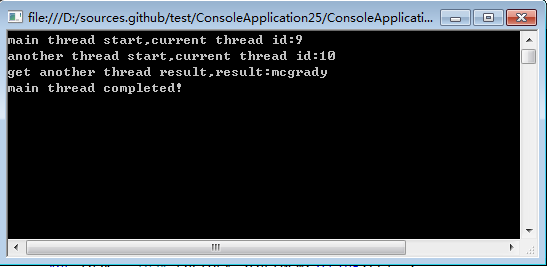
输出结果:
使用async&await实现
假如使用async&await如何实现呢,如下代码:
 #region 使用async&await实现

 static async void TestByAsyncAwait()

 {

     Console.WriteLine("main thread start,current thread id:" + Thread.CurrentThread.ManagedThreadId);

     var name = GetNameByAsyncAwait();

     Console.WriteLine(string.Format("get another thread result,result:{0}", await name));

     Console.WriteLine("main thread completed!");

 }

 static async Task<string> GetNameByAsyncAwait()

 {

     return await Task.Factory.StartNew<string>(() =>

     {

         Console.WriteLine("another thread start,current thread id:" + Thread.CurrentThread.ManagedThreadId);

         return "mcgrady";

     });

 }

 #endregion
输出结果:

输出结果跟使用Task相同。
代码执行流程如下图:

完整代码:
 namespace ConsoleApplication25

 {

     class Program

     {

         static void Main(string[] args)

         {

             //1,使用task实现

             //TestByTask();

             //2,使用async&await实现

             TestByAsyncAwait();

             Console.ReadKey();

         }

         #region 使用Task实现

         static void TestByTask()

         {

             Console.WriteLine("main thread start,current thread id:" + Thread.CurrentThread.ManagedThreadId);

             var task = Task.Factory.StartNew<string>(() =>

             {

                 return GetNameByTask();

             });

             Console.WriteLine("get another thread result,result:" + task.Result);

             Console.WriteLine("main thread completed!");

         }

         static string GetNameByTask()

         {

             Console.WriteLine("another thread start,current thread id:" + Thread.CurrentThread.ManagedThreadId);

             return "mcgrady";

         }

         #endregion

         #region 使用async&await实现

         static async void TestByAsyncAwait()

         {

             Console.WriteLine("main thread start,current thread id:" + Thread.CurrentThread.ManagedThreadId);

             var name = GetNameByAsyncAwait();

             Console.WriteLine(string.Format("get another thread result,result:{0}", await name));

             Console.WriteLine("main thread completed!");

         }

         static async Task<string> GetNameByAsyncAwait()

         {

             return await Task.Factory.StartNew<string>(() =>

             {

                 Console.WriteLine("another thread start,current thread id:" + Thread.CurrentThread.ManagedThreadId);

                 return "mcgrady";

             });

         }

         #endregion

     }

 }
多线程(5)async&await的更多相关文章
- async await 多线程
async await 并没有开启多线程 出现await的地方 只是开启了一个子线程继续往后执行 主线程返回 防止阻塞 相当于 await customerRepository.getall() ...
- C#的多线程——使用async和await来完成异步编程(Asynchronous Programming with async and await)
https://msdn.microsoft.com/zh-cn/library/mt674882.aspx 侵删 更新于:2015年6月20日 欲获得最新的Visual Studio 2017 RC ...
- 聊聊多线程那一些事儿 之 五 async.await深度剖析
hello task,咱们又见面啦!!是不是觉得很熟读的开场白,哈哈你哟这感觉那就对了,说明你已经阅读过了我总结的前面4篇关于task的文章,谢谢支持!感觉不熟悉的也没有关系,在文章末尾我会列出前四 ...
- async/await到底该怎么用?如何理解多线程与异步之间的关系?
前言 如标题所诉,本文主要是解决是什么,怎么用的问题,然后会说明为什么这么用.因为我发现很多萌新都会对之类的问题产生疑惑,包括我最初的我,网络上的博客大多知识零散,刚开始看相关博文的时候,就这样.然后 ...
- async/await的多线程问题
今天尝试把.net4.5新增的异步编程模型async/await加入自己的框架,因为从第一印象看,使用async/await的写法实在太方便了,以同步代码的方式写异步流程,写起来更顺畅,不容易打断思路 ...
- C#多线程和异步(二)——Task和async/await详解
一.什么是异步 同步和异步主要用于修饰方法.当一个方法被调用时,调用者需要等待该方法执行完毕并返回才能继续执行,我们称这个方法是同步方法:当一个方法被调用时立即返回,并获取一个线程执行该方法内部的业务 ...
- C#多线程和异步(二)——Task和async/await详解(转载)
一.什么是异步 同步和异步主要用于修饰方法.当一个方法被调用时,调用者需要等待该方法执行完毕并返回才能继续执行,我们称这个方法是同步方法:当一个方法被调用时立即返回,并获取一个线程执行该方法内部的业务 ...
- C#多线程和异步——Task和async/await详解
阅读目录 一.什么是异步 二.Task介绍 1 Task创建和运行 2 Task的阻塞方法(Wait/WaitAll/WaitAny) 3 Task的延续操作(WhenAny/WhenAll/Cont ...
- [.NET] 利用 async & await 的异步编程
利用 async & await 的异步编程 [博主]反骨仔 [出处]http://www.cnblogs.com/liqingwen/p/5922573.html 目录 异步编程的简介 异 ...
随机推荐
- 把一下程序中的print()函数改写成
源代码: #include <iostream> using namespace std; void print( int w ) { ; i <= w ; i++ ) { ; j ...
- nodejs操作mysql常见错误
1.Cannot enqueue Handshake after already enqueuing a Hand shake.这个错误提示意思是某个数据库连接已经执行了,不能进行多次连接了.遇到此类 ...
- python语法_函数
---恢复内容开始--- 函数: 1 减少重复代码 2 定义一个功能,需要直接调用 3 保持代码一致性 def funcation_name(参数s): 功能代码块0 参数可以为多个,传入时按照前后 ...
- android颜色color.xml设置
XML Code 12345678910111213141516171819202122232425262728293031323334353637383940414243444546474849 ...
- Redis缓存实现排序功能
如果对实时并发排序感兴趣,请关注这个项目(java):https://github.com/xuerong/hqrank,欢迎参与开发,pass:支持多字段排行 最近遇到一个问题就是根据需求需要对所有 ...
- Javascript高级编程学习笔记(84)—— Canvas(1)基本用法
Canvas绘图 Canvas自HTML5引入后,由于其炫酷的效果成为HTML5新增功能中最受欢迎的部分 Canvas元素通过在页面中设定一个区域,然后就可以使用JS在其中绘制图形 <canva ...
- .net core 灵活读取配置文件
using Microsoft.Extensions.Configuration; using System; using System.Collections.Generic; using Syst ...
- [Swift]LeetCode475. 供暖器 | Heaters
Winter is coming! Your first job during the contest is to design a standard heater with fixed warm r ...
- [Swift]LeetCode552. 学生出勤记录 II | Student Attendance Record II
Given a positive integer n, return the number of all possible attendance records with length n, whic ...
- [Swift]LeetCode767. 重构字符串 | Reorganize String
Given a string S, check if the letters can be rearranged so that two characters that are adjacent to ...