
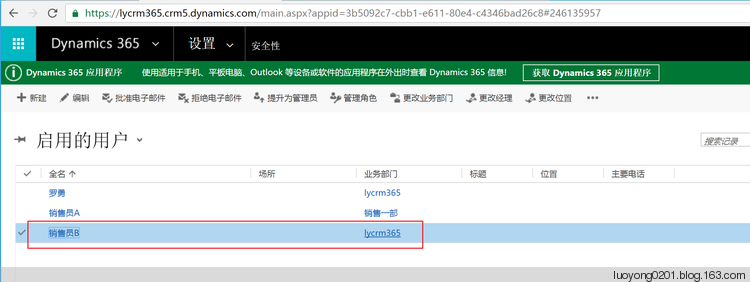
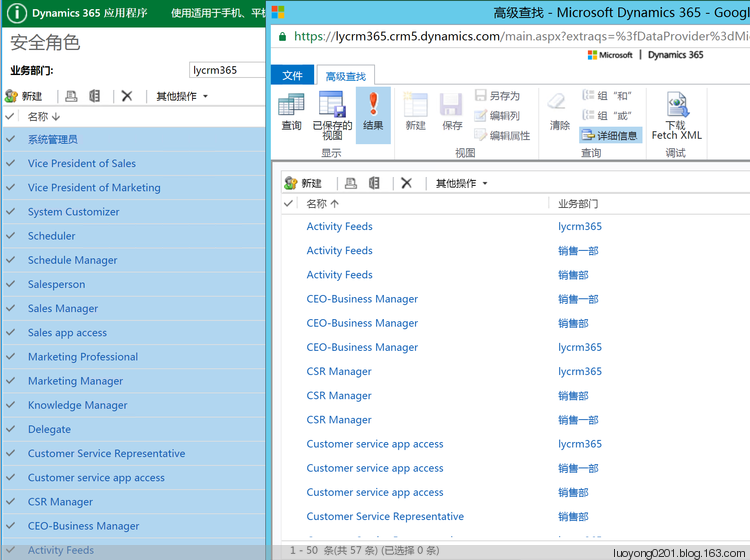
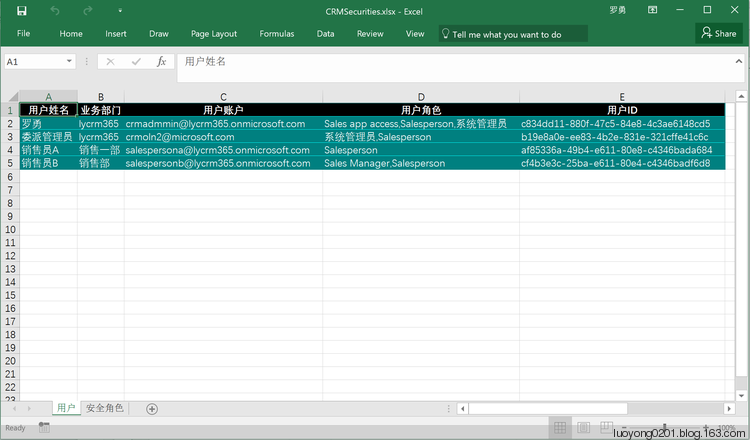
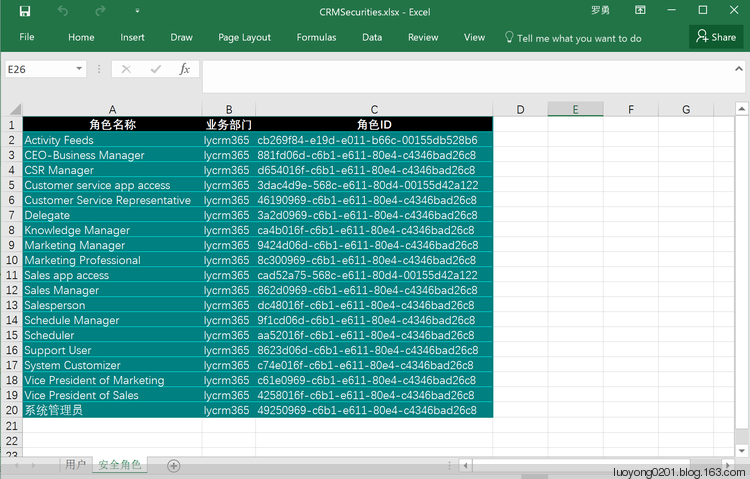
将Dynamics 365中的用户及其角色、角色导出到Excel中
关注本人微信和易信公众号: 微软动态CRM专家罗勇 ,回复240或者20161204可方便获取本文,同时可以在第一间得到我发布的最新的博文信息,follow me!我的网站是 www.luoyong.me 。


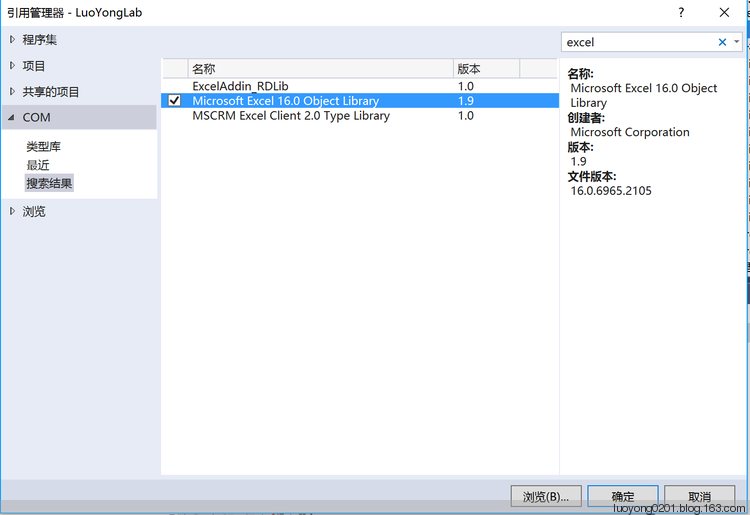
using Microsoft.Office.Interop.Excel;

using Microsoft.Xrm.Sdk;

using Microsoft.Xrm.Sdk.Client;

using Microsoft.Xrm.Sdk.Messages;

using Microsoft.Xrm.Sdk.Metadata;

using Microsoft.Xrm.Sdk.Query;

using Microsoft.Xrm.Tooling.Connector;

using System;

using System.Collections.Generic;

using System.Configuration;

using System.Drawing;

using System.IO;

using System.Linq;

using System.ServiceModel;

using System.ServiceModel.Description;

using System.Text;

using System.Xml;

namespace LuoYongLab

{

    class Program

    {

        static void Main(string[] args)

        {

            try

            {

                var crmSvc = new CrmServiceClient(ConfigurationManager.ConnectionStrings["CRM365"].ConnectionString);

                if (crmSvc.IsReady)

                {

                    Console.WriteLine("导出安全角色开始");

                    var fetchXml = string.Format(@"<fetch version='1.0' output-format='xml-platform' mapping='logical' distinct='false'>

<entity name='role'>

<attribute name='name' />

<attribute name='businessunitid' />

<attribute name='roleid' />

<order attribute='name' descending='false' />

<filter type='and'>

<condition attribute='parentroleid' operator='null' />

</filter>

</entity>

</fetch>");

                    EntityCollection ecRoles = crmSvc.RetrieveMultiple(new FetchExpression(fetchXml));

                    var excelApp = new Application();

                    excelApp.Visible = false;

                    Workbook securityWorkbook = excelApp.Workbooks.Add();

                    Worksheet rolesWorksheet = (Worksheet)excelApp.ActiveSheet;

                    rolesWorksheet.Name = "安全角色";

                    int row = ;

                    rolesWorksheet.Cells[, ] = "角色名称";

                    rolesWorksheet.Cells[, ] = "业务部门";

                    rolesWorksheet.Cells[, ] = "角色ID";

                    //rolesWorksheet.Rows[1].Font.Bold = true;//字体加粗

                    row++;

                    foreach (var roleEntity in ecRoles.Entities)

                    {

                        rolesWorksheet.Cells[row, ] = roleEntity.GetAttributeValue<string>("name");

                        rolesWorksheet.Cells[row, ] = roleEntity.GetAttributeValue<EntityReference>("businessunitid").Name;

                        rolesWorksheet.Cells[row, ] = roleEntity.GetAttributeValue<Guid>("roleid").ToString();

                        row++;

                    }

                    //rolesWorksheet.Columns[1].AutoFit();//自动列宽

                    rolesWorksheet.Range["A1", "C" + (row - )].AutoFormat(XlRangeAutoFormat.xlRangeAutoFormatColor1);

                    Console.WriteLine("导出用户及其安全角色开始");

                    fetchXml = @"<fetch version='1.0' output-format='xml-platform' mapping='logical' distinct='false'>

<entity name='systemuser'>

<attribute name='fullname' />

<attribute name='businessunitid' />

<attribute name='systemuserid' />

<attribute name='domainname' />

<order attribute='fullname' descending='false' />

<filter type='and'>

<condition attribute='isdisabled' operator='eq' value='0' />

<condition attribute='accessmode' operator='ne' value='3' />

</filter>

</entity>

</fetch>";

                    EntityCollection ecUsers = crmSvc.RetrieveMultiple(new FetchExpression(fetchXml));

                    Worksheet usersWorksheet = securityWorkbook.Worksheets.Add();

                    usersWorksheet.Name = "用户";

                    row = ;

                    usersWorksheet.Cells[, ] = "用户姓名";

                    usersWorksheet.Cells[, ] = "业务部门";

                    usersWorksheet.Cells[, ] = "用户账户";

                    usersWorksheet.Cells[, ] = "用户角色";

                    usersWorksheet.Cells[, ] = "用户ID";

                    row++;

                    foreach (var userEntity in ecUsers.Entities)

                    {

                        usersWorksheet.Cells[row, ] = userEntity.GetAttributeValue<string>("fullname");

                        usersWorksheet.Cells[row, ] = userEntity.GetAttributeValue<EntityReference>("businessunitid").Name;

                        usersWorksheet.Cells[row, ] = userEntity.GetAttributeValue<string>("domainname");

                        usersWorksheet.Cells[row, ] = string.Join(",", GetUserRoles(crmSvc.OrganizationServiceProxy, userEntity.GetAttributeValue<Guid>("systemuserid")).Distinct());

                        usersWorksheet.Cells[row, ] = userEntity.GetAttributeValue<Guid>("systemuserid").ToString();

                        row++;

                    }

                    usersWorksheet.Range["A1", "E" + (row - )].AutoFormat(XlRangeAutoFormat.xlRangeAutoFormatColor1);

                    securityWorkbook.SaveAs(Filename: "CRMSecurities.xlsx", FileFormat: XlFileFormat.xlWorkbookDefault);

                    securityWorkbook.Close();

                    excelApp.Quit();

                }

                else

                {

                    Console.WriteLine("连接CRM出错:" + crmSvc.LastCrmError);

                }

                Console.WriteLine("程序运行完成!");

                Console.ReadKey();

            }

            catch (FaultException ex)

            {

                Console.WriteLine("程序出现异常:ex.Message=" + ex.Message);

                Console.ReadKey();

            }

        }

        static IEnumerable<string> GetUserRoles(IOrganizationService service, Guid userId)

        {

            //首先获取用户直接授予的角色

            string fetchXml = string.Format(@"<fetch version='1.0' output-format='xml-platform' mapping='logical' distinct='true' no-lock='true'>

<entity name='role'>

<attribute name='name' />

<link-entity name='systemuserroles' from='roleid' to='roleid' visible='false' intersect='true'>

<link-entity name='systemuser' from='systemuserid' to='systemuserid' alias='ad'>

<filter type='and'>

<condition attribute='systemuserid' operator='eq' value='{0}' />

</filter>

</link-entity>

</link-entity>

</entity>

</fetch>", userId);

            var userRolesDirect = service.RetrieveMultiple(new FetchExpression(fetchXml)).Entities.Select(x => x.GetAttributeValue<string>("name"));

            //找出用户加入的所有负责人团队

            fetchXml = string.Format(@"<fetch version='1.0' output-format='xml-platform' mapping='logical' distinct='true'>

<entity name='team'>

<attribute name='teamid' />

<filter type='and'>

<condition attribute='teamtype' operator='eq' value='0' />

</filter>

<link-entity name='teammembership' from='teamid' to='teamid' visible='false' intersect='true'>

<link-entity name='systemuser' from='systemuserid' to='systemuserid' alias='ah'>

<filter type='and'>

<condition attribute='systemuserid' operator='eq' value='{0}' />

</filter>

</link-entity>

</link-entity>

</entity>

</fetch>", userId);

            var userTeams = service.RetrieveMultiple(new FetchExpression(fetchXml)).Entities.Select(x => x.GetAttributeValue<Guid>("teamid"));

            //团队拥有的角色也是这个团队所有用户拥有的角色,所以还要加上这部分角色

            var fetchXmlSb = new StringBuilder("<fetch version='1.0' output-format='xml-platform' mapping='logical' distinct='true'>");

            fetchXmlSb.Append("<entity name='role'>");

            fetchXmlSb.Append("<attribute name='name' />");

            fetchXmlSb.Append("<order attribute='name' descending='false' />");

            fetchXmlSb.Append("<link-entity name='teamroles' from='roleid' to='roleid' visible='false' intersect='true'>");

            fetchXmlSb.Append("<link-entity name='team' from='teamid' to='teamid' alias='ak'>");

            fetchXmlSb.Append("<filter type='or'>");

            foreach (var team in userTeams)

            {

                fetchXmlSb.Append(string.Format("<condition attribute='teamid' operator='eq' value='{0}' />", team));

            }

            fetchXmlSb.Append("</filter>");

            fetchXmlSb.Append("</link-entity>");

            fetchXmlSb.Append("</link-entity>");

            fetchXmlSb.Append("</entity>");

            fetchXmlSb.Append("</fetch>");

            var userRolesInTeam = service.RetrieveMultiple(new FetchExpression(fetchXmlSb.ToString())).Entities.Select(x => x.GetAttributeValue<string>("name"));

            return userRolesDirect.Concat(userRolesInTeam);

        }

    }

}
将Dynamics 365中的用户及其角色、角色导出到Excel中的更多相关文章
- html table表格导出excel的方法 html5 table导出Excel HTML用JS导出Excel的五种方法 html中table导出Excel 前端开发 将table内容导出到excel HTML table导出到Excel中的解决办法 js实现table导出Excel,保留table样式
先上代码 <script type="text/javascript" language="javascript"> var idTmr; ...
- 将datagrid中数据导出到excel中 -------<<工作日志2014-6-6>>
前台datagrid数据绑定 #region 导出到excel中 /// <summary> /// 2014-6-6 /// </summary> / ...
- 将Datagridview中的数据导出至Excel中
首先添加一个模块ImportToExcel,并添加引用 然后导入命名空间: Imports Microsoft.Office.Interop Imports System.Da ...
- Winform 中 dataGridView 导出到Excel中的方法总结
最近,在做CS端数据导出到Excel中时网上找了很多代码感觉都不是自己想要的,通过自己的整理归纳得到一个比较通用的方法,就给大家分享一下: 该方法需要用到两个参数(即对象),一个 DataGridV ...
- HTML table导出到Excel中的解决办法
第一部分:html+js 1.需要使用的表格数据(先不考虑动态生成的table) <table class="table tableStyles" id="tabl ...
- C# html的Table导出到Excel中
C#中导出Excel分为两大类.一类是Winform的,一类是Web.今天说的这一种是Web中的一种,把页面上的Table部分导出到Excel中. Table导出Excel,简单点说,分为以下几步: ...
- 把数据库里面的stu表中的数据,导出到excel中
# 2.写代码实现,把我的数据库里面的stu表中的数据,导出到excel中 #编号 名字 性别 # 需求分析:# 1.连接好数据库,写好SQL,查到数据 [[1,'name1','男'],[1,'na ...
- html table导出到Excel中,不走后台,js完成
静态表格table <table class="table tableStyles" id="tables"> <caption>不正经 ...
- JS将页面中表格,导出到Excel中(IE中)
原文地址:http://blog.csdn.net/sinat_15114467/article/details/51098522 var idTmr; function getExplorer() ...
随机推荐
- 在ASP.NET Core中使用brotli压缩
Brotli是一种全新的数据格式,可以提供比Zopfli高20-26%的压缩比.据谷歌研究,Brotli压缩速度同zlib的Deflate实现大致相同,而在Canterbury语料库上的压缩密度比LZ ...
- HashMap 相关面试题及其解答
Q:HashMap 的数据结构? A:哈希表结构(链表散列:数组+链表)实现,结合数组和链表的优点.当链表长度超过 8 时,链表转换为红黑树. transient Node<K,V>[] ...
- [SQL]LeetCode601. 体育馆的人流量 | Human Traffic of Stadium
SQL架构 Create table If Not Exists stadium (id int, visit_date DATE NULL, people int) Truncate table s ...
- MySQL casting from decimal to string(mysql decimal 转 varchar)
今天群里一个哥们问我mysql怎么将decimal转成varchar,经过查阅资料发现,mysql好像不能将decimal直接转换成varchar,但是可以转成char,原文链接:http://sta ...
- Python内置函数(68)——__import__
英文文档: __import__(name, globals=None, locals=None, fromlist=(), level=0) This function is invoked by ...
- @@ITENTITY
@@identity是表示的是最近一次向具有identity属性(即自增列)的表插入数据时对应的自增列的值,是系统定义的全局变量.一般系统定义的全局变量都是以@@开头,用户自定义变量以@开头.sele ...
- 为OPENCV添加freetype支持并显示中文字符(在mac上编译opencv及contrib库)
在mac电脑上管理这些gnu的库一般都使用Homebrew,但总有一些你个性化的需要是官方的Homebrew配方无法满足的.比如在屏幕的输出中使用中文字符. 在OPENCV中输出UTF8字符集早已经有 ...
- 流式大数据计算实践(7)----Hive安装
一.前言 1.这一文学习使用Hive 二.Hive介绍与安装 Hive介绍:Hive是基于Hadoop的一个数据仓库工具,可以通过HQL语句(类似SQL)来操作HDFS上面的数据,其原理就是将用户写的 ...
- spring-boot-2.0.3启动源码篇四 - run方法(三)之createApplicationContext
前言 此系列是针对springboot的启动,旨在于和大家一起来看看springboot启动的过程中到底做了一些什么事.如果大家对springboot的源码有所研究,可以挑些自己感兴趣或者对自己有帮助 ...
- web缓存策略之HTTP缓存大全
一. web缓存总分类 数据库数据缓存 Web应用,特别是SNS类型的应用,往往关系比较复杂,数据库表繁多,如果频繁进行数据库查询,很容易导致数据库不堪重荷.为了提供查询的性能,会将查询后的数据放到内 ...