
Java IO系列之四:NIO通信模型
分布式rpc框架有很多,比如dubbo,netty,还有很多其他的产品。但他们大部分都是基于nio的,
nio是非阻塞的io,那么它的内部机制是怎么实现的呢。
1.由一个专门的线程处理所有IO事件,并负责分发。
2.事件驱动机制,事件到来的时候触发操作,不需要阻塞的监视事件。
3.线程之前通过wait,notify通信,减少线程切换。
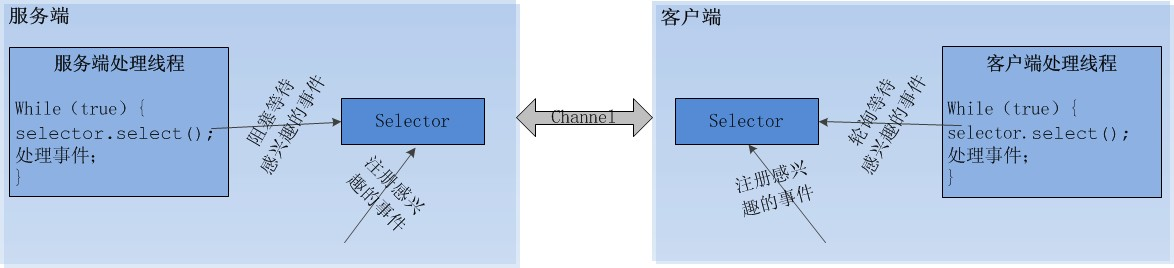

NIO使用步骤

服务端步骤:
import java.io.IOException;

import java.net.InetAddress;

import java.net.InetSocketAddress;

import java.net.UnknownHostException;

import java.nio.ByteBuffer;

import java.nio.channels.SelectionKey;

import java.nio.channels.Selector;

import java.nio.channels.ServerSocketChannel;

import java.nio.channels.SocketChannel;

import java.util.Iterator;

import java.util.Set;

public class NIOServer {

    public static void main(String[] args) throws IOException {

        new Thread(new ReactorTask()).start();

    }

    public static class ReactorTask implements Runnable {

        private Selector selector;

        public ReactorTask() {

            try {

                // 第一步:打开ServerSocketChannel,用于监听客户端的连接,它是所有客户端连接的父管道

                ServerSocketChannel acceptorSvr = ServerSocketChannel.open();

                // 第二步:绑定监听端口,设置连接为非阻塞模式

                acceptorSvr.socket().bind(new InetSocketAddress(InetAddress.getByName("localhost"), 1234));

                acceptorSvr.configureBlocking(false);

                // 第三步:创建Reactor线程,创建多路复用器并启动线程

                selector = Selector.open();

                // 第四步:将ServerSocketChannel注册到Reactor线程的多路复用器Selector上,监听Accept事件

                SelectionKey key = acceptorSvr.register(selector, SelectionKey.OP_ACCEPT);

            } catch (UnknownHostException e) {

                e.printStackTrace();

            } catch (IOException e) {

                e.printStackTrace();

            }

        }

        @Override

        public void run() {

            // 第五步:在run方法中无限循环体内轮询准备就绪的Key

            while (true) {

                try {

                    selector.select(1000);

                    Set<SelectionKey> selectedKeys = selector.selectedKeys();

                    Iterator<SelectionKey> it = selectedKeys.iterator();

                    SelectionKey key = null;

                    while (it.hasNext()) {

                        key = it.next();

                        it.remove();

                        try {

                            if (key.isValid()) {

                                // 处理新接入的请求消息

                                if (key.isAcceptable()) {

                                    // 第六步:多路复用器监听到有新的客户端接入,处理新的接入请求,完成TCP三次握手,建立物理链路

                                    ServerSocketChannel ssc = (ServerSocketChannel) key.channel();

                                    SocketChannel sc = ssc.accept();

                                    // 第七步:设置客户端链路为非阻塞模式

                                    sc.configureBlocking(false);

                                    sc.socket().setReuseAddress(true);

                                    // 第八步:将新接入的客户端连接注册到Reactor线程的多路复用器上,监听读操作,读取客户端发送的网络消息

                                    sc.register(selector, SelectionKey.OP_READ);

                                }

                                if (key.isReadable()) {

                                    // 第九步:异步读取客户端请求消息到缓存区

                                    SocketChannel sc = (SocketChannel) key.channel();

                                    ByteBuffer readBuffer = ByteBuffer.allocate(1024);

                                    int readBytes = sc.read(readBuffer);

                                    // 第十步:对ByteBuffer进行编解码,如果有半包消息指针reset,继续读取后续的报文

                                    if (readBytes > 0) {

                                        readBuffer.flip();

                                        byte[] bytes = new byte[readBuffer.remaining()];

                                        readBuffer.get(bytes);

                                        String body = new String(bytes, "UTF-8");

                                        System.out.println("The time server receive order : " + body);

                                        String currentTime = "QUERY TIME ORDER".equalsIgnoreCase(body)

                                                ? new java.util.Date(System.currentTimeMillis()).toString()

                                                : "BAD ORDER";

                                        //写应答

                                        byte[] bytes2 = currentTime.getBytes();

                                        ByteBuffer writeBuffer = ByteBuffer.allocate(bytes2.length);

                                        writeBuffer.put(bytes2);

                                        writeBuffer.flip();

                                        sc.write(writeBuffer);

                                    } else if (readBytes < 0) {

                                        // 对端链路关闭

                                        key.cancel();

                                        sc.close();

                                    } else

                                        ; // 读到0字节,忽略

                                }

                            }

                        } catch (Exception e) {

                            if (key != null) {

                                key.cancel();

                                if (key.channel() != null)

                                    key.channel().close();

                            }

                        }

                    }

                } catch (Throwable t) {

                    t.printStackTrace();

                }

            }

        }

    }

}
注意:如果发送区TCP缓冲区满,会导致写半包,此时,需要注册监听写操作位,循环写,直到整包消息写入TCP缓冲区
客户端步骤:
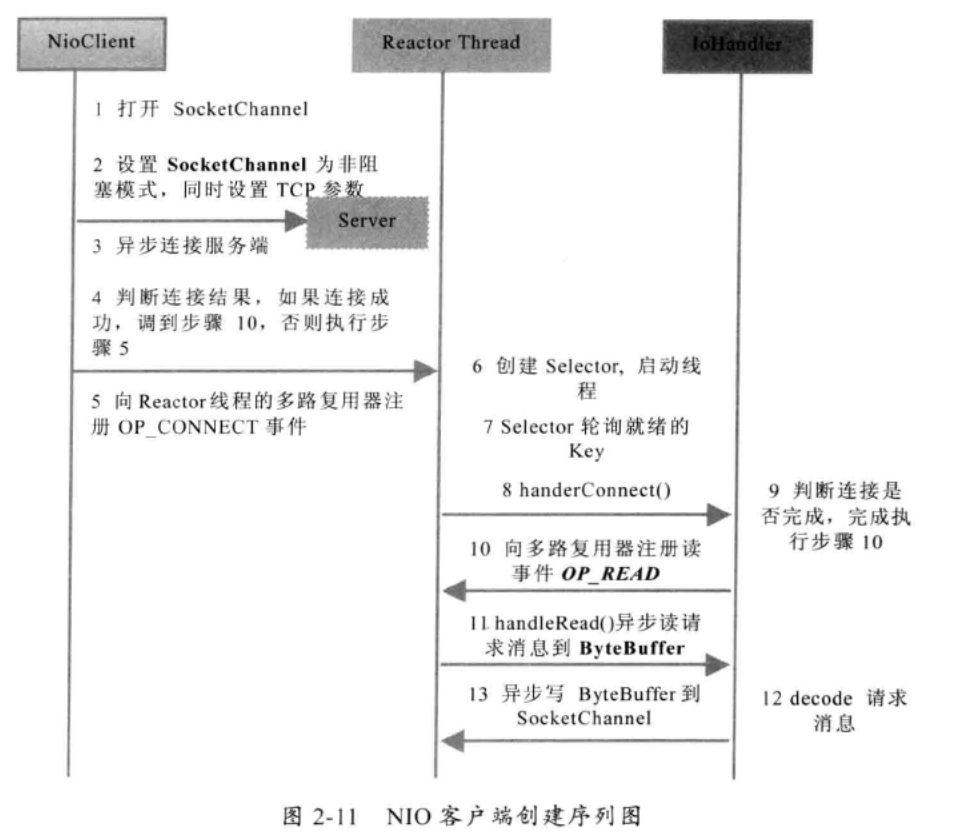
客户端:
import java.io.IOException;

import java.net.InetSocketAddress;

import java.nio.ByteBuffer;

import java.nio.channels.SelectionKey;

import java.nio.channels.Selector;

import java.nio.channels.SocketChannel;

import java.util.Iterator;

import java.util.Set;

public class TimeClientHandle implements Runnable {

    private String host;

    private int port;

    private Selector selector;

    private SocketChannel socketChannel;

    private volatile boolean stop;

    public TimeClientHandle(String host, int port) {

        this.host = host == null ? "127.0.0.1" : host;

        this.port = port;

        try {

            //第一步:打开SocketChannel,用于创建客户端连接

            socketChannel = SocketChannel.open();

            //第二步:设置SocketChannel为非阻塞模式

            socketChannel.configureBlocking(false);

            //第三步:创建多路复用器(在Reactor线程中)

            selector = Selector.open();

        } catch (IOException e) {

            e.printStackTrace();

            System.exit(1);

        }

    }

    @Override

    public void run() {

        try {

            // 第四步:socketChannel发起连接

            if (socketChannel.connect(new InetSocketAddress(host, port))) {

                //第五步:如果直接连接成功,则注册到多路复用器上

                socketChannel.register(selector, SelectionKey.OP_READ);

                //第六步:发送请求消息,读应答

                byte[] req = "QUERY TIME ORDER".getBytes();

                ByteBuffer writeBuffer = ByteBuffer.allocate(req.length);

                writeBuffer.put(req);

                writeBuffer.flip();

                socketChannel.write(writeBuffer);

                if (!writeBuffer.hasRemaining())

                    System.out.println("Send order 2 server succeed.");

            } else

                socketChannel.register(selector, SelectionKey.OP_CONNECT);

        } catch (IOException e) {

            e.printStackTrace();

            System.exit(1);

        }

        while (!stop) {

            try {

                //第七步:多路复用器在run的无限循环体内轮询准备就绪的Key

                selector.select(1000);

                Set<SelectionKey> selectedKeys = selector.selectedKeys();

                Iterator<SelectionKey> it = selectedKeys.iterator();

                SelectionKey key = null;

                while (it.hasNext()) {

                    key = it.next();

                    it.remove();

                    try {

                        if (key.isValid()) {

                            //第八步:将连接成功的Channel注册到多路复用器上

                            // 判断是否连接成功

                            SocketChannel sc = (SocketChannel) key.channel();

                            if (key.isConnectable()) {

                                if (sc.finishConnect()) {

                                    sc.register(selector, SelectionKey.OP_READ);

                                    //发送请求消息,读应答

                                    byte[] req = "QUERY TIME ORDER".getBytes();

                                    ByteBuffer writeBuffer = ByteBuffer.allocate(req.length);

                                    writeBuffer.put(req);

                                    writeBuffer.flip();

                                    sc.write(writeBuffer);

                                    if (!writeBuffer.hasRemaining())

                                        System.out.println("Send order 2 server succeed.");

                                } else

                                    System.exit(1);// 连接失败,进程退出

                            }

                            //监听读操作,读取服务端写回的网络信息

                            if (key.isReadable()) {

                                //第九步:读取信息到缓冲区

                                ByteBuffer readBuffer = ByteBuffer.allocate(1024);

                                int readBytes = sc.read(readBuffer);

                                if (readBytes > 0) {

                                    readBuffer.flip();

                                    byte[] bytes = new byte[readBuffer.remaining()];

                                    readBuffer.get(bytes);

                                    String body = new String(bytes, "UTF-8");

                                    System.out.println("Now is : " + body);

                                    this.stop = true;

                                } else if (readBytes < 0) {

                                    // 对端链路关闭

                                    key.cancel();

                                    sc.close();

                                } else

                                    ; // 读到0字节,忽略

                            }

                        }

                    } catch (Exception e) {

                        if (key != null) {

                            key.cancel();

                            if (key.channel() != null)

                                key.channel().close();

                        }

                    }

                }

            } catch (Exception e) {

                e.printStackTrace();

                System.exit(1);

            }

        }

        // 多路复用器关闭后,所有注册在上面的Channel和Pipe等资源都会被自动去注册并关闭,所以不需要重复释放资源

        if (selector != null)

            try {

                selector.close();

            } catch (IOException e) {

                e.printStackTrace();

            }

    }

}

package com.dxz.springsession.nio.demo6;

public class TimeClient {

    /**

     * @param args

     */

    public static void main(String[] args) {

    int port = 1234;

    if (args != null && args.length > 0) {

        try {

        port = Integer.valueOf(args[0]);

        } catch (NumberFormatException e) {

        // 采用默认值

        }

    }

    new Thread(new TimeClientHandle("127.0.0.1", port), "TimeClient-001")

        .start();

    }

}
抄录地址:
Java IO系列之四:NIO通信模型的更多相关文章
- java io系列16之 PrintStream(打印输出流)详解
本章介绍PrintStream以及 它与DataOutputStream的区别.我们先对PrintStream有个大致认识,然后再深入学习它的源码,最后通过示例加深对它的了解. 转载请注明出处:htt ...
- Java IO系列之一:IO
1. 概述 Java IO一般包含两个部分: 1.java.io包中堵塞型IO: 2.java.nio包中的非堵塞型IO,通常称为New IO. java.io包下,分为四大块近80个类: 1.基于字 ...
- java io系列21之 InputStreamReader和OutputStreamWriter
InputStreamReader和OutputStreamWriter 是字节流通向字符流的桥梁:它使用指定的 charset 读写字节并将其解码为字符.InputStreamReader 的作用是 ...
- java io系列25之 PrintWriter (字符打印输出流)
更多内容请参考:java io系列01之 "目录" PrintWriter 介绍 PrintWriter 是字符类型的打印输出流,它继承于Writer.PrintStream 用于 ...
- java io系列01之 "目录"
java io 系列目录如下: 01. java io系列01之 "目录" 02. java io系列02之 ByteArrayInputStream的简介,源码分析和示例(包括 ...
- java io系列06之 序列化总结(Serializable 和 Externalizable)
本章,我们对序列化进行深入的学习和探讨.学习内容,包括序列化的作用.用途.用法,以及对实现序列化的2种方式Serializable和Externalizable的深入研究. 转载请注明出处:http: ...
- java io系列15之 DataOutputStream(数据输出流)的认知、源码和示例
本章介绍DataOutputStream.我们先对DataOutputStream有个大致认识,然后再深入学习它的源码,最后通过示例加深对它的了解. 转载请注明出处:http://www.cnblog ...
- java io系列17之 System.out.println("hello world")原理
我们初学java的第一个程序是"hello world" public class HelloWorld { public static void main(String[] ar ...
- java io系列02之 ByteArrayInputStream的简介,源码分析和示例(包括InputStream)
我们以ByteArrayInputStream,拉开对字节类型的“输入流”的学习序幕.本章,我们会先对ByteArrayInputStream进行介绍,然后深入了解一下它的源码,最后通过示例来掌握它的 ...
随机推荐
- [Alibaba-ARouter] 简单好用的Android页面路由框架
开发一款App,总会遇到各种各样的需求和业务,这时候选择一个简单好用的轮子,就可以事半功倍 前言 Intent intent = new Intent(mContext, XxxActivity.cl ...
- 搭建Linux虚拟服务器
1.搭建Linux虚拟机环境安装VMware Workstation 14下载地址:https://www.cr173.com/soft/68480.html密钥:FF31K-AHZD1-H8ETZ- ...
- 抓包工具Charles安装时需要注意的地方
最新接到一个任务,需要为app端的升级提供新的接口.以前没有搞过这个,其实搞完之后也就那样!其中有很重要的一点,就是需要用到抓包工具,进行联调测试,观看app端的数据情况. 抓包工具最常用的两个:fi ...
- 基于GDAL库,读取海洋风场数据(.nc格式)c++版
经过这一段时间的对海洋数据的处理,接触了大量的与海洋相关的数据,例如海洋地形.海洋表面温度.盐度.湿度.云场.风场等数据,除了地形数据是grd格式外,其他的都是nc格式的数据.本文将以海洋风场数据为例 ...
- Java中String、StringBuilder、StringBuffer的区别
常量还是变量: String是字符串常量(以final修饰符进行修饰,不可更改): StringBuilder是字符串变量 StringBuffer是字符串变量 线程安全: String无所谓线程安全 ...
- 随机排序std::vector,扑克牌,麻将类尤其合用
有些需要重新对std::vector对象重新排序,特别是游戏,例如说:扑克牌,麻将,抽奖等,C++标准已经为std::vector写好了随机排序的方式,这里做个笔记: #include <alg ...
- 利用Sonar定制自定义扫描规则
上有3种方法可以自定义soanr的代码校验规则: 直接在sonar的web接口中增加XPath规则: 通过插件的功能来增加自定义规则,比如checkstyle,pmd等插件是允许自定义规则的: 通 ...
- SIM 800C指令笔记
拨号ATD137xxxxxxxx; 挂断-对方挂断收到NO CARRIER消息 挂断-主动挂断ATH 接电话ATA 打入电话消息RING 设置来电电话号码显示AT+CLIP=1显示消息格式:+CLIP ...
- Python操作Excel 之 openpyxl
一.基础 安装openpyxl 模块 pip install openpyxl 或者通过轮子安装 font(字体类):字号.字体颜色.下划线等 fill(填充类):颜色等 border(边框类):设置 ...
- C#中 SQL语句
SQL语句 SELECT STUFF(( (SELECT ',{' ),)) ),)) ),)) +'}' FROM ZSJTTD_HouseBuilding hb ,,'' ) HouseBuild ...