
flutter -------- ListView的使用
学习了Flutter,来分享一下学习的一些常用的知识,先来说说ListView
案例效果:
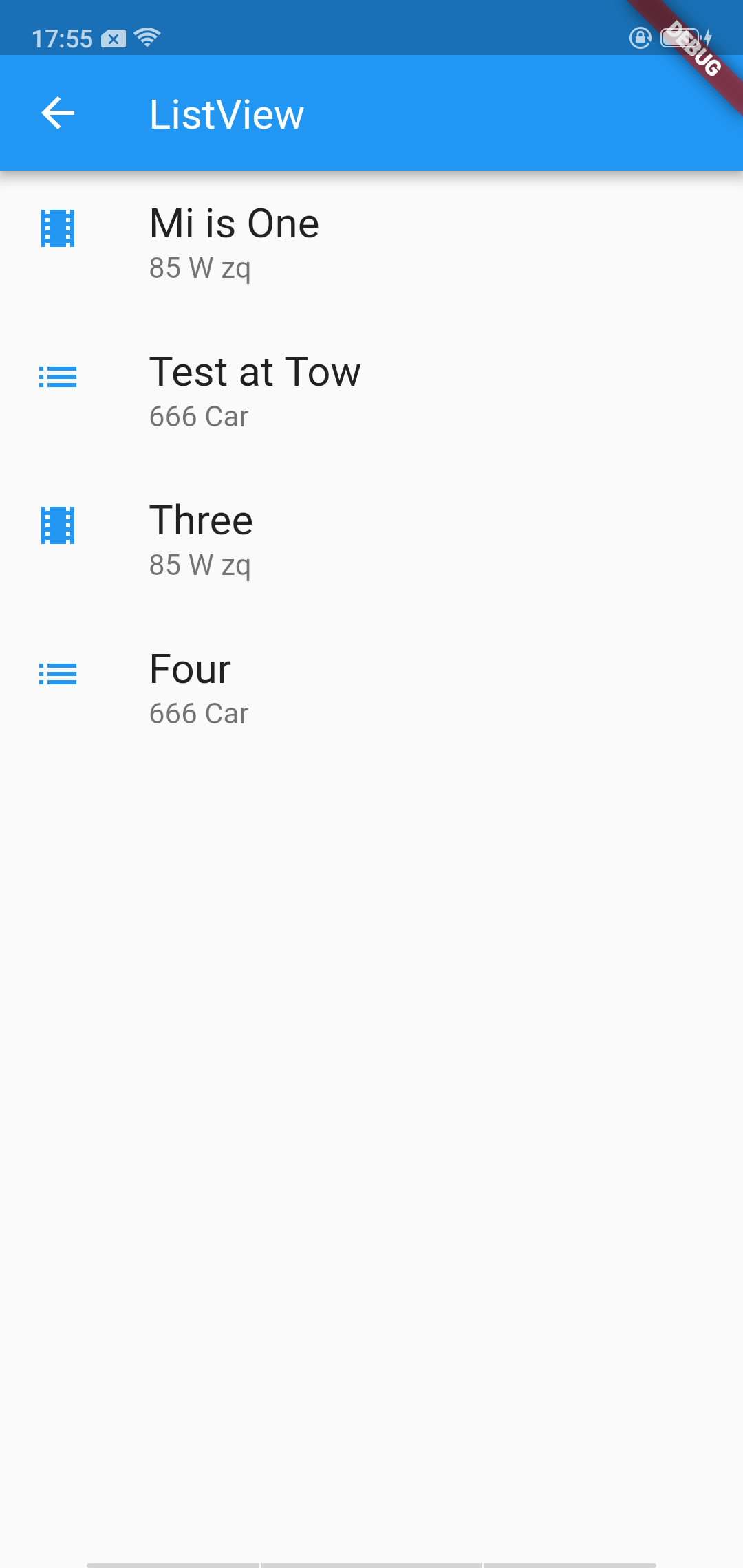
ListView是一个类似列的widget,它的内容对于其渲染框太长时会自动提供滚动。
ListView 摘要:
用于组织盒子中列表的特殊Column
可以水平或垂直放置
检测它的内容超过显示框时提供滚动
比Column配置少,但更易于使用并支持滚动
构建ListView有四个选项:
默认构造函数采用子类的显式List <Widget>。此构造函数适用于具有少量子项的列表视图,因为构造List需要为可能在列表视图中显示的每个子项执行工作,而不仅仅是那些实际可见的子项。
该ListView.builder构造函数采用IndexedWidgetBuilder,它建立在孩子的需求。此构造函数适用于具有大量(或无限)子项数的列表视图,因为仅为那些实际可见的子项调用构建器。
该ListView.separated构造函数有两个IndexedWidgetBuilder S: itemBuilder按需建立个子项目,separatorBuilder 同样建立其出现在子项之间的分隔符的孩子。此构造函数适用于具有固定数量子项的列表视图。
该ListView.custom构造需要SliverChildDelegate,它提供了自定义子模型的其他方面的能力。例如,SliverChildDelegate可以控制用于估计实际上不可见的子项大小的算法。
官方文档介绍:
https://docs.flutter.io/flutter/widgets/ListView-class.html
案例代码:
class UITest3_ListView extends StatelessWidget{

  List<Widget> list = <Widget>[

    new ListTile(

      title: new Text('Mi is One',

          style: new TextStyle(fontWeight: FontWeight.w500,fontSize: 20),

      ),

      subtitle: new Text("85 W zq"),

      leading: new Icon(Icons.theaters,color: Colors.blue[500]),

    ),

    new ListTile(

      title: new Text("Test at Tow",style: new TextStyle(fontWeight: FontWeight.w500,fontSize: 20)),

      subtitle: new Text("666 Car"),

      leading: new Icon(Icons.list,color: Colors.blue[500])

    ),

    new ListTile(

      title: new Text('Three',

        style: new TextStyle(fontWeight: FontWeight.w500,fontSize: 20),

      ),

      subtitle: new Text("85 W zq"),

      leading: new Icon(Icons.theaters,color: Colors.blue[500]),

    ),

    new ListTile(

        title: new Text("Four",style: new TextStyle(fontWeight: FontWeight.w500,fontSize: 20)),

        subtitle: new Text("666 Car"),

        leading: new Icon(Icons.list,color: Colors.blue[500]),

        onTap: (){

          Fluttertoast.showToast(

              msg: " Four",

              toastLength: Toast.LENGTH_SHORT,

              gravity: ToastGravity.BOTTOM,

              timeInSecForIos: 1,

              backgroundColor: Colors.blue,

              textColor: Colors.white

          );

        },

    )

  ];

  @override

  Widget build(BuildContext context) {

    // TODO: implement build

    return new Scaffold(

      appBar: new AppBar(

        title: Text("ListView"),

      ),

      body: new Center(

        child: new ListView(

            children: list,

        ),

      ),

    );

  }

}
flutter -------- ListView的使用的更多相关文章
- Flutter ListView 列表组件
列表常见的情况: 1.垂直列表 2.垂直图文列表 3.横向列表 4.动态列表 名称 类型 说明 scrollDirection Axis Axis.horizontal 横向列表 Axis.verti ...
- Flutter——ListView组件(平铺列表组件)
ListView的常见参数: 名称 类型 说明 scrollDirection Axis Axis.horizontal 水平列表 Axis.vertical 垂直列表 padding EdgeIns ...
- flutter ListView列表和导航传值以及回调
main.dart import 'package:flutter/material.dart'; void main(){ return runApp(MyApp()); } class Produ ...
- flutter ListView简介
child: new Container( child: new Center( child: ListView( shrinkWrap:true, children: <Widget>[ ...
- Flutter - ListView禁止用户上下滑动
ListView禁止用户上下滑动可以使用physics属性 physics: const NeverScrollableScrollPhysics()
- flutter ListView 页面滚动组件
ListView class A scrollable list of widgets arranged linearly. ListView is the most commonly used sc ...
- flutter ListView嵌套高度问题
ListView嵌套时高度无法自适应,需要设置高度才可以显示,设置以下属性可以解决上述问题 shrinkWrap: true, physics: NeverScrollableScrollPhysic ...
- Flutter 自定义列表以及本地图片引用
前言 上篇关于Flutter的文章总结了下标签+导航的项目模式的搭建,具体的有需要的可以去看看Flutter分类的文章,这篇文章我们简单的总结一下关于Flutter本地文件引用以及简单的自定义List ...
- flutter - 01 基础介绍以及ListView
这篇主要讲flutter最基本的操作.我们从一个实例入手,先不需要知道它里面的每一行是什么意思,我会慢慢说. main.dart import 'package:flutter/material.da ...
随机推荐
- if语句&switch&Scanner
if流程控制语句: if 语句的用语法如下: if(boolean表达式){ //如果条件为true那么执行 } 只有条件为true时才会执行,否则执行if语句后面的代码. 实例代码: public ...
- [python 练习] 计算个税
题目:利用python计算个税 说明:python有序字典的使用 代码: # -*- coding: utf-8 -*- from collections import OrderedDict # 税 ...
- jpa 使用笔记
1,嵌套类查询 List<Person> findByAddress_ZipCode(ZipCode zipCode); ZipCode是Address属性的内部属性. 2,jpa in ...
- Git使用和Vue项目
1.创建git排除文件,.gitignore 2.READEME.md 和 LICENSE开源协议 git init 创建仓库 , git status 查看文件状态 红色文件表示未提交. git ...
- OSM自建服务
1. 安装PostgreSQL. 2. 安装PostGis(安装目录为PostgreSQL目录). 3. 安装osm2pgsql. osm2pgsql下载地址:http://customdebu ...
- Vue入门:Vue项目创建及启动
1. 创建Vue项目存放地址 用于存放Vue项目,找个自己处理方便的地方.本人地址:D:\Program Files\Workspace\Vue 2. 创建项目 进入cmd窗口 进入项目存放地址 执行 ...
- 关于BDD100k数据输入处理mask变为56*56
Mask_rcnn数据训练 Mask rcnn往里面送的是数据原图,可能没有把mask送里面,而且mask的数据 56*56,仿照coco——inspect_data重点考虑 Bounding box ...
- phpstudy-5.6.27-nts 安装redis扩展
redis扩展安装流程 第一步: 首先直接查看一下phpinfo()的信息 找到下面两条信息 Architecture x86 PHP Extension Build API20131226,NTS, ...
- springboot-yml内list、map组合写法
yml:myProps: varmaplist: key11: - t1 - t2 - t3 key22: - t11 - t22 - t33 list: - topic1 - topic2 - to ...
- 基于OpenCV做“三维重建”(1)--找到并绘制棋盘
<OpenCV计算机视觉编程攻略(第3版)>这套书已经出到第3版了,如果你非要我说这本书有多好,我说不出来:只是很多我第一手的例子都是来源于这本书的-相比较OpenCV官方提供的代码,这本 ...