
spring注解驱动--组件注册
为容器中注册Bean
- @Configuration代表该类是一个配置类,配置类起到的作用和xml配置文件一样
- @Bean代表该方法的返回对象作为Bean加入IOC容器,默认Bean的id是方法的名称。可以在@Bean注解里更改value的值来更改名称
@Configuration

public class mainConfig {

    @Bean("person")

    public Person person01(){

        Person person = new Person();

        person.setId(1);

        person.setName("aa");

        return person;

    }

}
包扫描
ComponentScan配置扫描哪些包,用法和xml配置文件中的包扫描相同,包含可配置的excludeFilter和includeFilter选项。
- excludeFilters是一个Filter类型的数组,所以这里用大括号。每一个Filter元素包含过滤条件的类型以及具体的过滤条件。如下面的Filter类型为注解,过滤条件为Controller。
@Configuration

@ComponentScan(value = "comtroller",excludeFilters = {@ComponentScan.Filter(type = FilterType.ANNOTATION,classes = Controller.class)})

public class mainConfig {

    @Bean("person")

    public Person person01(){

        Person person = new Person();

        person.setId(1);

        person.setName("aa");

        return person;

    }

}
- includeFilters,配置只扫描哪些类型,多用于SpringMVC容器中只扫描controller注解,用法同XML配置,需要禁用默认过滤规则
@Configuration

@ComponentScan(value = "comtroller",includeFilters = {@ComponentScan.Filter(type=FilterType.ANNOTATION,classes=Controller.class)},useDefaultFilters = false)

public class mainConfig {

    @Bean("person")

    public Person person01(){

        Person person = new Person();

        person.setId(1);

        person.setName("aa");

        return person;

    }

}
其余常用包扫描的过滤方式
类名
只添加或者只过滤某个具体的类
@ComponentScan(value = "comtroller",excludeFilters = {@ComponentScan.Filter(type = FilterType.ASSIGNABLE_TYPE,classes = BookController.class)})
自定义规则
如何查看包扫描是否生效
查看包扫描是否生效就是查看Spring容器里是否有想要的Bean。
方法一:打印出Spring容器中所有Bean。简单粗暴。
public class test {

    public static void main(String[] args) {

        AnnotationConfigApplicationContext context = new AnnotationConfigApplicationContext(mainConfig.class);

        String[] names = context.getBeanDefinitionNames();

        for (String name:

             names) {

            System.out.println(name);

        }

    }

}
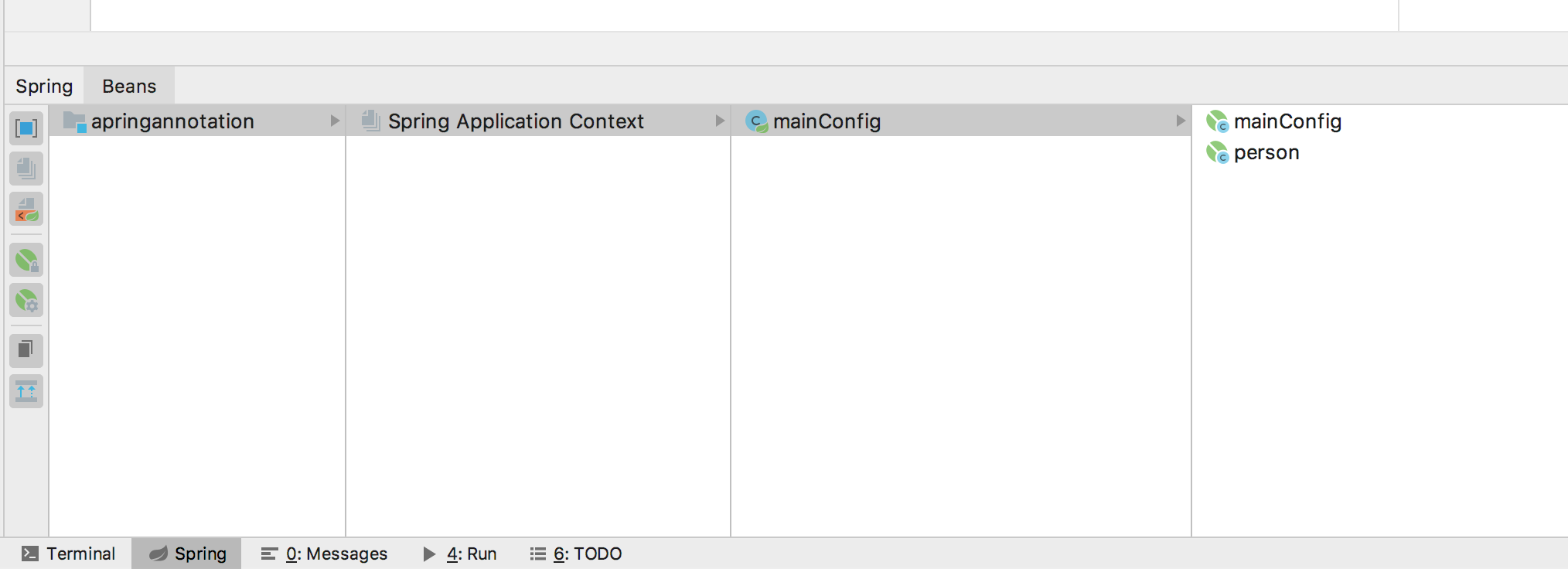
方法二:借助idea。每新配置一个Spring容器,无论是通过xml还是配置类方式,最好都配置idea的spring管理插件,这样可以不必运行测试类也可查看容器里的Bean
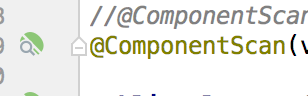
而且在配置生效的情况下@Component注解旁边会多一个符号,点击该符号可以跳转到扫描的包。
改变默认单例
Spring中的Bean默认是单例,且在容器加载的时候就被初始化。使用@Scope改变为多实例,对应的Bean在每次getBean的时候都会初始化一次,所以Bean在容器启动的时候不会初始化。背后的逻辑是单例模式是Spring容器维护了一个缓存HashMap,而多实例下并没有这个缓存。既然没有缓存那么在多实例情况下就无法存储初始化之后的Bean。
    @Bean("person")

    @Scope("prototype")

    public Person person01(){

        Person person = new Person();

        person.setId(1);

        person.setName("aa");

        return person;
懒加载
针对单实例情况下容器创建时Bean就会被创建,使用@Lazy可以实现对单实例Bean在getBean的时候才加载。
按照条件注册Bean
默认情况下被标注了@Configuration的类下所有标注@Bean的方法返回对象都会被加入Spring容器中,使用@Conditional注解可以自定义规则来只把某些Bean加入Spring容器中。
实现Condition接口中的matches方法。conditionContext包含了一个Bean所有的信息
- beanFactory,创建该Bean的工程
- classLoader,该Bean的类加载器
- enviroment,该Bean所处的环境,主要指的是OS的环境
- register,该Bean所处的容器
下面的代码实现两个功能:1、打印该Bean所处容器内所有的Bean 2、判断该Bean所处OS的类型,如果是Win就返回true即把Bean注入到容器中
public class WinCondition implements Condition {

    /**

     *

     * @param conditionContext 环境上下文

     * @param annotatedTypeMetadata 注释信息

     * @return

     */

    public boolean matches(ConditionContext conditionContext, AnnotatedTypeMetadata annotatedTypeMetadata) {

        ConfigurableListableBeanFactory beanFactory = conditionContext.getBeanFactory();

        ClassLoader classLoader = conditionContext.getClassLoader();

        Environment environment = conditionContext.getEnvironment();

        //获得容器对象,进而判断容器中Bean的注册情况

        BeanDefinitionRegistry registry = conditionContext.getRegistry();

        String[] names = registry.getBeanDefinitionNames();

        System.out.println("====");

        for (String name :

                names) {

            System.out.println(name);

        }

        String osName = environment.getProperty("os.name");

        if (osName.contains("Win")){

            return true;

        }

        return false;

    }

}
最后要把注解标注在方法或者配置类上。因为我的系统不是Win系统所以容器里没有zhangsan这个Bean。
 @Conditional({WinCondition.class})

    @Bean("zhangsan")

    public Person person_01(){

        return new Person("zhangsan",12);

    }
Import
在配置类上方标注@Import注解并声明要导入的类,会自动加到Spring中。
@Import({otherPojo.class, otherPojo2.class})

public class mainConfig {
ImportSelector
使用上和Import类似,通过实现ImportSelector接口可以按照条件批量注册Bean,其中return的String数组中的Bean会被注册到Spring中。
public class importSelect implements ImportSelector {

    /**

     * @param annotationMetadata 当前标注Import类的全部注解信息,不仅仅是Import

     * @return 要导入容器的类的全类名

     */

    public String[] selectImports(AnnotationMetadata annotationMetadata) {

        return new String[]{"pojo.otherPojo2"};

    }

}
@Import(importSelect.class)

public class mainConfig
Import注解是标注着配置类上的,ImportSelector中的AnnotationMetadata包含配置类所有注解的信息,通过打断点可以看到如下的结果。
FactoryBean
实现FactoryBean接口重写getObject方法,并用@Bean方式加入Configuration中,则getObject返回的对象会加入Spring容器中
spring注解驱动--组件注册的更多相关文章
- Spring注解驱动——组件注册系列
1.@Configuration 从Spring3.0,@Configuration用于定义配置类,可替换xml配置文件,被注解的类内部包含有一个或多个被@Bean注解的方法,这些方法将会被Annot ...
- spring注解扫描组件注册
最近对单点系统进行微服务拆分,被各个springboot的组件注册搞得云里雾里的.(有的是通过springboot的自动配置进IOC容器的,有的是自己添加构造方法添加进IOC容器.)决定抽时间将spr ...
- 【spring 注解驱动开发】spring组件注册
尚学堂spring 注解驱动开发学习笔记之 - 组件注册 组件注册 1.@Configuration&@Bean给容器中注册组件 2.@ComponentScan-自动扫描组件&指定扫 ...
- 【Spring注解驱动开发】组件注册-@ComponentScan-自动扫描组件&指定扫描规则
写在前面 在实际项目中,我们更多的是使用Spring的包扫描功能对项目中的包进行扫描,凡是在指定的包或子包中的类上标注了@Repository.@Service.@Controller.@Compon ...
- 【Spring注解驱动开发】使用@Scope注解设置组件的作用域
写在前面 Spring容器中的组件默认是单例的,在Spring启动时就会实例化并初始化这些对象,将其放到Spring容器中,之后,每次获取对象时,直接从Spring容器中获取,而不再创建对象.如果每次 ...
- 【Spring注解驱动开发】使用@Import注解给容器中快速导入一个组件
写在前面 我们可以将一些bean组件交由Spring管理,并且Spring支持单实例bean和多实例bean.我们自己写的类,可以通过包扫描+标注注解(@Controller.@Servcie.@Re ...
- 【Spring注解驱动开发】在@Import注解中使用ImportBeanDefinitionRegistrar向容器中注册bean
写在前面 在前面的文章中,我们学习了如何使用@Import注解向Spring容器中导入bean,可以使用@Import注解快速向容器中导入bean,小伙伴们可以参见<[Spring注解驱动开发] ...
- Spring 注解驱动(一)基本使用规则
Spring 注解驱动(一)基本使用规则 Spring 系列目录(https://www.cnblogs.com/binarylei/p/10198698.html) 一.基本使用 @Configur ...
- 0、Spring 注解驱动开发
0.Spring注解驱动开发 0.1 简介 <Spring注解驱动开发>是一套帮助我们深入了解Spring原理机制的教程: 现今SpringBoot.SpringCloud技术非常火热,作 ...
随机推荐
- mongodb~mapreduce的实现特殊逻辑的统计
map reduce的解释 这是一张来自mongodb-mapreduce图示,比较能说明问题
- 设计模式总结篇系列:适配器模式(Adapter)
网上看到不少关于适配器模式的讲解,其中对于适配器模式解释的过于专业,一时不是特别理解适配器模式到底是用来干嘛的,具体的适用场景在哪,其最精髓的地方到底在哪. 本文结合自己的理解,阐述下对适配器模式的看 ...
- Java线程Thread的状态解析以及状态转换分析 多线程中篇(七)
线程与操作系统中线程(进程)的概念同根同源,尽管千差万别. 操作系统中有状态以及状态的切换,Java线程中照样也有. State 在Thread类中有内部类 枚举State,用于抽象描述Java线程的 ...
- Spring Boot 2.x(三):搭建开发环境(整合Spring Data JPA)
为什么是JPA JPA虽然小众,但是足够优雅╮(╯_╰)╭,由于微服务的兴起,服务粒度的细化,多表联合的场景逐渐减少,更多的是一些简单的单表查询,而这正是JPA的强项所在.所以,以后的实战项目中我也会 ...
- 不要使用Resource Owner Password Credentials
不要使用Resource Owner Password Credentials 文章链接在这里 前言 最近公司项目在做一些重构,因为公司多个业务系统各自实现了一套登录逻辑,比较混乱.所以,现在需要做一 ...
- 详解什么是平衡二叉树(AVL)(修订补充版)
详解什么是平衡二叉树(AVL)(修订补充版) 前言 Wiki:在计算机科学中,AVL树是最早被发明的自平衡二叉查找树.在AVL树中,任一节点对应的两棵子树的最大高度差为1,因此它也被称为高度平衡树.查 ...
- Odd-e CSD Course Day 1
First 強烈的建議,記得準備好當地的 SIM 卡及插座轉接頭,在這五天中很好用的 接下來,我就各個主題來介紹一下相關的心得.首先我們這五天裡會依照 Scrum 的流程,完全的跑過一次,從一開始的需 ...
- Array的 filter() 和 sort()
filter() filter() 方法创建一个创建一个新数组,新数组中的元素是通过筛选原数组中的元素所得到的.筛选的方式是把传入的函数依次作用于每个元素,然后根据返回值是true还是false决定保 ...
- Dynamics 365测试和启用邮箱时候一直显示“安排电子邮件配置测试”怎么办?
摘要: 本人微信公众号:微软动态CRM专家罗勇 ,回复284或者20181125可方便获取本文,同时可以在第一间得到我发布的最新博文信息,follow me!我的网站是 www.luoyong.me ...
- iOS----------APP怎样做更安全
1 网络请求的安全方案 1.1 https请求,最好有安全交互平台. 1.2 对重要的参数请求进行加密(推荐AES,ERSA加密). 1.3 服务器返回数据时,对重要数据进行加密. 1.4 不要把密钥 ...