
SpringMVC-2-(Controller)
一)参数类型
    @RequestMapping("hello4")

    @ResponseBody

    public ModelAndView Hello4(

//                                Servlet的三个参数

                               HttpServletRequest request,

                               HttpServletResponse response,

                               HttpSession session,

//                               传入接本数据类型和引用数据类型,注意要和前端同名

                               String name,

                               People people,

//                               和前端不同命的解决办法

                               @RequestParam("address1")String address,

//                               前段没有传值,设置默认值

                               @RequestParam(defaultValue = "27") int age,

//                               设置这个值一定要有,没有就报错

                               @RequestParam(required = true) String email,

//                               接前端传过来的复选框的值

                               @RequestParam("likes")List<String> list,

//                               前端写法

//                               <input type="text" name="peo.name"/>

//                               <input type="text" name="peo.age"/>

//                               另外再写一个实体类,属性就是前端传值的名

//                               public class Test {

//                                    private People people;

                               Test test,

//                               前端写法

//                               <input type="text" name="peo[1].name"/>

//                               <input type="text" name="peo[1].age"/>

//                               另外要写一个实体类,属性就是前端传值的list集合

//                               public class Test {

//                                    private People people;

//                                    private List<People> peoples;

                               Test test1,

//                               其实model和ModelAndView还有session都产不多用法,只是返回一个数据参见下边的代码

                               Model model

                               )

            throws ServletException, IOException {

        ModelAndView hello = new ModelAndView("main");

        Model model1 = model.addAttribute("name", "xupeilei");

        return hello;

    }
restful风格:
<a href="hello1?name=aaa&age=27">普通风格</a>

<a href="hello2/bbb/17">result风格</a>
@RequestMapping("hello1/{name}/{age}")

    public ModelAndView Hello1(@PathVariable String name,@PathVariable String age) {

        System.out.println(name+"   "+age);

        System.out.println("hello springMVC控制器");

        ModelAndView hello = new ModelAndView("main");

        return hello;

    }
参数绑定到实体类:
有时间在写
自定义参数绑定
有事件在写
二)返回值类型及重定向和转发(默认方式都是请求转发)
理解重定向和转发:
重定向:
相当于是浏览器发出请求,返回一个url浏览器再去请求这个url,这时浏览器是知道他请求到哪里去了,所以地址栏可以看到url的改变
转发:
服务器的行为,浏览器发出请求之后,服务器可能又去请求了其他的资源最终只返回一个数据或者模型,这时浏览器并不知道服务器到底做了什么,他只能显示他请求的url;
@RequestMapping:会去找视图解析器
String
@RequestMapping("hello2")

    public String hello2(){

//        转发

//        return "forward:/html/err.html";

//        return "forward:/hello1";

//        重定向

//        return "redirect:/html/err.html";

        return "redirect:/hello1";

//        通过视图解析器

//        return "main";

    }
ModelAndView:
@Controller

public class HelloController {

    @RequestMapping("hello1")

    public ModelAndView hello1(){

//        自定义视图解析器找到main.jsp

//        ModelAndView modelAndView = new ModelAndView("main");

//        服务器转发,

//          跳转到err.html

//        ModelAndView modelAndView = new ModelAndView("forward:/html/err.html");

//          跳转到其他controller(hello2)

//        ModelAndView modelAndView = new ModelAndView("forward:/hello2");

//        浏览器重定向,

//          重定向到err.html

//        ModelAndView modelAndView = new ModelAndView("redirect:/html/err.html");

//          重定向到其他controller(hello2)

          ModelAndView modelAndView = new ModelAndView("redirect:/hello2");

//        会使用自定义视图解析器,结果找不到报错404

//        ModelAndView modelAndView = new ModelAndView("hello2");

        return modelAndView;

    }
void(没有返回值,只能重定向和转发)
@RequestMapping("hello3")

    public void hello3(HttpServletRequest request, HttpServletResponse response) throws IOException {

//        重定向

        request.getRequestDispatcher("/html/err.html");

//        request.getRequestDispatcher("/hello1");

//        转发

//        response.sendRedirect("/html/err.html");

//        response.sendRedirect("/hello1");

    }
@RequestMapping:
@ResponseBody:
String
void
ModelAndView
对象:(坑!大坑!!巨坑!!!超级坑!!!)(使用jackSon的时候要用高版本不然报错406,无法转换json格式)
@RequestMapping("/hello4")

    @ResponseBody

    public People hello4(HttpServletResponse response){

        People p=new People();

        p.setName("sss");

        p.setAddress("www");

        p.setAge(1);

        p.setEmail("ee");

        return p;

    }
     <dependency>

            <groupId>com.fasterxml.jackson.core</groupId>

            <artifactId>jackson-annotations</artifactId>

            <version>2.9.6</version>

        </dependency>

        <dependency>

            <groupId>com.fasterxml.jackson.core</groupId>

            <artifactId>jackson-core</artifactId>

            <version>2.9.6</version>

        </dependency>

        <dependency>

            <groupId>com.fasterxml.jackson.core</groupId>

            <artifactId>jackson-databind</artifactId>

            <version>2.9.6</version>

        </dependency>
三)自定义视图解析器
表示在返回值的前边加上/路径和后边加上.jsp,表示所要找的jsp所在德位置,就不需要在controller中手写了,作用就是偷懒;
但是注意:自定义视图解析器controller中的返回值不能加前缀,加的话就走默认的视图解析器,
存在的意义:当我们需要转发的时候
看图:
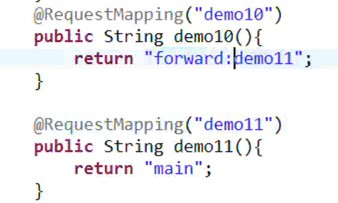
图一: 图二:
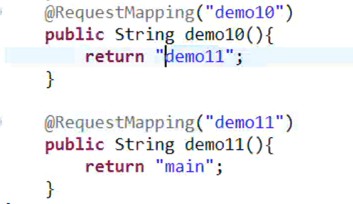
看图一:因为前边没有加任何东西,并且我又自定义视图解析器,那他走的就是自定义视图解析器,回去找一个demo11.jsp的东西,但是会发现找不到报错404
看图二:因为前边加了forward:这时候自定义的视图解析器就失效了,走默认视图解析器,解析出来要转发到dome11,就不去找demo11.jsp了
  <bean class="org.springframework.web.servlet.view.InternalResourceViewResolver" id="viewResolver">

        <property name="prefix" value="/WEB-INF/jsp/"/>

        <property name="suffix" value=".jsp"/>

    </bean>
四)请求方法限定
@RequestMapping(value = {"/hello123","/456",method = RequestMethod.POST)}
五)@ResponseBody注解
做了两件事情:
一:将返回值变成json字符串;
二:同时设置响应头为application/json
加上这个之后就不跳转了,以流的形式输出出去,也就不走视图解析器了,并且是直接填充到body中去了
String:
ModelAndView:
考虑一下返回值为ModelAndView 却得到一个json字符串的方式
Void:
对象:
六:拦截器
SpringMVC-2-(Controller)的更多相关文章
- 使用IntelliJ IDEA开发SpringMVC网站(二)框架配置
原文:使用IntelliJ IDEA开发SpringMVC网站(二)框架配置 摘要 讲解如何配置SpringMVC框架xml,以及如何在Tomcat中运行 目录[-] 文章已针对IDEA 15做了一定 ...
- springmvc小结(上)
1.springmvc的整体结构以及流程 ①.前端控制器:只需要在web.xml文件中配置即可 作用:接受请求,处理响应结果,转发器,中央处理器 ②.处理器映射器:根据请求的url找到相应的Handl ...
- 使用IntelliJ IDEA开发SpringMVC网站(五)博客文章管理
原文:使用IntelliJ IDEA开发SpringMVC网站(五)博客文章管理 摘要 通过对博客文章的管理,实现外键操作. 目录[-] 八.博客文章管理 1.查看文章 2.添加博客 3 ...
- 使用IntelliJ IDEA开发SpringMVC网站(四)用户管理
原文:使用IntelliJ IDEA开发SpringMVC网站(四)用户管理 摘要 通过对用户表的管理,更加深入地讲解SpringMVC的操作. 目录[-] 文章已针对IDEA 15做了一定的更新,部 ...
- 使用IntelliJ IDEA开发SpringMVC网站(三)数据库配置
原文:使用IntelliJ IDEA开发SpringMVC网站(三)数据库配置 摘要 讲解在IntelliJ IDEA中,如何进行Mysql数据库的配置 目录[-] 文章已针对IDEA 15做了一定的 ...
- SpringMVC起步(一)
SpringMVC起步(一) 笔记来源于慕课网:https://www.imooc.com/video/7126/0 MVC:Model-View-Controller Model:模型层,业务数据的 ...
- 手写SpringMVC框架(三)-------具体方法的实现
续接前文 手写SpringMVC框架(二)结构开发设计 本节我们来开始具体方法的代码实现. doLoadConfig()方法的开发 思路:我们需要将contextConfigLocation路径读取过 ...
- SpringMVC笔记(1)
一.SpringMVC简介 1.1 MVC模型 MVC模型 MVC全名是Model View Controller,是模型(model)- 视图(view)- 控制器(controller)的缩写,是 ...
- 使用IntelliJ IDEA开发SpringMVC网站(一)开发环境
使用IntelliJ IDEA开发SpringMVC网站(一)开发环境 摘要: 主要讲解初期的开发环境搭建,Maven的简单教学. 访问GitHub下载最新源码:https://github.com/ ...
- C#编译器优化那点事 c# 如果一个对象的值为null,那么它调用扩展方法时为甚么不报错 webAPI 控制器(Controller)太多怎么办? .NET MVC项目设置包含Areas中的页面为默认启动页 (五)Net Core使用静态文件 学习ASP.NET Core Razor 编程系列八——并发处理
C#编译器优化那点事 使用C#编写程序,给最终用户的程序,是需要使用release配置的,而release配置和debug配置,有一个关键区别,就是release的编译器优化默认是启用的.优化代码 ...
随机推荐
- C#嵌入动态链接库到可执行文件
C#嵌入动态链接库到可执行文件 将需要被集成的程序集放在项目的lib文件夹中,引用路径从解决方案开始,以“.”连接. 如图(解决方案名称为莫非): 核心代码: AppDomain.CurrentDom ...
- Android学习第十天
计算机表示图形的几种方式 a) Bmp:以高质量保存,用于计算机 b) Jpg:以良好的质量保存,用于计算机或网络 c) Png:以高质量保存 d) ...
- RBAC权限管理设计
一.权限简介 1. 问:为什么程序需要权限控制? 答:生活中的权限限制,① 看灾难片电影<2012>中富人和权贵有权登上诺亚方舟,穷苦老百姓只有等着灾难的来临:② 屌丝们,有没有想过为什么 ...
- 团体程序设计天梯赛(CCCC) L3015 球队“食物链” 状态压缩
团体程序设计天梯赛代码.体现代码技巧,比赛技巧. https://github.com/congmingyige/cccc_code #include <cstdio> #include ...
- 二、java基本语法
一.标识符 java对各种变量.方法和类等要素命名时使用的字符序列成为标识符:通俗点,凡是自己可以起名字的地方都叫标识符,都遵守标识符的规则 1.标识符命名规则: 1)标识符由字符.下划线.美元符或数 ...
- CMDB服务器管理系统【s5day90】:API构造可插拔式插件逻辑
1.服务器端目录结构: 1.__init__.py from django.conf import settings from repository import models import impo ...
- CAS实现单点登录
1.简介 SSO单点登录 在多个相互信任的系统中,用户只需要登录一次就可以访问其他受信任的系统. 新浪微博与新浪博客是相互信任的应用系统. *当用户首次访问新浪微博时,新浪微博识别到用户未登录,将请求 ...
- 第二节:框架前期准备篇之AutoFac常见用法总结
一. 说在前面的话 凡是大约工作在两年以上的朋友们,或多或少都会接触到一些框架搭建方面的知识,只要一谈到框架搭建这个问题或者最佳用法这个问题,势必会引起一点点小小的风波,我说我的好,他说他的好,非常容 ...
- PLSQL Developer 远程连接Oracle数据库
下载.安装.激活PLSQL Developer,本例使用 PLSQL Developer 13 (64 bit). 下载Oracle即时客户端 Instant Client,本例使用11gR2 链接: ...
- JavaScript数据类型 String字符串类型的属性和方法
属性 字符串String类型的每个实例都有一个length属性,表示字符串中的字符个数.由于字符串是不可变的,所以字符串的长度也不可变 字符串的length属性不会在for/in循环中枚举,也不能通过 ...