
【应用程序见解 Application Insights】在Application Insights中通过自定义查询结果定义指标并显示在Dashboard中
问题情形
通过Application Insights收集到指标数据后,如Request,Trace,Exception。但是默认的Insights图表不能满足业务的需求,需要自定义相应的类SQL语句并制作图表以便直观的显示,避免每次都需要重新查询数据并转换为图表。
类SQL的查询语句在Applicaiton Insights示例为:
// Response time trend

// Chart request duration over the last 12 hours.

requests

| where timestamp > ago(12h)

| summarize avgRequestDuration=avg(duration) by bin(timestamp, 10m) // use a time grain of 10 minutes

| render timechart

// Operations performance

// Calculate request count and duration by operations.

requests

| summarize RequestsCount=sum(itemCount), AverageDuration=avg(duration), percentiles(duration, 50, 95, 99) by operation_Name // you can replace 'operation_Name' with another value to segment by a different property

| order by RequestsCount desc // order from highest to lower (descending)

// Top 10 countries by traffic

// Chart the amount of requests from the top 10 countries.

requests

| summarize CountByCountry=count() by client_CountryOrRegion

| top 10 by CountByCountry

| render piechart

// Top 3 browser exceptions

// What were the highest reported exceptions today?

exceptions

| where notempty(client_Browser) and client_Type == 'Browser'

| summarize total_exceptions = sum(itemCount) by problemId

| top 3 by total_exceptions desc

// Failed requests – top 10

// What are the 3 slowest pages, and how slow are they?

requests

| where success == false

| summarize failedCount=sum(itemCount) by name

| top 10 by failedCount desc

| render barchart

// Failed operations

// Calculate how many times operations failed, and how many users were impacted.

requests

| where success == false

| summarize failedCount=sum(itemCount), impactedUsers=dcount(user_Id) by operation_Name

| order by failedCount desc
操作步骤
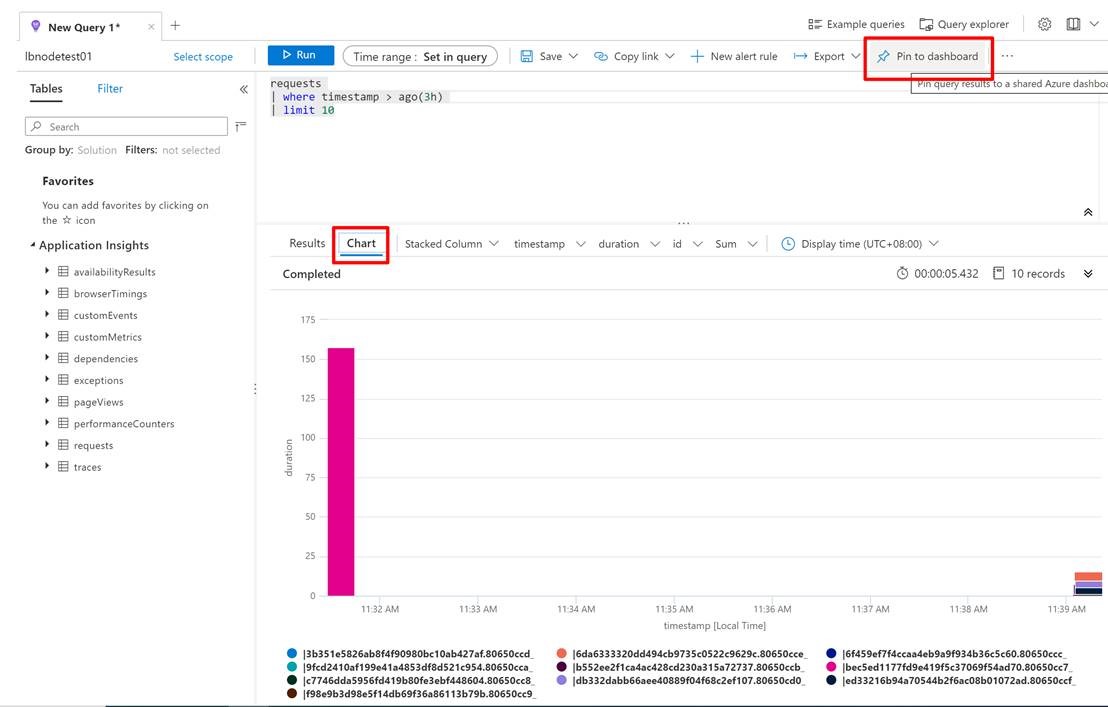
Application Insights提供了非常简单的办法来完成制作图表的步骤,只需要在Logs页面中,按照上面的类SQL语句写好后,点击右上角的固定到仪表盘(Pin To Dashboard)即可。
参考资料:
创建诊断设置以在 Azure 中收集资源日志和指标:https://docs.azure.cn/zh-cn/azure-monitor/platform/diagnostic-settings
【应用程序见解 Application Insights】在Application Insights中通过自定义查询结果定义指标并显示在Dashboard中的更多相关文章
- Java连接MySQL数据库。编写一个应用程序,在主类Test_4类中,通过JDBC访问stu数据库,显示t_student表中的内容(表结构见表1),显示效果自己设计。
题目2:编写一个应用程序,在主类Test_4类中,通过JDBC访问stu数据库,显示t_student表中的内容(表结构见表1),显示效果自己设计.之后,可根据显示的内容进行某条记录的删除(以id为条 ...
- 【应用程序见解 Application Insights】Application Insights 使用 Application Maps 构建请求链路视图
Applicaotn Insigths 使用 Application Maps 构建请求链路视图 构建系统时,请求的逻辑操作大多数情况下都需要在不同的服务,或接口中完成整个请求链路.一个请求可以经历 ...
- 【Azure 应用程序见解】Application Insights Java Agent 3.1.0的使用实验,通过修改单个URL的采样率来减少请求及依赖项的数据采集
问题描述 近日好消息,如果是一个Java Spring Cloud的项目,想使用Azure Applicaiton Insights来收集日志及一些应用程序见解.但是有不愿意集成SDK来修改代码或者配 ...
- 【转】VS2012编译出来的程序,在XP上运行,出现“.exe 不是有效的 win32 应用程序” “not a valid win32 application”
原文网址:http://www.cnblogs.com/Dageking/archive/2013/05/15/3079394.html VS2012编译出来的程序,在XP上运行,出现“.exe 不是 ...
- Android清单文件具体解释(三)----应用程序的根节点<application>
<application>节点是AndroidManifest.xml文件里必须持有的一个节点,它包括在<manifest>节点下.通过<application>节 ...
- 【IOS6.0 自学瞎折腾】(五)应用程序的启动过程和Application生命周期
一 :main函数入口 看下项目资源结构,其实程序的入口也是在main.m里面. #import <UIKit/UIKit.h> #import "BvinAppDelegate ...
- ios 程序发布使用xcode工具Application Loader 正在通过ITUNES STORE进行鉴定错误
ios 程序发布使用xcode工具Application Loader 正在通过ITUNES STORE进行鉴定错误 一:此错误会导致上传程序,一直停留在验证阶段,而没有一点上传进度:结果会苦等半天, ...
- 错误: 在类 Main 中找不到 main 方法, 请将 main 方法定义为: public static void main(String[] args) 否则 JavaFX 应用程序类必须扩展javafx.application.Application
错误: 在类 Main 中找不到 main 方法, 请将 main 方法定义为: public static void main(String[] args)否则 JavaFX 应用程序类必须扩展ja ...
- 关于C++程序运行程序是出现的this application has requested the runtime to terminate it in an unusual way. 异常分析
今天运行程序是出现了this application has requested the runtime to terminate it in an unusual way. 的异常报告,以前也经常 ...
随机推荐
- 浅入ABP(1):搭建基础结构的 ABP 解决方案
浅入ABP(1):搭建基础结构的 ABP 解决方案 目录 浅入ABP(1):搭建基础结构的 ABP 解决方案 搭建项目基础结构 ApbBase.Domain.Shared 创建过程 ApbBase.D ...
- CentOS 7使用PuppeteerSharp无头浏览器注意事项
环境: CentOS 7.6.1810 .net core 3.1 PuppeteerSharp 2.0.0 1.如网络部稳定可以提前下载需要的chromium 下载地址:https://storag ...
- PG-跨库操作-postgres_fdw
接上一篇<PG-跨库操作-dblink>:讲下postgres_fdw的使用:postgres_fdw工作原理详细介绍可以去看下<PostgreSQL指南>第4章: 对FDW特 ...
- kafka学习(二)kafka工作流程分析
一.发送数据 follower的同步流程 PS:Producer在写入数据的时候永远的找leader,不会直接将数据写入follower PS:消息写入leader后,follower是主动的去lea ...
- 能否使用GHDL+GTKWave代替Quartus ii
能否使用GHDL+GTKWave代替Quartus ii macOS High Sierra系统 10.13.6 [toc] 先给出答案 可以替代一部分功能 如果你是一个学工科的学生,正在学习EDA. ...
- java经典算法40题-附带解决代码
前一段时间工作比较闲,每天没有代码敲的日子有点无聊,于是为了保证自己的编程逻辑力的日常清醒,故百度了一些经典的java算法,然后自己思考编程解决问题,虽然那些东西比较基础了,但是有些题目小编看到了也是 ...
- 解决 SecureCRT 和 SecureFX 中文乱码
引言 最近老是有小伙伴给我发消息说,下载的 SecureCRT 和 SecureFX 安装打开后连接了自己的服务器或虚拟机后会出现中文乱码,每次都要给一一回复,我倒没事,主要是有时候因为工作的原因,所 ...
- GameObject的==的一个坑和一点GameObject的内部构造
一切都是因为==,才有了这篇博客 目录 测试 结果和分析 总结 测试 先放一段unity的一个普通的脚本 using UnityEngine; public class UnityEngineObje ...
- getopt函数用法
getopt被用来解析命令行选项参数. #include <unistd.h> extern char *optarg; //选项的参数指针 extern int o ...
- 【题解】[SDOI2017]数字表格
Link #include<bits/stdc++.h> using namespace std; #define int long long const int MAXN=1e6; in ...