
5. Linux文件目录管理和打包压缩与搜索命令
1.touch:用于创建空白文件或设置文件的时间

举例:使用ls 命令查看一个文件的修改时间,然后修改这个文件,最后再通过touch命令把修改后的文件时间设置成修改之前的时间(很多黑客就是这样做的):
[root@Centos test]# ll

total 8

-rw-r--r--. 1 root root  91 Aug  4 14:53 A.txt

-rw-r--r--. 1 root root  84 Aug  4 14:53 B.txt
[root@Centos test]# echo You can you up, no can no bebe>> A.txt

[root@Centos test]# ll

total 8

-rw-r--r--. 1 root root 122 Aug  4 16:36 A.txt

-rw-r--r--. 1 root root  84 Aug  4 14:53 B.txt
[root@Centos test]# touch -d 14:53 A.txt

[root@Centos test]# ll

total 8

-rw-r--r--. 1 root root 122 Aug  4 14:53 A.txt

-rw-r--r--. 1 root root  84 Aug  4 14:53 B.txt
注:用stat代替ll发现touch命令只能修改access time 和 modify time,而不能修改change time。
2.mkdir:用于创建空白的目录。
结合-p 参数来递归创建出具有嵌套叠层关系的文件目录。
[root@Centos test]# mkdir xinghen1216

[root@Centos test]# ll

total 8

-rw-r--r--. 1 root root 122 Aug  4 14:53 A.txt

-rw-r--r--. 1 root root  84 Aug  4 14:53 B.txt

drwxr-xr-x. 2 root root   6 Aug  4 16:46 xinghen1216
[root@Centos test]# mkdir -p a/b/c

[root@Centos test]# ll

total 8

drwxr-xr-x. 3 root root  15 Aug  4 16:47 a

-rw-r--r--. 1 root root 122 Aug  4 14:53 A.txt

-rw-r--r--. 1 root root  84 Aug  4 14:53 B.txt

drwxr-xr-x. 2 root root   6 Aug  4 16:46 xinghen1216

[root@Centos test]# cd a

[root@Centos a]# ll

total 0

drwxr-xr-x. 3 root root 15 Aug  4 16:47 b

[root@Centos a]# cd b

[root@Centos b]# ll

total 0

drwxr-xr-x. 2 root root 6 Aug  4 16:47 c

[root@Centos b]# cd c

[root@Centos c]# ll

total 0
3.cp:复制文件或目录。格式为“cp [选项] 源文件 目标文件”
1)如果目标文件是目录,则会把源文件复制到该目录中;
2)如果目标文件也是普通文件,则会询问是否要覆盖它;
3)如果目标文件不存在,则执行正常的复制操作。
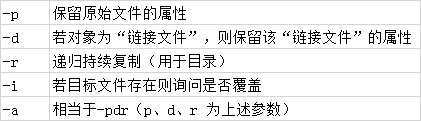
[root@Centos test]# cp A.txt a.txt

[root@Centos test]# ll

total 12

drwxr-xr-x. 3 root root  15 Aug  4 16:47 a

-rw-r--r--. 1 root root 122 Aug  4 16:58 a.txt

-rw-r--r--. 1 root root 122 Aug  4 14:53 A.txt

-rw-r--r--. 1 root root  84 Aug  4 14:53 B.txt

drwxr-xr-x. 2 root root   6 Aug  4 16:46 xinghen1216
4.mv:剪切文件或将文件重命名,格式为“mv [选项] 源文件 [目标路径|目标文件名]”
如果在同一个目录中对一个文件进行剪切操作,其实也就是对其进行重命名:
[root@Centos test]# mv a.txt aa.txt

[root@Centos test]# ll

total 12

drwxr-xr-x. 3 root root  15 Aug  4 16:47 a

-rw-r--r--. 1 root root 122 Aug  4 16:58 aa.txt

-rw-r--r--. 1 root root 122 Aug  4 14:53 A.txt

-rw-r--r--. 1 root root  84 Aug  4 14:53 B.txt

drwxr-xr-x. 2 root root   6 Aug  4 16:46 xinghen1216
5.rm:删除文件或目录,格式为“rm [选项] 文件”。
-f 表示跳过询问确认直接删除
-r表示删除目录
[root@Centos test]# ll

total 12

drwxr-xr-x. 3 root root  15 Aug  4 16:47 a

-rw-r--r--. 1 root root 122 Aug  4 16:58 aa.txt

-rw-r--r--. 1 root root 122 Aug  4 14:53 A.txt

-rw-r--r--. 1 root root  84 Aug  4 14:53 B.txt

drwxr-xr-x. 2 root root   6 Aug  4 16:46 xinghen1216

[root@Centos test]# rm -rf a

[root@Centos test]# ll

total 12

-rw-r--r--. 1 root root 122 Aug  4 16:58 aa.txt

-rw-r--r--. 1 root root 122 Aug  4 14:53 A.txt

-rw-r--r--. 1 root root  84 Aug  4 14:53 B.txt

drwxr-xr-x. 2 root root   6 Aug  4 16:46 xinghen1216
6.dd:按照指定大小和个数的数据块来复制文件或转换文件
Linux系统中有一个名为/dev/zero 的设备文件这个文件不会占用系统存储空间,但却可以提供无穷无尽的数据,因此可以使用它作为dd命令的输入文件,来生成一个指定大小的文件。
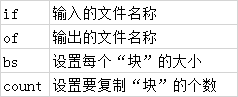
例如我们可以用dd 命令从/dev/zero 设备文件中取出一个大小为560MB 的数据块,然后保存成名为560_file 的文件。
[root@Centos test]# dd if=/dev/zero of=560_file count=1 bs=560M

1+0 records in

1+0 records out

587202560 bytes (587 MB) copied, 0.82832 s, 709 MB/s

[root@Centos test]# ll

total 573444

-rw-r--r--. 1 root root 587202560 Aug  4 17:21 560_file

-rw-r--r--. 1 root root       122 Aug  4 16:58 aa.txt
直接使用dd 命令来压制出光盘镜像文件,将它编程一个可立即使用的iso 镜像:
[root@Centos test]# dd if=/dev/cdrom of=centos-server-7.4.ios

8830976+0 records in

8830976+0 records out

4521459712 bytes (4.5 GB) copied, 111.594 s, 40.5 MB/s
7.file:查看文件的类型,格式为“file 文件名”。
[root@Centos test]# file aa.txt

aa.txt: ASCII text

[root@Centos test]# file xinghen1216

xinghen1216: directory

[root@Centos test]# file /dev/sda

/dev/sda: block special
8.tar对文件进行打包压缩或解压

常用:使用“tar -czvf 压缩包名称.tar.gz 要打包的目录”命令把指定的文件进行打包压缩;相应的解压命令为“tar -xzvf 压缩包名称.tar.gz”
[root@Centos test]# tar -czvf etc.tar.gz /etc

/etc/sane.d/hp5400.conf

/etc/sane.d/hpsj5s.conf

/etc/sane.d/leo.conf

。。。

[root@Centos test]# ll

total 11384

-rw-r--r--. 1 root root      122 Aug  4 16:58 aa.txt

-rw-r--r--. 1 root root 11651868 Aug  4 17:52 etc.tar.gz

drwxr-xr-x. 2 root root        6 Aug  4 17:42 xinghen1216
[root@Centos test]# cd ..

[root@Centos ~]# mkdir test01

[root@Centos ~]# tar -xzvf /root/test/etc.tar.gz -C /root/test01/

etc/smartmontools/smartd.conf

etc/smartmontools/smartd_warning.d/etc/sudoers.d/

etc/wgetrc

。。。
9.在文本中执行关键词搜索,并显示匹配的结果
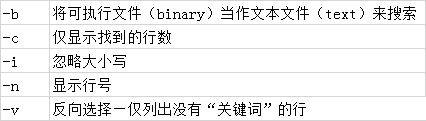
在 Linux 系统中,/etc/passwd 文件是保存着所有的用户信息,而一旦用户的登录终端被设置成/sbin/nologin,则不再允许登录系统,因此可以使用grep 命令来查找出当前系统中不允许登录系统的所有用户信息:
[root@Centos etc]# grep -n /sbin/nologin /etc/passwd

2:bin:x:1:1:bin:/bin:/sbin/nologin

3:daemon:x:2:2:daemon:/sbin:/sbin/nologin

4:adm:x:3:4:adm:/var/adm:/sbin/nologin
10.find:按照指定条件来查找文件,格式为“find [查找路径] 寻找条件操作”
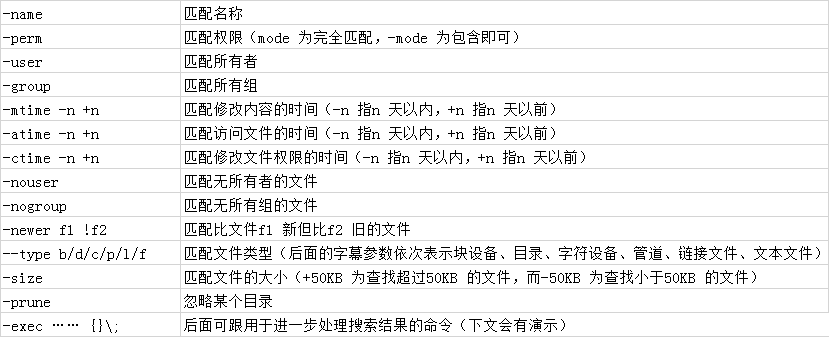
“-exec {} \;”参数,其中的{}表示find 命令搜索出的每一个文件,并且命令的结尾必须是“\;”。
举例:1)获取到/etc目录中所有以host 开头的文件列表
[root@Centos etc]# find /etc -name "host*" -print

/etc/host.conf

/etc/hosts

/etc/hosts.allow

/etc/hosts.deny

/etc/selinux/targeted/active/modules/100/hostname

/etc/hostname

/etc/avahi/hosts
2)在整个系统中搜索权限中包括SUID 权限的所有文件
[root@Centos etc]# find / -perm -4000 -print

find: ‘/proc/84104/task/84104/fd/6’: No such file or directory

find: ‘/proc/84104/task/84104/fdinfo/6’: No such file or directory

find: ‘/proc/84104/fd/6’: No such file or directory

find: ‘/proc/84104/fdinfo/6’: No such file or directory

/usr/bin/fusermount

/usr/bin/passwd

/usr/bin/chfn
3)在整个文件系统中找出所有归属于centos 用户的文件并复制到/root/findresults 目录
[root@Centos etc]# find / -user centos -exec cp -a {} /root/findresults/ \;
5. Linux文件目录管理和打包压缩与搜索命令的更多相关文章
- Linux 打包压缩与搜索命令
1.tar 用于对文件进行打包压缩或解压,格式为tar[选项][文件],-f参数必须放到参数最后一位 tar -czvf etc.tar.gz /etc tar参数及作用 参数 作用 -c 创建压缩文 ...
- linux打包压缩与搜索命令
1.tar命令 tar命令用于对文件进行打包压缩或解压,格式为“tar [选项] [文件]”. tar命令的参数及其作用 参数 作用 -c 创建压缩文件 -x 解开压缩文件 -t 查看压缩包内有哪些 ...
- Linux就该这么学——新手必须掌握的命令之打包压缩与搜索命令组
tar命令 用途 : 对文件进行打包或者解压 格式 : tar [选项] [文件] 表 tar命令的参数及作用 参数 作用 -c 创建压缩文件 -x 解开压缩文件 -t 查看压缩包内有哪些文件 -z ...
- Linux文件目录管理
Linux文件目录管理 文件的路径 路径: . 表示当此层目录 .. 表示上一层目录 - 代表前一个工作目录 ~ 代表"目前用户身份"所在的文件夹 ~account 代表accou ...
- Linux学习之路(三)搜索命令
1.文件搜索命令locate 2.命令搜索命令whereis与which 3.字符串搜索命令grep 4.find命令与grep命令的区别 locate命令相对于find命令搜索非常快,find命令在 ...
- Linux系类(8) - 文件搜索命令locate
文件搜索命令locate 命令格式 locate [文件名] 在后台数据库中按文件名搜索,搜索速度更快,而find.which是遍历所有目录去查找:后台数据库在/var/lib/mlocate (保存 ...
- linux下打包压缩和解压命令
.tar 压缩:tar cvf FileName.tar FileName 解压:tar xvf FileName.tar .gz解压1:gunzip FileName.gz解压2:gzip -d F ...
- Linux 文件目录管理的指令
1.知识点:绝对路径:写法从/(根目录开始) /usr/share/doc 相对路径:不从/开始 如cd ../man 如果清楚文件夹内部情况,建议使用相对路径在文件夹之间跳转,而不用绝对路径,每次 ...
- linux文件目录管理命令
1.touch命令 touch命令用于创建空白文件或设置文件的时间,格式为“touch [选项] [文件]”. touch test命令可以创建出一个名为test的空白文本文件 touch命令的参数 ...
随机推荐
- java注解学习笔记总结
注解的理解 ① jdk 5.0 新增的功能 ② Annotation 其实就是代码里的特殊标记, 这些标记可以在编译, 类加载, 运行时被读取, 并执行相应的处理.通过使用 Annotation,程序 ...
- python数据基本运算处理===循环
一.循环语句 1.while while的循环条件为True,即每次正常循环完毕都会返回判断一次条件 只有读到break才能立刻彻底结束循环,break只能结束本层循环 continue也能立即结束本 ...
- 《Go 语言并发之道》读后感 - 第一章
<Go 语言并发之道>读后感 - 第一章 前言 人生路漫漫,总有一本书帮助你在某条道路上打通任督二脉,<Go 语言并发之道>就是我作为一个 Gopher 道路上的一本打通任督二 ...
- 转 linux终端 字符界面 显示乱码 .
方法一:配置SSH工具 SecureCRT中文版配置 [全局选项]→[默认会话]→[编辑默认设置]→[终端]→[外观]→[字体]→[新宋体 10pt CHINESE_GB2312]→[字符编码 UTF ...
- redis 6.0新特性
防止忘记,记录一下 1.多线程IO Redis 6引入多线程IO,但多线程部分只是用来处理网络数据的读写和协议解析,执行命令仍然是单线程.之所以这么设计是不想因为多线程而变得复杂,需要去控制 key. ...
- 基于 OpenMP 的奇偶排序算法的实现
代码: #include <omp.h> #include <iostream> #include <cstdlib> #include <ctime> ...
- linux源码安装软件的一般方法
rhel系统貌似安装不了xmgrace,配置的时候居然说要那个M*tif库.百度了一下,需要openmotif库,然后用root账户想要用yum安装一下这个库,搞了好久没搞懂.后面搞明白了,原因竟是因 ...
- Promethues 之 Thanos
Promethues简介和原理 请看我之前写的 Prometheus简介,原理和安装 https://www.cnblogs.com/you-men/p/12839535.html 官方架构问题 官方 ...
- 【Java】面向对象
重新搞一波 复习巩固 简单记录 慕课网 imooc Java 零基础入门-Java面向对象-面向对象 都是视频课件里的. 文章目录 面向对象 什么是对象 什么是面向对象 类 什么是对象的属性和方法 类 ...
- 【ORA】ORA-32004: 问题分析和解决
今天做一个特殊的实验,需要重启数据库 数据库关闭没有问题 SQL> shutdown immediate; Database closed. Database dismounted. ORACL ...