
Typora标题自动编号+设定快捷键技巧
Typora标题自动编号
提示:要了解将这些CSS片段放在哪里,请参阅添加自定义CSS。
打开Typora偏好设置,打开主题文件夹,在主题文件夹中创建base.user.css文件,放置以下内容,则Typora自带的几个主题都会生效。
文章中的自动编号
此方法自动将编号添加到文章中的所有标题,如下所示:
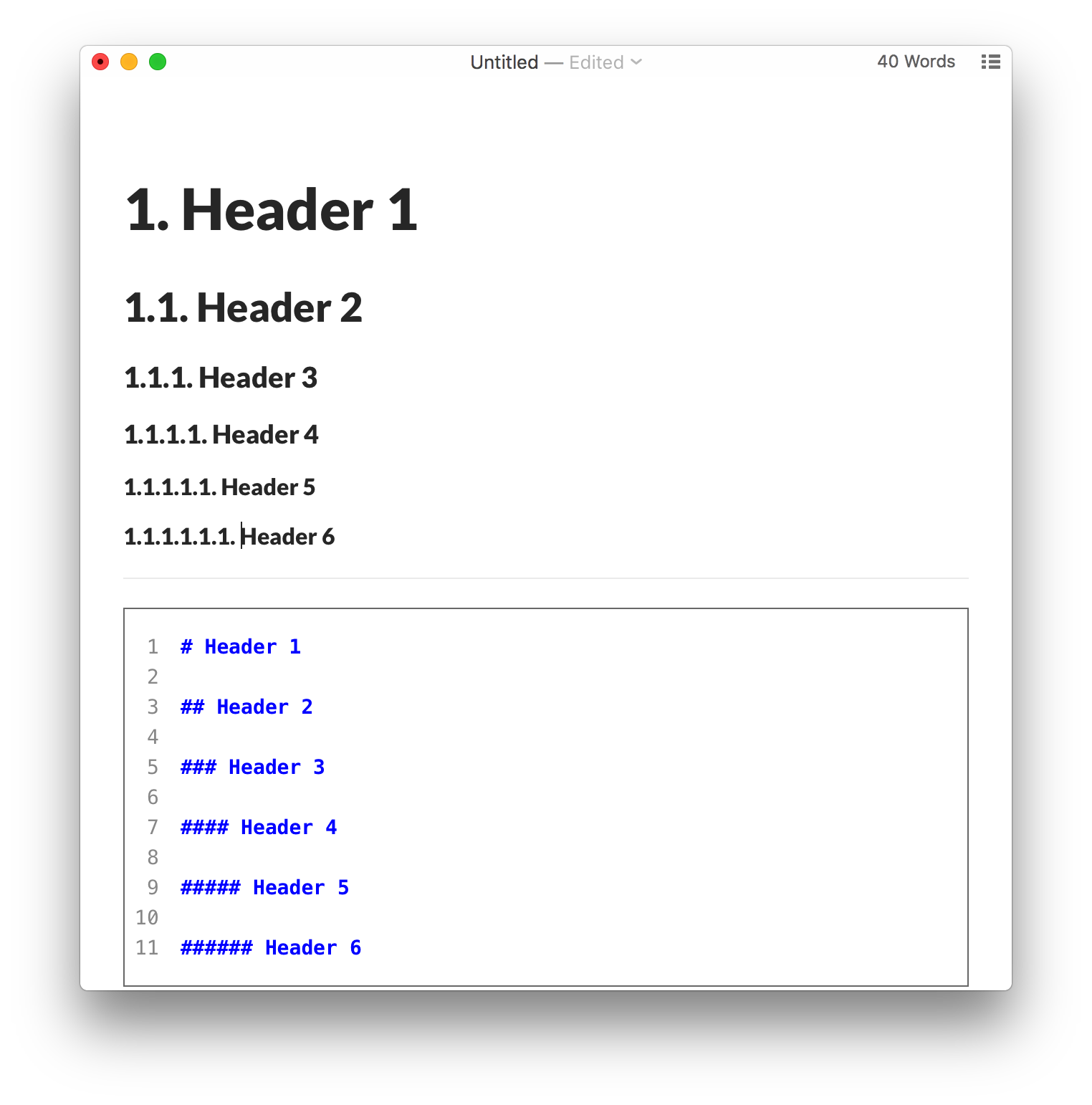
为此,请将以下内容添加到主题文件夹中的base.user.css或[theme] .user.css中。
/** initialize css counter */

#write {

    counter-reset: h1

}

h1 {

    counter-reset: h2

}

h2 {

    counter-reset: h3

}

h3 {

    counter-reset: h4

}

h4 {

    counter-reset: h5

}

h5 {

    counter-reset: h6

}

/** put counter result into headings */

#write h1:before {

    counter-increment: h1;

    content: counter(h1) ". "

}

#write h2:before {

    counter-increment: h2;

    content: counter(h1) "." counter(h2) ". "

}

#write h3:before,

h3.md-focus.md-heading:before /** override the default style for focused headings */ {

    counter-increment: h3;

    content: counter(h1) "." counter(h2) "." counter(h3) ". "

}

#write h4:before,

h4.md-focus.md-heading:before {

    counter-increment: h4;

    content: counter(h1) "." counter(h2) "." counter(h3) "." counter(h4) ". "

}

#write h5:before,

h5.md-focus.md-heading:before {

    counter-increment: h5;

    content: counter(h1) "." counter(h2) "." counter(h3) "." counter(h4) "." counter(h5) ". "

}

#write h6:before,

h6.md-focus.md-heading:before {

    counter-increment: h6;

    content: counter(h1) "." counter(h2) "." counter(h3) "." counter(h4) "." counter(h5) "." counter(h6) ". "

}

/** override the default style for focused headings */

#write>h3.md-focus:before,

#write>h4.md-focus:before,

#write>h5.md-focus:before,

#write>h6.md-focus:before,

h3.md-focus:before,

h4.md-focus:before,

h5.md-focus:before,

h6.md-focus:before {

    color: inherit;

    border: inherit;

    border-radius: inherit;

    position: inherit;

    left:initial;

    float: none;

    top:initial;

    font-size: inherit;

    padding-left: inherit;

    padding-right: inherit;

    vertical-align: inherit;

    font-weight: inherit;

    line-height: inherit;

}
TOC中的自动编号
如果要TOC显示自动编号的实体,可以尝试使用Typora用户发布的http://pastebin.com/NYugSbXk。
自动编号大纲面板
要在Typora的“轮廓”面板中显示自动编号,请在“首选项”面板中禁用可折叠的轮廓面板,然后尝试https://pastebin.com/XmYgBbaz。
Typora设定快捷键
文件 ---> 偏好设置 ---> 往下拉有一个 打开高级设置 ,点击--->看到两个json格式的文件,打开第二个(conf.user.json)
用记事本打开--->第17行“keyBinding”,在大括号中写 "代码块":“你要设置的快捷键”,比如我的是“代码块”:"Ctrl+Alt+P",保存文件,重启typora即可生效。
  // Custom key binding, which will override the default ones.

  "keyBinding": {

    // for example:

    // "Always on Top": "Ctrl+Shift+P"

    "注释":"Ctrl+Alt+/",

    "代码块":"Ctrl+Alt+P",

    "打开文件夹…":"Ctrl+Alt+O"

  },
Typora标题自动编号+设定快捷键技巧的更多相关文章
- word2007二级标题自动编号不从大标题开始的解决方法
今天在编写word文档的时候,遇到一个很奇怪的问题,word2007二级标题自动编号不从大标题开始,可能我说的比较模糊,我截个图大家一看就明白了. 我想要的是2.1 2.2结果,他确是从1.1开始了. ...
- Word章 节标题自动编号并由此自动生成目录 -- 含视频教程(1)
1. 写论文之前事先调好 写论文的时候,难免要用到章节,如何实现下图的效果呢? 其实结合用好两个功能就行了: >> 视频教程链接:B站,速度快,清晰 事先调好,可以给后续工作带来很多便利, ...
- word2010 标题自动编号设置
今天打算写篇文档,发现生成标题时无法自动生成编号,上网查了一下,现在把解决办法跟附图一块儿奉上. 新建word文档: 默认版式: 设置自动编号所在工具栏位置: 设置选择: 最终结果:
- word 文献标题自动编号
来自:word中自动编号和多级编号的使用 选中标题或段落,点击鼠标右键,在编号菜单内选择适合的自动编号样式.或者在窗口上方的“开始”选项卡中选择编号样式.如果对已选的编号样式不满意,可以照以上方法直接 ...
- word标题自动编号
1.打开word文档中多级列表->定义新的多级列表 2.根据下图设置级别对应的标题,然后确定
- 在Word中为标题样式添加自动编号功能
原文地址:http://blog.chinaunix.net/uid-16685753-id-2738270.html 摘要: 本文可以帮助你在Office 2007中为Word标题样式添加和设置自动 ...
- word 论文排版 —— 按指定格式章节的自动编号
在word中如何实现章节标题自动编号 标题样式与标题的编号是两个步骤,为标题建立编号是在为标题样式确定的基础后进行的.这是显而易见的,也即只有先定义了多级标题(也可使用 word 自带的标题样式),才 ...
- Word 图片表格自动编号、交叉引用、批量更改图片标题格式、生成图录和表录
1. 前言 论文往往里往往需要插入很多图片,下放需要标上 图a-b,其中 a 是章节号码,b是该章节中第几张图.比如第一章第二副图就是 图1-2.但是有个问题,每次我们插入了一张图或删掉了一张,前后的 ...
- python 实现 md文档自动编号
目录 1. 原理 2. 运行方法 3. 效果 4. 代码 1. 原理 正则匹配对相应字符串进行替换 2. 运行方法 python md_convert.py [a.md, b.md,...] # 转换 ...
随机推荐
- browsers simulator
browsers simulator https://developers.google.com/web/tools/chrome-devtools/device-mode/testing-other ...
- CSS3 & CSS var & :root
CSS3 & CSS var & :root How to change CSS :root color variables in JavaScript https://stackov ...
- how to get window width in javascript
how to get window width in javascript how to get window width in js How to Detect Screen Resolution ...
- SSR & 轮询登录 & Token
SSR & 轮询登录 & Token https://yuchengkai.cn/docs/frontend 扫码登录原理 https://www.cnblogs.com/xgqfrm ...
- 智能合约稳定币USDN的价值在哪里?
近几年来,区块链和数字货币市场快速发展,客观上需要价格相对稳定的交易媒介和贮藏手段,从而推动以链上资产或链下资产抵押型稳定币和算法型稳定币出现,以实现币价相对稳定的数字货币.市场上开始出现了诸如USD ...
- C++算法代码——n的全排列/全排列问题
题目来自:http://218.5.5.242:9018/JudgeOnline/problem.php?id=1541 题目描述 输入一个整数n,输出的n(n<=100)的全排列. 输入 输入 ...
- 关于Sidecar Pattern
本文转载自关于Sidecar Pattern 导语 Sidecar 是一个很纠结的名字,我们在翻译技术雷达时采用了一个比较通俗的翻译,即边车,而这个词随着微服务的火热与 Service Mesh 的逐 ...
- vue版本一直是2.9.6版本,卸载也卸载不掉,更新也更新不了
原文链接:https://blog.csdn.net/zlzbt/article/details/110136755 主要是找到本地文件 E:\StudyFile\VueStudy λ where v ...
- event loop整理
宏任务和微任务 让我们从浏览器加载 script 说起,当浏览器加载完 script 之后,不考虑 script 标签的 defer 属性,script 将被立即执行.这时,我们就创建了一个宏任务. ...
- 原生JS快速实现拖放
原生 JS 快速实现拖放 拖放是很常见的一种交互效果,很多时候我们都会借助于第三方的控件来实现,其实用原生 js 实现起来也非常的方便.接下来我们就用原生 js 和 css 快速实现拖放效果 html ...