
hive 将hive表数据查询出来转为json对象和json数组输出
一、将hive表数据查询出来转为json对象输出
1、将查询出来的数据转为一行一行,并指定分割符的数据
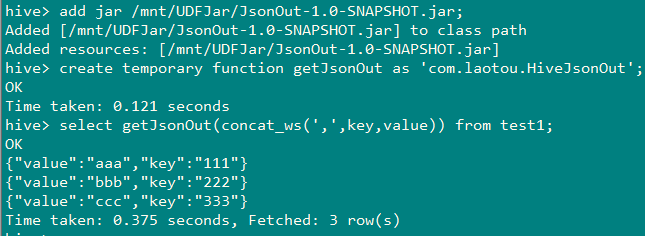
2、使用UDF函数,将每一行数据作为string传入UDF函数中转换为json再返回
1、准备数据
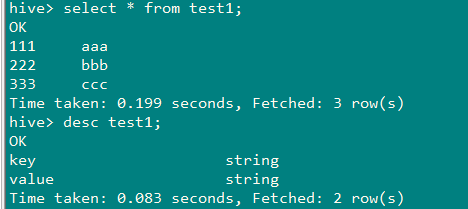
2、查询出来的数据转为一行一行,并指定分割符的数据

3、准备UDF函数
package com.laotou;

import org.apache.hadoop.hive.ql.exec.UDF;

import org.json.JSONException;

import org.json.JSONObject;

/**

 * @Author:

 * @Date: 2019/8/9

 */

public class HiveJsonOut extends UDF{public static String evaluate(String jsonStr) throws JSONException {

        String[] split = jsonStr.split(",");

        JSONObject result = new JSONObject();

        result.put("key", split[0]);

        result.put("value", split[1]);

        return String.valueOf(result);

    }

}
package com.laotou;

import org.apache.hadoop.hive.ql.exec.UDF;

import org.json.JSONException;

import org.json.JSONObject;

/**

 * @Author:

 * string转json:{"notifyType":13,"notifyEntity":{"school":"小学","name":"张三","age":"13"}}

 * @Date: 2019/8/14

 */

public class Record2Notify extends UDF {

    private static final String split_char = "!";

    private static final String null_char = "\002";

    public static String evaluate(int type, String line) throws JSONException {

        if (line == null) {

            return null;

        }

        JSONObject notify = new JSONObject();

        JSONObject entity = new JSONObject();

        notify.put("notifyType", type);

        String[] columns = line.split(split_char, -1);

        int size = columns.length / 2;

        for (int i = 0; i < size; i++) {

            String key = columns[i*2];

            String value = columns[i*2+1];

            if (isNull(key)) {

                throw new JSONException("Null key.1111111111");

            }

            if (!isNull(value)) {

                entity.put(key, value);

            }

        }

        notify.put("notifyEntity", entity);

        return notify.toString();

    }

    private static boolean isNull(String value) {

        return value == null || value.isEmpty() || value.equals(null_char);

    }

    public static void main(String[] args) throws JSONException {

        System.out.println(evaluate(13,"name!张三!age!13!school!小学"));

    }

}
二、将hive表数据查询出来转为json数组输出
思路:
1、使用UDF函数(见上面内容)将查询出来的每一条数据转成json对象
select getJsonOut(concat_ws(',',key,value)) as content from test1
2、将第一步查询的结果进行列转行,并设置为逗号进行分割,得到如下字符串
select concat_ws('!!',collect_list(bb.content)) as new_value

 from

(select getJsonOut(concat_ws(',',key,value)) as content from test1) bb;
结果如图:

3、使用UDF函数(JsonArray)将第2步中得到的字符串放入数组对象,准备UDF函数
package com.laotou;

import org.apache.hadoop.hive.ql.exec.UDF;
import org.json.JSONArray;
import org.json.JSONException;

/**
 * create temporary function getJsonArray as 'com.laotou.HiveJson';
 * @Author:
 * @Date: 2019/8/9
 */
public class HiveJson extends UDF{
    public static JSONArray evaluate(String jsonStr) throws JSONException {
        String[] split = jsonStr.split("!!");
        JSONArray jsonArray = new JSONArray();
        jsonArray.put(split[0]);
        jsonArray.put(split[1]);
        jsonArray.put(split[2]);
        jsonArray.put(split[3]);
        return jsonArray;
    }

}
4、测试
select getJsonArray(new_value) from

(select cast(concat_ws('!!',collect_list(bb.content)) as string) as new_value from

(select getJsonOut(concat_ws(',',key,value)) as content from test1) bb) cc;
hive 将hive表数据查询出来转为json对象和json数组输出的更多相关文章
- Hive的join表连接查询的一些注意事项
Hive支持的表连接查询的语法: join_table: table_reference JOIN table_factor [join_condition] | table_reference {L ...
- SQL Server 的表数据简单操作(表数据查询)
--表数据查询----数据的基本查询-- --数据简单的查询--select * | 字段名[,字段名2, ...] from 数据表名 [where 条件表达式] 例: use 商品管理数据库 go ...
- 10Oracle Database 数据表数据查询
Oracle Database 数据表数据查询 DML 数据操纵语言 - 数据的查看和维护 select / insert /delete /update 基本查询语句 Select [distinc ...
- MySQL多表数据查询(DQL)
数据准备: /* ------------------------------------创建班级表------------------------------------ */ CREATE TAB ...
- MySQL单表数据查询(DQL)
数据准备工作: CREATE TABLE student( sid INT PRIMARY KEY AUTO_INCREMENT, sname ), age TINYINT, city ), scor ...
- MySQL学习总结(五)表数据查询
查询数据记录,是指从数据库对象表中获取所要查询的数据记录,该操作可以说是数据最基本的操作之一,也是使用频率最高.最重要的数据操作. 1.单表数据记录查询 1.1.简单数据查询 SELECT field ...
- mybatis多表关联查询之resultMap单个对象
resultMap的n+1方式实现多表查询(多对一) 实体类 创建班级类(Clazz)和学生类(Student),并在Student中添加一个Clazz类型的属性,用于表示学生的班级信息. mappe ...
- SpringBoot之封装json对象返回json数据
/** * @description:封装json对象,所有返回结果都使用它 **/ public class Result<T> { private int code;// 业务自定义状 ...
- Hive(五)【DQL数据查询】
目录 一. 基本查询 1.1 算数运算符 1.2 常用聚合函数 1.3 limit 1.4 where 1.5 比较运算符(between|in|is null) 1.6 LIKE和RLIKE 1.7 ...
随机推荐
- 手把手教你写DI_2_小白徒手撸构造函数注入
小白徒手撸构造函数注入 在上一节:手把手教你写DI_1_DI框架有什么? 我们已经知道我们要撸哪些东西了 那么我们开始动工吧,这里呢,我们找小白同学来表演下 小白同学 :我们先定义一下我们的广告招聘纸 ...
- 【题解】「CF675A」Infinite Sequence
我用的是:分类讨论+暴力 其中分类讨论中,我用了一种namespace名命名空间.如果: \(c = 0\) : 当 \(a == b\) 时,输出 \(YES\) 否则 \(NO\) \(c < ...
- MySQL技术内幕InnoDB存储引擎(三)——文件相关
构成MySQL数据库和InnoDB存储引擎表的文件类型有: 参数文件:MySQL实例运行时需要的参数就是存储在这里. 日志文件:用来记录MySQL实例对某种条件做出响应时写入的文件. socket文件 ...
- 最短路径——BFS算法
最短路径--BFS算法 单源最短路径问题 每对顶点间的最短路径 BFS求无权图的单源最短路径 bool visited[MAX_VERTEX_NUM]; //访问标记数组 //广度优先遍历 void ...
- Day2 之 元组tuple
tuple 元组 也是有序列表 ,与list非常相似,但是tuple一旦初始化就不能修改. name = ('a','b',1,2,3,True) tuple ...
- docker 使用ubuntu 系统
1.安装Ubuntu系统命令:docker pull ubuntu这是一个极度精简的系统,连最基本的wget命令都没有:所以先要apt-get update升级系统和安装apt-get install ...
- Docker(四):Docker安装Redis
查找Redis镜像 镜像仓库 https://hub.docker.com/ 下拉镜像 docker pull redis 查看镜像 docker images 创建Redis容器 运行Redis镜像 ...
- pytest接口测试轻松入门
通过Postman请求结果如下图: 那我们怎么用pytest进行测试呢? 在接口测试,我们要用到requests包,实现代码如下: import pytest import allure import ...
- 网络编程-python实现-socket(1.1.1)
@ 目录 1.不同电脑进程之间如何通信 2.什么是socket 3.创建socket 1.不同电脑进程之间如何通信 利用ip地址 协议 端口 标识网络的进程,网络中的进程通信就可以利用这个标志与其他进 ...
- .Net 常用ORM框架对比:EF Core、FreeSql、SqlSuger
前言: 最近由于工作需要,需要选用一种ORM框架,也因此对EF Core.FreeSql.SqlSuger作简单对比.个人认为各有有优势,存在即合理,不然早就被淘汰了是吧,所以如何选择因人而议.因项目 ...