
.net core编写转发服务
我有个小伙伴问我,他需要写一个转发服务的他有很多功能要通过他的服务转发~

技术栈又不一定asp.net core,我就想起泥水老前辈的BeetleX.FastHttpApi
中午午休,折腾了一会儿前辈,问清楚了FastHttpApi如何配置控制器依赖注入和控制器的路由配置
花了一些时间折腾,算折腾出来了
入口调用部分代码如下
        static void Main(string[] args)

        {

            UnitWork.Instance.Register((services) =>

            {

                services.AddScoped<Forward.Core.Forward>();

                services.AddSingleton<MaillService>();

                services.AddSingleton(typeof(IConfig), (serviceProvider)=>

                {

                    var instance = new Config();

                    instance.TryAdd<MaillService>("maill");

                    return instance;

                });

            });

            UnitWork.Instance.Builder();

            var mApiServer = new HttpApiServer();

            mApiServer.ActionFactory.ControllerInstance += (o, e) =>

            {

                e.Controller = UnitWork.Instance.ServiceProvider.GetRequiredService(e.Type);

            };

            mApiServer.Register(Assembly.Load("Forward.Core"));

            mApiServer.Open();

            Console.ReadLine();

        }

    }
服务本体
    public class MaillService : IForwardService

    {

        private string userName = "2598145226@qq.com";

        private string pawssword = "********";

        private string _host = "smtp.qq.com";

        [ParamType(typeof(MaillModel))]

        public async Task<object> ExecuteAsync(object param)

        {

            MaillModel maillModel = param as MaillModel;

            using (SmtpClient smtpClient = new SmtpClient(_host, ))

            {

                smtpClient.DeliveryMethod = SmtpDeliveryMethod.Network;//指定电子邮件发送方式

                smtpClient.Host = _host;//指定SMTP服务器

                smtpClient.Credentials = new NetworkCredential(userName, pawssword);//用户名和密码

                smtpClient.EnableSsl = true;

                MailAddress fromAddress = new MailAddress(userName, "华灯");

                MailAddress toAddress = new MailAddress(maillModel.ToMail);

                MailMessage mailMessage = new MailMessage(fromAddress, toAddress);

                mailMessage.Subject = maillModel.Subject;//主题

                mailMessage.SubjectEncoding = Encoding.UTF8;

                mailMessage.Body = maillModel.Body;//内容

                mailMessage.BodyEncoding = Encoding.UTF8;//正文编码

                mailMessage.IsBodyHtml = true;//设置为HTML格式

                mailMessage.Priority = MailPriority.Normal;//优先级

                await smtpClient.SendMailAsync(mailMessage);

            }

            return true;

        }

    }

    internal class MaillModel

    {

        public string ToMail { get; set; }

        public string Subject { get; set; }

        public string Body { get; set; }

    }
转发服务部分
   [Controller(BaseUrl = "/Forward", SingleInstance = false)]

    public class Forward

    {

        private IForwardFactory ForwardFactory { get; }

        public Forward(IForwardFactory forwardFactory)

        {

            ForwardFactory = forwardFactory;

        }

        [Post(Route = "{url}")]

        [NoDataConvert]

        public async Task<ResponseModel> Service(string url,IHttpContext context)

        {

            var result = new ResponseModel()

            {

                RequestTime = DateTime.Now

            };

            try

            {

                var json = context.Request.Stream.ReadString(context.Request.Length);

                result.Data = await ForwardFactory.ForwardAsync(url, json);

                result.ResponseTime = DateTime.Now;

                result.IsSuccessFul = true;

            }

            catch(Exception ex)

            {

                result.ResponseTime = DateTime.Now;

                result.Data = ex.ToString();

            }

            return result;

        }

    }
   [Controller(BaseUrl = "/Forward", SingleInstance = false)]

    public class Forward

    {

        private IForwardFactory ForwardFactory { get; }

        public Forward(IForwardFactory forwardFactory)

        {

            ForwardFactory = forwardFactory;

        }

        [Post(Route = "{url}")]

        [NoDataConvert]

        public async Task<ResponseModel> Service(string url,IHttpContext context)

        {

            var result = new ResponseModel()

            {

                RequestTime = DateTime.Now

            };

            try

            {

                var json = context.Request.Stream.ReadString(context.Request.Length);

                result.Data = await ForwardFactory.ForwardAsync(url, json);

                result.ResponseTime = DateTime.Now;

                result.IsSuccessFul = true;

            }

            catch(Exception ex)

            {

                result.ResponseTime = DateTime.Now;

                result.Data = ex.ToString();

            }

            return result;

        }

    }
他只需要在入口地方注入服务即可
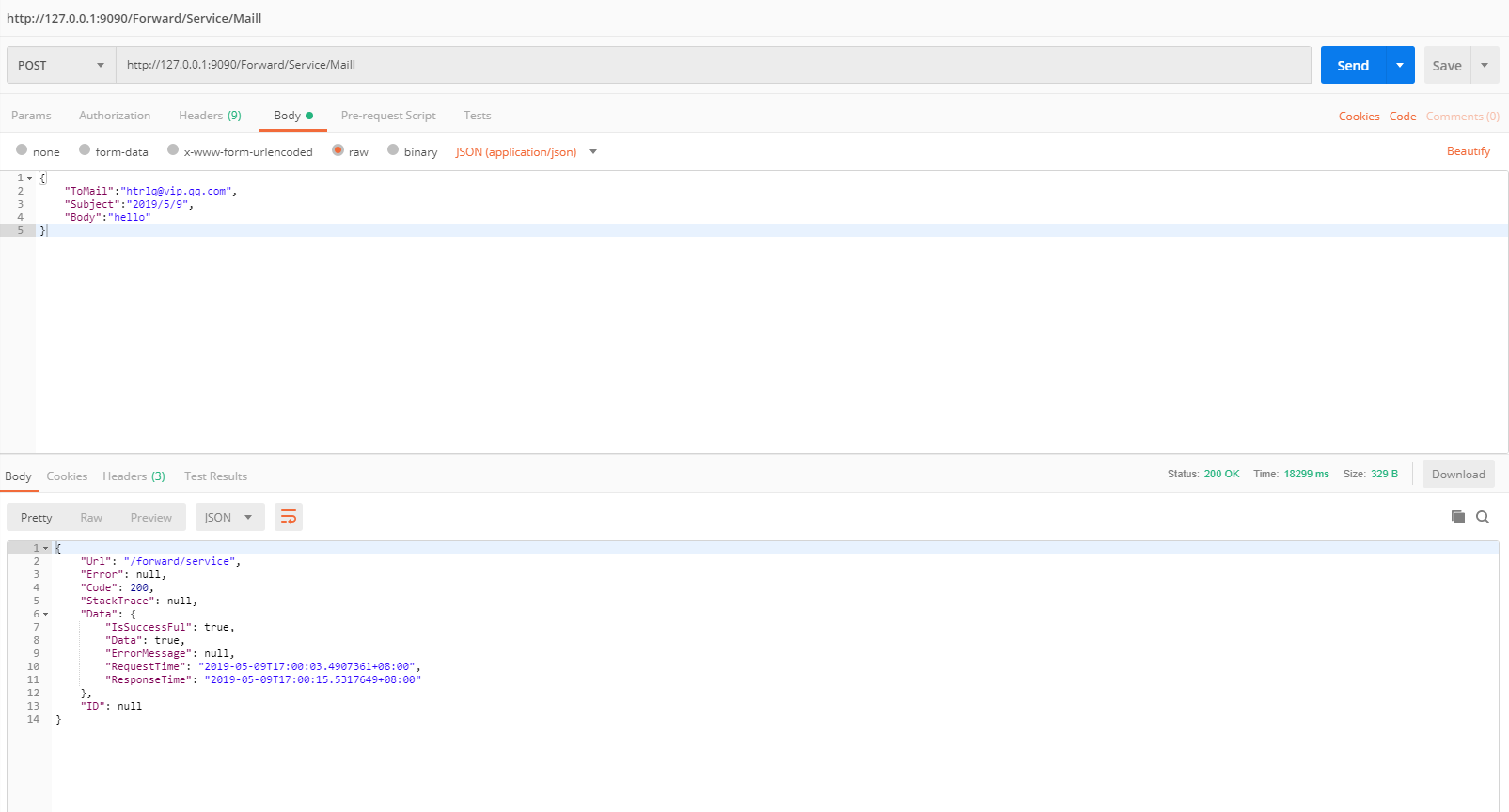
调用一个发送邮件的服务
项目在
https://github.com/htrlq/ForwardService
.net core编写转发服务的更多相关文章
- .net core编写转发服务(二) 添加服务发布订阅
源设计就单纯完成了把服务转发到特定的服务模块,一定程度上解耦了业务流程 但是我们实际开发过程中会面临服务转发后还有一些列关联的服务 举个例子 你调用了发送邮件的服务,接下来会面临扣费的服务,扣费之后会 ...
- .net core编写转发服务(三) 接入Polly
在web服务里面,很常见出现各种问题,需要一些响应的策略,比如服务繁忙的时候,重试,或者重试等待 服务繁忙的时候根据策略即使处理 关于接入Polly我还是沿用之前的代码,继续迭代 Web Api用的是 ...
- .Net Core with 微服务 - Ocelot 网关
上一次我们通过一张架构图(.Net Core with 微服务 - 架构图)来讲述了微服务的结构,分层等内容.从现在开始我们开始慢慢搭建一个最简单的微服务架构.这次我们先用几个简单的 web api ...
- .Net Core with 微服务 - Consul 注册中心
上一次我们介绍了 Ocelot 网关的基本用法.这次我们开始介绍服务注册发现组件 Consul 的简单使用方法. 服务注册发现 首先先让我们回顾下服务注册发现的概念. 在实施微服务之后,我们的调用都变 ...
- 使用AWS亚马逊云搭建Gmail转发服务(三)
title: 使用AWS亚马逊云搭建Gmail转发服务(三) author:青南 date: 2015-01-02 15:42:22 categories: [Python] tags: [log,G ...
- 使用AWS亚马逊云搭建Gmail转发服务(二)
title: 使用AWS亚马逊云搭建Gmail转发服务(二) author:青南 date: 2014-12-31 14:44:27 categories: [Python] tags: [Pytho ...
- 使用AWS亚马逊云搭建Gmail转发服务(一)
title: 使用AWS亚马逊云搭建Gmail转发服务(一) author:青南 date: 2014-12-30 15:41:35 categories: Python tags: [Gmail,A ...
- C#码农的大数据之路 - 使用Ambari自动化安装HDP2.6(基于Ubuntu16.04)并运行.NET Core编写的MR作业
准备主机 准备3台主机,名称作用如下: 昵称 Fully Qualified Domain Name IP 作用 Ubuntu-Parrot head1.parrot 192.168.9.126 Am ...
- 手把手教你使用spring cloud+dotnet core搭建微服务架构:服务治理(-)
背景 公司去年开始使用dotnet core开发项目.公司的总体架构采用的是微服务,那时候由于对微服务的理解并不是太深,加上各种组件的不成熟,只是把项目的各个功能通过业务层面拆分,然后通过nginx代 ...
随机推荐
- Python入门002
1.编程语言介绍 分类:机器语言汇编语言高级语言(编译型.解释型号) 总结:#1.执行效率:机器语言>汇编语言>高级语言(编译型>解释型) #2.开发效率:机器语言<汇编语言& ...
- @Autowired 引发的一系列思考
关于Java注解 注解定义 标记注解 - 没有元素 @interface Marker { } 单元素注解 - 只有一个元素 @interface Single { String value() de ...
- Scala 面向对象(六):面向对象的特征二:继承 (一)
1 Scala继承的基本语法 class 子类名 extends 父类名 { 类体 } class Person { var name : String = _ var age : Int = _ d ...
- 机器学习实战基础(二十三):sklearn中的降维算法PCA和SVD(四) PCA与SVD 之 PCA中的SVD
PCA中的SVD 1 PCA中的SVD哪里来? 细心的小伙伴可能注意到了,svd_solver是奇异值分解器的意思,为什么PCA算法下面会有有关奇异值分解的参数?不是两种算法么?我们之前曾经提到过,P ...
- HLS的M3U8文件介绍
HLS的M3U8文件介绍 HLS (HTTP Live Streaming)是Apple的动态码率自适应技术.主要用于PC和Apple终端的音视频服务. 相较于实时传输协议(RTP),HLS可以穿过任 ...
- mysql groupby 字段合并问题(group_concat)
在我们的日常mysql查询中,我们可能会遇到这样的情况: 对表中的所有记录进行分类,并且我需要得到每个分类中某个字段的全部成员. 上面的话,大家看起来可能不太好懂,下面举一个例子来给大家说明. 现在我 ...
- Spring Bean的生命周期 ---附详细流程图及测试代码
一.生命周期流程图: Spring Bean的完整生命周期从创建Spring容器开始,直到最终Spring容器销毁Bean,这其中包含了一系列关键点 假设一个Bean实现了所有的接口,大的概况一下Be ...
- Ethical Hacking - GAINING ACCESS(2)
Server Side Attacks - INFORMATION GATHERING Need an IP address. Very simple if target is on the same ...
- C++ RMQ问题
RMQ问题是区间求最值问题,就是求一个数组第i个到第j个中最大数或最小数的算法. 这个算法有一些倍增思想,也有一些二分思想.具体是一个数组,m[i][j]表示从i开始往后数2的j次方个数的最大值或最小 ...
- IDEA 2020版破解
这期教一下大家如何破解IDEA 最新版破解教程 有以前的idea建议卸载哈~安装最新版的版本 一:我们首先去idea官网下载最新版 下方是idae官网2020最新链接 https://www.jetb ...