
Vue购物车实例
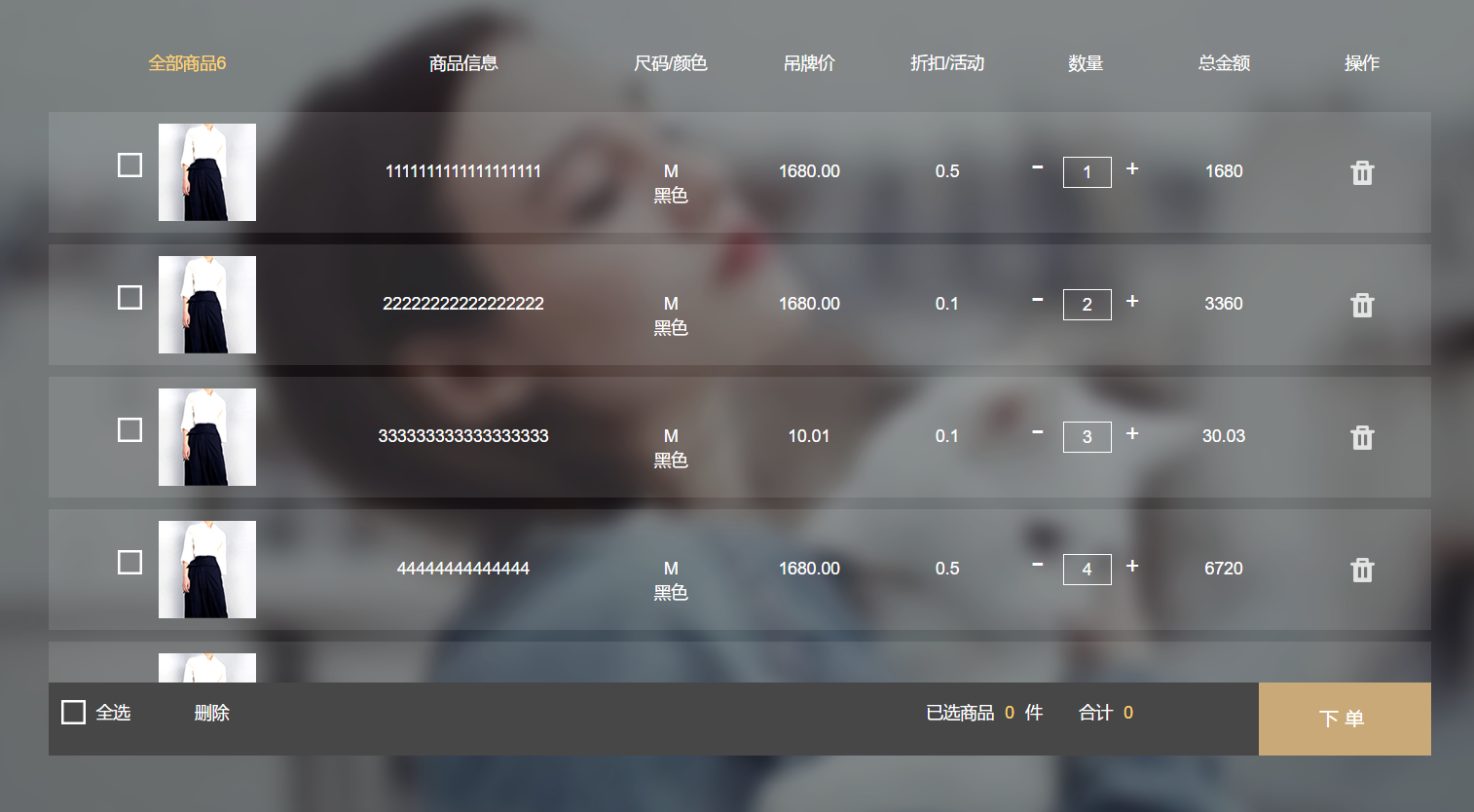
<div class="buyCarBox" id="buyCarBox" v-cloak>

		<div class="haveCloth" v-if="cloths.length">

			<div class="cloth-thead">

				<div class="cloth-td-head">全部商品{{ cloths.length }}</div>

				<div class="cloth-td-head">商品信息</div>

				<div class="cloth-td-head">尺码/颜色</div>

				<div class="cloth-td-head">吊牌价</div>

				<div class="cloth-td-head">折扣/活动</div>

				<div class="cloth-td-head">数量</div>

				<div class="cloth-td-head">总金额</div>

				<div class="cloth-td-head">操作</div>

			</div>

			<div class="buyCarCloth">

				<div class="hasCloth">

				<ul class="clothBox">

					<li class="cloth-tr" v-for="(ocloth,index) in cloths" :class="{ 'active-tr':ocloth.Checked == 1 }">

						<div class="cloth-td clothImage">

							<span class="checkboxImg" v-bind:data-checked=ocloth.Checked v-on:click=checkedCloth($event,index)>

								<img src="/Content/Images/information/buyCarNoCheaked.png" />

								<img class="checkedD" src="/Content/Images/information/buyCarClothChecked.png" />

							</span>

							<img :src=ocloth.ImagePath />

						</div>

						<div class="cloth-td clothName">{{ ocloth.Name }}</div>

						<div class="cloth-td sizeColor">

							<div>{{ ocloth.Size }}</div>

							<div>{{ ocloth.Color }}</div>

						</div>

						<div class="cloth-td clothPrice">{{ ocloth.Price }}</div>

						<div class="cloth-td clothActive">{{ ocloth.Active }}</div>

						<div class="cloth-td clothAddCut">

							<span v-on:click=cutNum(index)> - </span>

								<input type="number"  :value=ocloth.Count v-model=ocloth.Count v-on:keyup=minNum($event,index) />

							<span v-on:click=addNum(index)> + </span>

						</div>

						<div class="cloth-td">{{ ocloth.Count * ocloth.Price }}</div>

						<div class="cloth-td"><img class="delCloth" title="删除" v-on:click=delCloth(index) src="/Content/Images/information/delIcon.png" /></div>

					</li>

				</ul>

			</div>

			</div>

			<div class="totalCount">

				<div class="totalAllCheck" v-bind:data-state=totalAllCheck v-on:click=AllChecked()>

					<img class="totalAllchecked" src="/Content/Images/information/buyCarNoCheaked.png" />

					<img class="totalAllUnChecked" src="/Content/Images/information/buyCarClothChecked.png" />

					<span>{{ totalAllCheck ?'全不选':'全选' }}</span>

				</div>

				<div class="goBuy">

					下单

				</div>

				<div class="batchDelCloth" v-on:click=batchDelCloth()>

					删除

				</div>

				<div class="totalPrice">

					合计

					<span>{{ totalPrice }}</span>

				</div>

				<div class="clothCount">

					已选商品

					<span>{{ totalCount }}</span> 件

				</div>

			</div>

		</div>

		<div class="noCloth" v-else>

			<img class="noClothImage" src="/Content/Images/information/emptyBuyCar.png" />

			<span class="noClothMsg">您的购物车是空的,快去<a href="#">挑选商品></a></span>

		</div>

	</div>

<script>

	var buyCar = new Vue({

		el: "#buyCarBox",

		data: {

			totalAllCheck: 0,

			cloths: [{

					ImagePath: '/Content/Images/information/carClothDemo.jpg',

					Name: '1111111111111111111',

					Size: 'M',

					Color: '黑色',

					Price: '1680.00',

					Active: '0.5',

					Count: '1',

					Checked: 0

				},

				{

					ImagePath: '/Content/Images/information/carClothDemo.jpg',

					Name: '22222222222222222',

					Size: 'M',

					Color: '黑色',

					Price: '1680.00',

					Active: '0.1',

					Count: '2',

					Checked: 0

				},

				{

					ImagePath: '/Content/Images/information/carClothDemo.jpg',

					Name: '333333333333333333',

					Size: 'M',

					Color: '黑色',

					Price: '10.01',

					Active: '0.1',

					Count: '3',

					Checked: 0

				},

				{

					ImagePath: '/Content/Images/information/carClothDemo.jpg',

					Name: '44444444444444',

					Size: 'M',

					Color: '黑色',

					Price: '1680.00',

					Active: '0.5',

					Count: '4',

					Checked: 0

				},

				{

					ImagePath: '/Content/Images/information/carClothDemo.jpg',

					Name: '555555555555',

					Size: 'M',

					Color: '黑色',

					Price: '1680.00',

					Active: '0.1',

					Count: '5',

					Checked: 0

				},

				{

					ImagePath: '/Content/Images/information/carClothDemo.jpg',

					Name: '66666666666666',

					Size: 'M',

					Color: '黑色',

					Price: '1680.00',

					Active: '0.5',

					Count: '6',

					Checked: 0

				},

			]

		},

		computed: {

			//选中商品总数量

			totalCount: function() {

				var totalCount = 0;

				for(var i = 0; i < this.cloths.length; i++) {

					if(this.cloths[i].Checked == 1) {

						totalCount += parseInt(this.cloths[i].Count)

					}

				}

				if(totalCount == 0) {

					this.totalAllCheck =  0;

					$('.totalAllCheck').addClass('totalUnCheck')

				}

				return totalCount;

			},

			//选中商品总价

			totalPrice: function() {

				var totalPrice = 0;

				for(var i = 0; i < this.cloths.length; i++) {

					if(this.cloths[i].Checked == 1) {

						totalPrice += parseInt(this.cloths[i].Count) * parseFloat(this.cloths[i].Price)

					}

				}

				return totalPrice;

			},

		},

		methods: {

			checkedCloth: function(_this, index) {

				var oClothchecked;

				var checked = this.cloths[index].Checked;

				if(checked == 0) {

					this.cloths[index].Checked = 1;

				} else {

					this.cloths[index].Checked = 0;

					oClothchecked = false;

				}

			},

			addNum: function(index) {

				this.cloths[index].Count++;

			},

			cutNum: function(index) {

				if(this.cloths[index].Count > 1) {

					this.cloths[index].Count--;

				}

			},

			minNum:function(_this,index){//商品最小数量限制

				var val = $(_this.currentTarget).val();

				if( this.cloths[index].Count < 1 ){

					this.cloths[index].Count = 1;

				}

			},

			AllChecked: function() {//全选按钮事件

				if($('.totalAllCheck').attr('data-state') == 0 ) {

					//全选

					for(var i = 0; i < this.cloths.length; i++) {

						this.cloths[i].Checked = 1;

					}

					this.totalAllCheck = 1;

				} else {

					//全不选

					for(var i = 0; i < this.cloths.length; i++) {

						this.cloths[i].Checked = 0;

					}

					this.totalAllCheck = 0;

				}

			},

			delCloth: function(index) {//删除某件商品

				this.cloths.splice(index, 1);

			},

			batchDelCloth: function() {//批量删除商品

				for(var i = 0, flag = true, len = this.cloths.length; i < len; flag ? i++ : i) {

					if(this.cloths[i].Checked == 1) {

						this.delCloth(i);

						flag = false;

					} else {

						flag = true;

					}

				}

			}

		}

	})

</script>
demo演示地址:https://sunxiaomingatcn.github.io/SXM_DEMO/vueCar/buyCar.html
Vue购物车实例的更多相关文章
- 068——VUE中vuex的使用场景分析与state购物车实例
<!DOCTYPE html> <html lang="en"> <head> <meta charset="UTF-8&quo ...
- Vue.js实例练习
最近学习Vue.js感觉跟不上节奏了,Vue.js用起来很方便. 主要实现功能,能添加书的内容和删除.(用的Bootstrap的样式)demo链接 标题用了自定义组件,代码如下: components ...
- Vue组件实例间的直接访问
前面的话 有时候需要父组件访问子组件,子组件访问父组件,或者是子组件访问根组件. 在组件实例中,Vue提供了相应的属性,包括$parent.$children.$refs和$root,这些属性都挂载在 ...
- vue.js实例对象+组件树
vue的实例对象 首先用js的new关键字实例化一个vue el: vue组件或对象装载在页面的位置,可通过id或class或标签名 template: 装载的内容.HTML代码/包含指令或者其他组件 ...
- 前端MVC Vue2学习总结(二)——Vue的实例、生命周期与Vue脚手架(vue-cli)
一.Vue的实例 1.1.创建一个 Vue 的实例 每个 Vue 应用都是通过 Vue 函数创建一个新的 Vue 实例开始的: var vm = new Vue({ // 选项 }) 虽然没有完全遵循 ...
- Vue2.5笔记:Vue的实例与生命周期
理解与认识 Vue 的实例是我们学习 Vue 非常重要的一步,也是非常必须的,因为实例是它的一个起点,也是它的一个入口,只有我们创建一个 Vue 实例之后,我们才行利用它进行一些列的操作. 首先 Vu ...
- vue的实例
vue的实例 创建一个vue实例的写法和创建一个变量一样 var vm = new Vue{{ //我们一般用vm来接收vue的实例,vm是 ViewModel的缩写 }} 然后,我们就可以给vue实 ...
- Vue.js—组件快速入门及Vue路由实例应用
上次我们学习了Vue.js的基础,并且通过综合的小实例进一步的熟悉了Vue.js的基础应用.今天我们就继续讲讲Vue.js的组件,更加深入的了解Vue,js的使用.首先我们先了解一下什么是Vue.js ...
- 【05】Vue 之 实例详解与生命周期
Vue的实例是Vue框架的入口,其实也就是前端的ViewModel,它包含了页面中的业务逻辑处理.数据模型等,当然它也有自己的一系列的生命周期的事件钩子,辅助我们进行对整个Vue实例生成.编译.挂着. ...
随机推荐
- Python数据分析(二): Pandas技巧 (2)
Pandas的第一部分: http://www.cnblogs.com/cgzl/p/7681974.html github地址: https://github.com/solenovex/My-Ma ...
- RecyclerView 加点击事件
在apapter里去实现. View.OnClickListener onClickListener = new View.OnClickListener() { @Override public v ...
- 从今天起开始记录下在freecodecamp学习的一些tip吧(所有内容都在这个随笔的评论里面记录)
因为可能东西会很零碎 所以就放在随笔里吧 当需要在字符串中使用一个: " 或者 ' 时 可以通过在引号前面使用 反斜杠 (\) 来转义引号. var sampleStr = "Al ...
- SEO是件贼有意思的事情 golang入坑系列
这两天迷上了SEO.真心看不起百度的竞价排名,但作为一个商业网站,赚钱是一件无可厚非的事情.只做活雷锋,没有大金主是做不长的.做完功课后,发现百度和google的SEO策略又不相同,几乎是无法通用.百 ...
- Java基础(三)-final关键字分析
今天来谈谈final关键字的作用, 虽然有很多博文关于final进行了很深的研究,但还是要去记录下谈谈自己的见解加深下印象.下面直接进入主题: 一.final关键字的作用 1.被final修饰的类不能 ...
- 自动化构建工具—gulp的简单配置
把之前用到的gulp总结整理下,有时候说不出来的,就写出来吧,做个笔记,以后也可以慢慢补充 cnpm i --save-dev gulp 把nodejs模块写到package.json配置文件中,当保 ...
- 大数据学习系列之四 ----- Hadoop+Hive环境搭建图文详解(单机)
引言 在大数据学习系列之一 ----- Hadoop环境搭建(单机) 成功的搭建了Hadoop的环境,在大数据学习系列之二 ----- HBase环境搭建(单机)成功搭建了HBase的环境以及相关使用 ...
- java学习笔记之字符流文件复制
字符文件复制 FileReader fr =new FileReader("b.txt");//绑定源文件 FileWriter fw= new FileWriter(" ...
- 機器學習基石(Machine Learning Foundations) 机器学习基石 课后习题链接汇总
大家好,我是Mac Jiang,非常高兴您能在百忙之中阅读我的博客!这个专题我主要讲的是Coursera-台湾大学-機器學習基石(Machine Learning Foundations)的课后习题解 ...
- Android OpenGL ES(八)----纹理编程框架
1.把纹理载入进OpenGL中 我们的第一个任务就是把一个图像文件的数据载入到一个OpenGL的纹理中. 作为開始.让我们又一次舍弃第二篇的框架.又一次创建一个程序,新建一个util工具包,在该包下创 ...