
Vue购物车实例
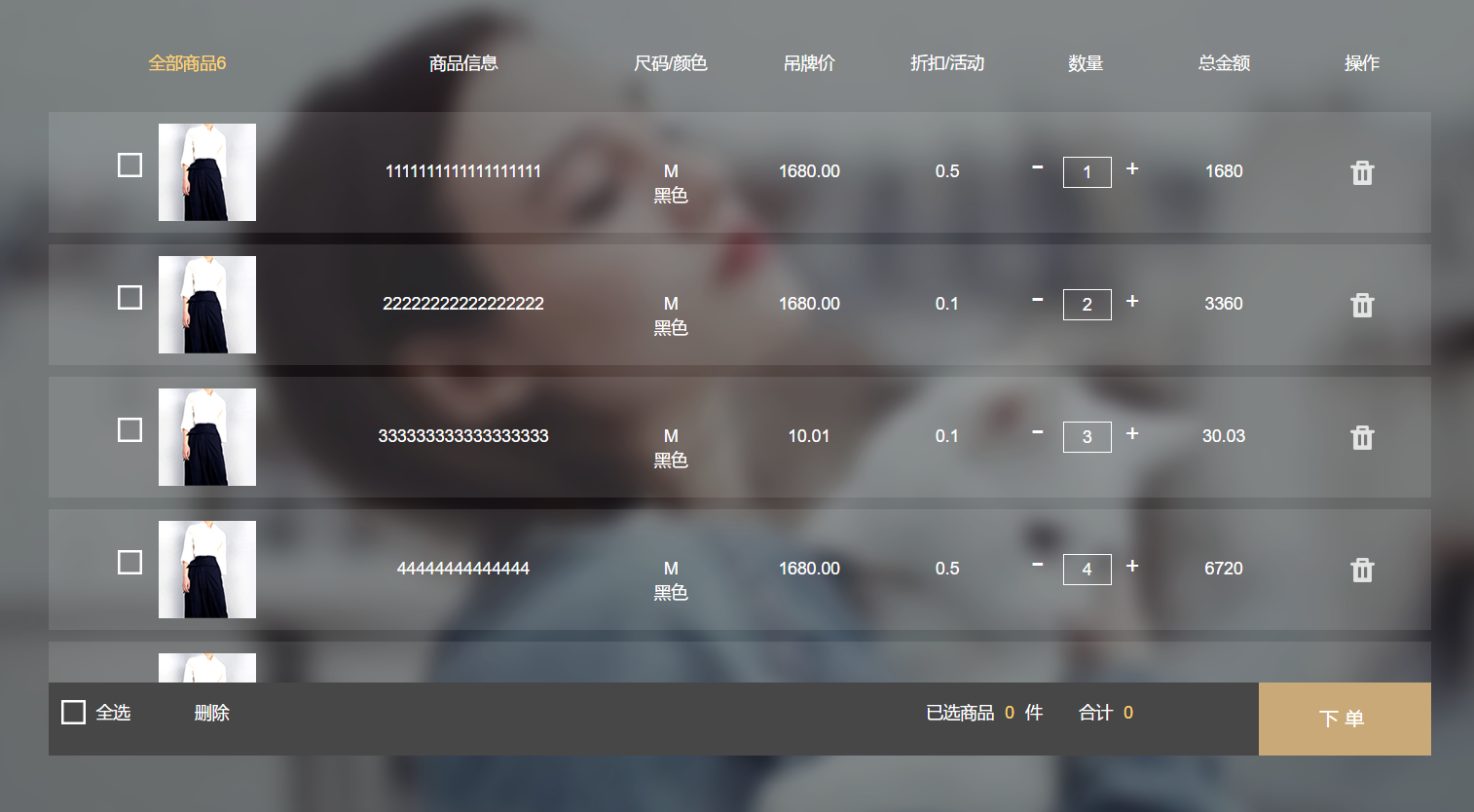
<div class="buyCarBox" id="buyCarBox" v-cloak>

		<div class="haveCloth" v-if="cloths.length">

			<div class="cloth-thead">

				<div class="cloth-td-head">全部商品{{ cloths.length }}</div>

				<div class="cloth-td-head">商品信息</div>

				<div class="cloth-td-head">尺码/颜色</div>

				<div class="cloth-td-head">吊牌价</div>

				<div class="cloth-td-head">折扣/活动</div>

				<div class="cloth-td-head">数量</div>

				<div class="cloth-td-head">总金额</div>

				<div class="cloth-td-head">操作</div>

			</div>

			<div class="buyCarCloth">

				<div class="hasCloth">

				<ul class="clothBox">

					<li class="cloth-tr" v-for="(ocloth,index) in cloths" :class="{ 'active-tr':ocloth.Checked == 1 }">

						<div class="cloth-td clothImage">

							<span class="checkboxImg" v-bind:data-checked=ocloth.Checked v-on:click=checkedCloth($event,index)>

								<img src="/Content/Images/information/buyCarNoCheaked.png" />

								<img class="checkedD" src="/Content/Images/information/buyCarClothChecked.png" />

							</span>

							<img :src=ocloth.ImagePath />

						</div>

						<div class="cloth-td clothName">{{ ocloth.Name }}</div>

						<div class="cloth-td sizeColor">

							<div>{{ ocloth.Size }}</div>

							<div>{{ ocloth.Color }}</div>

						</div>

						<div class="cloth-td clothPrice">{{ ocloth.Price }}</div>

						<div class="cloth-td clothActive">{{ ocloth.Active }}</div>

						<div class="cloth-td clothAddCut">

							<span v-on:click=cutNum(index)> - </span>

								<input type="number"  :value=ocloth.Count v-model=ocloth.Count v-on:keyup=minNum($event,index) />

							<span v-on:click=addNum(index)> + </span>

						</div>

						<div class="cloth-td">{{ ocloth.Count * ocloth.Price }}</div>

						<div class="cloth-td"><img class="delCloth" title="删除" v-on:click=delCloth(index) src="/Content/Images/information/delIcon.png" /></div>

					</li>

				</ul>

			</div>

			</div>

			<div class="totalCount">

				<div class="totalAllCheck" v-bind:data-state=totalAllCheck v-on:click=AllChecked()>

					<img class="totalAllchecked" src="/Content/Images/information/buyCarNoCheaked.png" />

					<img class="totalAllUnChecked" src="/Content/Images/information/buyCarClothChecked.png" />

					<span>{{ totalAllCheck ?'全不选':'全选' }}</span>

				</div>

				<div class="goBuy">

					下单

				</div>

				<div class="batchDelCloth" v-on:click=batchDelCloth()>

					删除

				</div>

				<div class="totalPrice">

					合计

					<span>{{ totalPrice }}</span>

				</div>

				<div class="clothCount">

					已选商品

					<span>{{ totalCount }}</span> 件

				</div>

			</div>

		</div>

		<div class="noCloth" v-else>

			<img class="noClothImage" src="/Content/Images/information/emptyBuyCar.png" />

			<span class="noClothMsg">您的购物车是空的,快去<a href="#">挑选商品></a></span>

		</div>

	</div>

<script>

	var buyCar = new Vue({

		el: "#buyCarBox",

		data: {

			totalAllCheck: 0,

			cloths: [{

					ImagePath: '/Content/Images/information/carClothDemo.jpg',

					Name: '1111111111111111111',

					Size: 'M',

					Color: '黑色',

					Price: '1680.00',

					Active: '0.5',

					Count: '1',

					Checked: 0

				},

				{

					ImagePath: '/Content/Images/information/carClothDemo.jpg',

					Name: '22222222222222222',

					Size: 'M',

					Color: '黑色',

					Price: '1680.00',

					Active: '0.1',

					Count: '2',

					Checked: 0

				},

				{

					ImagePath: '/Content/Images/information/carClothDemo.jpg',

					Name: '333333333333333333',

					Size: 'M',

					Color: '黑色',

					Price: '10.01',

					Active: '0.1',

					Count: '3',

					Checked: 0

				},

				{

					ImagePath: '/Content/Images/information/carClothDemo.jpg',

					Name: '44444444444444',

					Size: 'M',

					Color: '黑色',

					Price: '1680.00',

					Active: '0.5',

					Count: '4',

					Checked: 0

				},

				{

					ImagePath: '/Content/Images/information/carClothDemo.jpg',

					Name: '555555555555',

					Size: 'M',

					Color: '黑色',

					Price: '1680.00',

					Active: '0.1',

					Count: '5',

					Checked: 0

				},

				{

					ImagePath: '/Content/Images/information/carClothDemo.jpg',

					Name: '66666666666666',

					Size: 'M',

					Color: '黑色',

					Price: '1680.00',

					Active: '0.5',

					Count: '6',

					Checked: 0

				},

			]

		},

		computed: {

			//选中商品总数量

			totalCount: function() {

				var totalCount = 0;

				for(var i = 0; i < this.cloths.length; i++) {

					if(this.cloths[i].Checked == 1) {

						totalCount += parseInt(this.cloths[i].Count)

					}

				}

				if(totalCount == 0) {

					this.totalAllCheck =  0;

					$('.totalAllCheck').addClass('totalUnCheck')

				}

				return totalCount;

			},

			//选中商品总价

			totalPrice: function() {

				var totalPrice = 0;

				for(var i = 0; i < this.cloths.length; i++) {

					if(this.cloths[i].Checked == 1) {

						totalPrice += parseInt(this.cloths[i].Count) * parseFloat(this.cloths[i].Price)

					}

				}

				return totalPrice;

			},

		},

		methods: {

			checkedCloth: function(_this, index) {

				var oClothchecked;

				var checked = this.cloths[index].Checked;

				if(checked == 0) {

					this.cloths[index].Checked = 1;

				} else {

					this.cloths[index].Checked = 0;

					oClothchecked = false;

				}

			},

			addNum: function(index) {

				this.cloths[index].Count++;

			},

			cutNum: function(index) {

				if(this.cloths[index].Count > 1) {

					this.cloths[index].Count--;

				}

			},

			minNum:function(_this,index){//商品最小数量限制

				var val = $(_this.currentTarget).val();

				if( this.cloths[index].Count < 1 ){

					this.cloths[index].Count = 1;

				}

			},

			AllChecked: function() {//全选按钮事件

				if($('.totalAllCheck').attr('data-state') == 0 ) {

					//全选

					for(var i = 0; i < this.cloths.length; i++) {

						this.cloths[i].Checked = 1;

					}

					this.totalAllCheck = 1;

				} else {

					//全不选

					for(var i = 0; i < this.cloths.length; i++) {

						this.cloths[i].Checked = 0;

					}

					this.totalAllCheck = 0;

				}

			},

			delCloth: function(index) {//删除某件商品

				this.cloths.splice(index, 1);

			},

			batchDelCloth: function() {//批量删除商品

				for(var i = 0, flag = true, len = this.cloths.length; i < len; flag ? i++ : i) {

					if(this.cloths[i].Checked == 1) {

						this.delCloth(i);

						flag = false;

					} else {

						flag = true;

					}

				}

			}

		}

	})

</script>
demo演示地址:https://sunxiaomingatcn.github.io/SXM_DEMO/vueCar/buyCar.html
Vue购物车实例的更多相关文章
- 068——VUE中vuex的使用场景分析与state购物车实例
<!DOCTYPE html> <html lang="en"> <head> <meta charset="UTF-8&quo ...
- Vue.js实例练习
最近学习Vue.js感觉跟不上节奏了,Vue.js用起来很方便. 主要实现功能,能添加书的内容和删除.(用的Bootstrap的样式)demo链接 标题用了自定义组件,代码如下: components ...
- Vue组件实例间的直接访问
前面的话 有时候需要父组件访问子组件,子组件访问父组件,或者是子组件访问根组件. 在组件实例中,Vue提供了相应的属性,包括$parent.$children.$refs和$root,这些属性都挂载在 ...
- vue.js实例对象+组件树
vue的实例对象 首先用js的new关键字实例化一个vue el: vue组件或对象装载在页面的位置,可通过id或class或标签名 template: 装载的内容.HTML代码/包含指令或者其他组件 ...
- 前端MVC Vue2学习总结(二)——Vue的实例、生命周期与Vue脚手架(vue-cli)
一.Vue的实例 1.1.创建一个 Vue 的实例 每个 Vue 应用都是通过 Vue 函数创建一个新的 Vue 实例开始的: var vm = new Vue({ // 选项 }) 虽然没有完全遵循 ...
- Vue2.5笔记:Vue的实例与生命周期
理解与认识 Vue 的实例是我们学习 Vue 非常重要的一步,也是非常必须的,因为实例是它的一个起点,也是它的一个入口,只有我们创建一个 Vue 实例之后,我们才行利用它进行一些列的操作. 首先 Vu ...
- vue的实例
vue的实例 创建一个vue实例的写法和创建一个变量一样 var vm = new Vue{{ //我们一般用vm来接收vue的实例,vm是 ViewModel的缩写 }} 然后,我们就可以给vue实 ...
- Vue.js—组件快速入门及Vue路由实例应用
上次我们学习了Vue.js的基础,并且通过综合的小实例进一步的熟悉了Vue.js的基础应用.今天我们就继续讲讲Vue.js的组件,更加深入的了解Vue,js的使用.首先我们先了解一下什么是Vue.js ...
- 【05】Vue 之 实例详解与生命周期
Vue的实例是Vue框架的入口,其实也就是前端的ViewModel,它包含了页面中的业务逻辑处理.数据模型等,当然它也有自己的一系列的生命周期的事件钩子,辅助我们进行对整个Vue实例生成.编译.挂着. ...
随机推荐
- Spring集成Quartz完成定时任务
在JavaEE系统中,我们经常会用到定时任务,比如每天晚上凌晨之后跑批处理或者是每天某个时刻群发消息等等. 我们可以使用java.util.Timer结合java.util.TimerTask来去完成 ...
- 实战Excel Add-in的三种玩法
作者:陈希章 发表于 2017年11月26日 前言 这个系列文章应该有一阵子没有更新了,原因是一如既往的多,但是根本所在是我对于某些章节其实还没有完全想好怎么写,尤其是对于Office Add-in这 ...
- 自理一遍android 高级知识
之后按目录得复习巩固 目录: 客卓高级知识整理 1 移动架构 1.1 素养与基础 1.1.1 主流设计模式 创建型 行为型 结构型 1.1.2 UML 1.1.3 设计原则 1.1.4 AOP架构 1 ...
- Heap Sorting 总结 (C++)
各位读者,大家好. 因为算法和数据结构相关的知识都是在国外学的,所以有些词汇翻译的可能不准确,然后一些源代码的注释可能是英文的,如有给大家带来什么不方便,请见谅.今天我想写一下Heap相关的知识,从基 ...
- 爬虫day 04(通过登录去爬虫 解决django的csrf_token)
#通过登录去爬虫 #首先要有用户名和密码 import urllib.request import http.cookiejar from lxml import etree head = { 'Co ...
- iscroll遇到的两个坑
最近移动端闪付遇到的两个坑做下总结: 1.使用iscroll后,滑动并没有生效 解决方案: 首先要查看:结构是否正确: <div id="wrapper"> //w ...
- C++杂分析
class word{ public: word(){cout<<"word constructure \n";} word(int i){cout<<&q ...
- Libevent 事件循环(1)
// 事件的dispatch int event_base_loop(struct event_base *base, int flags) { //得到采用的事件模型 epoll/epoll/ ...
- 分布式版本控制系统 Git 教程
简介 Git 是什么? Git 是一个开源的分布式版本控制系统. 什么是版本控制? 版本控制是一种记录一个或若干文件内容变化,以便将来查阅特定版本修订情况的系统. 什么是分布式版本控制系统? 介绍分布 ...
- 03.redis与ssm整合(mybatis二级缓存)
SSM+redis整合 ssm框架之前已经搭建过了,这里不再做代码复制工作. 这里主要是利用redis去做mybatis的二级缓存,mybaits映射文件中所有的select都会刷新已有缓存,如果不存 ...