
基于vue2.0的一个豆瓣电影App
1、搭建项目框架
使用vue-cli 没安装的需要先安装
使用vue-cli生成项目框架
接着 进入项目目录
然后安装项目依赖包

2、安装需要的依赖包
该项目需要用到vue-router bootstrap
 <link rel="stylesheet" href="/node_modules/bootstrap/dist/css/bootstrap.css">

  <link rel="stylesheet" href="http://v3.bootcss.com/examples/dashboard/dashboard.css">
3、编写代码
App.vue
<template>

  <div id="app">

    <nav class="navbar navbar-inverse navbar-fixed-top">

      <div class="container-fluid">

        <div class="navbar-header">

          <button type="button" class="navbar-toggle collapsed" data-toggle="collapse" data-target="#navbar" aria-expanded="false"

            aria-controls="navbar">

            <span class="sr-only">Toggle navigation</span>

            <span class="icon-bar"></span>

            <span class="icon-bar"></span>

            <span class="icon-bar"></span>

          </button>

          <a class="navbar-brand" href="#">基于Vue2.0的一个豆瓣电影App</a>

        </div>

        <div id="navbar" class="navbar-collapse collapse">

          <form class="navbar-form navbar-right">

            <input type="text" class="form-control" placeholder="Search...">

          </form>

        </div>

      </div>

    </nav>

    <div class="container-fluid">

      <div class="row">

        <div class="col-sm-3 col-md-2 sidebar">

          <ul class="nav nav-sidebar">

             <li class="active" v-focus="{server:currentRoute}">

              <router-link to="/in_theaters/0">正在热映</router-link>

            </li>

            <li v-focus="{server:currentRoute}">

              <router-link to="/coming_soon/0">即将上映</router-link>

            </li>

            <li v-focus="{server:currentRoute}">

              <router-link to="/top250/0">Top</router-link>

            </li>

          </ul>

        </div>

        <div class="col-sm-9 col-sm-offset-3 col-md-10 col-md-offset-2 main">

          <router-view></router-view>

        </div>

      </div>

    </div>

  </div>

  </div>

</template>

<script>

  import jsonp from './js/jsonp.js'

  import config from './js/config.js'

  export default {

    name: 'app',

    data() {

      return {

        currentRoute: '',

        search: ''

      }

    },

    created() {

      this.request();

    },

    methods: {

      request() {

        var server = this.$route.params.server;

         this.currentRoute = server;

      },

      data: {

        jsondata: {}

      },

      Search() {

        this.$router.push({ path: '/search/0?t=' + this.search, params: { t: this.search } });

      }

    },

    watch: {

      '$route': 'request'

    }

  }
然后在src目录下新建一个components文件夹
<template>

    <div>

        <h1 class="page-header">{{jsondata.title}}</h1>

        <ul class="list-group">

            <li class="list-group-item" v-for="(item,index) in jsondata.subjects">

                <span class="badge">{{item.rating.average}}</span>

                <div class="media-left">

                    <router-link :to="{path:'/detail/'+item.id}">

                        <img class="media-object" :src="item.images.small" alt="">

                    </router-link>

                </div>

                <div class="media-body">

                    <h3 class="media-heading">{{item.title}}</h3>

                    <p>

                        <span>类型:</span><span>{{item.genres.join('、')}}</span>

                    </p>

                    <p>

                        <span>导演:</span> <span v-for="(val,index) in item.casts">{{val.name + (index==item.casts.length-1?'':'、')}}</span>

                    </p>

                </div>

            </li>

        </ul>

        <div id="layear" v-show="!show">

            <p>当前第{{parseInt(currentPage) +1}}页、共 {{countPage}}页</p>

            <nav>

                <ul class="pager">

                    <li :class="{disabled:currentPage<=0}">

                        <router-link :to="{path:'/'+server+'/'+ (currentPage<=0?0:(parseInt(currentPage)-1))}">上一页</router-link>

                    </li>

                    <li :class="{disabled:currentPage>=countPage}">

                        <router-link :to="{path:'/'+server+'/'+(parseInt(currentPage) + parseInt(1))}">下一页</router-link>

                    </li>

                </ul>

            </nav>

        </div>

        <div class="spinner" v-show="show">

            <div class="double-bounce1"></div>

            <div class="double-bounce2"></div>

        </div>

    </div>

</template>

<script>

    import Vue from 'vue'

    import jsonp from '../js/jsonp.js'

    import config from '../js/config.js'

    export default {

        created() {

            this.request();

        },

        data() {

            return {

                currentPage: 0,

                jsondata: {},

                countPage: 0,

                server: '',

                show: 'true'

            }

        },

        methods: {

            request() {

                this.show = true;

                var server = this.$route.params.server;

                this.server = server;

                this.currentPage = this.$route.params.page;

                var count = 10;

                jsonp(config.apiServer + server, { count: count, start: this.currentPage * count, q: this.$route.query.t }, function (data) {

                    this.jsondata = data;

                    this.countPage = Math.ceil(this.jsondata.total / this.jsondata.count);

                    this.show = false;

                }.bind(this))

            }

        },

        watch: {

            '$route.path': 'request',

            '$route.params':'request'

        }

    }

</script>

<style scoped>

    .spinner {

        width: 60px;

        height: 60px;

        margin: 100px auto;

        position: fixed;

        left: 0;

        right: 0;

        top: 0;

        bottom: 0;

    }

    .double-bounce1,

    .double-bounce2 {

        width: 100%;

        height: 100%;

        border-radius: 50%;

        background-color: #67CF22;

        opacity: 0.6;

        position: absolute;

        top: 0;

        left: 0;

        -webkit-animation: bounce 2.0s infinite ease-in-out;

        animation: bounce 2.0s infinite ease-in-out;

    }

    .double-bounce2 {

        -webkit-animation-delay: -1.0s;

        animation-delay: -1.0s;

    }

    @-webkit-keyframes bounce {

        0%,

        100% {

            -webkit-transform: scale(0.0)

        }

        50% {

            -webkit-transform: scale(1.0)

        }

    }

    @keyframes bounce {

        0%,

        100% {

            transform: scale(0.0);

            -webkit-transform: scale(0.0);

        }

        50% {

            transform: scale(1.0);

            -webkit-transform: scale(1.0);

        }

    }

</style>
接着在src目录下创建js文件夹 存放js文件
var jsonp = function (url, data, callback) {

    var cbFuncName = 'jsonp_fun' + Math.random().toString().replace('.', '');

    window[cbFuncName] = callback;

    var queryString = url.indexOf('?') == -1 ? '?' : '&';

    for (var key in data) {

        queryString += key + '=' + data[key] + '&';

    }

    queryString += 'callback=' + cbFuncName;

    var script = document.createElement('script');

    script.src = url + queryString;

    document.body.appendChild(script);

}

export default jsonp
在新建一个config.js 用来存放一些配置信息
const apiServer = 'https://api.douban.com/v2/movie/';

export default { apiServer }
接着在新建一个focus.js 用来左边导航栏获取焦点
import Vue from 'vue'

var focus = {};

focus.install = function () {

    Vue.directive('focus', function (el, binding) {

        var server = binding.value.server;

        var aLink = el.children[0].href;

        var link = /^((http)?:\/\/)[\w]+:+[\d]+\/\W+([\w]+)?\/\w/;

        var val = (aLink.match(link))[3];

        el.className = '';

        if (val == server) {

            el.className = 'active';

        }

    })

}

export default focus;
然后来到main.js中 引用vue-router 和引用刚才的focus.js和配置vue-router
import Vue from 'vue'

import App from './App.vue'

import VueRouter from 'vue-router'

import movielist from './components/movielist.vue'

import focus from './js/focus'

Vue.use(VueRouter)

Vue.use(focus)

var routes = [{

  path: '/:server/:page', component: movielist

},

{ path: '*', redirect:'/in_theaters/0' }]

var router = new VueRouter({

  routes

})

new Vue({

  el: '#app',

  router,

  render: h => h(App)

})
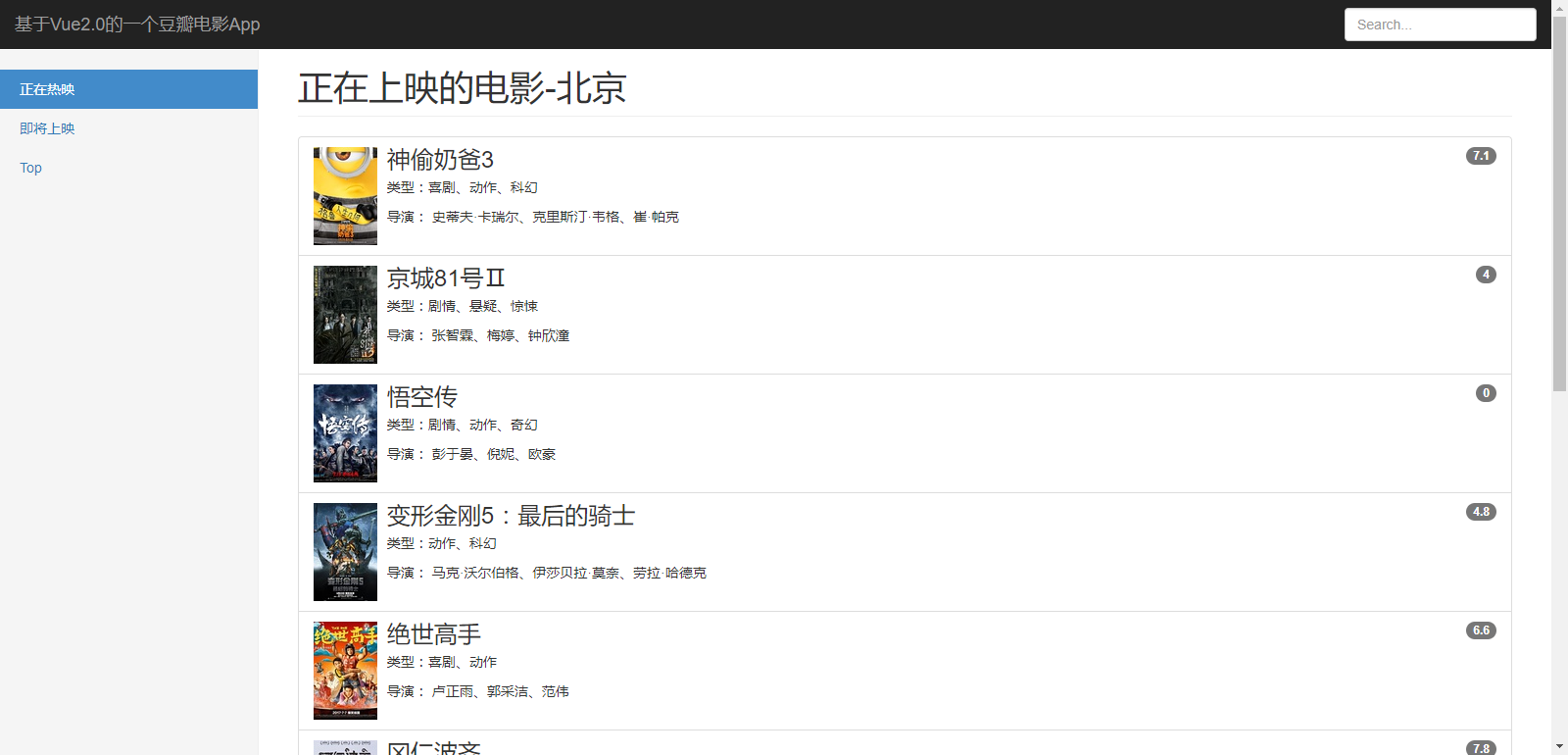
到这边页面基本成型了
公众号
欢迎关注我的公众号“码上开发”,每天分享最新技术资讯。关注获取最新资源
基于vue2.0的一个豆瓣电影App的更多相关文章
- 基于Bootstrap+angular的一个豆瓣电影app
1.搭建项目框架 npm初始化项目 npm init -y //按默认配置初始化项目 安装需要的第三方库 npm install bootstrap angular angular-route --s ...
- 基于vue2.0的一个系统
前言 这是一个用vue做的单页面管理系统,这里只是介绍架子搭建思路 前端架构 沿用Vue全家桶系列开发,主要技术栈:vue2.x+vue-router+vuex+element-ui1.x+axios ...
- 基于vue2.0的一个分页组件
分页组件在项目中经常要用到之前一直都是在网上找些jq的控件来用(逃..),最近几个项目用上vue了项目又刚好需要一个分页的功能.于是百度发现几篇文章介绍的实在方式有点复杂, 没耐心看自己动手造轮子写了 ...
- 基于vue2.0的在线电影APP,
基于vue2.0构建的在线电影网[film],webpack + vue + vuex + vue-loader + keepAlive + muse-ui + cordova 全家桶,cordova ...
- 基于vue2.0的分页组件开发
今天安排的任务是写基于vue2.0的分页组件,好吧,我一开始是觉得超级简单的,但是越写越写不出来,写的最后乱七八糟的都不知道下句该写什么了,所以重新捋了思路,小结一下- 首先写组件需要考虑: 要从父组 ...
- 基于vue2.0打造移动商城页面实践 vue实现商城购物车功能 基于Vue、Vuex、Vue-router实现的购物商城(原生切换动画)效果
基于vue2.0打造移动商城页面实践 地址:https://www.jianshu.com/p/2129bc4d40e9 vue实现商城购物车功能 地址:http://www.jb51.net/art ...
- 基于vue2.0前端组件库element中 el-form表单 自定义验证填坑
eleme写的基于vue2.0的前端组件库: http://element.eleme.io 我在平时使用过程中,遇到的问题. 自定义表单验证出坑: 1: validate/resetFields 未 ...
- vue-swiper 基于Vue2.0开发 轻量、高性能轮播插件
vue-swiper 基于 Vue2.0 开发,基本满足大部分功能 轻量.高性能轮播插件.目前支持 无缝衔接自动轮播.无限轮播.手势轮播 没有引入第三方库,原生 js 封装,打包之后只有 8.2KB ...
- 基于mykernel2.0编写一个操作系统内核
基于mykernel2.0编写一个操作系统内核 一. 实验准备 详细要求 基于mykernel 2.0编写一个操作系统内核 按照https://github.com/mengning/mykernel ...
随机推荐
- java虚拟机学习-深入理解JVM(1)
1 Java技术与Java虚拟机 说起Java,人们首先想到的是Java编程语言,然而事实上,Java是一种技术,它由四方面组成: Java编程语言.Java类文件格式.Java虚拟机和Java应 ...
- WinForm笔记
Hi All, 分享一个学WinForm时的笔记: 1. 关键字 partial:是部分类,允许将一个类放在多个文件当中. 2. MessageBox()类相当于Console.WriteLine() ...
- Android学习探索之App多渠道打包及动态添加修改资源属性
前言: 关于Android渠道打包是一个比较老的话题,今天主要记录总结一下多渠道打包以及如果动态配置修改一些资源属性.今天以公司实际需求为例进行演示,由于项目复用很多公共的业务组件,而且业务组件之间的 ...
- 【 js 基础 】【 源码学习 】源码设计 (持续更新)
学习源码,除了学习对一些方法的更加聪明的代码实现,同时也要学习源码的设计,把握整体的架构.(推荐对源码有一定熟悉了之后,再看这篇文章) 目录结构:第一部分:zepto 设计分析第二部分:undersc ...
- 小K的H5之旅-HTML的基本结构与基本标签
一.什么是HTML HTML是超文本标签语言,即网页的源码.而浏览器就是翻译解释HTML源码的工具. 二.HTML文档的结构 HTML文档主要包括三大部分:文档声明部分.<head>头部部 ...
- Java将头像图片保存到MySQL数据库
在做头像上传的过程中通常是将图片保存到数据库中,这里简单介绍一中将图片保存到数据库的方法: jsp代码: <div> <input class="avatar-input& ...
- 【JAVAEE学习笔记】hibernate03:多表操作详解、级联、关系维护和练习:添加联系人
一.一对多|多对一 1.关系表达 表中的表达 实体中的表达 orm元数据中表达 一对多 <!-- 集合,一对多关系,在配置文件中配置 --> <!-- name属性:集合属性名 co ...
- Java对于内存的需要知道的知识
内存 内存大家都知道(当然不是硬盘啊).与c.c++相比呢,Java在内存管理的方面一个优越之处就是我们不用显式的去对对象进行内存的分配和内存的回收,可能有人会着迷于对内存使用分配的这种快感,但是随着 ...
- 12.ThreadPoolExecutor线程池原理及其execute方法
jdk1.7.0_79 对于线程池大部分人可能会用,也知道为什么用.无非就是任务需要异步执行,再者就是线程需要统一管理起来.对于从线程池中获取线程,大部分人可能只知道,我现在需要一个线程来执行一个任 ...
- MFC简单绘制安卓机器人
原始日期:2014-03-29 20:35 众所周知,google的安卓机器人形象十分经典,包括眼睛的位置,胳膊以及天线的位置都是有固定位置和比例的,而且是最恰当的,看起来最美.而微软基础类库MFC绘 ...