
tensorflow 从入门到摔掉肋骨 教程二
构造你自己的第一个神经网络
通过手势的图片识别图片比划的数字:
1) 现在用1080张64*64的图片作为训练集
2) 用120张图片作为测试集

定义初始化值
def load_dataset():

    train_dataset = h5py.File('datasets/train_signs.h5', "r")

    train_set_x_orig = np.array(train_dataset["train_set_x"][:]) # your train set features

    train_set_y_orig = np.array(train_dataset["train_set_y"][:]) # your train set labels

    test_dataset = h5py.File('datasets/test_signs.h5', "r")

    test_set_x_orig = np.array(test_dataset["test_set_x"][:]) # your test set features

    test_set_y_orig = np.array(test_dataset["test_set_y"][:]) # your test set labels

    classes = np.array(test_dataset["list_classes"][:]) # the list of classes

    train_set_y_orig = train_set_y_orig.reshape((1, train_set_y_orig.shape[0]))

    test_set_y_orig = test_set_y_orig.reshape((1, test_set_y_orig.shape[0]))

return train_set_x_orig, train_set_y_orig, test_set_x_orig, test_set_y_orig, classes

X_train_orig, Y_train_orig, X_test_orig, Y_test_orig, classes = load_dataset()
小测:
import matplotlib.pyplot as plt

index = 0

plt.imshow(X_train_orig[index])

print(Y_train_orig)

print ("y = " + str(np.squeeze(Y_train_orig[:, index])))
小测2:把矩阵降维为一维,并做分类映射
# Flatten the training and test images

X_train_flatten = X_train_orig.reshape(X_train_orig.shape[0], -1).T

X_test_flatten = X_test_orig.reshape(X_test_orig.shape[0], -1).T

# Normalize image vectors

X_train = X_train_flatten/255.

X_test = X_test_flatten/255.

# Convert training and test labels to one hot matrices

Y_train = convert_to_one_hot(Y_train_orig, 6)

Y_test = convert_to_one_hot(Y_test_orig, 6)

print ("number of training examples = " + str(X_train.shape[1]))

print ("number of test examples = " + str(X_test.shape[1]))

print ("X_train shape: " + str(X_train.shape))

print ("Y_train shape: " + str(Y_train.shape))

print ("X_test shape: " + str(X_test.shape))

print ("Y_test shape: " + str(Y_test.shape))

结果:number of training examples = 1080

number of test examples = 120

X_train shape: (12288, 1080)

Y_train shape: (6, 1080)

X_test shape: (12288, 120)

Y_test shape: (6, 120)
线性回归模型:LINEAR -> RELU -> LINEAR -> RELU -> LINEAR -> SOFTMAX.
Softmax 是判断哪个分类的概率最大
3.1 创建容器 存放变量
def create_placeholders(n_x,n_y):

    X = tf.placeholder(tf.float32, shape=[n_x, None])

    Y = tf.placeholder(tf.float32, shape=[n_y, None])

    return X,Y
小测:
X, Y = create_placeholders(12288, 6)

print ("X = " + str(X))

print ("Y = " + str(Y))
3.2 初始化参数
在tensorflow里有get_variable初始化参数,通过Xavier进行设置变量的权重
W1 = tf.get_variable("W1", [25,12288], initializer = tf.contrib.layers.xavier_initializer(seed = 1))
b1 = tf.get_variable("b1", [25,1], initializer = tf.zeros_initializer())
def initialize_parameters():

      tf.set_random_seed(1)                   # so that your "random" numbers match ours

    ### START CODE HERE ### (approx. 6 lines of code)

    W1 = tf.get_variable("W1", [25,12288], initializer = tf.contrib.layers.xavier_initializer(seed = 1))

    b1 = tf.get_variable("b1", [25,1], initializer = tf.zeros_initializer())

    W2 = tf.get_variable("W2", [12,25], initializer = tf.contrib.layers.xavier_initializer(seed = 1))

    b2 = tf.get_variable("b2", [12,1], initializer = tf.zeros_initializer())

    W3 = tf.get_variable("W3", [6,12], initializer = tf.contrib.layers.xavier_initializer(seed = 1))

    b3 = tf.get_variable("b3", [6,1], initializer = tf.zeros_initializer())

    ### END CODE HERE ###

    parameters = {"W1": W1,

                  "b1": b1,

                  "W2": W2,

                  "b2": b2,

                  "W3": W3,

                  "b3": b3}

return parameters
3.3 向前传播 训练集训练
常用到的tensorflow函数:
tf.add(…,..)
tf.matmul(..,..) 矩阵阶乘
tf.nn.relu(..) Relu激活函数
def forward_propagation(X, parameters):

# Retrieve the parameters from the dictionary "parameters"

    print(X.shape)

    W1 = parameters['W1']

    b1 = parameters['b1']

    W2 = parameters['W2']

    b2 = parameters['b2']

    W3 = parameters['W3']

    b3 = parameters['b3']

    ### START CODE HERE ### (approx. 5 lines)              # Numpy Equivalents:

    Z1 = tf.add(tf.matmul(W1, X), b1)                                              # Z1 = np.dot(W1, X) + b1

    A1 = tf.nn.relu(Z1)                                                  # A1 = relu(Z1)

    Z2 = tf.add(tf.matmul(W2, A1), b2)                                          # Z2 = np.dot(W2, a1) + b2

    A2 = tf.nn.relu(Z2)                                                  # A2 = relu(Z2)

    Z3 = tf.add(tf.matmul(W3, A2), b3)                                           # Z3 = np.dot(W3,Z2) + b3

    ### END CODE HERE ###

    return Z3
小测:
        tf.reset_default_graph()

        With tf.Session() as sess:

        X,Y = create_placeholders(12888,6)

        Parameters = initialize_parameters()

        Z3 = forward_propagation(X,parameters)

        Print(“Z3=”+str(Z3))
3.4 计算损失函数(成本函数 Cost function)
在tensorflow 函数里 有tf.reduce_mean(tf.nn.softmax_cross_entropy_with_logits(logits=…,labels=…)) 其中
softmax_cross_entropy_with_logits是计算softmax函数
def conpute_cost(Z3,Y)

   logits = tf.transpose(Z3)  ##向量的转置

   labels = tf.transpose(Y)  ##向量的转置

   cost = tf.reduce_mean(tf.nn.softmax_cross_entropy_with_logits(logits=logits,labels=labels))

   return cost
3.5 向后传播 求导 参数更新
向后传播 主要是通过求导来进行梯度下降 然后优化参数模型
其根本就是对损失函数求最小值
优化函数:
Optimizer = tf.train.GrandientDescentOptimizer(learning_rate = learning_rate).minimize(cost)
执行函数:
_,c=sess.run([optimizer,cost],feed_dict={X:minibatch_X,Y:minibatch_Y})
3.6 一个完整的例子 (把上面的代码块汇总成功能)
def model(X_train, Y_train, X_test, Y_test, learning_rate = 0.0001,

          num_epochs = 1500, minibatch_size = 32, print_cost = True):

    """

    Implements a three-layer tensorflow neural network: LINEAR->RELU->LINEAR->RELU->LINEAR->SOFTMAX.

    Arguments:

    X_train -- training set, of shape (input size = 12288, number of training examples = 1080)

    Y_train -- test set, of shape (output size = 6, number of training examples = 1080)

    X_test -- training set, of shape (input size = 12288, number of training examples = 120)

    Y_test -- test set, of shape (output size = 6, number of test examples = 120)

    learning_rate -- learning rate of the optimization

    num_epochs -- number of epochs of the optimization loop

    minibatch_size -- size of a minibatch

    print_cost -- True to print the cost every 100 epochs

    Returns:

    parameters -- parameters learnt by the model. They can then be used to predict.

    """

    ops.reset_default_graph()                         # to be able to rerun the model without overwriting tf variables

    tf.set_random_seed(1)                             # to keep consistent results

    seed = 3                                          # to keep consistent results

    (n_x, m) = X_train.shape                          # (n_x: input size, m : number of examples in the train set)

    n_y = Y_train.shape[0]                            # n_y : output size

    costs = []                                        # To keep track of the cost

    # Create Placeholders of shape (n_x, n_y)

    ### START CODE HERE ### (1 line)

    X, Y = create_placeholders(n_x, n_y)

    ### END CODE HERE ###

    # Initialize parameters

    ### START CODE HERE ### (1 line)

    parameters = initialize_parameters()

    ### END CODE HERE ###

    # Forward propagation: Build the forward propagation in the tensorflow graph

    ### START CODE HERE ### (1 line)

    Z3 = forward_propagation(X, parameters)

    ### END CODE HERE ###

    # Cost function: Add cost function to tensorflow graph

    ### START CODE HERE ### (1 line)

    cost = compute_cost(Z3, Y)

    ### END CODE HERE ###

    # Backpropagation: Define the tensorflow optimizer. Use an AdamOptimizer.

    ### START CODE HERE ### (1 line)

    optimizer = tf.train.AdamOptimizer(learning_rate = learning_rate).minimize(cost)

    ### END CODE HERE ###

    # Initialize all the variables

    init = tf.global_variables_initializer()

    # Start the session to compute the tensorflow graph

    with tf.Session() as sess:

        # Run the initialization

        sess.run(init)

        # Do the training loop

        for epoch in range(num_epochs):

            epoch_cost = 0.                       # Defines a cost related to an epoch

            num_minibatches = int(m / minibatch_size) # number of minibatches of size minibatch_size in the train set

            seed = seed + 1

            minibatches = random_mini_batches(X_train, Y_train, minibatch_size, seed)

            for minibatch in minibatches:

                # Select a minibatch

                (minibatch_X, minibatch_Y) = minibatch

                # IMPORTANT: The line that runs the graph on a minibatch.

                # Run the session to execute the "optimizer" and the "cost", the feedict should contain a minibatch for (X,Y).

                ### START CODE HERE ### (1 line)

                _ , minibatch_cost = sess.run([optimizer, cost], feed_dict={X: minibatch_X, Y: minibatch_Y})

                ### END CODE HERE ###

                epoch_cost += minibatch_cost / num_minibatches

            # Print the cost every epoch

            if print_cost == True and epoch % 100 == 0:

                print ("Cost after epoch %i: %f" % (epoch, epoch_cost))

            if print_cost == True and epoch % 5 == 0:

                costs.append(epoch_cost)

        # plot the cost

        plt.plot(np.squeeze(costs))

        plt.ylabel('cost')

        plt.xlabel('iterations (per tens)')

        plt.title("Learning rate =" + str(learning_rate))

        plt.show()

        # lets save the parameters in a variable

        parameters = sess.run(parameters)

        print ("Parameters have been trained!")

        # Calculate the correct predictions

        correct_prediction = tf.equal(tf.argmax(Z3), tf.argmax(Y))

        # Calculate accuracy on the test set

        accuracy = tf.reduce_mean(tf.cast(correct_prediction, "float"))

        print ("Train Accuracy:", accuracy.eval({X: X_train, Y: Y_train}))

        print ("Test Accuracy:", accuracy.eval({X: X_test, Y: Y_test}))

        return parameters
我们执行:
parameters = model(X_train, Y_train, X_test, Y_test)
得到结果:

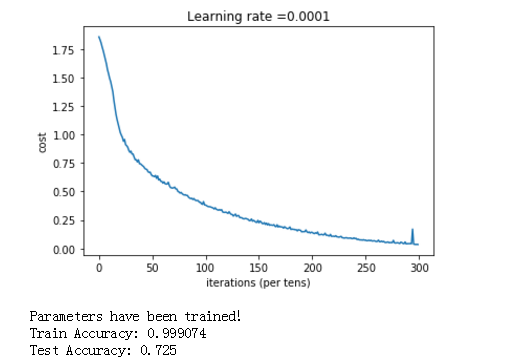
tensorflow的 函数库很多,这里是冰山一角,还有很多需要我们去学习。后面有时间,就把图像识别的卷积的tensorflow例子给搬出研究一下。
我的大都内容来自吴恩达的公益视频和教案,特此鸣谢。
参考:吴恩达网易课程
tensorflow 从入门到摔掉肋骨 教程二的更多相关文章
- 给深度学习入门者的Python快速教程 - numpy和Matplotlib篇
始终无法有效把word排版好的粘贴过来,排版更佳版本请见知乎文章: https://zhuanlan.zhihu.com/p/24309547 实在搞不定博客园的排版,排版更佳的版本在: 给深度学习入 ...
- SpringBoot入门教程(二)CentOS部署SpringBoot项目从0到1
在之前的博文<详解intellij idea搭建SpringBoot>介绍了idea搭建SpringBoot的详细过程, 并在<CentOS安装Tomcat>中介绍了Tomca ...
- 基于tensorflow的MNIST手写数字识别(二)--入门篇
http://www.jianshu.com/p/4195577585e6 基于tensorflow的MNIST手写字识别(一)--白话卷积神经网络模型 基于tensorflow的MNIST手写数字识 ...
- Tensorflow高速入门2--实现手写数字识别
Tensorflow高速入门2–实现手写数字识别 环境: 虚拟机ubuntun16.0.4 Tensorflow 版本号:0.12.0(仅使用cpu下) Tensorflow安装见: http://b ...
- 给深度学习入门者的Python快速教程
给深度学习入门者的Python快速教程 基础篇 numpy和Matplotlib篇 本篇部分代码的下载地址: https://github.com/frombeijingwithlove/dlcv_f ...
- TensorFlow从入门到实战资料汇总 2017-02-02 06:08 | 数据派
TensorFlow从入门到实战资料汇总 2017-02-02 06:08 | 数据派 来源:DataCastle数据城堡 TensorFlow是谷歌基于DistBelief进行研发的第二代人工智能学 ...
- 【0】TensorFlow光速入门-序
本文地址:https://www.cnblogs.com/tujia/p/13863181.html 序言: 对于我这么一个技术渣渣来说,想学习TensorFlow机器学习,实在是太难了: 百度&qu ...
- 【2】TensorFlow光速入门-数据预处理(得到数据集)
本文地址:https://www.cnblogs.com/tujia/p/13862351.html 系列文章: [0]TensorFlow光速入门-序 [1]TensorFlow光速入门-tenso ...
- 无废话ExtJs 入门教程二十一[继承:Extend]
无废话ExtJs 入门教程二十一[继承:Extend] extjs技术交流,欢迎加群(201926085) 在开发中,我们在使用视图组件时,经常要设置宽度,高度,标题等属性.而这些属性可以通过“继承” ...
随机推荐
- 替代PhotoShop:GIMP图形编辑器的使用
GIMP最早是linux环境下用于图形编辑的一款开源软件,目前的功能很已经很丰富,如果使用得当,在很多的图形编辑操作上完全可以替代收费的Photoshop(PS).目前GIMP已经发展成了多平台的开源 ...
- WPF DataGrid 样式设置
隔行换色,鼠标单击,悬浮样式都有,其具体效果如图 1 所示. 图 1 WPF DataGrid 样式设置效果图 其中: 界面设计代码下所示 ? + 查看代码 1 2 3 4 5 6 7 8 9 10 ...
- Java爬虫
作为一位Java爬虫的初学者,分享一下自己的心得.所用到的jar包 org.codehaus.jettison.jar jsoup-1.7.3.jar个人认为爬虫的实现机制:获取Docume对象-&g ...
- Extjs6(四)——侧边栏导航根据路由跳转页面
本文基于ext-6.0.0 之前做的时候这个侧边栏导航是通过tab切换来切换页面的,但是总感觉不太对劲,现在终于发现怎么通过路由跳转了,分享给大家,可能有些不完善的地方,望大家读后可以给些指点.欢迎留 ...
- C#同步方法转异步
public async Task DelayAsync() { await Task.Run(()=>Delay()); } private void Delay() { } 本作品采用知识共 ...
- PyCharm 2017 官网 下载 安装 设置 配置 (主题 字体 字号) 使用 入门 教程
一.安装 Python 3.6 首先,要安装好 Python 3.6.如果你还没有安装,可以参考咪博士之前的教程 Python 3.6.3 官网 下载 安装 测试 入门教程 (windows) 二.官 ...
- 微信公众平台开发接口PHP SDK
以前没接触过微信公众平台开发,前几天刚找到实习公司就要求我做一个微信公众平台的应用,于是乎开始学习微信公众平台开发接口的调用,看开发文档之后还是不知道从何入手,只好上网找入门资料,终于在方倍工作室找到 ...
- Java中Double保留后小数位的几种方法
最近做个小实验,其中一部分要求将表单提交的数据转换为double,这个功能其实很简单直接一句Double.parseDouble(request.getParameter("chinese& ...
- linux C 文件操作之fgets()
1. fgets(...)从标准设备读数据. 原型:fgets(s,n,stdin); 假设在控制台下,我们可以用fgets(...)替代gets(),读入键盘输入的信息,fget ...
- Ionic3 下拉刷新
参考: http://ionicframework.com/docs/api/components/refresher/Refresher/