
Python3.5下安装&测试Scrapy
1、引言
Scrapy框架结构清晰,基于twisted的异步架构可以充分利用计算机资源,是做爬虫必备基础,本文将对Scrapy的安装作介绍。
2、安装lxml
2.1 下载地址:https://www.lfd.uci.edu/~gohlke/pythonlibs/#twisted 选择对应python3.5的lxml库
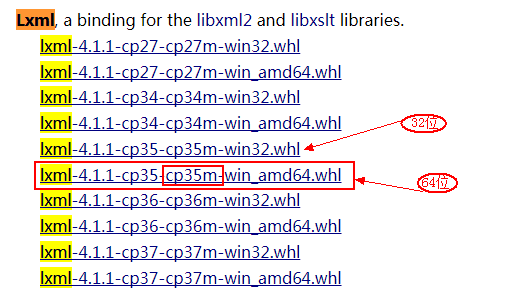
2.2 如果pip的版本过低,先升级pip:
python -m pip install -U pip
2.3 安装lxml库(先将下载的库文件copy到python的安装目录,按住shift键并鼠标右击选择“在此处打开命令窗口”)
pip install lxml-4.1.1-cp35-cp35m-win_amd64.whl
看到出现successfully等字样说明按章成功。
3、 安装Twisted库
3.1 下载链接:https://www.lfd.uci.edu/~gohlke/pythonlibs/#twisted 选择对应python3.5的库文件
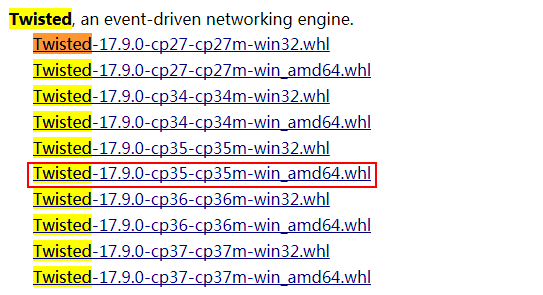
3.2 安装
pip install Twisted-17.9.0-cp35-cp35m-win_amd64.whl
看到出现successfully等字样说明按章成功。
Note:部分机器可能安装失败,可以尝试将 Twisted-17.9.0-cp35-cp35m-win_amd64.whl文件移动到 $python/Scripts/ 目录下,重新安装。
4、安装Scrapy
twisted库安装成功后,安装scrapy就简单了,在命令提示符窗口直接输入命令:
pip install scrapy
看到出现successfully等字样说明按章成功。
5、Scrapy测试
5.1 新建项目
先新建一个Scrapy爬虫项目,选择python的工作目录(我的是:H:\PycharmProjects 然后安装Shift键并鼠标右键选择“在此处打开命令窗口”),然后输入命令:
scrapy startproject allister
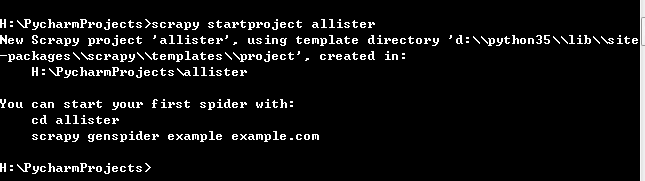
对应目录会生成目录allister文件夹,目录结构如下:
└── allister

├── allister

│ ├── __init__.py

│ ├── items.py

│ ├── pipelines.py

│ ├── settings.py

│ └── spiders

└── scrapy.cfg

简单介绍个文件的作用:

# -----------------------------------------------

scrapy.cfg:项目的配置文件;

allister/ : 项目的python模块,将会从这里引用代码

allister/items.py:项目的items文件

allister/pipelines.py:项目的pipelines文件

allister/settings.py :项目的设置文件

allister/spiders : 存储爬虫的目录
5.2 修改allister/items.py文件:
# -*- coding: utf-8 -*-

# Define here the models for your scraped items

#

# See documentation in:

# https://doc.scrapy.org/en/latest/topics/items.html

import scrapy

class AllisterItem(scrapy.Item):

    name = scrapy.Field()

    level = scrapy.Field()

    info = scrapy.Field()
5.3 编写文件 AllisterSpider.py
# !/usr/bin/env python

# -*- coding: utf-8 -*-

# @File  : AllisterSpider.py

# @Author: Allister.Liu

# @Date  : 2018/1/18

# @Desc  :

import scrapy

from allister.items import AllisterItem

class ItcastSpider(scrapy.Spider):

    name = "ic2c"

    allowed_domains = ["http://www.itcast.cn"]

    start_urls = [

        "http://www.itcast.cn/channel/teacher.shtml#ac"

    ]

    def parse(self, response):

        items = []

        for site in response.xpath('//div[@class="li_txt"]'):

            item = AllisterItem()

            t_name = site.xpath('h3/text()')

            t_level = site.xpath('h4/text()')

            t_desc = site.xpath('p/text()')

            unicode_teacher_name = t_name.extract_first().strip()

            unicode_teacher_level = t_level.extract_first().strip()

            unicode_teacher_info = t_desc.extract_first().strip()

            item["name"] = unicode_teacher_name

            item["level"] = unicode_teacher_level

            item["info"] = unicode_teacher_info

            yield item
编写完成后复制至项目的 \allister\spiders目录下,cmd选择项目根目录输入以下命令:
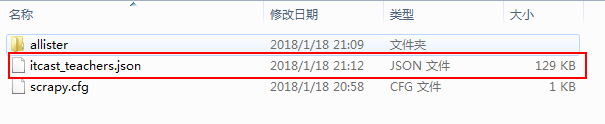
scrapy crawl ic2c -o itcast_teachers.json -t json
抓取的数据将以json的格式存储在ic2c_infos.json文件中;
如果出现如下错误请看对应解决办法:
Scrapy运行错误:ImportError: No module named win32api
Python3.5下安装&测试Scrapy的更多相关文章
- Python3.X下安装Scrapy
Python3.X下安装Scrapy (转载) 2017年08月09日 15:19:30 jingzhilie7908 阅读数:519 标签: python 相信很多同学对于爬虫需要安装Scrap ...
- centos7 python3.5 下安装paramiko
centos7 python3.5 下安装paramiko 安装开发包 yum install openssl openssl-devel python-dev -y 安装pip前需要前置安装setu ...
- 在python3.5下安装scrapy包
此前scrapy只支持python2.x 但是最新的1.1.0rc1已结开始支持py3了 如果电脑上安装了scrapy的依赖包,诸如lxml.OpenSSL 1.你直接下载Scrapy-1.1.0rc ...
- python3 linux下安装
1.下载 https://www.python.org/ftp/python/3.5.2/Python-3.5.2.tgz 2.安装 上传到linux服务器 #进入上传文件的目录 cd /app/pr ...
- 在Python3.5下安装和测试Scrapy爬网站
1. 引言 Scrapy框架结构清晰,基于twisted的异步架构可以充分利用计算机资源,是爬虫做大的必备基础.本文将讲解如何快速安装此框架并使用起来. 2. 安装Twisted 2.1 同安装Lxm ...
- win7中python3.4下安装scrapy爬虫框架(亲测可用)
貌似最新的scrapy已经支持python3,但是错误挺多的,以下为在win7中的安装步骤: 1.首先需要安装Scrapy的依赖包,包括parsel, w3lib, cryptography, pyO ...
- 在Windows10 64位 Anaconda4 Python3.5下安装XGBoost
系统环境: Windows10 64bit Anaconda4 Python3.5.1 软件安装: Git for Windows MINGW 在安装的时候要改一个选择(Architecture选择x ...
- Windows python3.3下安装BeautifulSoup
首先在官网下载:http://www.crummy.com/software/BeautifulSoup/#Download BeautifulSoup在版本4以上都开始支持python3了,所以就下 ...
- 关于在Python3.6下安装MySQL-python,flask-sqlalchemy模块的问题
这周末在学习Flask框架的时候,有需要安装MySQL-python模块,一开始用pip安装: pip install MySQL-python 但是安装的时候报错了: error: command ...
随机推荐
- 【深度学习系列】用PaddlePaddle和Tensorflow实现GoogLeNet InceptionV2/V3/V4
上一篇文章我们引出了GoogLeNet InceptionV1的网络结构,这篇文章中我们会详细讲到Inception V2/V3/V4的发展历程以及它们的网络结构和亮点. GoogLeNet Ince ...
- 《修改代码的艺术》【PDF】下载
<修改代码的艺术>[PDF]下载链接: https://u253469.pipipan.com/fs/253469-230382309 内容简介 <修改代码的艺术>针对大型的. ...
- 深入分析JavaWeb技术内幕(修订版)》【PDF】下载
<深入分析JavaWeb技术内幕(修订版)>[PDF]下载链接: https://u253469.pipipan.com/fs/253469-230062569 内容简介 <深入分析 ...
- ligerUI---ligerGrid分页排序的使用(从后台获取数据显示)
写在前面: 最近项目的前框框架用的是ligerUI,里面用到了ligerGrid表格,下面就来说说从后台获取数据并在前台页面进行完美展示.啊哈哈哈..(天啦,坐我旁边的丽姐貌似炒股 一个月可以搞几十万 ...
- 轨迹系列——Socket总结及实现基于TCP或UDP的809协议方法
文章版权由作者李晓晖和博客园共有,若转载请于明显处标明出处:http://www.cnblogs.com/naaoveGIS/ 1.背景 在上一篇博客中我详细介绍了809协议的内容.809协议规范了通 ...
- VMware安装Linux,系统分区。
系统分区: 主分区<=4 扩展分区<=1 主分区+扩展分区<=4 扩展分区不能直接使用,必须再分成若干逻辑分区才能读写数据. 逻辑分区编号从5开始,1-4给主分区和扩展分区使用的,不 ...
- JavaScript循环实例
几个经典的循环案例: 1.一张纸的厚度是0.0001米,将纸对折,对折多少次厚度超过珠峰高度8848米 var i=0; var h=0.0001; while(true){ i++; h=h*2; ...
- iOS 使用 CATransform3D 处理 3D 影像、制做互动立体旋转的效果
1. Swift http://www.cocoachina.com/swift/20170518/19305.html domehttps://pan.baidu.com/s/1i4XXSkH OC ...
- Python学习日记:day8-------文件操作
文件操作 1,文件路径:d:\xxxx.txt 绝对路径:从根目录到最后 相对路径:当前目录下的文件 2,编码方式:utf-8 3,操作方式:只读,只写,追加,读写,写读...... ...
- Foreign websites
[社交] 1.Twitter. It's what's happening. 2.Telegram Messenger 3.Facebook - Log In or Sign Up 4.Instagr ...