
spring cloud 集成 swagger2 构建Restful APIS 说明文档
<dependencies>

  <dependency>

    <groupId>org.springframework.cloud</groupId>

    <artifactId>spring-cloud-starter-eureka</artifactId>

  </dependency>

  <!--Swagger-->

  <dependency>

    <groupId>io.springfox</groupId>

    <artifactId>springfox-swagger-ui</artifactId>

    <version>2.6.1</version>

  </dependency>

  <dependency>

    <groupId>io.springfox</groupId>

    <artifactId>springfox-swagger2</artifactId>

    <version>2.6.1</version>

  </dependency>

  <dependency>

    <groupId>org.json</groupId>

    <artifactId>json</artifactId>

  </dependency>

  <!-- actuator 健康检查,检测该服务是否正常运行 -->

  <dependency>

    <groupId>org.springframework.boot</groupId>

    <artifactId>spring-boot-starter-actuator</artifactId>

  </dependency>

  <dependency>

    <groupId>org.springframework.boot</groupId>

    <artifactId>spring-boot-starter-web</artifactId>

  </dependency>

</dependencies>
pom.xml
package com.yyit.marketOperation.message;

import org.springframework.boot.SpringApplication;

import org.springframework.boot.autoconfigure.SpringBootApplication;

import springfox.documentation.swagger2.annotations.EnableSwagger2;

@SpringBootApplication

@EnableSwagger2  //启动swagger注解

public class Application{

public static void main(String[] args){

  // TODO Auto-generated method stub

  SpringApplication.run(Application.class, args);

  }

}
Application.java
- 引入了一个注解@EnableSwagger2来启动swagger注解。(启动该注解使得用在controller中的swagger注解生效,覆盖的范围由@ComponentScan的配置来指定,这里默认指定为根路径"com.xxx.firstboot"下的所有controller)
package com.liuwq.marketOperation.message;

import java.time.LocalDate;

import org.springframework.context.annotation.Bean;

import org.springframework.context.annotation.ComponentScan;

import org.springframework.context.annotation.Configuration;

import org.springframework.http.ResponseEntity;

import org.springframework.web.client.RestTemplate;

import springfox.documentation.builders.ApiInfoBuilder;

import springfox.documentation.builders.PathSelectors;

import springfox.documentation.builders.RequestHandlerSelectors;

import springfox.documentation.service.ApiInfo;

import springfox.documentation.spi.DocumentationType;

import springfox.documentation.spring.web.plugins.Docket;

import springfox.documentation.swagger2.annotations.EnableSwagger2;

@Configuration

@ComponentScan(basePackages ={"com.liuwq.marketOperation.*"})

@EnableSwagger2

public class Swagger2{

  @Bean

  public Docket petApi(){

    return new Docket(DocumentationType.SWAGGER_2)

                .apiInfo(apiInfo())

                .select()

                .apis(RequestHandlerSelectors.basePackage("com.liuwq.marketOperation.message"))

                .paths(PathSelectors.any())

                .build()

                .pathMapping("/")

                .directModelSubstitute(LocalDate.class,String.class)

                .genericModelSubstitutes(ResponseEntity.class)

                .useDefaultResponseMessages(false)

                .enableUrlTemplating(true);

  }

  private ApiInfo apiInfo(){

    return new ApiInfoBuilder()

                .title("Spring cloud 中使用Swagger2构建Restful APIs")

                .description("微信墙,内容相关接口")

                .termsOfServiceUrl("git@github.com:LiuwqGit/spring-boot-eureka.git")

                .contact("liuwq").version("1.0").build();

  }

  @Bean

  public RestTemplate restTemplate(){

    return new RestTemplate();

  }

}
swagger2.java
样式一:
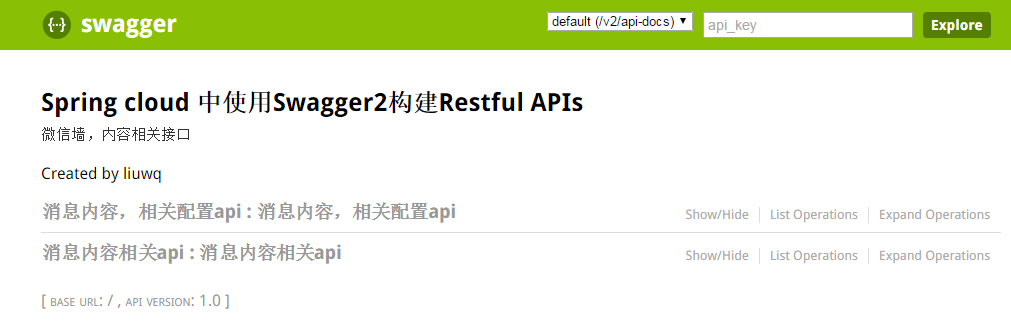
样式二:


spring cloud 集成 swagger2 构建Restful APIS 说明文档的更多相关文章
- Spring Boot 集成Swagger2生成RESTful API文档
Swagger2可以在写代码的同时生成对应的RESTful API文档,方便开发人员参考,另外Swagger2也提供了强大的页面测试功能来调试每个RESTful API. 使用Spring Boot可 ...
- springboot集成swagger2构建RESTful API文档
在开发过程中,有时候我们需要不停的测试接口,自测,或者交由测试测试接口,我们需要构建一个文档,都是单独写,太麻烦了,现在使用springboot集成swagger2来构建RESTful API文档,可 ...
- Spring Boot中使用Swagger2构建RESTful APIs
关于 Swagger Swagger能成为最受欢迎的REST APIs文档生成工具之一,有以下几个原因: Swagger 可以生成一个具有互动性的API控制台,开发者可以用来快速学习和尝试API. S ...
- Spring Boot中使用Swagger2构建RESTful APIs介绍
1.添加相关依赖 <!-- https://mvnrepository.com/artifact/io.springfox/springfox-swagger2 --> <depen ...
- 集成swagger2构建Restful API
集成swagger2构建Restful API 在pom.xml中进行版本管理 <swagger.version>2.8.0</swagger.version> 给taosir ...
- Spring Boot 入门系列(二十二)使用Swagger2构建 RESTful API文档
前面介绍了如何Spring Boot 快速打造Restful API 接口,也介绍了如何优雅的实现 Api 版本控制,不清楚的可以看我之前的文章:https://www.cnblogs.com/zha ...
- Spring Boot中使用Swagger2构建RESTful API文档
在开发rest api的时候,为了减少与其他团队平时开发期间的频繁沟通成本,传统做法我们会创建一份RESTful API文档来记录所有接口细节,然而这样的做法有以下几个问题: 1.由于接口众多,并且细 ...
- Spring Boot 集成 Swagger 生成 RESTful API 文档
原文链接: Spring Boot 集成 Swagger 生成 RESTful API 文档 简介 Swagger 官网是这么描述它的:The Best APIs are Built with Swa ...
- Spring MVC中使用 Swagger2 构建Restful API
1.Spring MVC配置文件中的配置 [java] view plain copy <!-- 设置使用注解的类所在的jar包,只加载controller类 --> <contex ...
随机推荐
- web第十天总结
今天进入web学习第十天,学习了xml序列化,servlet,其他的想不起来了,回顾以前的java基础面向对象,多态,继承.封装,但是还不是很理解.对于map,list,set更是理解不透,2011年 ...
- UWP--页面传值
//匿名对象 private void Button1_OnClick(object sender, RoutedEventArgs e) { , name = "LBI" }); ...
- Java数据类型及其转换&&经常用到的快捷键
数据类型 基本数据类型分类 (8种) byte .short. int. long. char. float. double .boolean 1个字节占8位 整数型byte 1字节 -128~1 ...
- (10)集合之双列集合Map,HashMap,TreeMap
Map中的元素是两个对象,一个对象作为键,一个对象作为值.键不可以重复,但是值可以重复. 看顶层共性方法找子类特有对象. Map与Collection在集合框架中属并列存在 Map存储的是键值对 Ma ...
- 初学canvas,遇到width和height显示问题和用excanvas.js兼容IE问题
/*-----------------------ITEYE 祈祷幸福博客原创,转载请注明.-------------------*/ 第一次认真写技术博客文~~~若有不严谨的地方,望指正. 今天是第 ...
- Linux下python开发环境的准备
升级python 安装依赖: yum install lrzsz zlib zlib-devel openssl readline-deve gcc ibffi-devel python-dev ...
- deepin系统下如何设置wifi热点(亲测有效)
deepin系统下如何设置wifi热点(亲测有效) deepin wifi ap linux 热点 首先必须吐槽一下linux下设置wifi太累了....来来回回折腾了我好久的说.心累... 好了废话 ...
- vs2012 asp调试设置 清单目录
在web.cong中添加 <system.webServer> <directoryBrowse enabled="true" /> </system ...
- Dashboard登录成功后 RuntimeError: Unable to create a new session key.
openstack按照官网docs部署horizon后,使用admin账号密码登录,但网页提示未知错误. 查看/var/log/httpd/error_log 提示这个:RuntimeError: U ...
- JAVA-随机读写文件
File类通过使用 . 来获取当前路径,从而取得文件. File f = new File(".\\Res\\Temp.txt"); 或者直接使用空构造函数: File f = n ...