
.9-浅析webpack源码之NodeEnvironmentPlugin模块总览
介绍Compiler的构造比较无趣,不如先过后面的,在用到compiler的时候再做讲解。
这一节主要讲这行代码:
// 不管这里

compiler = new Compiler();

compiler.context = options.context;

compiler.options = options;

// 看这里

new NodeEnvironmentPlugin().apply(compiler);
这个构造了一个NodeEnvironmentPlugin对象并调用apply对compiler进行操作。
流程图:
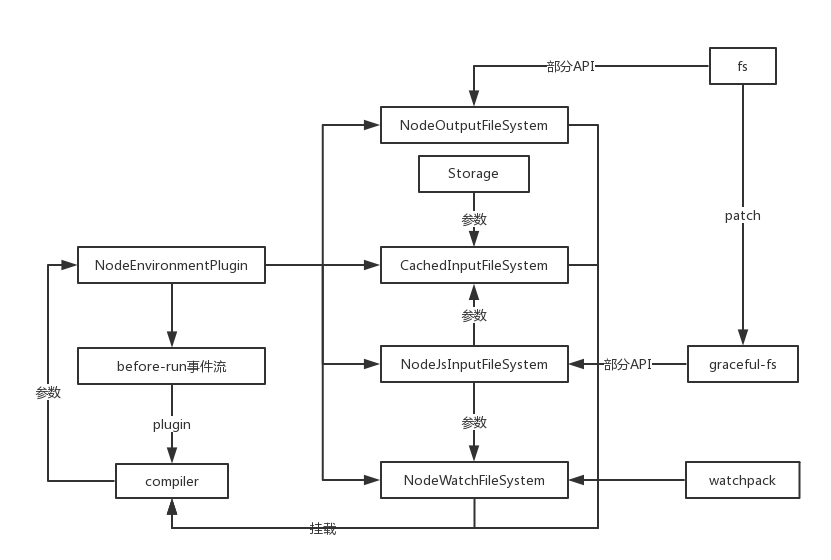
模块源码如下:
"use strict";

const NodeWatchFileSystem = require("./NodeWatchFileSystem");

const NodeOutputFileSystem = require("./NodeOutputFileSystem");

const NodeJsInputFileSystem = require("enhanced-resolve/lib/NodeJsInputFileSystem");

const CachedInputFileSystem = require("enhanced-resolve/lib/CachedInputFileSystem");

class NodeEnvironmentPlugin {

    apply(compiler) {

        // 可以缓存输入的文件系统

        compiler.inputFileSystem = new CachedInputFileSystem(new NodeJsInputFileSystem(), 60000);

        const inputFileSystem = compiler.inputFileSystem;

        // 输出文件系统

        compiler.outputFileSystem = new NodeOutputFileSystem();

        // 监视文件系统

        compiler.watchFileSystem = new NodeWatchFileSystem(compiler.inputFileSystem);

        // 添加事件流before-run

        compiler.plugin("before-run", (compiler, callback) => {

            if (compiler.inputFileSystem === inputFileSystem)

                inputFileSystem.purge();

            callback();

        });

    }

}

module.exports = NodeEnvironmentPlugin;
除去添加事件流,其余几步都是在compiler对象上挂载node的fs文件系统,详细的API用法可以去nodejs官网看文档:https://nodejs.org/dist/latest-v8.x/docs/api/
这里只做简介:
NodeJsInputFileSystem
var fs = require("graceful-fs");

module.exports = NodeJsInputFileSystem;

// 获取文件信息

NodeJsInputFileSystem.prototype.stat = fs.stat.bind(fs);

// 读取目录内容

NodeJsInputFileSystem.prototype.readdir = function readdir(path, callback) {

    // files 是目录中不包括 '.' 和 '..' 的文件名的数组

    fs.readdir(path, function(err, files) {

        callback(err, files && files.map(function(file) {

            // 对文件名进行NFC格式化

            return file.normalize ? file.normalize("NFC") : file;

        }));

    });

};

// 读取文件

NodeJsInputFileSystem.prototype.readFile = fs.readFile.bind(fs);

// 读取链接

NodeJsInputFileSystem.prototype.readlink = fs.readlink.bind(fs);

// 同步方法

NodeJsInputFileSystem.prototype.statSync = fs.statSync.bind(fs);

NodeJsInputFileSystem.prototype.readdirSync = function readdirSync(path) {/**/};

NodeJsInputFileSystem.prototype.readFileSync = fs.readFileSync.bind(fs);

NodeJsInputFileSystem.prototype.readlinkSync = fs.readlinkSync.bind(fs);
可以看到,这里只是对引入的graceful-js的部分方法进行bind绑定,大概看一下graceful-fs的内容:
var fs = require('fs')

// ...工具方法

module.exports = patch(require('./fs.js'))

if (process.env.TEST_GRACEFUL_FS_GLOBAL_PATCH) {

    module.exports = patch(fs)

}

module.exports.close = fs.close = (function(fs$close) { /*...*/ })(fs.close)

module.exports.closeSync = fs.closeSync = (function(fs$closeSync) { /*...*/ })(fs.closeSync)

function patch(fs) {

    // fs方法二次封装

    return fs

}
跟名字一样,内部调用了一个patch对fs模块进行二次封装,变得更加'优雅'。
NodeOutputFileSystem
"use strict";

const fs = require("fs");

const path = require("path");

const mkdirp = require("mkdirp");

class NodeOutputFileSystem {

    constructor() {

        // 新建多层级文件夹

        this.mkdirp = mkdirp;

        // 新建单个文件夹

        this.mkdir = fs.mkdir.bind(fs);

        // 删除文件夹

        this.rmdir = fs.rmdir.bind(fs);

        // 删除文件

        this.unlink = fs.unlink.bind(fs);

        // 将内容写进某个文件

        this.writeFile = fs.writeFile.bind(fs);

        // 略

        this.join = path.join.bind(path);

    }

}

module.exports = NodeOutputFileSystem;
这个模块就十分亲民,都是原生的nodeAPI,并没有进行包装。
"use strict";

const Watchpack = require("watchpack");

class NodeWatchFileSystem {

    constructor(inputFileSystem) {

            this.inputFileSystem = inputFileSystem;

            this.watcherOptions = {

                aggregateTimeout: 0

            };

            this.watcher = new Watchpack(this.watcherOptions);

        }

        // 对文件进行监视

    watch(files, dirs, missing, startTime, options, callback, callbackUndelayed) { /*...*/ }

}

module.exports = NodeWatchFileSystem;
模块内容比较简单,引入一个inputFileSystem进行初始化监视对象,原型上只有一个watch方法。(实际内容非常深入和繁杂,后面再讲)
这个模块主要是为了接下来输出打包文件做准备,主要内容大部分是nodejs相关。
不过没关系,都是用JS写的。
.9-浅析webpack源码之NodeEnvironmentPlugin模块总览的更多相关文章
- .12-浅析webpack源码之NodeWatchFileSystem模块总览
剩下一个watch模块,这个模块比较深,先大概过一下整体涉及内容再分部讲解. 流程图如下: NodeWatchFileSystem const Watchpack = require("wa ...
- .3-浅析webpack源码之预编译总览
写在前面: 本来一开始想沿用之前vue源码的标题:webpack源码之***,但是这个工具比较巨大,所以为防止有人觉得我装逼跑来喷我(或者随时鸽),加上浅析二字,以示怂. 既然是浅析,那么案例就不必太 ...
- .6-浅析webpack源码之validateSchema模块
validateSchema模块 首先来看错误检测: const webpackOptionsValidationErrors = validateSchema(webpackOptionsSchem ...
- .4-浅析webpack源码之convert-argv模块
上一节看了一眼预编译的总体代码,这一节分析convert-argv模块. 这个模块主要是对命令参数的解析,也是yargs框架的核心用处. 生成默认配置文件名数组 module.exports = fu ...
- .15-浅析webpack源码之WebpackOptionsApply模块-plugin事件流总览
总体过了一下后面的流程,发现Compiler模块确实不适合单独讲解,这里继续讲解后面的代码: compiler.options = new WebpackOptionsApply().process( ...
- .14-浅析webpack源码之Watchpack模块
解决掉了最头疼的DirectoryWatcher内部实现,这一节可以结束NodeWatchFileSystem模块. 关于watch的应用场景,仔细思考了下,这不就是热重载的核心嘛. 首先是监视文件, ...
- .13-浅析webpack源码之WatcherManager模块
从模块流可以看出,这个NodeWatchFileSystem模块非常深,这里暂时不会深入到chokidar模块,有点太偏离本系列文章了,从WatcherManager开始讲解. 流程如图: 源码非常简 ...
- .11-浅析webpack源码之Storage模块
至此已完成NodeJsInputFileSysten模块的讲解,下一步就是实际实用的模块: compiler.inputFileSystem = new CachedInputFileSystem(n ...
- .10-浅析webpack源码之graceful-fs模块
在cachedInput.output.watch三大文件系统中,output非常简单,没有必要讲,其余两个模块依赖于input模块,而input主要是引用了graceful-fs的部分API,所以这 ...
随机推荐
- Ionic3 启动页以及应用图标
将新的启动页和应用图标图片(最好是高清png)上传到根目录 resources 使用命令自动生成,通过CMD进入项目所在文件夹,分别执行 ionic cordova resources android ...
- 最长上升子序列(NlogN)总结
最长上升子序列总结 最开始的知道最长上升子序列的时候,简单DP的时候,但是后来遇到很多最长上升子序列的问题就没法用DP来解决,时间复杂度和空间复杂度都不允许.
- Nginx详解以及LNMP的搭建
v\:* {behavior:url(#default#VML);} o\:* {behavior:url(#default#VML);} w\:* {behavior:url(#default#VM ...
- css中单位 px、em 的区别【转载】
原文:http://www.admin10000.com/document/6267.html 在国内网站中,包括三大门户,以及“引领”中国网站设计潮流的蓝色理想,ChinaUI等都是使用了p ...
- 【译】Asp.Net Identity Cookies 格式化-中英对照版
原文出处 Trailmax Tech Max Vasilyev: ASP.Net MVC development in Aberdeen, Scotland I've been reached out ...
- Oracle Database 12c Release 2安装详解
第1章 Oracle Database 12c Release 2安装详解 1.1 下载方法 oracle官网https://www.oracle.com 1)打开官方网站,找到下载连接 2)选择更多 ...
- 在ASP.NET开发中一些单词的标准缩写
有些词可能共用一些缩写.带星号的缩写或词来源于PeopleSoft标准. The following standard word abbreviations should be used in nam ...
- c#异步调用的几种方式
首先,我们分析一下异步处理的环境 需要在当前线程中获取返回值 不需要在当前线程中获取返回值,但是仍然需要对返回值做处理对于第1中情况,还可以继续细分 在当前线程中启动线程T,然后继续执行当前线程中的其 ...
- Python小爬虫
网页解析器下载网址: http://www.crummy.com/software/BeautifulSoup/ ...
- MySQL解压版配置步骤详细教程
解压mysql到D盘根目录 在解压路径下复制my-default.ini,修改名称为my.ini 在my.ini内容如下 [client]default-character-set=utf8 [mys ...