
搭建公司内部的NuGet服务器

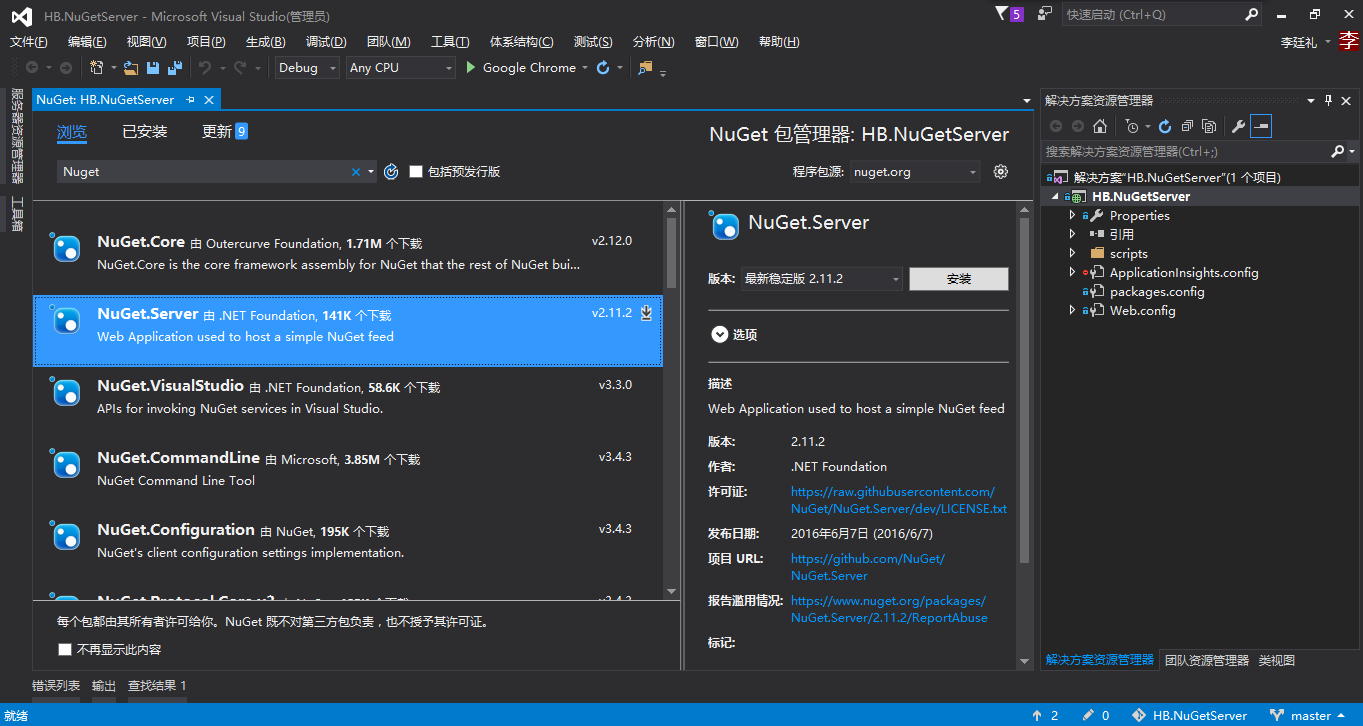

 是作为一个密钥,防止其他人来访问我们的Nuget服务(NuGet Package Explorer来访问的时候也许要填入我们预先设置好的密钥才能够进行访问)
<?xml version="1.0" encoding="utf-8"?>
<!-- For more information on how to configure your ASP.NET application, please visit http://go.microsoft.com/fwlink/?LinkId=169433 -->
<configuration>
<appSettings>
<!-- Determines if an Api Key is required to push\delete packages from the server. -->
<add key="requireApiKey" value="true" /> <!--
Set the value here to allow people to push/delete packages from the server.
NOTE: This is a shared key (password) for all users.
-->
<add key="apiKey" value="ChinaNet910111" />
<!--
Change the path to the packages folder. Default is ~/Packages.
This can be a virtual or physical path.
-->
<add key="packagesPath" value="~/Packages" /> <!--
Set allowOverrideExistingPackageOnPush to false to mimic NuGet.org's behaviour (do not allow overwriting packages with same id + version).
-->
<add key="allowOverrideExistingPackageOnPush" value="false" /> <!--
Set ignoreSymbolsPackages to true to filter out symbols packages. Since NuGet.Server does not come with a symbol server,
it makes sense to ignore this type of packages. When enabled, files named `.symbols.nupkg` or packages containing a `/src` folder will be ignored. If you only push .symbols.nupkg packages, set this to false so that packages can be uploaded.
-->
<add key="ignoreSymbolsPackages" value="true" /> <!--
Set enableDelisting to true to enable delist instead of delete as a result of a "nuget delete" command.
- delete: package is deleted from the repository's local filesystem.
- delist:
- "nuget delete": the "hidden" file attribute of the corresponding nupkg on the repository local filesystem is turned on instead of deleting the file.
- "nuget list" skips delisted packages, i.e. those that have the hidden attribute set on their nupkg.
- "nuget install packageid -version version" command will succeed for both listed and delisted packages.
e.g. delisted packages can still be downloaded by clients that explicitly specify their version.
-->
<add key="enableDelisting" value="false" /> <!--
Set enableFrameworkFiltering to true to enable filtering packages by their supported frameworks during search.
-->
<add key="enableFrameworkFiltering" value="false" /> <!--
When running NuGet.Server in a NAT network, ASP.NET may embed the erver's internal IP address in the V2 feed.
Uncomment the following configuration entry to enable NAT support.
-->
<!-- <add key="aspnet:UseHostHeaderForRequestUrl" value="true" /> -->
</appSettings>
<system.web>
<httpRuntime maxRequestLength="" />
<compilation debug="true" />
</system.web>
<system.serviceModel>
<serviceHostingEnvironment aspNetCompatibilityEnabled="true" />
</system.serviceModel>
<system.webServer>
<staticContent>
<mimeMap fileExtension=".nupkg" mimeType="application/zip" />
</staticContent>
<modules runAllManagedModulesForAllRequests="true">
</modules>
</system.webServer>
</configuration>
web.config
搭建公司内部的NuGet服务器的更多相关文章
- .NET持续集成与自动化部署之路第二篇——使用NuGet.Server搭建公司内部的Nuget(包)管理器
使用NuGet.Server搭建公司内部的Nuget(包)管理器 前言 Nuget是一个.NET平台下的开源的项目,它是Visual Studio的扩展.在使用Visual Studio开发基 ...
- 通过ProGet搭建一个内部的Nuget服务器
.NET Core项目完全使用Nuget 管理组件之间的依赖关系,Nuget已经成为.NET 生态系统中不可或缺的一个组件,从项目角度,将项目中各种组件的引用统统交给NuGet,添加组件/删除组件/以 ...
- 搭建公司内部的NuGet Server
随着公司业务慢慢的拓展,项目便会越来越来多,很多项目会依赖其他项目DLL,比如一些底层的技术框架DLL引用,还有各业务系统的也有可能会有引用的可能. 项目多,交叉引用多,如果要是有一个DLL更新,那就 ...
- 在VS中自动生成NuGet包以及搭建自己的或单位内部的NuGet服务器
关于NuGet的介绍已经很多,可以参考下面的: NuGet学习笔记(1)--初识NuGet及快速安装使用 http://kb.cnblogs.com/page/143190/ NuGet学习笔记(2) ...
- DNS域名解析之搭建公司内部域--技术流ken
什么是DNS DNS( Domain Name System)是“域名系统”的英文缩写,是一种组织成域层次结构的计算机和网络服务命名系统,它用于TCP/IP网络,它所提供的服务是用来将主机名和域名转换 ...
- NuGet学习笔记3——搭建属于自己的NuGet服务器
文章导读 创建NuGetServer Web站点 发布站点到IIS 添加本地站点到包包数据源 在上一篇NuGet学习笔记(2) 使用图形化界面打包自己的类库 中讲解了如何打包自己的类库,接下来进行最重 ...
- NuGet学习笔记(3) 搭建属于自己的NuGet服务器
文章导读 创建NuGetServer Web站点 发布站点到IIS 添加本地站点到包包数据源 在上一篇NuGet学习笔记(2) 使用图形化界面打包自己的类库 中讲解了如何打包自己的类库,接下来进行最重 ...
- NuGet学习笔记(3)——搭建属于自己的NuGet服务器(转)
在上一篇NuGet学习笔记(2) 使用图形化界面打包自己的类库 中讲解了如何打包自己的类库,接下来进行最重要的一步,从零开始搭建属于自己的NuGet服务器,诚然园子里及其它很多地方已经有完全写好的Nu ...
- 搭建属于自己的NuGet服务器
文章导读 创建NuGetServer Web站点 发布站点到IIS 添加本地站点到包包数据源 在上一篇NuGet学习笔记(2) 使用图形化界面打包自己的类库 中讲解了如何打包自己的类库,接下来进行最重 ...
随机推荐
- Gaussian and Truncated Gaussian
Everybody knows about Gaussian distribution, and Gaussian is very popular in Bayesian world and even ...
- 轻松配置httpd的虚拟主机
html { font-family: sans-serif } body { margin: 0 } article,aside,details,figcaption,figure,footer,h ...
- YYHS-Super Big Stupid Cross(二分+扫描线+平衡树)
题目描述 “我是超级大沙茶”——Mato_No1 为了证明自己是一个超级大沙茶,Mato 神犇决定展示自己对叉(十字型)有多么的了 解. Mato 神犇有一个平面直角坐标系,上面有一些线段,保证这些线 ...
- HTML与标记属性
网站部分:UI:AI.PS 前端:html.css.js 网站:是一个存放在网络服务器上的完整信息的集合体.由域名.空间服务器.网站程序.数据库等组成.由多个网页以一定的方式连接在一起,成为一个整体. ...
- JavaScript--我发现,原来你是这样的JS(四)(看看变量,作用域,垃圾回收机制是啥)
一.介绍 这是红宝书(JavaScript高级程序设计 3版)的读书笔记第四篇,是红宝书第四章内容(主要是变量和作用域问题),当然其中还有我个人的理解.红宝书这本书可以说是难啃的,要看完不容易,挺厚的 ...
- Python开篇
一:Python的前世今生 python的创始人为吉多·范罗苏姆(Guido van Rossum).1989年的圣诞节期间,吉多·范罗苏姆为了在阿姆斯特丹打发时间,决心开发一个新的脚本解释程序,作为 ...
- 【学习】原生js学习笔记1:添加class和使input为不可用
<input type="checkbox" id="new_check" onChange="noUse()" checked> ...
- 超级详细 一听就会:利用JavaScript jQuery实现图片无限循环轮播(不借助于轮播插件)
前言 作为一个前端工程师,无论公司是什么行业,无论你做什么端,基本都会遇到一个避不开的动画效果:循环轮播.做轮播并不难,市场上的轮播插件有很多,其中比较著名的是swiper,使用也非常简单.但轮播插件 ...
- Java boolean类型
有关java boolean类型的定义: The boolean data type has only two possible values: true and false. Use this da ...
- PHP操作Memcached
一.PHP连接Memcached: 一个简单的使用示例: $memcache = new Memcache; $memcache->connect("127.0.0.1",1 ...