
HttpRequest 类
关于此类的介绍:查看HttpRequest类
点击查看:HttpRequest中方法的封装
跟这个类对应的HttpResponse类
定义:使 ASP.NET 能够读取客户端在 Web 请求期间发送的 HTTP 值。
public sealed class HttpRequest
注:本篇主要介绍可以根据这个类获取什么信息,只会介绍一些用到的方法。
你先要在引用中添加 System.Web.然后引用命名空间。
属性:




      public void GetTest()

        {

            int loop1, loop2;

            NameValueCollection coll;  //System.Collections.Specialized;  命名空间下

            // Load ServerVariable collection into NameValueCollection object.

            coll = Request.ServerVariables;

            // Get names of all keys into a string array.

            String[] arr1 = coll.AllKeys;

            for (loop1 = ; loop1 < arr1.Length; loop1++)

            {

                Response.Write("Key: " + arr1[loop1] + "<br>");

                String[] arr2 = coll.GetValues(arr1[loop1]);

                for (loop2 = ; loop2 < arr2.Length; loop2++)

                {

                    Response.Write("Value " + loop2 + ": " + Server.HtmlEncode(arr2[loop2]) + "<br>");

                }

            }

        }

public Uri UrlReferrer { get; }
Url类简单介绍
定义: 提供统一资源标识符 (URI) 的对象表示形式和对 URI 各部分的轻松访问。


属性: 截取一部分属性
返回字符串类型


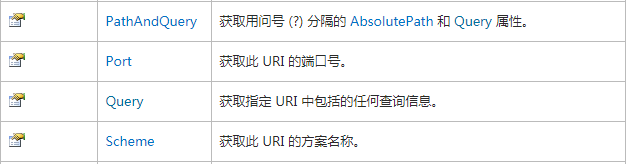
测试:
页面1有一个连接到页面2去
<asp:LinkButton ID="LinkButton1" runat="server" PostBackUrl="~/TestDemo/WebForm2.aspx">LinkButton</asp:LinkButton>
页面2的加载事件把上一个URL信息输出
 protected void Page_Load(object sender, EventArgs e)

        {

            Uri MyUrl = Request.UrlReferrer;

            Response.Write("Referrer URL: " + Server.HtmlEncode(MyUrl.AbsoluteUri) + "<br>");

            Response.Write("Referrer URL Port: " + Server.HtmlEncode(MyUrl.Port.ToString()) + "<br>");

            Response.Write("Referrer URL Protocol: " + Server.HtmlEncode(MyUrl.Scheme) + "<br>");

            Response.Write("Referrer URL: " + Server.HtmlEncode(MyUrl.Query) + "<br>");

        }

传参是一样的(需要使用get传参)
用途:
使用这个很好的可以解决我们登入返回登入页面的问题。登入返回登入前的页面还可以使用Session解决,在登入前把页面信息都保存起来,登入成功后在读取出来。
注:需要在登入页面的加载事件把上一个URL用字符串存起来,登入成功了,跳转这个字符串。(写了登入事件,点击的时候会让页面刷新,上一个页面就是本事页面了)
解决方法:
  string beforeURL = "";  //第一次进入的时候把之前的页面存起来

        protected void Page_Load(object sender, EventArgs e)

        {

            if (!IsPostBack)

            {

                if (Request.UrlReferrer != null)    //如果这个页面是第一个打开的,这个值为空

                {

                    beforeURL = Request.UrlReferrer.ToString();

                }

            }

        }
 if (beforeURL!="")

                    {

                        Response.Redirect(beforeURL);

                    }

                    else

                    {

                        Response.Redirect("HomePage/Index.aspx");

                    }
这三个都是返回字符串类型


备注:原始 URL 被指以下域信息的 URL 的一部分。 在 URL 字符串 http://www.contoso.com/articles/recent.aspx,原始的 URL 是 /articles/recent.aspx。 如果存在,原始的 URL 包括查询字符串。
            Response.Write("Referrer1: " + Server.HtmlEncode(Request.PhysicalApplicationPath) + "<br>");

            Response.Write("Referrer2: " + Server.HtmlEncode(Request.PhysicalPath) + "<br>");

            Response.Write("Referrer URL: " + Server.HtmlEncode(Request.RawUrl) + "<br>");



属性:

Response.Write("Type: " + Server.HtmlEncode(Request.Browser.Type) + "<br>");


Response.Write("Url: " + Server.HtmlEncode(Request.Url.ToString()) + "<br>");
Url: http://localhost:4265/TestDemo/WebForm1.aspx?data=1&ke=good


get传参
string fullname1 = Request.QueryString["fullname"];  //返回的是string类型

string fullname2 = Request["fullname"];
第一行代码会查找键"fullname"仅在查询字符串中;第二行中查找"fullname"中的所有 HTTP 请求集合的键。
HttpRequest.Item 属性 (String)
从 QueryString、Form、Cookies 或 ServerVariables 集合获取指定的对象。
Type: System.Collections.Specialized.NameValueCollection
NameValueCollection 类
表示可通过键或索引访问的关联 String 键和 String 值的集合。
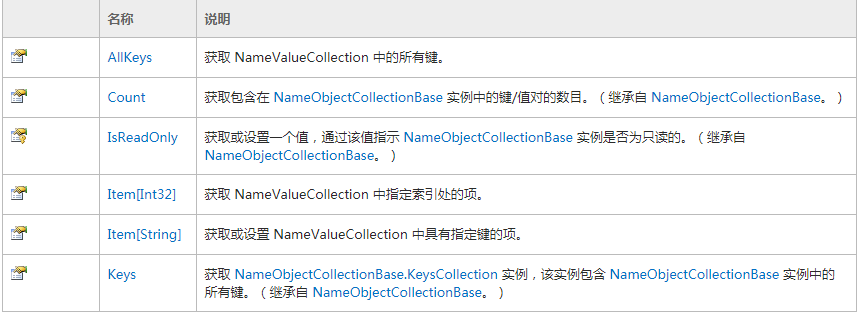


post传参
Form和QueryString是一样的,都可以使用下面的方法获取都有的健和值
            int loop1 = ;

            NameValueCollection coll = Request.QueryString;  //注意引用命名空间

            string[] arr1 = coll.AllKeys;

            for (loop1 = ; loop1 < arr1.Length; loop1++)

            {

                Response.Write("Form: " + arr1[loop1] + ",Vlue:"+ Request.QueryString[arr1[loop1]] + "<br>");

            }



 protected void Page_Load(object sender, EventArgs e)

        {

            int loop1, loop2;

            NameValueCollection coll;

            // Load Header collection into NameValueCollection object.

            coll = Request.Headers;

            // Put the names of all keys into a string array.

            String[] arr1 = coll.AllKeys;

            for (loop1 = ; loop1 < arr1.Length; loop1++)

            {

                Response.Write("Key: " + arr1[loop1] + "<br>");

                // Get all values under this key.

                String[] arr2 = coll.GetValues(arr1[loop1]);

                for (loop2 = ; loop2 < arr2.Length; loop2++)

                {

                    Response.Write("Value " + loop2 + ": " + Server.HtmlEncode(arr2[loop2]) + "<br>");

                }

            }

        }
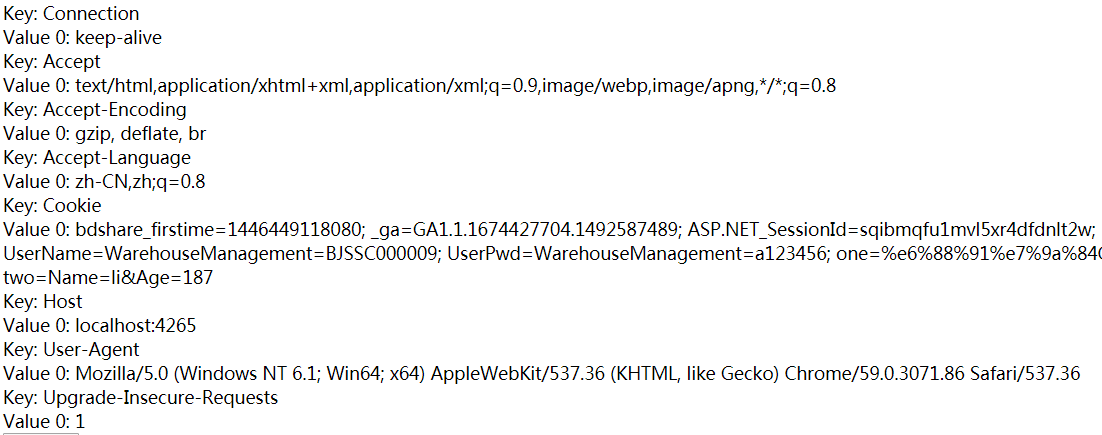


Request.Cookies["XX"];//返回的是HttpCookie类
HttpCookie 类
提供以类型安全的方式来创建和操作单个 HTTP cookie。
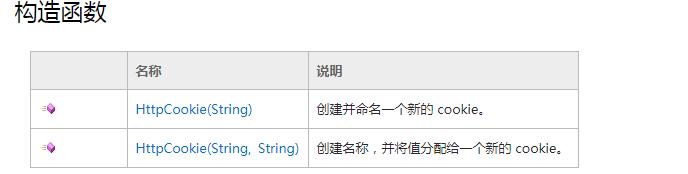

简单的设想Cookies
设置一个Cookies
Response.Cookies["one"].Value =Server.UrlEncode("我的Cookie值"); //要存储中文需要编码
获取一个Cookies
Response.Write(Server.UrlDecode(Request.Cookies["one"].Value) +"<br>");//进行解码
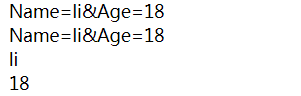
还可以在一个Cookies里面设置多个健
    HttpCookie myCookie = new HttpCookie("two");

            myCookie.Values["Name"] = "li";//中文编码

            myCookie.Values["Age"] = "";

            Response.Cookies.Add(myCookie);
    Response.Write(Request.Cookies["two"].Value+"<br>");

            Response.Write(Request.Cookies["two"].Values + "<br>");

            Response.Write(Request.Cookies["two"].Values["Name"] + "<br>");

            Response.Write(Request.Cookies["two"]["Age"] + "<br>");
调用封装的方法:
            HttpRequestC.WriteCookie("one", "我的Cookied值");

            HttpRequestC.WriteCookie("two", "li", "Name");

            HttpRequestC.WriteCookie("two", "", "Age");
            Response.Write(HttpRequestC.GetCookie("one")+"<br>");

            Response.Write(HttpRequestC.GetCookie("two","Name") + "<br>");

            Response.Write(HttpRequestC.GetCookie("two", "Age") + "<br>");

Request.Params["xxx"];//通用方法


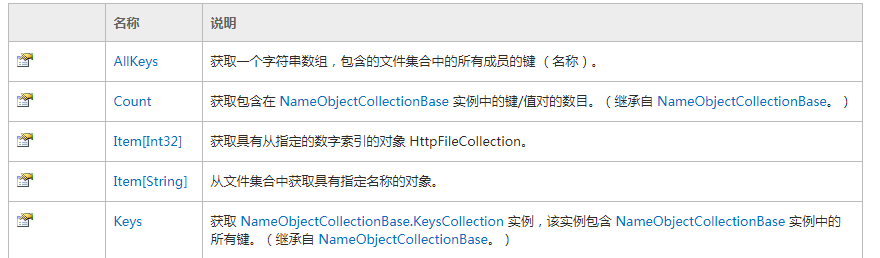
HttpFileCollection.Item 属性 (String)

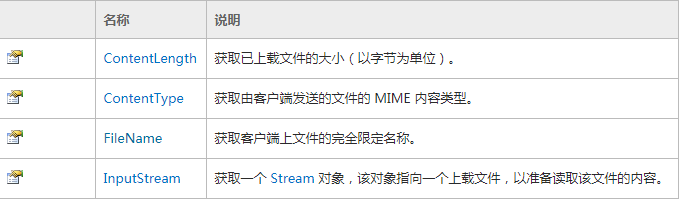
HttpPostedFile 类
提供已上载的客户端的各个文件的访问权限。
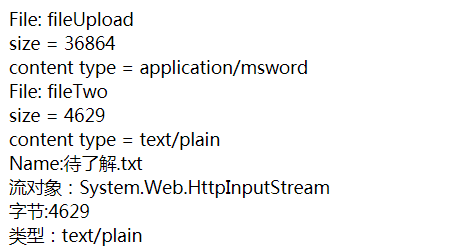
    <asp:FileUpload ID="fileUpload" runat="server" />

        <asp:FileUpload ID="fileTwo" runat="server" />
    protected void LinkButton1_Click(object sender, EventArgs e)

        {

            int loop1;

            HttpFileCollection Files = Request.Files;

            string[] arr1 = Files.AllKeys;

            for (loop1 = ; loop1 < arr1.Length; loop1++)

            {

                Response.Write("File: " + Server.HtmlEncode(arr1[loop1]) + "<br />");

                Response.Write("  size = " + Files[loop1].ContentLength + "<br />");

                Response.Write("  content type = " + Files[loop1].ContentType + "<br />");

            }

            HttpPostedFile pf = Request.Files["fileTwo"];

            Response.Write("Name:"+pf.FileName+"<br>");

            Response.Write("流对象:"+pf.InputStream + "<br>");

            Response.Write("字节:"+pf.ContentLength + "<br>");

            Response.Write("类型:"+pf.ContentType + "<br>");

        }
基本介绍就到这了。
HttpRequest 类的更多相关文章
- ASP.NET -- WebForm -- HttpRequest类的方法和属性
ASP.NET -- WebForm -- HttpRequest类的方法和属性 1. HttpRequest类的方法(1) BinaryRead: 执行对当前输入流进行指定字节数的二进制读取. ( ...
- C# 之 HttpRequest 类
Request对象派生自HttpRequest类,使 ASP.NET 能够读取客户端在 Web 请求期间发送的 HTTP 值,从客户端获取信息,浏览器的种类,用户输入表单的数据,Cooki ...
- HttpWebRequest类与HttpRequest类的区别
HttpRequest类的对象用于服务器端,获取客户端传来的请求的信息,包括HTTP报文传送过来的所有信息.而HttpWebRequest用于客户端,拼接请求的HTTP报文并发送等. HttpWebR ...
- C#,WebRequest类、HttpWebRequest类与HttpRequest类的区别
C#,WebRequest类和HttpWebRequest类的区别? httpWebRequest是webRequest的子类,httpWebRequest是基于http协议的 . HttpWebRe ...
- (4)ASP.NET HttpRequest 类
HttpRequest 类的主要作用是读取客户端在 Web 请求期间发送的 HTTP 值. https://msdn.microsoft.com/zh-cn/library/system.web.ht ...
- .net学习笔记----HttpRequest类
一.HttpRequest的作用 HttpRequest的作用是令到Asp.net能够读取客户端发送HTTP值.比如表单.URL.Cookie传递过来的参数. 返回字符串的那些值就不说了,那些基本上都 ...
- HttpRequest类
一.HttpRequest的作用 HttpRequest的作用是令到Asp.net能够读取客户端发送HTTP值.比如表单.URL.Cookie传递过来的参数. 返回字符串的那些值就不说了,那些基本上都 ...
- .net学习笔记----HttpRequest,WebRequest,HttpWebRequest区别
WebRequest是一个虚类/基类,HttpWebRequest是WebRequest的具体实现 HttpRequest类的对象用于服务器端,获取客户端传来的请求的信息,包括HTTP报文传送过来的所 ...
- java http工具类和HttpUrlConnection上传文件分析
利用java中的HttpUrlConnection上传文件,我们其实只要知道Http协议上传文件的标准格式.那么就可以用任何一门语言来模拟浏览器上传文件.下面有几篇文章从http协议入手介绍了java ...
随机推荐
- linux下安装apache最常见的报错解决
报错如下: Starting httpd: httpd: Could not reliably determine the server's fully qualified domain name, ...
- socket编程 做一回文抄公
socket接口是TCP/IP网络的API,socket接口定义了许多函数或例程,程序员能够用他们来研发TCP/IP网络上的应用程式.要学Internet上的TCP/IP网络编程,必须理解socket ...
- Jquery-鼠标事件
鼠标事件是在用户移动鼠标光标或者使用任意鼠标键点击时触发的.(1):click事件:click事件于用户在元素敲击鼠标左键,并在相同元素上松开左键时触发. $('p').click(fu ...
- ASP.NET WEB API 自定义模型校验过滤器
对外公开WEB接口时,对模型校验是常见的安全常识,常见的写法是在controller中判断ModelState.IsValid,以注册用户API为例. Model: public class Regi ...
- Your password does not satisfy the current policy requirements
创建用户,做测试想设置一个简单的密码.报错: 大概是MySQL5.7搞事情,默认安装了validate_password插件. mysql> SHOW VARIABLES LIKE 'valid ...
- [基础架构]PeopleSoft工作原理(从浏览器发送请求开始)
PeopleSoft体系结构是由几大组成部分构成,之前文章已经详细讲过,了解这几大组成部分是怎么协同工作的更为重要.在本文中将帮助您了解PeopleSoft的工作原理以及用户发送的请求是如何被解析以及 ...
- 用 volume container 共享数据 - 每天5分钟玩转 Docker 容器技术(42)
volume container 是专门为其他容器提供 volume 的容器.它提供的卷可以是 bind mount,也可以是 docker managed volume.下面我们创建一个 volum ...
- epii.js简约而不简单的JS模板引擎
epii.js是什么 epii.js是一个 模板引擎,可快速实现数据与ui绑定,快速实现事件绑定,与处理,不依赖任何第三方库,仅仅8k,在native+webapp开发 和 web开发,h5微网页上均 ...
- Luogu 1006 传纸条 / NOIP 2008 传纸条(动态规划)
Luogu 1006 传纸条 / NOIP 2008 传纸条(动态规划) Description 小渊和小轩是好朋友也是同班同学,他们在一起总有谈不完的话题.一次素质拓展活动中,班上同学安排做成一个m ...
- Centos 6.5开启rsync同步
一.测试环境 操作系统:Centos6.5 Server1:172.18.11.100 源服务器 Server2:172.18.11.110 目标服务器 二.操作步骤: 1.先 ...