
主流页面编辑器比对:TinyMCE VS FCKeditor
开发中先用的是 FCKeditor 编辑器,感觉页面展示的东西太繁琐,所以换了 TinyMCE 编辑器。 为了方便理解,本文不采用穿插比对
先看 FCKeditor :
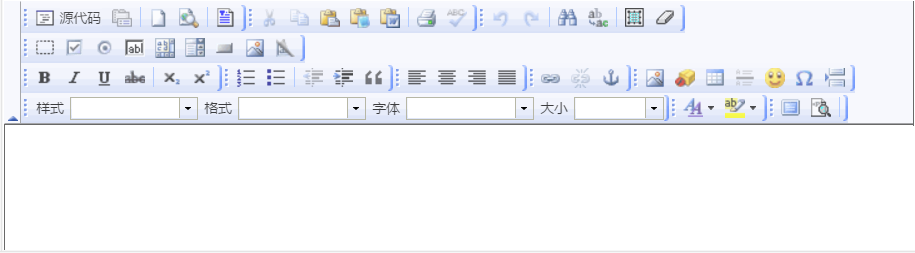
1、jsp :结束标签不能贴着开始标签
  <fck:editor id="content" basePath="${ctx}/scripts/fckeditor/" skinPath="skins/office2003/">

   </fck:editor>
2、js 取值、赋值
//取值 - id

var oEditor = FCKeditorAPI.GetInstance("content");

var content = $.trim(oEditor.GetXHTML(true));

//赋值 - id

var oEditor = FCKeditorAPI.GetInstance("content") ;
oEditor.SetHTML("值") ;
3、页面
再看 TinyMCE:
1、tinyMCE 在页面需要初始化
      tinymce.init({

           selector: "textarea",  //填充 textarea 标签

           upload_image_url: '${ctx}/uploadTinyMcePic', //配置的上传图片的路由(servlet 配置)

           height: 300,

           language:'zh_CN',

           plugins: [

             'advlist autolink lists link  charmap print preview hr anchor pagebreak',

             'searchreplace wordcount visualblocks visualchars code fullscreen',

             'insertdatetime media nonbreaking save table contextmenu directionality',

             'emoticons template paste textcolor colorpicker textpattern imagetools codesample toc help uploadimage fontselect'

           ],

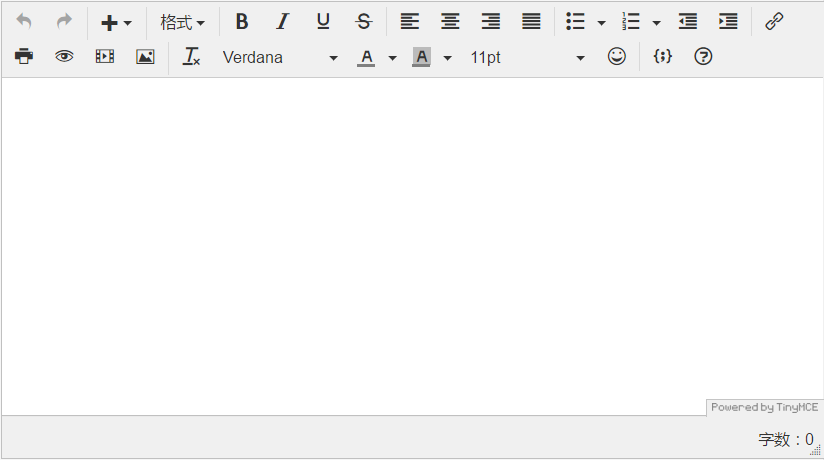
           toolbar1: 'undo redo | insert | styleselect | bold italic underline strikethrough | alignleft aligncenter alignright alignjustify | bullist numlist outdent indent | link image',

           toolbar2: 'print preview media uploadimage | removeformat fontselect forecolor backcolor fontsizeselect emoticons | codesample help',

           image_advtab: true,

           templates: [

             { title: 'Test template 1', content: 'Test 1' },

             { title: 'Test template 2', content: 'Test 2' }

           ],

           menubar: false

       });
PS:当页面有多个textarea 标签是,需要填充指定标签则 将 selector: "textarea" 改为:
mode : "exact",//用特定的模式

elements : "textareaEdit",//容器的id值,将来要在页面中替换的 textarea
2、TinyMCE 取值、赋值:
//取值

var content = tinyMCE.activeEditor.getContent();

//赋值 - id

tinyMCE.get("content").setContent("值");
3、页面
由上可知:
FCKeditor:配置简单,但界面繁杂,取值赋值相对复杂。
TinyMCE: 每个页面都要初始化相对复杂,但界面简洁,取值赋值相对简单。
主流页面编辑器比对:TinyMCE VS FCKeditor的更多相关文章
- 最新主流 Markdown 编辑器推荐
Markdown ,2004年由 John Gruberis 设计和开发,是一种可以使用普通文本编辑器编写的标记语言,通过简单的标记语法,它可以使普通文本内容具有一定的格式,以下将介绍目前比较流行的一 ...
- 移动端H5页面编辑器开发实战--原理结构篇
很久前的写的文章了,转载下发到这里 原文地址: https://blog.csdn.net/tech_meizu/article/details/52288797
- 移动端H5页面编辑器开发实战--经验技巧篇
很久前的写的文章了,转载下发到这里 原本地址: https://blog.csdn.net/tech_meizu/article/details/52484775
- 常用的富文本框插件FreeTextBox、CuteEditor、CKEditor、FCKEditor、TinyMCE、KindEditor ;和CKEditor实例
http://www.cnblogs.com/cxd4321/archive/2013/01/30/2883078.html 目前市面上用的比较多的富文本编辑器有: FreeTextBox 一个有很多 ...
- FCKeditor文本编辑器的使用方法
FCKeditor是一个功能强大支持所见即所得功能的文本编辑器,可以为用户提供微软office软件一样的在线文档编辑服务. 它不需要安装任何形式的客户端,兼容绝大多数主流浏览器,支持ASP.Net.A ...
- 在线富文本编辑器FckEditor配置(.Net Framework 3.5)
进入FCKeditor文件夹,编辑 fckconfig.js 文件.1.上传设置 . var _FileBrowserLanguage = 'php' ; // a ...
- Flask博客开发——Tinymce编辑器
之前Flask博客的文本编辑器比较简陋,这里为博客添加个优雅易用的Tinymce文本编辑器. 1.项目中添加Tinymce 下载好Tinymce包以及语言包,并添加到项目中.添加到项目的方法,参考了这 ...
- FCKeditor编辑器第一次点击总是报错(上传图片) 之后就好了
错误: Failed to execute 'getRangeAt' on 'Selection': 0 is not a valid index. FCKeditor编辑器第一次点击总是报错(上 ...
- asp.net文本编辑器FCKeditor使用方法详解
文本编辑器的使用: 1.FCKeditor的官方网站是:http://www.fckeditor.net/download 目前最新的FCKeditor.Net_2.6.9版本. 请在此页下载:ht ...
随机推荐
- cadence pcb 设计学习记录提纲
Cadence软件是一款"一站式"的电气EDA软件系统.因能力所限,此处仅涉及使用cadence软件绘制PCB.日后随着对软件使用程度的加深,自己打算学习使用cadence软件的原 ...
- jquery 实现滚动条下拉时无限加载的简单实例
var lastId=0;//记录每一次加载时的最后一条记录id,跟您的排序方式有关. var isloading = false; $(window).bind("scroll ...
- 逻辑关系下的NN应用
自己好奇搜了几篇别人对Ng视频的的笔记,读下去可观性很强,后回到自己的笔记却觉得矛盾很多,有些地方搞得很模糊,自己没有仔细去想导致写完读起来很怪,此篇之后我决定放慢记笔记的速度,力求尽多地搞清楚模 ...
- flask 扩展之 -- flask-mail
Flask-Mail 封装了 python 标准库 smtplib 包, 以便于更好的与 Flask 集成. 一. 安装 $ pip install flask-mail 二. 配置 及 初始化 Fl ...
- jqueryui autocomplete的使用与angular配合的小坑
刚开始在做搜索联想功能时,使用了jquery.autocomplete.js插件,当并不理想,首先插件老旧,也只适合老版的jquery.其次在数组中只能联想到首字母一样的数据,比如[12,23,222 ...
- 【Python3之异常处理】
一.错误和异常 1.错误 代码运行前的语法或者逻辑错误 语法错误(这种错误,根本过不了python解释器的语法检测,必须在程序执行前就改正) def test: ^ SyntaxError: inva ...
- django-xadmin隐藏菜单不显示
环境:https://github.com/y2kconnect/xadmin-for-python3.git python3.5 django1.9.12 在adminx.py中的Admin类增加属 ...
- zookeeer client 通信协议
这里主要记录zookeeper client通信协议的.在官方的文档里没找到协议相关部分.这里是记录的协议是通过分析客户端代码得来的. 一.通信流程 客户端发起连接,发送握手包进行timeout协商, ...
- 【Android Developers Training】 43. 序言:管理音频播放
注:本文翻译自Google官方的Android Developers Training文档,译者技术一般,由于喜爱安卓而产生了翻译的念头,纯属个人兴趣爱好. 原文链接:http://developer ...
- Java内部类与final关键字详解
一.内部类的几种创建方法: 1.成员内部类 class Outer{ private int i = 1; class Inner{ public void fun() {System.out.pri ...