
主流页面编辑器比对:TinyMCE VS FCKeditor
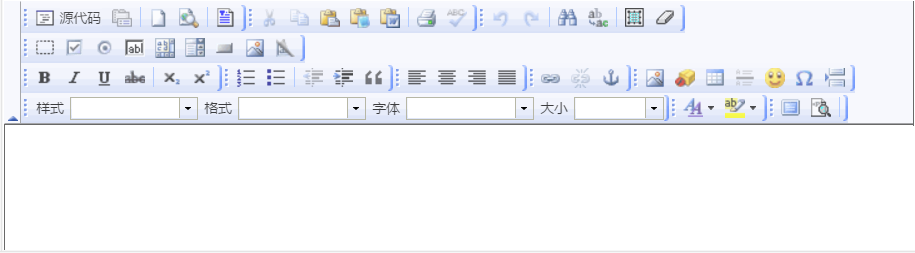
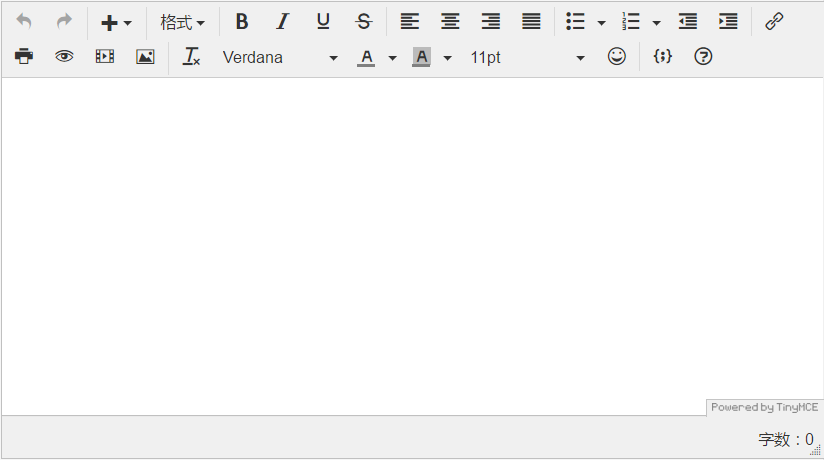
开发中先用的是 FCKeditor 编辑器,感觉页面展示的东西太繁琐,所以换了 TinyMCE 编辑器。 为了方便理解,本文不采用穿插比对
先看 FCKeditor :
1、jsp :结束标签不能贴着开始标签
  <fck:editor id="content" basePath="${ctx}/scripts/fckeditor/" skinPath="skins/office2003/">

   </fck:editor>
2、js 取值、赋值
//取值 - id

var oEditor = FCKeditorAPI.GetInstance("content");

var content = $.trim(oEditor.GetXHTML(true));

//赋值 - id

var oEditor = FCKeditorAPI.GetInstance("content") ;
oEditor.SetHTML("值") ;
3、页面
再看 TinyMCE:
1、tinyMCE 在页面需要初始化
      tinymce.init({

           selector: "textarea",  //填充 textarea 标签

           upload_image_url: '${ctx}/uploadTinyMcePic', //配置的上传图片的路由(servlet 配置)

           height: 300,

           language:'zh_CN',

           plugins: [

             'advlist autolink lists link  charmap print preview hr anchor pagebreak',

             'searchreplace wordcount visualblocks visualchars code fullscreen',

             'insertdatetime media nonbreaking save table contextmenu directionality',

             'emoticons template paste textcolor colorpicker textpattern imagetools codesample toc help uploadimage fontselect'

           ],

           toolbar1: 'undo redo | insert | styleselect | bold italic underline strikethrough | alignleft aligncenter alignright alignjustify | bullist numlist outdent indent | link image',

           toolbar2: 'print preview media uploadimage | removeformat fontselect forecolor backcolor fontsizeselect emoticons | codesample help',

           image_advtab: true,

           templates: [

             { title: 'Test template 1', content: 'Test 1' },

             { title: 'Test template 2', content: 'Test 2' }

           ],

           menubar: false

       });
PS:当页面有多个textarea 标签是,需要填充指定标签则 将 selector: "textarea" 改为:
mode : "exact",//用特定的模式

elements : "textareaEdit",//容器的id值,将来要在页面中替换的 textarea
2、TinyMCE 取值、赋值:
//取值

var content = tinyMCE.activeEditor.getContent();

//赋值 - id

tinyMCE.get("content").setContent("值");
3、页面
由上可知:
FCKeditor:配置简单,但界面繁杂,取值赋值相对复杂。
TinyMCE: 每个页面都要初始化相对复杂,但界面简洁,取值赋值相对简单。
主流页面编辑器比对:TinyMCE VS FCKeditor的更多相关文章
- 最新主流 Markdown 编辑器推荐
Markdown ,2004年由 John Gruberis 设计和开发,是一种可以使用普通文本编辑器编写的标记语言,通过简单的标记语法,它可以使普通文本内容具有一定的格式,以下将介绍目前比较流行的一 ...
- 移动端H5页面编辑器开发实战--原理结构篇
很久前的写的文章了,转载下发到这里 原文地址: https://blog.csdn.net/tech_meizu/article/details/52288797
- 移动端H5页面编辑器开发实战--经验技巧篇
很久前的写的文章了,转载下发到这里 原本地址: https://blog.csdn.net/tech_meizu/article/details/52484775
- 常用的富文本框插件FreeTextBox、CuteEditor、CKEditor、FCKEditor、TinyMCE、KindEditor ;和CKEditor实例
http://www.cnblogs.com/cxd4321/archive/2013/01/30/2883078.html 目前市面上用的比较多的富文本编辑器有: FreeTextBox 一个有很多 ...
- FCKeditor文本编辑器的使用方法
FCKeditor是一个功能强大支持所见即所得功能的文本编辑器,可以为用户提供微软office软件一样的在线文档编辑服务. 它不需要安装任何形式的客户端,兼容绝大多数主流浏览器,支持ASP.Net.A ...
- 在线富文本编辑器FckEditor配置(.Net Framework 3.5)
进入FCKeditor文件夹,编辑 fckconfig.js 文件.1.上传设置 . var _FileBrowserLanguage = 'php' ; // a ...
- Flask博客开发——Tinymce编辑器
之前Flask博客的文本编辑器比较简陋,这里为博客添加个优雅易用的Tinymce文本编辑器. 1.项目中添加Tinymce 下载好Tinymce包以及语言包,并添加到项目中.添加到项目的方法,参考了这 ...
- FCKeditor编辑器第一次点击总是报错(上传图片) 之后就好了
错误: Failed to execute 'getRangeAt' on 'Selection': 0 is not a valid index. FCKeditor编辑器第一次点击总是报错(上 ...
- asp.net文本编辑器FCKeditor使用方法详解
文本编辑器的使用: 1.FCKeditor的官方网站是:http://www.fckeditor.net/download 目前最新的FCKeditor.Net_2.6.9版本. 请在此页下载:ht ...
随机推荐
- ubuntu eclipse 建立server 提示coud not load the tomcat server configuration at /opt/apache ...的解决方法
ubuntu eclipse 建立server 提示coud not load the tomcat server configuration at /opt/apache ...的解决方法 & ...
- 微信 python 接口 -- itchat 文档
itchat 一. 安装 $ pip install itchat 特殊的字典使用方式 通过打印 itchat 的用户以及注册消息的参数, 可以发现这些值都是字典. 但实际上 itchat 精心构造了 ...
- PHPStorm中的快捷键
1.Ctrl+Alt+L 格式化代码 2.windows下按下快捷`Ctrl`+`Shift`+`-`,这样就能折叠所有代码了. 3.windows下按下快捷`Ctrl`+`Shift`+`+`,这样 ...
- c++,函数名不要和某个类名相同 (syntax error : missing ';' before identifier....)
直接上代码: // outside.h class Outside { private: class Inner { public: Inner(Outside& out) : out_(ou ...
- PHPCMS v9 自定义表单添加验证码
1. 在 \phpcms\templates\default\formguide\show.html 中添加验证码显示 <input type="text" id=&quo ...
- el 表达式遍历Map
el 表达式遍历Map<c:forEach var="item" items="${payMentMap}"> <option value=& ...
- [leetcode-557-Reverse Words in a String III]
Given a string, you need to reverse the order of characters in each word within a sentence whilestil ...
- js或者jq的tab切换
<!DOCTYPE html><html><head><meta http-equiv="Content-Type" content=&q ...
- 安装 Node 和 gulp
gulp 是基于 node 实现的,那么我们就需要先安装 node. Node 是一个基于Chrome JavaScript V8引擎建立的一个平台,可以利用它实现 Web服务,做类似PHP的事. 打 ...
- 在线用户数-Constants
package com.pb.news.constants; public class Constants { public static int ONLINE_USER_COUNT=0;//在线用户 ...