
hive lateral view 与 explode详解
1.explode
hive wiki对于expolde的解释如下:
explode() takes in an array (or a map) as an input and outputs the elements of the array (map) as separate rows. UDTFs can be used in the SELECT expression list and as a part of LATERAL VIEW.
As an example of using explode() in the SELECT expression list, consider a table named myTable that has a single column (myCol) and two rows:
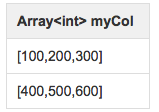
Then running the query:
SELECT explode(myCol) AS myNewCol FROM myTable;will produce: 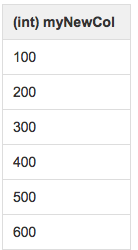
The usage with Maps is similar:
SELECT explode(myMap) AS (myMapKey, myMapValue) FROM myMapTable;总结起来一句话:explode就是将hive一行中复杂的array或者map结构拆分成多行。
使用实例:
xxx表中有一个字段mvt为string类型,数据格式如下:
[{“eid”:”38”,”ex”:”affirm_time_Android”,”val”:”1”,”vid”:”31”,”vr”:”var1”},{“eid”:”42”,”ex”:”new_comment_Android”,”val”:”1”,”vid”:”34”,”vr”:”var1”},{“eid”:”40”,”ex”:”new_rpname_Android”,”val”:”1”,”vid”:”1”,”vr”:”var1”},{“eid”:”19”,”ex”:”hotellistlpage_Android”,”val”:”1”,”vid”:”1”,”vr”:”var01”},{“eid”:”29”,”ex”:”bookhotelpage_Android”,”val”:”0”,”vid”:”1”,”vr”:”var01”},{“eid”:”17”,”ex”:”trainMode_Android”,”val”:”1”,”vid”:”1”,”vr”:”mode_Android”},{“eid”:”44”,”ex”:”ihotelList_Android”,”val”:”1”,”vid”:”36”,”vr”:”var1”},{“eid”:”47”,”ex”:”ihotelDetail_Android”,”val”:”0”,”vid”:”38”,”vr”:”var1”}]
用explode小试牛刀一下:
select explode(split(regexp_replace(mvt,'\\[|\\]',''),'\\},\\{')) from ods_mvt_hourly where day=20160710 limit 10;最后出来的结果如下:
{“eid”:”38”,”ex”:”affirm_time_Android”,”val”:”1”,”vid”:”31”,”vr”:”var1”
“eid”:”42”,”ex”:”new_comment_Android”,”val”:”1”,”vid”:”34”,”vr”:”var1”
“eid”:”40”,”ex”:”new_rpname_Android”,”val”:”1”,”vid”:”1”,”vr”:”var1”
“eid”:”19”,”ex”:”hotellistlpage_Android”,”val”:”1”,”vid”:”1”,”vr”:”var01”
“eid”:”29”,”ex”:”bookhotelpage_Android”,”val”:”0”,”vid”:”1”,”vr”:”var01”
“eid”:”17”,”ex”:”trainMode_Android”,”val”:”1”,”vid”:”1”,”vr”:”mode_Android”
“eid”:”44”,”ex”:”ihotelList_Android”,”val”:”1”,”vid”:”36”,”vr”:”var1”
“eid”:”47”,”ex”:”ihotelDetail_Android”,”val”:”0”,”vid”:”38”,”vr”:”var1”}
{“eid”:”38”,”ex”:”affirm_time_Android”,”val”:”1”,”vid”:”31”,”vr”:”var1”
“eid”:”42”,”ex”:”new_comment_Android”,”val”:”1”,”vid”:”34”,”vr”:”var1”
2.lateral view
hive wiki 上的解释如下:
Lateral View Syntax
lateralView: LATERAL VIEW udtf(expression) tableAlias AS columnAlias (‘,’ columnAlias)*
fromClause: FROM baseTable (lateralView)*
Description
Lateral view is used in conjunction with user-defined table generating functions such as explode(). As mentioned in Built-in Table-Generating Functions, a UDTF generates zero or more output rows for each input row. A lateral view first applies the UDTF to each row of base table and then joins resulting output rows to the input rows to form a virtual table having the supplied table alias.
Example
Consider the following base table named pageAds. It has two columns: pageid (name of the page) and adid_list (an array of ads appearing on the page)
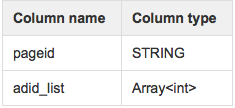
An example table with two rows:
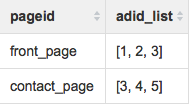
and the user would like to count the total number of times an ad appears across all pages.
A lateral view with explode() can be used to convert adid_list into separate rows using the query:
SELECT pageid, adid

FROM pageAds LATERAL VIEW explode(adid_list) adTable AS adid;
The resulting output will be 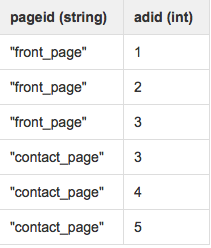
Then in order to count the number of times a particular ad appears, count/group by can be used:
SELECT adid, count(1)

FROM pageAds LATERAL VIEW explode(adid_list) adTable AS adid

GROUP BY adid;
The resulting output will be
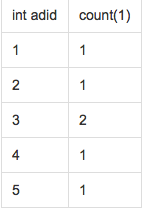
由此可见,lateral view与explode等udtf就是天生好搭档,explode将复杂结构一行拆成多行,然后再用lateral view做各种聚合。
3.实例
还是第一部分的例子,上面我们explode出来以后的数据,不是标准的json格式,我们通过lateral view与explode组合解析出标准的json格式数据:
SELECT ecrd, CASE WHEN instr(mvtstr,'{')=0

    AND instr(mvtstr,'}')=0 THEN concat('{',mvtstr,'}') WHEN instr(mvtstr,'{')=0

    AND instr(mvtstr,'}')>0 THEN concat('{',mvtstr) WHEN instr(mvtstr,'}')=0

    AND instr(mvtstr,'{')>0 THEN concat(mvtstr,'}') ELSE mvtstr END AS mvt

      FROM ods.ods_mvt_hourly LATERAL VIEW explode(split(regexp_replace(mvt,'\\[|\\]',''),'\\},\\{')) addTable AS mvtstr

        WHERE DAY='20160710' and ecrd is not null limit 10
查询出来的结果:
xxx
{“eid”:”38”,”ex”:”affirm_time_Android”,”val”:”1”,”vid”:”31”,”vr”:”var1”}
xxx
{“eid”:”42”,”ex”:”new_comment_Android”,”val”:”1”,”vid”:”34”,”vr”:”var1”}
xxx
{“eid”:”40”,”ex”:”new_rpname_Android”,”val”:”1”,”vid”:”1”,”vr”:”var1”}
xxx
{“eid”:”19”,”ex”:”hotellistlpage_Android”,”val”:”1”,”vid”:”1”,”vr”:”var01”}
xxx
{“eid”:”29”,”ex”:”bookhotelpage_Android”,”val”:”0”,”vid”:”1”,”vr”:”var01”
xxx
{“eid”:”17”,”ex”:”trainMode_Android”,”val”:”1”,”vid”:”1”,”vr”:”mode_Android”}
xxx
{“eid”:”44”,”ex”:”ihotelList_Android”,”val”:”1”,”vid”:”36”,”vr”:”var1”}
xxx
{“eid”:”47”,”ex”:”ihotelDetail_Android”,”val”:”1”,”vid”:”38”,”vr”:”var1”}
xxx
{“eid”:”38”,”ex”:”affirm_time_Android”,”val”:”1”,”vid”:”31”,”vr”:”var1”}
xxx
{“eid”:”42”,”ex”:”new_comment_Android”,”val”:”1”,”vid”:”34”,”vr”:”var1”}
4.Ending
Lateral View通常和UDTF一起出现,为了解决UDTF不允许在select字段的问题。
Multiple Lateral View可以实现类似笛卡尔乘积。
Outer关键字可以把不输出的UDTF的空结果,输出成NULL,防止丢失数据。
参考内容:
1.http://blog.csdn.net/oopsoom/article/details/26001307 lateral view的用法实例
2.https://my.oschina.net/leejun2005/blog/120463 复合函数的用法,比较详细
3.http://blog.csdn.net/zhaoli081223/article/details/46637517 udtf的介绍
Lateral View用法 与 Hive UDTF explode
Lateral View是Hive中提供给UDTF的conjunction,它可以解决UDTF不能添加额外的select列的问题。
1. Why we need Lateral View?
- select game_id, explode(split(user_ids,'\\[\\[\\[')) as user_id from login_game_log where dt='2014-05-15'
- FAILED: Error in semantic analysis: UDTF's are not supported outside the SELECT clause, nor nested in expressions。
提示语法分析错误,UDTF不支持函数之外的select 语句,真无语。。。
如果我们想支持怎么办呢?接下来就是Lateral View 登场的时候了。
2. Lateral View explain
2.1 单个Lateral View
Lateral view is used in conjunction with user-defined table generatingfunctions such as explode(). As mentioned in Built-in Table-Generating Functions, a UDTF generates zero or more output rows foreach input row. A lateral view first applies the UDTF to each row of base tableand then joins resulting output rows to the input rows to form a virtual tablehaving the supplied table alias.
解释一下:
Lateral view 其实就是用来和像类似explode这种UDTF函数联用的。lateral view 会将UDTF生成的结果放到一个虚拟表中,然后这个虚拟表会和输入行即每个game_id进行join 来达到连接UDTF外的select字段的目的。
Lateral View Syntax
lateralView: LATERAL VIEW udtf(expression) tableAlias AS columnAlias (',' columnAlias)*fromClause: FROM baseTable (lateralView)* |
可以看出,可以在2个地方用Lateral view:
1. 在udtf前面用
2. 在from baseTable后面用
举个例子:
1. 先创建一个文件,里面2列用\t分割,game_id和user_ids
- hive> create table test_lateral_view_shengli(game_id string,userl_ids string) row format delimited fields terminated by '\t' stored as textfile;
- OK
- Time taken: 2.451 seconds
- hive> load data local inpath '/home/hadoop/test_lateral' into table test_lateral_view_shengli;
- Copying data from file:/home/hadoop/test_lateral
- Copying file: file:/home/hadoop/test_lateral
- Loading data to table dw.test_lateral_view_shengli
- OK
- Time taken: 6.716 seconds
- hive> select * from test_lateral_view_shengli;
- OK
- game101 15358083654[[[ab33787873[[[zjy18052480603[[[shlg1881826[[[lxqab110
- game66 winning1ren[[[13810537508
- game101 hu330602003[[[hu330602004[[[hu330602005[[[15967506560
下面使用lateral_view
- hive> select game_id, user_id
- > from test_lateral_view_shengli lateral view explode(split(userl_ids,'\\[\\[\\[')) snTable as user_id
- > ;
- Total MapReduce jobs = 1
- Launching Job 1 out of 1
- Number of reduce tasks is set to 0 since there's no reduce operator
- Starting Job = job_201403301416_445839, Tracking URL = http://10.1.9.10:50030/jobdetails.jsp?jobid=job_201403301416_445839
- Kill Command = /app/home/hadoop/src/hadoop-0.20.2-cdh3u5/bin/../bin/hadoop job -Dmapred.job.tracker=10.1.9.10:9001 -kill job_201403301416_445839
- 2014-05-16 17:39:19,108 Stage-1 map = 0%, reduce = 0%
- 2014-05-16 17:39:28,157 Stage-1 map = 100%, reduce = 0%
- 2014-05-16 17:39:38,830 Stage-1 map = 100%, reduce = 100%
- Ended Job = job_201403301416_445839
- OK
- game101 hu330602003
- game101 hu330602004
- game101 hu330602005
- game101 15967506560
- game101 15358083654
- game101 ab33787873
- game101 zjy18052480603
- game101 shlg1881826
- game101 lxqab110
- game66 winning1ren
- game66 13810537508
2.2 多个Lateral View
|
Array<int> col1 |
Array<string> col2 |
|
[1, 2] |
[a", "b", "c"] |
|
[3, 4] |
[d", "e", "f"] |
转换目标:
|
int myCol1 |
string myCol2 |
|
1 |
"a" |
|
1 |
"b" |
|
1 |
"c" |
|
2 |
"a" |
|
2 |
"b" |
|
2 |
"c" |
|
3 |
"d" |
|
3 |
"e" |
|
3 |
"f" |
|
4 |
"d" |
|
4 |
"e" |
|
4 |
"f" |
- SELECT myCol1, myCol2 FROM baseTable
- LATERAL VIEW explode(col1) myTable1 AS myCol1
- LATERAL VIEW explode(col2) myTable2 AS myCol2;
3. Outer Lateral View
hive> select * FROM test_lateral_view_shengli LATERAL VIEW explode(array()) C AS a ;结果是什么都不输出。
SELECT * FROM src LATERAL VIEW OUTER explode(array()) C AS a limit 10;- 238 val_238 NULL
- 86 val_86 NULL
- 311 val_311 NULL
- 27 val_27 NULL
- 165 val_165 NULL
- 409 val_409 NULL
- 255 val_255 NULL
- 278 val_278 NULL
- 98 val_98 NULL
- ...
4.总结:
hive lateral view 与 explode详解的更多相关文章
- hive中的lateral view 与 explode函数的使用
hive中的lateral view 与 explode函数的使用 背景介绍: explode与lateral view在关系型数据库中本身是不该出现的. 因为他的出现本身就是在操作不满足第一范式的数 ...
- 【Hive学习之六】Hive Lateral View &视图&索引
环境 虚拟机:VMware 10 Linux版本:CentOS-6.5-x86_64 客户端:Xshell4 FTP:Xftp4 jdk8 hadoop-3.1.1 apache-hive-3.1.1 ...
- hive中,lateral view 与 explode函数
hive中常规处理json数据,array类型json用get_json_object(#,"$.#")这个方法足够了,map类型复合型json就需要通过数据处理才能解析. exp ...
- Hive lateral view explode
select 'hello', x from dual lateral view explode(array(1,2,3,4,5)) vt as x 结果是: hello 1 hello 2 ...
- 大数据学习系列之七 ----- Hadoop+Spark+Zookeeper+HBase+Hive集群搭建 图文详解
引言 在之前的大数据学习系列中,搭建了Hadoop+Spark+HBase+Hive 环境以及一些测试.其实要说的话,我开始学习大数据的时候,搭建的就是集群,并不是单机模式和伪分布式.至于为什么先写单 ...
- Asp.Net MVC part2 View、Controller详解
View详解Razor视图引擎简介HtmlHelper强类型页面 Razor视图引擎简介强大的@:表示使用C#代码,相当于aspx中的<%%>可以完成输出功能当遇到html标签时会认为C# ...
- Hive Lateral View
一.简介 1.Lateral View 用于和UDTF函数[explode,split]结合来使用. 2.首先通过UDTF函数将数据拆分成多行,再将多行结果组合成一个支持别名的虚拟表. 3.主要解决在 ...
- Hive存储格式之ORC File详解,什么是ORC File
目录 概述 文件存储结构 Stripe Index Data Row Data Stripe Footer 两个补充名词 Row Group Stream File Footer 条纹信息 列统计 元 ...
- Hive on Spark安装配置详解(都是坑啊)
个人主页:http://www.linbingdong.com 简书地址:http://www.jianshu.com/p/a7f75b868568 简介 本文主要记录如何安装配置Hive on Sp ...
随机推荐
- Linux中硬盘物理扇区与文件系统文件对应关系(转)
1 概述 系统读写文件过程中,如下面内核打印信息,报告读写某个扇区错误.那么我们如何能够通过sector找到读写哪个文件错误? kernel: end_request: I ...
- bzoj 4709 [Jsoi2011]柠檬——单调栈二分处理决策单调性
题目:https://www.lydsy.com/JudgeOnline/problem.php?id=4709 题解:https://blog.csdn.net/neither_nor/articl ...
- CF 316G3 Good Substrings——广义后缀自动机
题目:http://codeforces.com/contest/316/problem/G3 对询问串和模式串一起建一个后缀自动机,做出在每个串上的 right 集合大小之后枚举自动机上的每个点看看 ...
- 在没有go-pear.bat的php中安装pear
因为需要安装phpunit,要先装pear,网上的教程大多数是以双击go-pear.bat开始,但是我安装的php文件夹里压根没有这个文件.经过几次搜索之后终于找到了办法.解决步骤如下:1.下载下面连 ...
- Oracle Split字符串
为了让 PL/SQL 函数返回数据的多个行,必须通过返回一个 REF CURSOR 或一个数据集合来完成.REF CURSOR 的这种情况局限于可以从查询中选择的数据,而整个集合在可以返回前,必须进行 ...
- 写了一个hiero中添加自定义Token的脚本
Hiero自带Token往往不够用,shotname中自带版本号的情况下要升级版本会很麻烦,比如Shot_0001_v001这样一个序列名,要升级为Shot_0001_v002就必须把_v001之前的 ...
- mycat 1.6 配置【仅学习测试配置使用】
jdk 自行配置 mycat 1.6 点击下载 配置文件 schema.xml <?xml version="1.0"?> <!DOCTYPE mycat:sch ...
- Mysql 复制工作原理
数据库配置的时候,一定要开启二进制日志,如果开始没开启后来再想开启的话,必须重启. 基于日志点的复制 备份数据库工具 ----------------------------------------- ...
- Mysql 性能优化4 mysql参数配置
mysql 参数的介绍 大概450项参数,大多保持默认就可以了 错误的参数 崩溃,错误,运行缓慢. 参数最好在生产环境前配置好.最好不要在生产环境 中 直接配置,有可能不会立即生效,或者之前的数据和配 ...
- 推荐两个小工具MediaInfo 和 netpersec
[转载请注明出处]:http://blog.csdn.net/longlong530 流媒体服开发的时候常用的两个工具, 1. MediaInfo 下载路径:(http://w.x.baidu ...