
13.2SolrCloud集群使用手册之CoreAdmin API
转载请出自出处:http://www.cnblogs.com/hd3013779515/
CoreAdminHandler是用来管理Solr cores的,用来管理一个Solr instance中所有的cores。
1. 查看状态STATUS
http://192.168.137.171:8080/solr-cloud/admin/cores?action=STATUS


2.创建Core
|
name |
The name of the new core. Same as "name" on the <core> element. |
|
instanceDir |
The directory where files for this SolrCore should be stored. Same as instanceDir on the <core> element. |
|
config |
(Optional) Name of the config file (solrconfig.xml) relative to instanceDir. |
|
schema |
(Optional) Name of the schema file (schema.xml) relative to instanceDir. |
|
datadir |
(Optional) Name of the data directory relative to instanceDir. |
|
configSet |
(Optional) Name of the configset to use for this core (see Config Sets) |
|
collection |
(Optional) The name of the collection to which this core belongs. The default is the name of the core. collection.<param>=<value> causes a property of <param>=<value> to be set if a new collection is being created. Use collection.configName=<configname> to point to the configuration for a new collection. |
|
shard |
(Optional) The shard id this core represents. Normally you want to be auto-assigned a shard id. |
|
property.name=value |
(Optional) Sets the core property name to value. See core.properties file contents. |
|
async |
(Optional) Request ID to track this action which will be processed asynchronously |
(1)增加shard3的第一个replica(指定core名字和目录)
http://192.168.137.171:8080/solr-cloud/admin/cores?action=CREATE&name=myc2_s3_r1&instanceDir=myc2_s3_r1_t&collection=myc2&shard=shard3

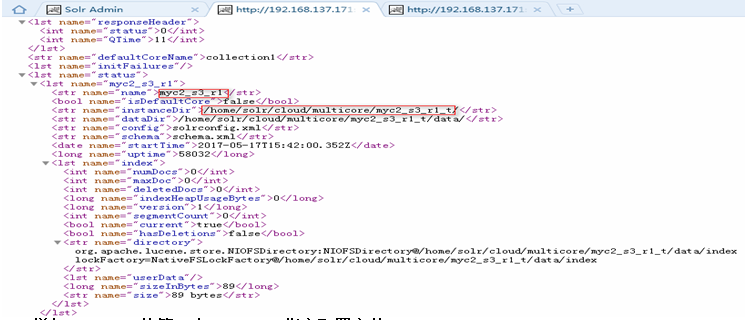
(2)增加shard3的第二个replica(指定配置文件)
http://192.168.137.172:8080/solr-cloud/admin/cores?action=CREATE&name=myc2_s3_r2&instanceDir=myc2_s3_r2&collection=myc2&shard=shard3&config=solrconfig2.xml&schema=schema2.xml


(3)新建collection(增加shard1的第一个replica)
http://192.168.137.171:8080/solr-cloud/admin/cores?action=CREATE&name=myc3_s1_r1&instanceDir=myc3_s1_r1&collection=myc3&shard=shard1&configSet=myconf&collection.configName=myconf2

3.刷新core
当core的配置文件有变化时,可以reload一下。采用的是无缝连接方式。
http://192.168.137.171:8080/solr-cloud/admin/cores?action=RELOAD&core=myc3_s1_r1
4.重命名core
http://192.168.137.171:8080/solr-cloud/admin/cores?action=RENAME&core=myc3_s1_r1&other=coreother
5.交换core
交换core的名字,可以把待机core升格为livecore,同时保持可以恢复livecore。
官方示例:http://localhost:8983/solr/admin/cores?action=SWAP&core=core1&other=core0
6.下线core
官方示例:http://localhost:8983/solr/admin/cores?action=UNLOAD&core=core0
7.合并索引
官方示例:
方式1:http://localhost:8983/solr/admin/cores?action=MERGEINDEXES&core=core0&indexDir=/opt/solr/core1/data/index&indexDir=/opt/solr/core2/data/index
方式2:http://localhost:8983/solr/admin/cores?action=mergeindexes&core=core0&srcCore=core1&srcCore=core2
8.切分
官方示例:http://localhost:8983/solr/admin/cores?action=SPLIT&core=core0&targetCore=core1&targetCore=core2
可选参数:
|
Parameter |
Description |
Multi-valued |
|
core |
The name of the core to be split. |
false |
|
path |
The directory path in which a piece of the index will be written. |
true |
|
targetCore |
The target Solr core to which a piece of the index will be merged |
true |
|
ranges |
A comma-separated list of hash ranges in hexadecimal format |
false |
|
split.key |
The key to be used for splitting the index |
false |
|
async |
(Optional) Request ID to track this action which will be processed asynchronously |
false |
9.查看请求状态
官方示例:http://localhost:8983/solr/admin/cores?action=REQUESTSTATUS&requestid=1
13.2SolrCloud集群使用手册之CoreAdmin API的更多相关文章
- 13.1SolrCloud集群使用手册之Collections API
转载请出自出处:http://www.cnblogs.com/hd3013779515/ 1.创建collection name:指明collection名字 router.name:指定路由策略,默 ...
- 13.4SolrCloud集群使用手册之CRUD
转载请出自出处:http://www.cnblogs.com/hd3013779515/ Student.java package cn.ljh.ssm.test; import org.apache ...
- 13.3SolrCloud集群使用手册之Zookeeper指令
转载请出自出处:http://www.cnblogs.com/hd3013779515/ 1.upconfig java -classpath .:/home/solr/cloud/lib/* org ...
- Ubuntu_10.04下Hadoop-0.20.2集群配置手册
Ubuntu_10.04下Hadoop-0.20.2集群配置手册 一.软硬件环境的准备 下面的文章来自hadoopor.com,我先交待一下我自己的环境: 两台机器,每台机器上面两个虚机(vmware ...
- Nginx+Tomcat+MemCached 集群配置手册
系统实施文档 Nginx+Tomcat+MemCached 集群配置手册 目 录 第1章 概述 1.1 目标 互联网的快速发展带来了互联网系统的高负载和高可用性, 这要求我们在设计系统架 ...
- 实现CI/CDk8s高可用集群搭建总结以及部署API到k8s
实现CI/CD(Centos7.2)系列二:k8s高可用集群搭建总结以及部署API到k8s 前言:本系列博客又更新了,是博主研究很长时间,亲自动手实践过后的心得,k8s集群是购买了5台阿里云服务器部署 ...
- Greenplum(4.3.73)集群安装手册
1. 概述 本文档仅限于指导Greenplum 4.3.7.3(对应安装包greenplum-db-4.3.7.3-build-2-RHEL5-x86_64.bin)版本在CentOS6.5 系统进行 ...
- OEMCC 13.2 集群版本安装部署
之前测试部署过OEMCC 13.2单机,具体可参考之前随笔: OEMCC 13.2 安装部署 当时环境:两台主机,系统RHEL 6.5,分别部署OMS和OMR: OMS,也就是OEMCC的服务端 IP ...
- kubeadm安装kubernetes 1.13.1集群完整部署记录
k8s是什么 Kubernetes简称为k8s,它是 Google 开源的容器集群管理系统.在 Docker 技术的基础上,为容器化的应用提供部署运行.资源调度.服务发现和动态伸缩等一系列完整功能,提 ...
随机推荐
- Async Await异步调用WebApi
先铺垫一些基础知识 在 .net 4.5中出现了 Async Await关键字,配合之前版本的Task 来使得开发异步程序更为简单易控. 在使用它们之前 我们先关心下 为什么要使用它们.好比 一个 ...
- Three.js开发指南---使用three.js的材质(第四章)
材质就像物体的皮肤,决定了几何体的外表,例如是否像草地/金属,是否透明,是否显示线框等 一 材质 THREE.js的材质分为多种,Three.js提供了一个材质基类THREE.Material, 该基 ...
- POJ1458(KB12-L LCS)
Common Subsequence Time Limit: 1000MS Memory Limit: 10000K Total Submissions: 51319 Accepted: 21 ...
- 老男孩教育python全栈第九期视频
失效了在下面评论即可,会及时更新.python9期已全部更新完 链接: https://pan.baidu.com/s/1VV8_ZyVasK05iKd7QMxO-A 密码: 9zau
- php+layui实现图片上传与预览
端代码: <!DOCTYPE html> <html> <head> <meta charset="utf-8"> <titl ...
- nodejs 知识总结
作者QQ:1095737364 QQ群:123300273 欢迎加入! 1.添加模块:保存到package.json文件中; # npm install vue --save 注意 ...
- 洛谷P4396 [AHOI2013]作业(树套树)
题意 题目链接 Sol 为什么一堆分块呀..三维数点不应该是套路离线/可持久化+树套树么.. 亲测树状数组套权值线段树可过 复杂度\(O(nlog^2n)\),空间\(O(nlogn)\)(离线) # ...
- 【代码笔记】iOS-MBProgressHUD+MJ
一,效果图. 二,工程图. 三,代码. ViewController.m #import "ViewController.h" #import "MBProgressHU ...
- 高并发情况下,如何生成分布式全局id
1.使用UUID生成全局id,不占用宽带 2.基于数据库自增或者序列生成全局id,占用宽带,设置自增步长实现集群,但可扩展性差 3.基于redis生成全局id,占用宽度,设置自增步长实现集群,性能比数 ...
- 图片圆角显示与手机版文章页面CSS布局
<!DOCTYPE html> <html lang="en"> <head> <meta charset="UTF-8&quo ...