
ServiceStack NetCoreAppSettings 配置文件读取和设置
假设Node和npm已经安装
npm install -g @servicestack/cli
执行命令dotnet-new selfhost SSHost
这样就创建了ServiceStack的控制台程序,用VS2017解决方案,添加如下代码
using Funq;

using Microsoft.AspNetCore.Builder;

using Microsoft.AspNetCore.Hosting;

using Microsoft.Extensions.Configuration;

using Microsoft.Extensions.DependencyInjection;

using ServiceStack;

using SSHost.ServiceInterface;

using System;

using System.IO;

using System.Threading.Tasks;

namespace SSHost

{

    public class Program

    {

        public static void Main(string[] args)

        {

            var host = new WebHostBuilder()

                .UseKestrel()

                .UseContentRoot(Directory.GetCurrentDirectory())

                .UseStartup<Startup>()

                .UseUrls(Environment.GetEnvironmentVariable("ASPNETCORE_URLS") ?? "http://localhost:5000/")

                .Build();

            host.Run();

        }

    }

    public class Startup

    {

        public IConfiguration Configuration { get; set; }

        public Startup(IConfiguration configuration) => Configuration = configuration;

        // This method gets called by the runtime. Use this method to add services to the container.

        public void ConfigureServices(IServiceCollection services)

        {

        }

        // This method gets called by the runtime. Use this method to configure the HTTP request pipeline.

        public void Configure(IApplicationBuilder app, IHostingEnvironment env)

        {

            //nuget里添加Microsoft.Extensions.Configuration.json,否则编译不认识AddJsonFile

            var builder = new ConfigurationBuilder()

                  .SetBasePath(env.ContentRootPath)

                  .AddJsonFile($"appsettings.json", optional: true)

                  .AddEnvironmentVariables();

            Configuration = builder.Build();

            app.UseServiceStack(new AppHost

            {

                AppSettings = new NetCoreAppSettings(Configuration)

            });

            app.Run(context =>

            {

                context.Response.Redirect("/metadata");

                return Task.FromResult();

            });

        }

    }

    public class AppHost : AppHostBase

    {

        public AppHost()

            : base("SSHost", typeof(MyServices).Assembly) { }

        public class PageConfig

        {

            public int LightListPageSize { get; set; }

            public int GatewayListPageSize { get; set; }

        }

        public override void Configure(Container container)

        {

            SetConfig(new HostConfig

            {

                DebugMode = AppSettings.Get(nameof(HostConfig.DebugMode), false)

            });

            #region 读取或者设置NetCoreAppSettings

            //读取单个值

            Console.WriteLine($"MaxRecords: {AppSettings.GetString("MaxRecords")}");

            //读取对象属性

            Console.WriteLine($"PageConfig: {AppSettings.GetString("PageConfig:LightListPageSize")}");

            //读取整个对象

            var pageConfig = AppSettings.Get<PageConfig>("PageConfig");

            Console.WriteLine($"ConnectionString: {AppSettings.GetString("ConnectionStrings:DefaultConnection")}");

            //设置每页记录最大数量为200

            AppSettings.Set<int>("MaxRecords", );

            Console.WriteLine($"MaxRecords: {AppSettings.GetString("MaxRecords")}");

            pageConfig.LightListPageSize = ;

            pageConfig.GatewayListPageSize = ;

            //设置属性,然后读取对象

            AppSettings.Set<int>("PageConfig:LightListPageSize", );

            var pageConfig2 = AppSettings.Get<PageConfig>("PageConfig");

            Console.WriteLine("设置配置完毕");

            #endregion

        }

    }

}
项目SSHost里添加配置文件appsettings.Json,里面配置内容如下
{

  "MaxRecords": "",

  "PageConfig": {

    "LightListPageSize": "",

    "GatewayListPageSize": ""

  },

  "ConnectionStrings": {

    "DefaultConnection": "Server=(localdb)\\MSSQLLocalDB;Database=_CHANGE_ME;Trusted_Connection=True;MultipleActiveResultSets=true"

  }

}
编译运行,出现如下错误信息
>------ 已启动全部重新生成: 项目: SSHost.ServiceModel, 配置: Debug Any CPU ------

>SSHost.ServiceModel -> D:\SSHost\SSHost.ServiceModel\bin\Debug\netstandard2.\SSHost.ServiceModel.dll

>------ 已启动全部重新生成: 项目: SSHost.ServiceInterface, 配置: Debug Any CPU ------

>SSHost.ServiceInterface -> D:\SSHost\SSHost.ServiceInterface\bin\Debug\netstandard2.\SSHost.ServiceInterface.dll

>------ 已启动全部重新生成: 项目: SSHost, 配置: Debug Any CPU ------

>------ 已启动全部重新生成: 项目: SSHost.Tests, 配置: Debug Any CPU ------

>SSHost.Tests -> D:\SSHost\SSHost.Tests\bin\Debug\netcoreapp2.\SSHost.Tests.dll

>Program.cs(,,,): error CS1061: “IConfigurationBuilder”未包含“AddJsonFile”的定义,并且找不到可接受第一个“IConfigurationBuilder”类型参数的可访问扩展方法“AddJsonFile”(是否缺少 using 指令或程序集引用?)

>已完成生成项目“SSHost.csproj”的操作 - 失败。

========== 全部重新生成: 成功  个,失败  个,跳过  个 ==========
nuget里添加Microsoft.Extensions.Configuration.json,否则编译不认识AddJsonFile
再次编译运行
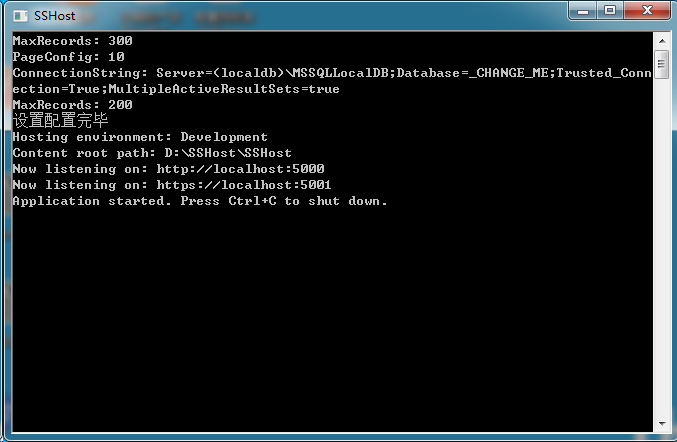
总结一下,ServiceStack的AppSettings功能非常强大,并且非常好用,不仅支持过去的Web.config,也支持.Net Core的appsettings.json,还支持文本文件
想了解更多的情况,可以查看文档:https://github.com/ServiceStack/docs/blob/master/docs/_documentation/AppSettings.md
ServiceStack NetCoreAppSettings 配置文件读取和设置的更多相关文章
- [spring源码学习]二、IOC源码——配置文件读取
一.环境准备 对于学习源码来讲,拿到一大堆的代码,脑袋里肯定是嗡嗡的,所以从代码实例进行跟踪调试未尝不是一种好的办法,此处,我们准备了一个小例子: package com.zjl; public cl ...
- VS2012中,C# 配置文件读取 + C#多个工程共享共有变量 + 整理using语句
(一) C# 配置文件读取 C#工程可以自动生成配置文件,以便整个工程可以使用设置的配置进行后续的处理工作. 1. 首先,右键工程文件-->Properties -->settings-- ...
- C# 配置文件读取与修改(转)
C# 配置文件读取与修改 配置文件在很多情况下都使用到, 配置文件分为两种 一种是应用程序的配置文件, 一种是web的配置文件. 两种配置文件最大的区别是web的配置文件更新之后会实时更新, 应用 ...
- smarty 从配置文件读取变量
smarty变量分3种: Variables [变量] Variables assigned from PHP [从PHP分配的变量] Variables loaded from config fil ...
- 【Spring源码分析】配置文件读取流程
前言 Spring配置文件读取流程本来是和http://www.cnblogs.com/xrq730/p/6285358.html一文放在一起的,这两天在看Spring自定义标签的时候,感觉对Spri ...
- MySql5.7配置文件my.cnf设置
# MySql5.7配置文件my.cnf设置[client]port = 3306socket = /tmp/mysql.sock [mysqld]########################## ...
- Python模块之: ConfigParser 配置文件读取
Python模块之: ConfigParser 配置文件读取 ConfigParser用于读写类似INI文件的配置文件,配置文件的内容可组织为组,还支持多个选项值(option-value)类型. ...
- MySql5.7配置文件my.ini 设置 my.ini文件路径
mysql配置文件my-default.ini my.ini修改后重启无效,原来是路径错了,记录一下: windows操作系统下: 1. 由于我们使用MySql 时,需要修改mysql 的 my.i ...
- MySql5.7 配置文件 my.cnf 设置
https://blog.csdn.net/gzt19881123/article/details/52594783 # MySql5.7配置文件my.cnf设置 [client] port = 33 ...
随机推荐
- js 异步加载和同步加载
异步加载 异步加载也叫非阻塞模式加载,浏览器在下载js的同时,同时还会执行后续的页面处理.在script标签内,用js创建一个script元素并插入到document中,这种就是异步加载js文件了: ...
- OneZero第三周第五次站立会议(2016.4.8)
1. 时间: 15:10--15:25 共计15分钟. 2. 成员: X 夏一鸣 * 组长 (博客:http://www.cnblogs.com/xiaym896/), G 郭又铭 (博客:http ...
- VB.NET中的DLL编写和调用的最简单示例
DLL(动态链接库)是一个很有用的东西,在开发大项目的时候显得非常重要,因为多人合作开发时,可以给每个人分配一个任务,用DLL完成,最后组合起来,就不会出现互相冲突的问题.这里给出最简单的DLL编写与 ...
- 树状数组训练题2:SuperBrother打鼹鼠(vijos1512)
先给题目链接:打鼹鼠 这道题怎么写? 很明显是树状数组. 而且,很明显是二维树状数组. 如果你没学过二维的树状数组,那么戳开这里:二维树状数组 看完以后,你就会知道怎么做了. 没有什么好解释的,几乎就 ...
- canvas 实现飞碟射击游戏
var canvas = document.getElementById('canvas'); var cxt = canvas.getContext('2d'); // 射击角度 var ang = ...
- MongDB 配置成本地服务
一.配置mangodb. 首先现在下来直接安装就好了, 可视化工具可以后面再安装. 在自己安装的目录下面(这个随意做好能够放一块)建立一个data文件, 再在下面建立一个db文件 在cmd中进入到Mo ...
- Jetty配置
类似TomCat 登陆官网www.eclipse.org Download下载Jetty zip压缩版 解压到文件夹,打开idea的Config->Jetty-server->Local- ...
- 常量表达式和constexpr(c++11)
常量表达式 常量表达式是指值不会改变且在编译阶段就能得到计算结果的表达式(两点要求) ; //是常量表达式 ; //是常量表达式 "; const int siz=s.size(); //不 ...
- BZOJ 3744 Gty的妹子序列 (分块 + BIT)
3744: Gty的妹子序列 Time Limit: 20 Sec Memory Limit: 128 MBSubmit: 1931 Solved: 570[Submit][Status][Dis ...
- 获取当前操作的IFrame对象的方法
分两种情况:第一种:获取JS函数在父页面上,如下 function getIframeByElement(element){ var iframe; $("iframe").eac ...