
转:JavaScript Reference for Microsoft Dynamics CRM 2011 / 2013
JavaScript Reference for Microsoft Dynamics CRM 2011 / 2013
Here’s a quick reference guide covering Microsoft CRM syntax for common jscript requirements.
Most of the examples are provided as functions that you can easily test in the OnLoad event of the Account form to see a working example. These are not production hardened but they’ll help you with the CRM syntax.
(updated: 30 July 2012)
Index:
- Get the GUID value of a Lookup field
- Get the Text value of a Lookup field
- Get the value of a Text field
- Get the database value of an Option Set field
- Get the text value of an Option Set field
- Get the database value of a Bit field
- Get the value of a Date field
- Get the day, month and year parts from a Date field
- Set the value of a String field
- Set the value of an Option Set (pick list) field
- Set a Date field / Default a Date field to Today
- Set a Date field to 7 days from now
- Set the Time portion of a Date Field
- Set the value of a Lookup field
- Split a Full Name into First Name and Last Name fields
- Set the Requirement Level of a Field
- Disable a field
- Force Submit the Save of a Disabled Field
- Show/Hide a Field
- Show/Hide a field based on a Bit field
- Show/Hide a Nav item
- Show/Hide a Section
- Show/Hide a Tab
- Save the form
- Save and close the form
- Close the form
- Determine which fields on the form are dirty
- Determine the Form Type
- Get the GUID of the current record
- Get the GUID of the current user
- Get the Security Roles of the current user
- Determine the CRM Server URL
- Refresh a Sub-Grid
- Change the default entity in the lookup window of a Customer or Regarding field
- Pop an existing CRM record (new approach)
- Pop an existing CRM record (old approach)
- Pop a blank CRM form (new approach)
- Pop a new CRM record with default values (new approach)
- Pop a new CRM record with default values (old approach)
- Pop a Dialog from a ribbon button
- Pop a URL from a ribbon button
- Pop the lookup window associated to a Lookup field
- Pop a Web Resource (new approach)
- SWITCH statements
- Pop an Ok/Cancel dialog
- Retrieve a GUID via REST (default the Price List field)
1. Get the GUID value of a lookup field:
Note: this example reads and pops the GUID of the primary contact on the Account form
|
1
2
3
4
|
function AlertGUID() { var primaryContactGUID = Xrm.Page.data.entity.attributes.get("primarycontactid").getValue()[0].id; alert(primaryContactGUID);} |
2. Get the Text value of a lookup field:
Note: this example reads and pops the name of the primary contact on the Account form
|
1
2
3
4
|
function AlertText() { var primaryContactName = Xrm.Page.data.entity.attributes.get("primarycontactid").getValue()[0].name; alert(primaryContactName);} |
3. Get the value of a text field:
Note: this example reads and pops the value of the Main Phone (telephone1) field on the Account form
|
1
2
3
4
|
function AlertTextField() { var MainPhone = Xrm.Page.data.entity.attributes.get("telephone1").getValue(); alert(MainPhone);} |
4. Get the database value of an Option Set field:
Note: this example reads and pops the value of the Address Type (address1_addresstypecode) field on the Account form
|
1
2
3
4
5
6
|
function AlertOptionSetDatabaseValue() { var AddressTypeDBValue = Xrm.Page.data.entity.attributes.get("address1_addresstypecode").getValue(); if (AddressTypeDBValue != null) { alert(AddressTypeDBValue); }} |
5. Get the text value of an Option Set field:
Note: this example reads and pops the value of the Address Type (address1_addresstypecode) field on the Account form
|
1
2
3
4
5
6
|
function AlertOptionSetDisplayValue() { var AddressTypeDisplayValue = Xrm.Page.data.entity.attributes.get("address1_addresstypecode").getText(); if (AddressTypeDisplayValue != null) { alert(AddressTypeDisplayValue); }} |
6. Get the database value of a Bit field:
|
1
2
3
4
|
// example GetBitValue("telephone1");function GetBitValue(fieldname) { return Xrm.Page.data.entity.attributes.get(fieldname).getValue();} |
7. Get the value of a Date field:
returns a value like: Wed Nov 30 17:04:06 UTC+0800 2011
and reflects the users time zone set under personal options
|
1
2
3
4
|
// example GetDate("createdon");function GetDate(fieldname) { return Xrm.Page.data.entity.attributes.get(fieldname).getValue();} |
8. Get the day, month and year parts from a Date field:
|
1
2
3
4
5
6
7
8
9
10
11
12
13
14
15
16
|
// This function takes the fieldname of a date field as input and returns a DD-MM-YYYY value// Note: the day, month and year variables are numbersfunction FormatDate(fieldname) { var d = Xrm.Page.data.entity.attributes.get(fieldname).getValue(); if (d != null) { var curr_date = d.getDate(); var curr_month = d.getMonth(); curr_month++; // getMonth() considers Jan month 0, need to add 1 var curr_year = d.getFullYear(); return curr_date + "-" + curr_month + "-" + curr_year; } else return null;}// An example where the above function is calledalert(FormatDate("new_date2")); |
9. Set the value of a string field:
Note: this example sets the Account Name field on the Account Form to “ABC”
|
1
2
3
4
|
function SetStringField() { var Name = Xrm.Page.data.entity.attributes.get("name"); Name.setValue("ABC");} |
10. Set the value of an Option Set (pick list) field:
Note: this example sets the Address Type field on the Account Form to “Bill To”, which corresponds to a database value of “1”
|
1
2
3
4
|
function SetOptionSetField() { var AddressType = Xrm.Page.data.entity.attributes.get("address1_addresstypecode"); AddressType.setValue(1);} |
11. Set a Date field / Default a Date field to Today:
|
1
2
|
//set date field to now (works on date and date time fields)Xrm.Page.data.entity.attributes.get("new_date1").setValue(new Date()); |
12. Set a Date field to 7 days from now:
|
1
2
3
4
5
6
|
function SetDateField() { var today = new Date(); var futureDate = new Date(today.setDate(today.getDate() + 7)); Xrm.Page.data.entity.attributes.get("new_date2").setValue(futureDate); Xrm.Page.data.entity.attributes.get("new_date2").setSubmitMode("always"); // Save the Disabled Field} |
13. Set the Time portion of a Date Field:
|
1
2
3
4
5
6
7
8
9
10
11
|
// This is a function you can call to set the time portion of a date fieldfunction SetTime(attributeName, hour, minute) { var attribute = Xrm.Page.getAttribute(attributeName); if (attribute.getValue() == null) { attribute.setValue(new Date()); } attribute.setValue(attribute.getValue().setHours(hour, minute, 0));}// Here's an example where I use the function to default the time to 8:30amSetTime('new_date2', 8, 30); |
14. Set the value of a Lookup field:
Note: here I am providing a reusable function…
|
1
2
3
4
5
6
7
8
9
10
11
|
// Set the value of a lookup fieldfunction SetLookupValue(fieldName, id, name, entityType) { if (fieldName != null) { var lookupValue = new Array(); lookupValue[0] = new Object(); lookupValue[0].id = id; lookupValue[0].name = name; lookupValue[0].entityType = entityType; Xrm.Page.getAttribute(fieldName).setValue(lookupValue); }} |
Here’s an example of how to call the function (I retrieve the details of one lookup field and then call the above function to populate another lookup field):
|
1
2
3
4
5
6
|
var ExistingCase = Xrm.Page.data.entity.attributes.get("new_existingcase");if (ExistingCase.getValue() != null) { var ExistingCaseGUID = ExistingCase.getValue()[0].id; var ExistingCaseName = ExistingCase.getValue()[0].name; SetLookupValue("regardingobjectid", ExistingCaseGUID, ExistingCaseName, "incident");} |
15. Split a Full Name into First Name and Last Name fields:
|
1
2
3
4
5
6
7
8
|
function PopulateNameFields() { var ContactName = Xrm.Page.data.entity.attributes.get("customerid").getValue()[0].name; var mySplitResult = ContactName.split(" "); var fName = mySplitResult[0]; var lName = mySplitResult[1]; Xrm.Page.data.entity.attributes.get("firstname").setValue(fName); Xrm.Page.data.entity.attributes.get("lastname").setValue(lName);} |
16. Set the Requirement Level of a Field:
Note: this example sets the requirement level of the Address Type field on the Account form to Required.
Note: setRequiredLevel(“none”) would make the field optional again.
|
1
2
3
4
|
function SetRequirementLevel() { var AddressType = Xrm.Page.data.entity.attributes.get("address1_addresstypecode"); AddressType.setRequiredLevel("required");} |
17. Disable a field:
|
1
2
3
4
|
function SetEnabledState() { var AddressType = Xrm.Page.ui.controls.get("address1_addresstypecode"); AddressType.setDisabled(true);} |
18. Force Submit the Save of a Disabled Field:
|
1
2
|
// Save the Disabled FieldXrm.Page.data.entity.attributes.get("new_date1").setSubmitMode("always"); |
19. Show/Hide a field:
|
1
2
3
4
|
function hideName() { var name = Xrm.Page.ui.controls.get("name"); name.setVisible(false);} |
20. Show/Hide a field based on a Bit field
|
1
2
3
4
5
6
7
8
9
|
function DisableExistingCustomerLookup() { var ExistingCustomerBit = Xrm.Page.data.entity.attributes.get("new_existingcustomer").getValue(); if (ExistingCustomerBit == false) { Xrm.Page.ui.controls.get("customerid").setVisible(false); } else { Xrm.Page.ui.controls.get("customerid").setVisible(true); }} |
21. Show/Hide a nav item:
Note: you need to refer to the nav id of the link, use F12 developer tools in IE to determine this
|
1
2
3
4
|
function hideContacts() { var objNavItem = Xrm.Page.ui.navigation.items.get("navContacts"); objNavItem.setVisible(false);} |
22. Show/Hide a Section:
Note: Here I provide a function you can use. Below the function is a sample.
|
1
2
3
4
5
6
7
8
|
function HideShowSection(tabName, sectionName, visible) { try { Xrm.Page.ui.tabs.get(tabName).sections.get(sectionName).setVisible(visible); } catch (err) { }}HideShowSection("general", "address", false); // "false" = invisible |
23. Show/Hide a Tab:
Note: Here I provide a function you can use. Below the function is a sample.
|
1
2
3
4
5
6
7
8
|
function HideShowTab(tabName, visible) { try { Xrm.Page.ui.tabs.get(tabName).setVisible(visible); } catch (err) { }}HideShowTab("general", false); // "false" = invisible |
24. Save the form:
|
1
2
3
|
function SaveAndClose() { Xrm.Page.data.entity.save();} |
25. Save and close the form:
|
1
2
3
|
function SaveAndClose() { Xrm.Page.data.entity.save("saveandclose");} |
26. Close the form:
Note: the user will be prompted for confirmation if unsaved changes exist
|
1
2
3
|
function Close() { Xrm.Page.ui.close();} |
27. Determine which fields on the form are dirty:
|
1
2
3
4
5
6
7
8
9
|
var attributes = Xrm.Page.data.entity.attributes.get() for (var i in attributes) { var attribute = attributes[i]; if (attribute.getIsDirty()) { alert("attribute dirty: " + attribute.getName()); } } |
28. Determine the Form Type:
Note: Form type codes: Create (1), Update (2), Read Only (3), Disabled (4), Bulk Edit (6)
|
1
2
3
4
5
6
|
function AlertFormType() { var FormType = Xrm.Page.ui.getFormType(); if (FormType != null) { alert(FormType); }} |
29. Get the GUID of the current record:
|
1
2
3
4
5
6
|
function AlertGUID() { var GUIDvalue = Xrm.Page.data.entity.getId(); if (GUIDvalue != null) { alert(GUIDvalue); }} |
30. Get the GUID of the current user:
|
1
2
3
4
5
6
|
function AlertGUIDofCurrentUser() { var UserGUID = Xrm.Page.context.getUserId(); if (UserGUID != null) { alert(UserGUID); }} |
31. Get the Security Roles of the current user:
(returns an array of GUIDs, note: my example reveals the first value in the array only)
|
1
2
3
|
function AlertRoles() { alert(Xrm.Page.context.getUserRoles());} |
32. Determine the CRM server URL:
|
1
2
3
4
5
6
7
|
// Get the CRM URLvar serverUrl = Xrm.Page.context.getServerUrl();// Cater for URL differences between on premise and onlineif (serverUrl.match(/\/$/)) { serverUrl = serverUrl.substring(0, serverUrl.length - 1);} |
33. Refresh a Sub-Grid:
|
1
2
|
var targetgird = Xrm.Page.ui.controls.get("target_grid");targetgird.refresh(); |
34. Change the default entity in the lookup window of a Customer or Regarding field:
Note: I am setting the customerid field’s lookup window to offer Contacts (entityid 2) by default (rather than Accounts). I have also hardcoded the GUID of the default view I wish displayed in the lookup window.
|
1
2
3
4
5
|
function ChangeLookup() { document.getElementById("customerid").setAttribute("defaulttype", "2"); var ViewGUID= "A2D479C5-53E3-4C69-ADDD-802327E67A0D"; Xrm.Page.getControl("customerid").setDefaultView(ViewGUID);} |
35. Pop an existing CRM record (new approach):
|
1
2
3
4
5
6
7
8
|
function PopContact() { //get PrimaryContact GUID var primaryContactGUID = Xrm.Page.data.entity.attributes.get("primarycontactid").getValue()[0].id; if (primaryContactGUID != null) { //open Contact form Xrm.Utility.openEntityForm("contact", primaryContactGUID) }} |
36. Pop an existing CRM record (old approach):
Note: this example pops an existing Case record. The GUID of the record has already been established and is stored in the variable IncidentId.
|
01
02
03
04
05
06
07
08
09
10
11
12
|
//Set features for how the window will appearvar features = "location=no,menubar=no,status=no,toolbar=no";// Get the CRM URLvar serverUrl = Xrm.Page.context.getServerUrl();// Cater for URL differences between on premise and onlineif (serverUrl.match(/\/$/)) { serverUrl = serverUrl.substring(0, serverUrl.length - 1);}window.open(serverUrl + "/main.aspx?etn=incident&pagetype=entityrecord&id=" + encodeURIComponent(IncidentId), "_blank", features, false); |
37. Pop a blank CRM form (new approach):
|
1
2
3
|
function PopNewCase() { Xrm.Utility.openEntityForm("incident")} |
38. Pop a new CRM record with default values (new approach):
|
1
2
3
4
5
6
7
8
9
10
11
12
13
14
|
function CreateIncident() { //get Account GUID and Name var AccountGUID = Xrm.Page.data.entity.getId(); var AccountName = Xrm.Page.data.entity.attributes.get("name").getValue(); //define default values for new Incident record var parameters = {}; parameters["title"] = "New customer support request"; parameters["casetypecode"] = "3"; parameters["customerid"] = AccountGUID; parameters["customeridname"] = AccountName; parameters["customeridtype"] = "account"; //pop incident form with default values Xrm.Utility.openEntityForm("incident", null, parameters);} |
39. Pop a new CRM record with default values (old approach):
Note: this example pops the Case form from the Phone Call form, defaulting the Case’s CustomerID based on the Phone Call’s SenderID and defaulting the Case Title to “New Case”
|
1
2
3
4
5
6
7
8
9
10
11
12
13
14
15
16
17
18
19
20
21
22
23
|
//Collect values from the existing CRM form that you want to default onto the new recordvar CallerGUID = Xrm.Page.data.entity.attributes.get("from").getValue()[0].id;var CallerName = Xrm.Page.data.entity.attributes.get("from").getValue()[0].name;//Set the parameter valuesvar extraqs = "&title=New Case";extraqs += "&customerid=" + CallerGUID;extraqs += "&customeridname=" + CallerName;extraqs += "&customeridtype=contact";//Set features for how the window will appearvar features = "location=no,menubar=no,status=no,toolbar=no";// Get the CRM URLvar serverUrl = Xrm.Page.context.getServerUrl();// Cater for URL differences between on premise and onlineif (serverUrl.match(/\/$/)) { serverUrl = serverUrl.substring(0, serverUrl.length - 1);}//Pop the windowwindow.open(serverUrl + "/main.aspx?etn=incident&pagetype=entityrecord&extraqs=" + encodeURIComponent(extraqs), "_blank", features, false); |
40. Pop a Dialog from a ribbon button
Note: this example has the Dialog GUID and CRM Server URL hardcoded, which you should avoid. A simple function is included which centres the Dialog when launched.
|
01
02
03
04
05
06
07
08
09
10
11
12
13
|
function LaunchDialog(sLeadID) { var DialogGUID = "128CEEDC-2763-4FA9-AB89-35BBB7D5517D"; serverUrl = serverUrl + "cs/dialog/rundialog.aspx?DialogId=" + "{" + DialogGUID + "}" + "&EntityName=lead&ObjectId=" + sLeadID; PopupCenter(serverUrl, "mywindow", 400, 400); window.location.reload(true);}function PopupCenter(pageURL, title, w, h) { var left = (screen.width / 2) - (w / 2); var top = (screen.height / 2) - (h / 2); var targetWin = window.showModalDialog(pageURL, title, 'toolbar=no, location=no, directories=no, status=no, menubar=no, scrollbars=no, resizable=no, copyhistory=no, width=' + w + ', height=' + h + ', top=' + top + ', left=' + left);} |
41. Pop a URL from a ribbon button
Great info on the window parameters you can set here: http://javascript-array.com/scripts/window_open/
|
01
02
03
04
05
06
07
08
09
10
11
12
13
14
15
16
17
18
19
20
21
22
23
|
function LaunchSite() { // read URL from CRM field var SiteURL = Xrm.Page.data.entity.attributes.get("new_sharepointurl").getValue(); // execute function to launch the URL LaunchFullScreen(SiteURL);}function LaunchFullScreen(url) { // set the window parameters params = 'width='+screen.width; params += ', height='+screen.height; params += ', top=0, left=0'; params += ', fullscreen=yes'; params += ', resizable=yes'; params += ', scrollbars=yes'; params += ', location=yes'; newwin=window.open(url,'windowname4', params); if (window.focus) { newwin.focus() } return false;} |
42. Pop the lookup window associated to a Lookup field:
|
1
|
window.document.getElementById('new_existingcase').click(); |
43. Pop a Web Resource (new approach):
|
1
2
3
|
function PopWebResource() { Xrm.Utility.openWebResource("new_Hello");} |
44. Using a SWITCH statement
|
1
2
3
4
5
6
7
8
9
10
11
12
13
14
15
16
17
18
19
20
21
22
23
24
|
function GetFormType() { var FormType = Xrm.Page.ui.getFormType(); if (FormType != null) { switch (FormType) { case 1: return "create"; break; case 2: return "update"; break; case 3: return "readonly"; break; case 4: return "disabled"; break; case 6: return "bulkedit"; break; default: return null; } }} |
45. Pop an Ok/Cancel Dialog
|
1
2
3
4
5
6
7
8
9
10
11
12
13
|
function SetApproval() { if (confirm("Are you sure?")) { // Actions to perform when 'Ok' is selected: var Approval = Xrm.Page.data.entity.attributes.get("new_phaseapproval"); Approval.setValue(1); alert("Approval has been granted - click Ok to update CRM"); Xrm.Page.data.entity.save(); } else { // Actions to perform when 'Cancel' is selected: alert("Action cancelled"); }} |
46. Retrieve a GUID via REST (default the Price List field)
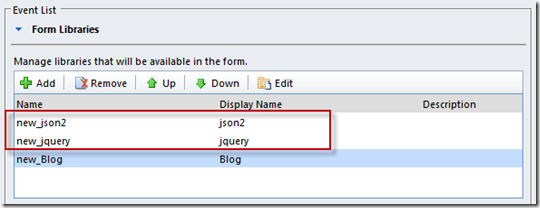
In this example (intended for the Opportunity form’s Onload event) I execute a REST query to retrieve the GUID of the Price List named “Wholesale Price List”. I then execute the DefaultPriceList function to default the Price List field. As this uses REST your CRM form will need json2 and jquery libraries registered on the CRM form (I have these libraries in asolution file I import when needed):
|
1
2
3
4
5
6
7
8
9
10
11
12
13
14
15
16
17
18
19
20
21
22
23
24
25
26
27
28
29
30
31
32
33
34
35
36
37
38
39
40
41
42
43
44
|
function RetrieveGUID() { // Get CRM Context var context = Xrm.Page.context; var serverUrl = context.getServerUrl(); // Cater for URL differences between on-premise and online if (serverUrl.match(/\/$/)) { serverUrl = serverUrl.substring(0, serverUrl.length - 1); } // Define ODATA query var ODATA_ENDPOINT = "/XRMServices/2011/OrganizationData.svc"; var ODATA_EntityCollection = "/PriceLevelSet"; var PriceListName = 'Wholesale Price List'; var QUERY = "?$select=PriceLevelId&$filter=Name%20eq%20'" + PriceListName + "'&$top=1"; var URL = serverUrl + ODATA_ENDPOINT + ODATA_EntityCollection + QUERY; //Asynchronous AJAX call $.ajax({ type: "GET", contentType: "application/json; charset=utf-8", datatype: "json", url: URL, beforeSend: function (XMLHttpRequest) { //Specifying this header ensures that the results will be returned as JSON. XMLHttpRequest.setRequestHeader("Accept", "application/json"); }, success: function (data, textStatus, XmlHttpRequest) { //This function will trigger asynchronously if the Retrieve was successful var GUID_Retrieved = data.d.results[0].PriceLevelId; DefaultPriceList(GUID_Retrieved, PriceListName); }, error: function (XmlHttpRequest, textStatus, errorThrown) { //This function will trigger asynchronously if the Retrieve returned an error alert("ajax call failed"); } });}function DefaultPriceList(GUID, NAME){ var lookupValue = new Array(); lookupValue[0] = new Object(); lookupValue[0].id = GUID; lookupValue[0].name = NAME; lookupValue[0].entityType = "pricelevel"; Xrm.Page.getAttribute("pricelevelid").setValue(lookupValue);} |
Here is a little more info that will help you get your head around the general design of all this…
Depending upon what you want to do you will interact with one of the following:
Xrm.Page.data.entity.attributes – The data fields represented by fields on the form
Xrm.Page.ui.controls – The user interface controls on the form
Xrm.Page.ui.navigation.items – The navigation items on the form
Xrm.Utility – A container of helpful functions
When referring to fields or controls you must specify the name of the field and surround with quotes (and make sure you get the case right):
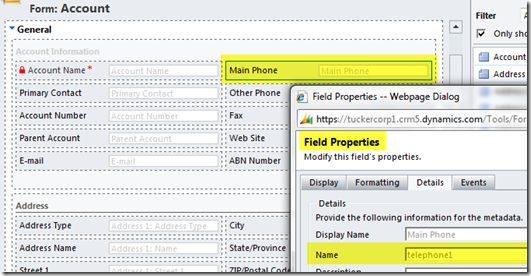
When referring to nav items you must specify the nav ID and surround it with quotes. To determine the nav ID:
– open the CRM form in IE
– hit F12 to activate IE’s developer tools (if it doesn’t appear, check for it under Task Manager and maximise it from there)
– in the developer tools window click the arrow to activate the “Select element by click” mode
– on the CRM form click the nav item (the dev tools window will take you to HTML definition of that element)
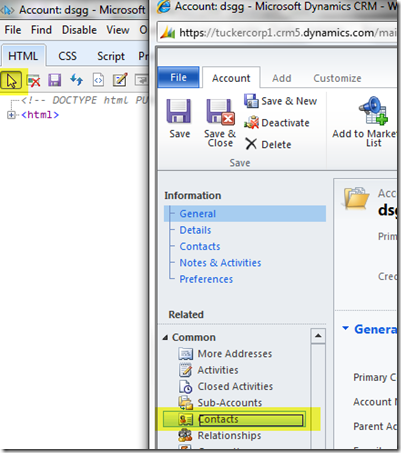
– just above there you will see the nav ID specified, look for id=”nav<something>”

When setting properties to true/false do not surround the true/false value with quotes.
Typically there are 2 steps to interacting with fields. First you get the field as an object. Then you interact with that object to get or set the property value you are interested in.
Here’s an excellent post that provides a comparison of CRM v4 syntax and CRM 2011:
And here’s a download containing similar code snippets but provisioned as installable Visual Studio code snippets (something I wasn’t aware of but think is pretty cool!).
Here’s another useful jscript list: http://andreaswijayablog.blogspot.com/2011/07/crm-2011-javascript-functions.html
Share this:
转:JavaScript Reference for Microsoft Dynamics CRM 2011 / 2013的更多相关文章
- Error message “Assembly must be registered in isolation” when registering Plugins in Microsoft Dynamics CRM 2011 2013 解决办法
Error message “Assembly must be registered in isolation” when registering Plugins in Microsoft Dynam ...
- Orchard CRM 更新 - 同时支持 Microsoft Dynamics CRM 2011, 2013, 2015, 2016!
本版本支持: 使用Orchard 1.8.1 系统 Dynamics CRM 2015 DLL .Net Framework 4.5.2 演示版本: http://www.orchardcrm.com ...
- Microsoft Dynamics CRM 2011/2013 JS操作集锦
1.Xrm.Page.context用户ID:getUserId()用户角色:getUserRoles()用户语言:getUserLcid()组织名称:getOrgUniqueName()组织语言:g ...
- Dynamices CRM JS 类库 神器 XrmServiceToolkit - A Microsoft Dynamics CRM 2011 & CRM 2013 JavaScript Library
XrmServiceToolkit - A Microsoft Dynamics CRM 2011 & CRM 2013 JavaScript Library http://xrmservic ...
- How to control PrincipalObjectAccess table growth in Microsoft Dynamics CRM 2011
https://support.microsoft.com/en-us/kb/2664150 How to control PrincipalObjectAccess table growth in ...
- Microsoft Dynamics CRM 2011的组织服务中的RetrieveMultiple方法(转)
本篇文章,介绍Microsoft Dynamics CRM 2011的组织服务中的RetrieveMultiple方法. RetreiveMultiple方法,用于获取实体的多个实例,该方法的签名如下 ...
- Microsoft Dynamics CRM 2011 相关-摘自网络
Microsoft Dynamics CRM Server 2011硬件需求: 组件 *最低要求 *推荐配置 处理器 x64 体系结构或兼容的双核 1.5 GHz 处理器 四核 x64 体系结构 2 ...
- Microsoft Dynamics CRM 2011 当您在 大型数据集上执行 RetrieveMultiple 查询很慢的解决方法
症状 当您在 Microsoft Dynamics CRM 2011 年大型数据集上执行 RetrieveMultiple 查询时,您会比较慢. 原因 发生此问题是因为大型数据集缓存 Retrieve ...
- Microsoft Dynamics CRM4.0 和 Microsoft Dynamics CRM 2011 JScript 方法对比
CRM 2011 如果需要再IE里面调试,可以按F12在前面加上contentIFrame,比如 contentIFrame.document.getElementById("字段" ...
随机推荐
- <--------------------------构造方法------------------------------>
1 构造方法 初始化阶段 给对象的属性进行赋值 构造方法 什么是构造方法 : 字面 方法构建时 就使用的方法 对象创建的时候就使用的方法 作用:对象的属性值初始化2 如何用构造方法 修饰符 构造方法名 ...
- Explicit
Prefixing the explicit keyword to the constructor prevents the compiler from using that constructor ...
- python 调试之assert and logging
断言 assert assert后面跟的表达式应该是True,否则,根据程序运行的逻辑,后面的代码肯定会出错. 如果断言失败,会抛出AssertionError def foo(s): n = int ...
- Grid Virtual Server 和 网格计算
Grid Virtual Server 的 Virtual Server 源于 LVS (Linux Virtual Server) , LVS 的意思就是把 多个 Linux 服务器 联合起来构成一 ...
- taro refs引用
创建 Refs Taro 支持使用字符串和函数两种方式创建 Ref: 使用字符串创建 ref 通过函数创建 ref(推荐) 你也可以通过传递一个函数创建 ref, 在函数中被引用的组件会作为函数的第一 ...
- Springboot配置文件映射
添加类和配置文件的映射: 1.定义映射类 @Component @PropertySource("classpath:config/XX.properties") public c ...
- hadoop商业版本的选择介绍
记得刚接触到hadoop的时候跟大部分人一样都会抱怨hadoop的安装部署问题,对于一个新手来说这这的是个头疼的问题,可能需要花费一整天的时间才能把分布式环境安装配置好.在刚接触hadoop的一段时间 ...
- Linux配置Python默认版本
我们知道在Windows下多版本共存的配置方法就是改可执行文件的名字,配置环境变量. Linux中的配置原理差不多,思路就是生成软链接,配置到环境变量. 在没配置之前,我的Ubuntu中安装了pyth ...
- Azure Storage (26) HTML5播放Azure Storage MP4问题
<Windows Azure Platform 系列文章目录> 问题:客户描述说在Azure Storage上的MP4视频无法在线播放,只能看到黑屏的视频,有声音但是没有图像 问题排查:H ...
- vi 编辑器基本命令
命令模式(esc) k 上移一行j 下移一行h 左移一行l 右移一行 6j 下移6行 5k 上移5行 0 将游标放在一行的开始$ 将游标放在一行的末尾w 将游标移动到下一个单词b 将游标移动到上一个 ...