
Install Greenplum OSS on Ubuntu
About Greenplum Database
Greenplum Database is an MPP SQL Database based on PostgreSQL. Its used in production in hundreds of large corporations and government agencies around the world and including the open source has over thousands of deployments globally.
Greenplum Database scales to multi-petabyte data sizes with ease and allows a cluster of powerful servers to work together to provide a single SQL interface to the data.
In addition to using SQL for analyzing structured data, Greenplum provides modules and extensions on top of the PostgreSQL abstractions for in database machine learning and AI, Geospatial analytics, Text Search (with Apache Solr) and Text Analytics with Python and Java, and the ability to create user-defined functions with Python, R, Java, Perl, C or C++.
Greenplum Database Ubuntu Distribution
Greenplum Database is the only open source product in its category that has a large install base, and now with the release of Greenplum Database 5.3, Ready to Install binaries are hosted for the Ubuntu Operating System to make installation and deployment easy.
Ubuntu is a popular operating system in cloud-native environments and is based on the very well respected Debian Linux distribution.
In this article, I will demonstrate how to install the Open Source Greenplum Database binaries on the Ubuntu Operating System.
Greenplum Database binaries for Ubuntu are hosted on the Personal Package Archive system, which allows the community to contribute readily to install packages that can be installed from any internet connected system.
So let’s get right to it!
Greenplum OSS on Ubuntu Installation Instructions
First, ensure you have a supported Ubuntu OS version. At the time of this writing, Ubuntu builds of Greenplum are built for the 16.04 LTS (long-term support) release version of Ubuntu. Check the PPA page, for current information about which OS version is available.
Add the Greenplum PPA repository to your Ubuntu System, like this:
sudo add-apt-repository ppa:greenplum/db
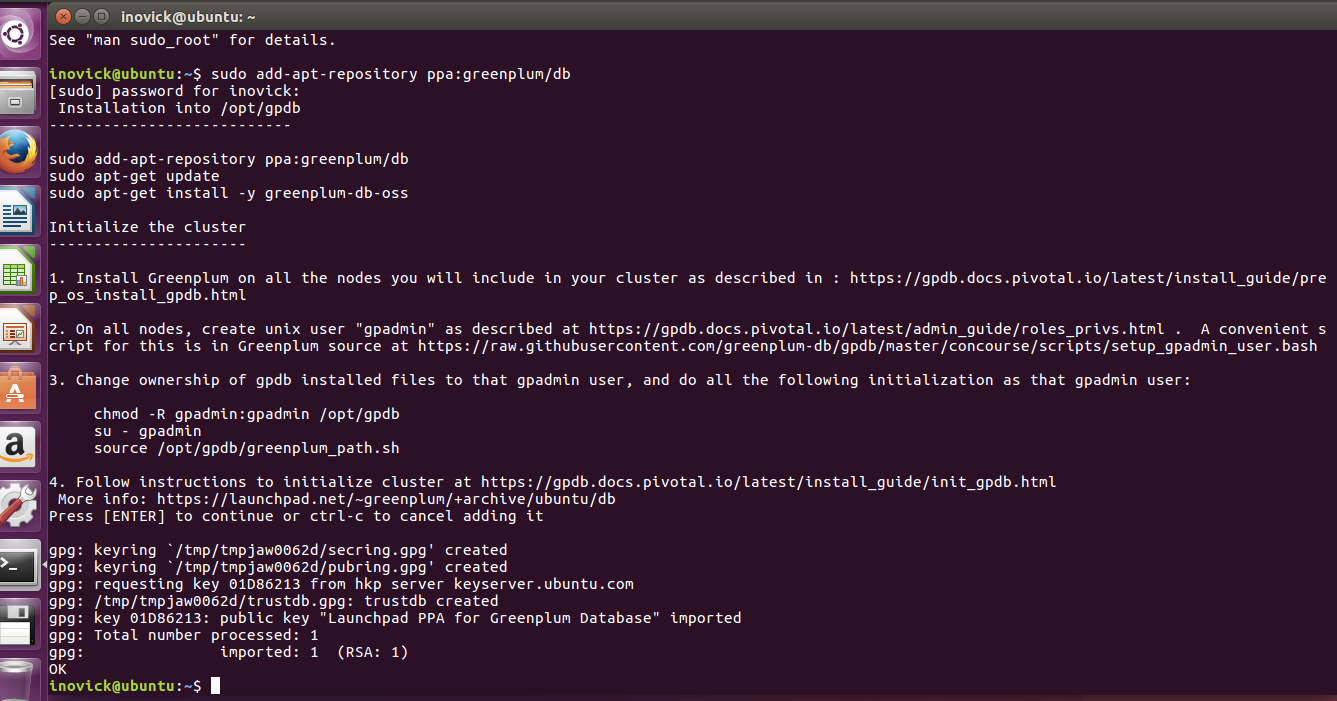
Update your Ubuntu system to retrieve information from the recently added repository, like this:
sudo apt-get update
Install the Greenplum Database software, like this:
sudo apt-get install greenplum-db-oss
The above command will install the Greenplum Database software and any required dependencies on the system automatically and put the resulting software in /opt/gpdb.
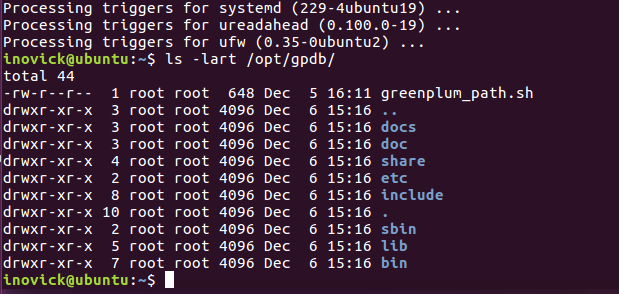
Load Greenplum Database software into your environment with the following command:
$ . /opt/gpdb/greenplum_path.sh

$ which gpssh

/opt/gpdb/bin/gpssh
You can see the software is on the path by testing using the which command as above. Now you can copy a Greenplum cluster configuration file template into your local directory for editing like this:
cp $GPHOME/docs/cli_help/gpconfigs/gpinitsystem_singlenode .
Edit gpinitsystem Configuration File
The following edits can be made for the most simple cluster configuration running locally.
Create this file and put only your hostname into the file:
MACHINE_LIST_FILE=./hostlist_singlenode
Update this line to have a directory you want to use for primaries for example:
declare -a DATA_DIRECTORY=(/gpdata1 /gpdata2)
declare -a DATA_DIRECTORY=(/home/inovick/primary /home/inovick/primary)
And make sure the directory mentioned above exists.
Update this line to have the hostname of your machine, in my case, the hostname is ‘ubuntu’:
MASTER_HOSTNAME=hostname_of_machine
MASTER_HOSTNAME=ubuntu
Update the master data directory entry in the file and ensure it exists by making the directory:
MASTER_DIRECTORY=/home/inovick/master
That’s enough to get the database initialized and up running, so close the file and let’s initialize the cluster. We will have a master segment instance and two primary segment instances with this configuration. In more advanced setups you would configure a standby master and segment mirrors on additional hosts, and the data would be automatically both sharded (distributed) between the primary segments and mirrored from primaries to mirrors.
Run gpinitsystem
First, let’s make sure ssh keys are exchanged by running the following command. Screenshot from my system is shown below:
gpssh-exchkeys -f hostlist_singlenode
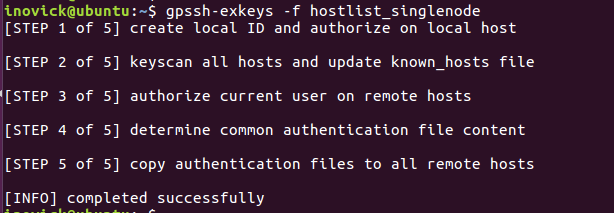
Ok, we need to start the cluster, let’s get started. Run the following command:
gpinitsystem -c gpinitsystem_singlenode
The utility will print out what its going to do and then ask you to confirm before proceeding. Here is an example below:

Once it finishes you are good to go, you can create a database, login and start doing queries and inserting data as shown below:

To really get the full benefit, you will want to do some of the following things:
- Allocate enough hardware to process large amounts of data in your cluster
- Check the official Greenplum Database documentation
- Watch some of the Greenplum Videos on YouTube
- Load a lot of data using the high speed parallel load of gpload or external tables with gpfdist, PXF, or S3
That’s it for this tutorial, enjoy Greenplum OSS on Ubuntu.
PPA description
Installation into /opt/gpdb
---------------------------
sudo apt-get install -y software-properties-common
sudo add-apt-repository ppa:greenplum/db

sudo apt-get update
sudo apt-get install -y greenplum-db-oss
Initialize the cluster
----------------------
1. Install Greenplum on all the nodes you will include in your cluster as described in : https://gpdb.docs.pivotal.io/latest/install_guide/prep_os_install_gpdb.html
2. On all nodes, create unix user "gpadmin" as described at https://gpdb.docs.pivotal.io/latest/admin_guide/roles_privs.html . A convenient script for this is in Greenplum source at https://raw.githubusercontent.com/greenplum-db/gpdb/master/concourse/scripts/setup_gpadmin_user.bash
3. Change ownership of gpdb installed files to the gpadmin user, and do all the following initialization as that gpadmin user:
chown -R gpadmin:gpadmin /opt/gpdb
su - gpadmin
source /opt/gpdb/greenplum_path.sh
4. Follow instructions to initialize cluster at https://gpdb.docs.pivotal.io/latest/install_guide/init_gpdb.html
Adding this PPA to your system
You can update your system with unsupported packages from this untrusted PPA by adding ppa:greenplum/db to your system's Software Sources. (Read about installing)
sudo add-apt-repository ppa:greenplum/db
sudo apt-get update
Install Greenplum OSS on Ubuntu的更多相关文章
- Install Google Pinyin on Ubuntu 14.04
Install Google Pinyin on Ubuntu 14.04 I've been spending more and more time on Ubuntu and I'm not us ...
- HOWTO install Oracle 11g on Ubuntu Linux 12.04 (Precise Pangolin) 64bits
安装了Ubuntu 12.04 64bit, 想在上面安装Oracle 11gr2,网上找了好多文档都没成功,最后完全参考了MordicusEtCubitus的文章. 成功安装的关键点:install ...
- Install a Redmine on Ubuntu system
# How to install a Redmine on Ubuntu system Ref to: https://www.linode.com/docs/applications/project ...
- Install LAMP Stack On Ubuntu 16.04
原文:http://www.unixmen.com/how-to-install-lamp-stack-on-ubuntu-16-04/ LAMP is a combination of operat ...
- How do you install Google Chrome on Ubuntu?
https://askubuntu.com/questions/510056/how-to-install-google-chrome sudo apt-get install chromium-br ...
- Install eclipse ns3 in ubuntu 14.04
1. NS3 install 参考NS3 tutorial即可. 2.eclipse 2.1下载 下载地址:http://www.eclipse.org/downloads/ ...
- install dns server on ubuntu
参考 CSDN/Ubuntu环境下安装和配置DNS服务器 在 Ubuntu 上安裝 DNS server Install BIND 9 on Ubuntu and Configure It for U ...
- [译]How to Install Node.js on Ubuntu 14.04 如何在ubuntu14.04上安装node.js
原文链接为 http://www.hostingadvice.com/how-to/install-nodejs-ubuntu-14-04/ 由作者Jacob Nicholson 发表于October ...
- Install latest R for ubuntu
### delete old version rm -rf /usr/local/lib/R /usr/lib/R ~/**/R sudo apt-get autoremove rstudio sud ...
随机推荐
- FastAdmin 数据库备份插件更新到 v1.0.4
FastAdmin 数据库备份插件更新到 v1.0.4 下载地址: https://www.fastadmin.net/store/database.html 更新如下: 修复了忽略列表无效的 Bug ...
- FastAdmin 开发学习给输入框加上清除功能
FastAdmin 开发学习给输入框加上清除功能 在社区上有小伙伴询问如果给输入框加上清除功能,因为有时修重新搜索时需要将输入框的内容快速清除,所以这个功能对用户非常友好. 如上图所示这种. 我看了一 ...
- Office 2010 打开文件后所有的格式成了时间的解决方法
最新不知道什么原因,每一个 Excel 文件打开后,时需的数据都成了时间格式. 而且改都改不了,改了后第二次打开又成了这个样子. 最后找到解决方法. 如下动画,将 [$F400] 数据格式删除就可以. ...
- 列表(list)的增删改查
list 可以通过 索引,切片,切片加步长取出列表中的某个元素 列表的增: # 追加 append() 在列表的后面追加元素 # 插入 insert()在列表的某个位置插入元素 会加在你输入位置的 ...
- [转]RPC 框架通俗介绍
关于RPC 你的题目是RPC(远程过程调用,Remote Procedure Call)框架,首先了解什么叫RPC,为什么要RPC,RPC是指远程过程调用,也就是说两台服务器A,B,一个应用部署在A服 ...
- Percona XtraDB Cluster 的一些使用限制(PXC 5.7)
Percona XtraDB Cluster有众多的优秀特性,使得mysql集群得以轻松实现.但是不要忽略了它的一些限制.如果你无法接受,或者你的应用程序或数据库(比如使用了memory引擎)对限制无 ...
- java-jdbc数据库连接
web.xml:(web.xml) <!-- 加载spring容器 --> <context-param> <param-name>contextConfigLoc ...
- Jmeter使用流程及简单分析监控
本文摘自:一颗糖果 https://www.cnblogs.com/linglingyuese/archive/2013/03/04/linglingyuese-one.html 1.下载Jmet ...
- 在Hanlp词典手动添加未登录词的方式介绍
在使用Hanlp词典进行分词的时候,会出现分词不准的情况,原因是内置词典中并没有收录当前这个词,也就是我们所说的未登录词,只要把这个词加入到内置词典中就可以解决类似问题,如何操作呢,下面我们来看一下: ...
- Apache Tika
Tika入门 Tika是一个内容抽取的工具集合(a toolkit for text extracting).它集成了POI, Pdfbox 并且为文本抽取工作提供了一个统一的界面.其次,Tika也提 ...