
Using NHibernate with SQLite
The most convenient method to add NHibernate and SQLite for C# project is using NuGet. You can check that in [1]. But I prefer a more free way to do it with NAnt. Let's do it.
Step 1, download all packages from official websites.
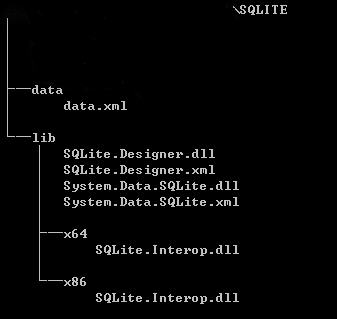
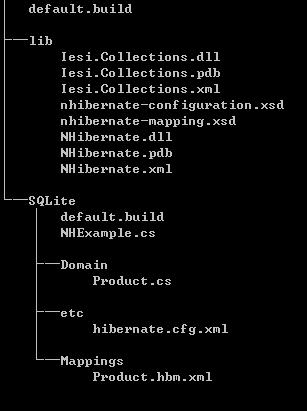
Step 2, set up the directory structure
For SQLite files:
For NHibernate files:
Step 3, create your domain entity class.
// Product.cs
namespace NHExample.Domain

{

    public class Product

    {

        public virtual Guid Id { get; set; }

        public virtual string Name { get; set; }

        public virtual string Category { get; set; }

        public virtual int Price { get; set; }

    }

}
Step 4, create the mapping file Product.hbm.xml.
<?xml version="1.0" encoding="utf-8" ?>

<hibernate-mapping xmlns="urn:nhibernate-mapping-2.2"

                   assembly="NHExample"

                   namespace="NHExample.Domain">

  <class name="Product" table="products">

    <id name="Id">

      <generator class="guid" />

    </id>

    <property name="Name" />

    <property name="Category" />

    <property name="Price" />

  </class>

</hibernate-mapping>
Step 5, create NHibernate configuration file hibernate.cfg.xml.
<?xml version="1.0" encoding="utf-8" ?>

<hibernate-configuration xmlns="urn:nhibernate-configuration-2.2">

  <session-factory name="NHibernate.Test">

    <property name="connection.driver_class">NHibernate.Driver.SQLite20Driver</property>

    <property name="connection.connection_string">Data Source=nhibernate.db;Version=3</property>

    <property name="dialect">NHibernate.Dialect.SQLiteDialect</property>

    <property name="query.substitutions">true=1;false=0</property>

    <property name="show_sql">true</property>

  </session-factory>

</hibernate-configuration>
Step 6, create a driver for it
// NHExample.cs

using System;

using System.Linq;

using NHibernate;

using NHibernate.Cfg;

using NHibernate.Tool.hbm2ddl;

namespace NHExample

{

	class NHExample

	{

		static void Main(string[] args)

		{

			// Initialize NHibernate

			var cfg = new Configuration();

			cfg.Configure();

			cfg.AddAssembly(typeof(Domain.Product).Assembly);

			// Get ourselves an NHibernate Session

			var sessions = cfg.BuildSessionFactory();

			var sess = sessions.OpenSession();

			// Create the database schema

			new SchemaExport(cfg).Create(true, true);

			// Create a Product...

			var product = new Domain.Product

			{

				Name = "Some C# Book",

				Price = 500,

				Category = "Books"

			};

			// And save it to the database

			sess.Save(product);

			sess.Flush();

			// Note that we do not use the table name specified

			// in the mapping, but the class name, which is a nice

			// abstraction that comes with NHibernate

			IQuery q = sess.CreateQuery("FROM Product");

			var list = q.List<Domain.Product>();

			// List all the entries' names

			list.ToList().ForEach( p => Console.WriteLine( p.Name ));

		}

	}

}
Step 7, create a NAnt script.
<?xml version="1.0"?>

<project name="SQLite with NHibernate" default="run">

    <property name="debug" value="true" />

	<property name="outdir" value="bin" />

	<property name="libdir" value="../lib" />

	<property name="sqlite_libdir" value="../../sqlite/lib" />

    <target name="clean" description="remove all generated files">

		<delete dir="${outdir}" />

    </target>

    <target name="build" description="compiles the source code">

		<mkdir dir="${outdir}" />

		<csc debug="${debug}" output="${outdir}/NHExample.exe" target="exe">

			<references basedir="${libdir}">

				<include name="NHibernate.dll" />

			</references>

			<sources>

				<include name="Domain/Product.cs" />

				<include name="NHExample.cs" />

			</sources>

			<resources dynamicprefix="true" prefix="NHExample.Domain">

				<include name="Mappings/*.hbm.xml" />

			</resources>

		</csc>

		<copy todir="${outdir}">

            <fileset basedir="${libdir}">

              <include name="NHibernate.dll" />

              <include name="NHibernate.xml" />

              <include name="Iesi.Collections.dll" />

              <include name="Iesi.Collections.xml" />

            </fileset>

        </copy>

		<copy todir="${outdir}">

		    <fileset basedir="etc">

              <include name="hibernate.cfg.xml" />

			</fileset>

		</copy>

		<copy todir="${outdir}">

            <fileset basedir="${sqlite_libdir}">

              <include name="System.Data.SQLite.dll" />

              <include name="System.Data.SQLite.xml" />

            </fileset>

        </copy>

		<copy todir="${outdir}/x64">

            <fileset basedir="${sqlite_libdir}/x64">

              <include name="SQLite.Interop.dll" />

            </fileset>

        </copy>

		<copy todir="${outdir}/x86">

            <fileset basedir="${sqlite_libdir}/x86">

              <include name="SQLite.Interop.dll" />

            </fileset>

        </copy>

	</target>

	<target name="run" depends="build">

		<exec program="${outdir}/NHExample.exe" workingdir="${outdir}"/>

	</target>

</project>
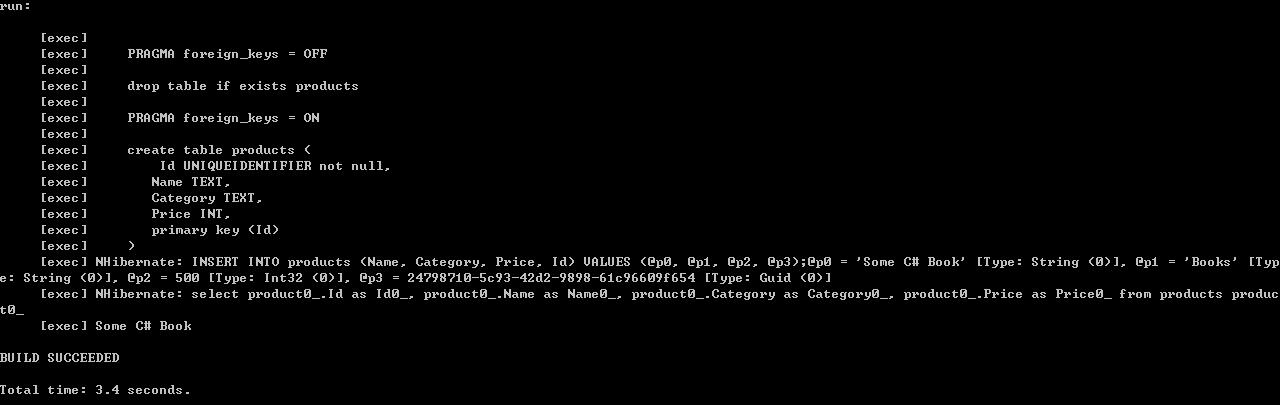
Step 8, build and run it
Links:
NHibernate: http://nhforge.org/
SQLite.NET: http://system.data.sqlite.org/index.html/doc/trunk/www/index.wiki
References:
[1] http://coding-journal.com/setting-up-nhibernate-with-sqlite-using-visual-studio-2010-and-nuget/
Using NHibernate with SQLite的更多相关文章
- Could not create the driver from NHibernate.Driver.SQLite20Driver
使用NHibernate连接Sqlite语句,版本为.net3.5. 升级.net 4.0出现异常,提示”Could not create the driver from NHibernate.Dri ...
- USING NHIBERNATE WITH MySQL
In previous USING NHIBERNATE WITH SQLITE, we connect SQLITE with ORM framework NHibernate. One of th ...
- lync项目总结
概述 9月份,由于公司人事变动,摆在自己面前也有两条路可选择,一是选择lync,二是选择sharepoint,由于之前,部门老大已经让我看了大概一个月的有关lync方面的资料(文档,代码,项目实施等) ...
- [Nhibernate]sqlite数据库基本使用
目录 写在前面 操作步骤 总结 写在前面 昨天有朋友问我在nhibernate中如何使用sqlite数据库,当时实在忙的不可开交,下周要去山西出差,实在没空,按我的说法使用sqlite跟使用sqlse ...
- Fluent NHibernate and Mysql,SQLite,PostgreSQL
http://codeofrob.com/entries/sqlite-csharp-and-nhibernate.html https://code.google.com/archive/p/csh ...
- 启用SQLite的Data Provider 运行WECOMPANYSITE时遇到ERROR CREATING CONTEXT 'SPRING.ROOT': ERROR THROWN BY A DEPENDENCY OF OBJECT 'SYSTEM.DATA.SQLITE'
从网上下载的源码WeCompanySite,运行时报错 Error creating context 'spring.root': Error thrown by a dependency of ob ...
- 耗时两月,NHibernate系列出炉
写在前面 这篇总结本来是昨天要写的,可昨天大学班长来视察工作,多喝了点,回来就倒头就睡了,也就把这篇总结的文章拖到了今天. nhibernate系列从开始着手写,到现在前后耗费大概两个月的时间,通过总 ...
- 【翻译】Fluent NHibernate介绍和入门指南
英文原文地址:https://github.com/jagregory/fluent-nhibernate/wiki/Getting-started 翻译原文地址:http://www.cnblogs ...
- 【翻译】首个基于NHibernate的应用程序
首个基于NHibernate的应用程序 Your first NHibernate based application 英文原文地址:http://www.nhforge.org/wikis/how ...
随机推荐
- 【大数据】Scala学习笔记
第 1 章 scala的概述1 1.1 学习sdala的原因 1 1.2 Scala语言诞生小故事 1 1.3 Scala 和 Java 以及 jvm 的关系分析图 2 1.4 Scala语言的特点 ...
- ssm 整合 redis(简单教程)
最后我建议大家使用 Spring StringRedisTemplate 配置,参阅: http://blog.csdn.net/hanjun0612/article/details/78131333 ...
- Spring定时服务QuartZ
在JavaEE系统中,我们会经常用到定时任务,比如每天凌晨生成前天报表,每一小时生成汇总数据等等. 我们可以使用java.util.Timer结合java.util.TimerTask来完成这项工作, ...
- Python3中的编码问题
编码方式介绍 我们首先来熟悉一下常见的一些编码方式,按照时间轴来划分,共有以下几种编码方式(常见): ASCII编码方式:对127个常见字符进行编码,其中包含了10个阿拉伯数字,共52个大小写英文字母 ...
- 前端学习 -- Css -- 行间距
在CSS并没有为我们提供一个直接设置行间距的方式,我们只能通过设置行高来间接的设置行间距,行高越大行间距越大.使用line-height来设置行高 .行高类似于我们上学单线本,单线本是一行一行,线与线 ...
- NOIP2017 列队——动态开点线段树
Description: Sylvia 是一个热爱学习的女♂孩子. 前段时间,Sylvia 参加了学校的军训.众所周知,军训的时候需要站方阵. Sylvia 所在的方阵中有n×m名学生,方阵的行数为 ...
- cookie的安全性问题
HTTP协议: (1)请求组成部分: 请求行:(get或者post请求:请求路径(不包括主机) :http1.1) 请求头:请求头是浏览器交给服务器的一些信息(比较cookie啥的) 请求体:只有po ...
- sking
#include #include #include typedef struct SKI{ int data; int x; int y; char flag; int len; }STSKI; i ...
- 内联汇编_把a值赋给b的汇编代码
int main(int argc, char *argv[]) { int a = 10, b; __asm__("movl %1, %%eax\n\t" "movl ...
- linux命令总结之echo命令
echo是一种最常用的与广泛使用的内置于Linux的bash和C shell的命令,通常用在脚本语言和批处理文件中来在标准输出或者文件中显示一行文本或者字符串. echo命令的语法是: echo [选 ...