
Spring Boot (十五): Spring Boot + Jpa + Thymeleaf 增删改查示例
这篇文章介绍如何使用 Jpa 和 Thymeleaf 做一个增删改查的示例。
先和大家聊聊我为什么喜欢写这种脚手架的项目,在我学习一门新技术的时候,总是想快速的搭建起一个 Demo 来试试它的效果,越简单越容易上手最好。在网上找相关资料的时候总是很麻烦,有的文章写的挺不错的但是没有源代码,有的有源代码但是文章介绍又不是很清楚,所在找资料的时候稍微有点费劲。因此在我学习 Spring Boot 的时候,会写一些最简单基本的示例项目,一方面方便其它朋友以最快的方式去了解,一方面如果我的项目需要用到相关技术的时候,直接在这个示例版本去改造或者集成就可以。
现在的技术博客有很多的流派,有的喜欢分析源码,有的倾向于底层原理,我最喜欢写这种小而美的示例,方便自己方便他人。
其实以前写过 Thymeleaf 和 Jpa 的相关文章:Spring Boot (四): Thymeleaf 使用详解和Spring Boot(五):Spring Data Jpa 的使用 里面的代码示例都给的云收藏的内容Favorites-web,云收藏的内容比较多,查找起来不是很方便,因此想重新整理一篇快速上手、简单的内容,来介绍 Jpa 和 Thymeleaf 的使用,也就是本文的内容。
这篇文章就不在介绍什么是 Jpa 、 Thymeleaf ,如果还不了解这些基本的概念,可以先移步前两篇相关文章。
快速上手
配置文件
pom 包配置
pom 包里面添加 Jpa 和 Thymeleaf 的相关包引用
<dependency>

    <groupId>org.springframework.boot</groupId>

    <artifactId>spring-boot-starter-web</artifactId>

</dependency>

<dependency>

    <groupId>org.springframework.boot</groupId>

    <artifactId>spring-boot-starter-thymeleaf</artifactId>

</dependency>

<dependency>

    <groupId>org.springframework.boot</groupId>

    <artifactId>spring-boot-starter-data-jpa</artifactId>

</dependency>

<dependency>

    <groupId>mysql</groupId>

    <artifactId>mysql-connector-java</artifactId>

</dependency>
在application.properties中添加配置
spring.datasource.url=jdbc:mysql://127.0.0.1/test?useUnicode=true&characterEncoding=utf-8&serverTimezone=UTC&useSSL=true

spring.datasource.username=root

spring.datasource.password=root

spring.datasource.driver-class-name=com.mysql.cj.jdbc.Driver

spring.jpa.properties.hibernate.hbm2ddl.auto=create

spring.jpa.properties.hibernate.dialect=org.hibernate.dialect.MySQL5InnoDBDialect

spring.jpa.show-sql= true

spring.thymeleaf.cache=false
其中propertiesspring.thymeleaf.cache=false是关闭 Thymeleaf 的缓存,不然在开发过程中修改页面不会立刻生效需要重启,生产可配置为 true。
在项目 resources 目录下会有两个文件夹:static目录用于放置网站的静态内容如 css、js、图片;templates 目录用于放置项目使用的页面模板。
启动类
启动类需要添加 Servlet 的支持
@SpringBootApplication

public class JpaThymeleafApplication extends SpringBootServletInitializer {

    @Override

    protected SpringApplicationBuilder configure(SpringApplicationBuilder application) {

        return application.sources(JpaThymeleafApplication.class);

    }

    public static void main(String[] args) throws Exception {

        SpringApplication.run(JpaThymeleafApplication.class, args);

    }

}
数据库层代码
实体类映射数据库表
@Entity

public class User {

    @Id

    @GeneratedValue

    private long id;

    @Column(nullable = false, unique = true)

    private String userName;

    @Column(nullable = false)

    private String password;

    @Column(nullable = false)

    private int age;

    ...

}
继承 JpaRepository 类会自动实现很多内置的方法,包括增删改查。也可以根据方法名来自动生成相关 Sql,具体可以参考:Spring Boot (五):Spring Data Jpa 的使用
public interface UserRepository extends JpaRepository<User, Long> {

    User findById(long id);

    Long deleteById(Long id);

}
业务层处理
Service 调用 Jpa 实现相关的增删改查,实际项目中 Service 层处理具体的业务代码。
@Service

public class UserServiceImpl implements UserService{

    @Autowired

    private UserRepository userRepository;

    @Override

    public List<User> getUserList() {

        return userRepository.findAll();

    }

    @Override

    public User findUserById(long id) {

        return userRepository.findById(id);

    }

    @Override

    public void save(User user) {

        userRepository.save(user);

    }

    @Override

    public void edit(User user) {

        userRepository.save(user);

    }

    @Override

    public void delete(long id) {

        userRepository.delete(id);

    }

}
Controller 负责接收请求,处理完后将页面内容返回给前端。
@Controller

public class UserController {

    @Resource

    UserService userService;

    @RequestMapping("/")

    public String index() {

        return "redirect:/list";

    }

    @RequestMapping("/list")

    public String list(Model model) {

        List<User> users=userService.getUserList();

        model.addAttribute("users", users);

        return "user/list";

    }

    @RequestMapping("/toAdd")

    public String toAdd() {

        return "user/userAdd";

    }

    @RequestMapping("/add")

    public String add(User user) {

        userService.save(user);

        return "redirect:/list";

    }

    @RequestMapping("/toEdit")

    public String toEdit(Model model,Long id) {

        User user=userService.findUserById(id);

        model.addAttribute("user", user);

        return "user/userEdit";

    }

    @RequestMapping("/edit")

    public String edit(User user) {

        userService.edit(user);

        return "redirect:/list";

    }

    @RequestMapping("/delete")

    public String delete(Long id) {

        userService.delete(id);

        return "redirect:/list";

    }

}
return "user/userEdit";代表会直接去 resources 目录下找相关的文件。return "redirect:/list";代表转发到对应的 Controller,这个示例就相当于删除内容之后自动调整到 list 请求,然后再输出到页面。
页面内容
list 列表
<!DOCTYPE html>

<html lang="en" xmlns:th="http://www.thymeleaf.org">

<head>

    <meta charset="UTF-8"/>

    <title>userList</title>

    <link rel="stylesheet" th:href="@{/css/bootstrap.css}"></link>

</head>

<body class="container">

<br/>

<h1>用户列表</h1>

<br/><br/>

<div class="with:80%">

    <table class="table table-hover">

        <thead>

        <tr>

            <th>#</th>

            <th>User Name</th>

            <th>Password</th>

            <th>Age</th>

            <th>Edit</th>

            <th>Delete</th>

        </tr>

        </thead>

        <tbody>

        <tr  th:each="user : ${users}">

            <th scope="row" th:text="${user.id}">1</th>

            <td th:text="${user.userName}">neo</td>

            <td th:text="${user.password}">Otto</td>

            <td th:text="${user.age}">6</td>

            <td><a th:href="@{/toEdit(id=${user.id})}">edit</a></td>

            <td><a th:href="@{/delete(id=${user.id})}">delete</a></td>

        </tr>

        </tbody>

    </table>

</div>

<div class="form-group">

    <div class="col-sm-2 control-label">

        <a href="/toAdd" th:href="@{/toAdd}" class="btn btn-info">add</a>

    </div>

</div>

</body>

</html>
效果图:

<tr th:each="user : ${users}"> 这里会从 Controler 层 model set 的对象去获取相关的内容,th:each表示会循环遍历对象内容。
其实还有其它的写法,具体的语法内容可以参考这篇文章:Spring Boot (四): Thymeleaf 使用详解
修改页面:
<!DOCTYPE html>
<html lang="en" xmlns:th="http://www.thymeleaf.org">
<head>
<meta charset="UTF-8"/>
<title>user</title>
<link rel="stylesheet" th:href="@{/css/bootstrap.css}"></link>
</head>
<body class="container">
<br/>
<h1>修改用户</h1>
<br/><br/>
<div class="with:80%">
<form class="form-horizontal" th:action="@{/edit}" th:object="${user}" method="post">
<input type="hidden" name="id" th:value="*{id}" />
<div class="form-group">
<label for="userName" class="col-sm-2 control-label">userName</label>
<div class="col-sm-10">
<input type="text" class="form-control" name="userName" id="userName" th:value="*{userName}" placeholder="userName"/>
</div>
</div>
<div class="form-group">
<label for="password" class="col-sm-2 control-label" >Password</label>
<div class="col-sm-10">
<input type="password" class="form-control" name="password" id="password" th:value="*{password}" placeholder="Password"/>
</div>
</div>
<div class="form-group">
<label for="age" class="col-sm-2 control-label">age</label>
<div class="col-sm-10">
<input type="text" class="form-control" name="age" id="age" th:value="*{age}" placeholder="age"/>
</div>
</div>
<div class="form-group">
<div class="col-sm-offset-2 col-sm-10">
<input type="submit" value="Submit" class="btn btn-info" />
<a href="/toAdd" th:href="@{/list}" class="btn btn-info">Back</a>
</div>
</div>
</form>
</div>
</body>
</html>
添加页面和修改类似就不在贴代码了。
效果图:
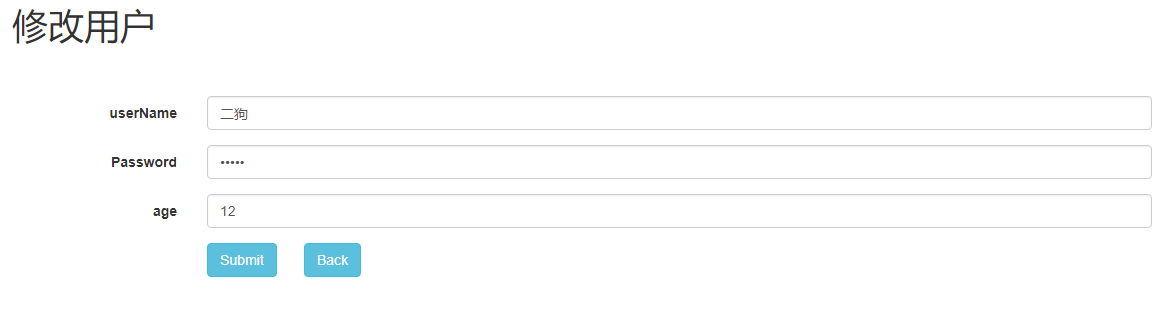
这样一个使用 Jpa 和 Thymeleaf 的增删改查示例就完成了。
文章内容已经升级到 Spring Boot 2.x
当然所以的示例代码都在这里:
Spring Boot (十五): Spring Boot + Jpa + Thymeleaf 增删改查示例的更多相关文章
- springboot(十五):springboot+jpa+thymeleaf增删改查示例
这篇文章介绍如何使用jpa和thymeleaf做一个增删改查的示例. 先和大家聊聊我为什么喜欢写这种脚手架的项目,在我学习一门新技术的时候,总是想快速的搭建起一个demo来试试它的效果,越简单越容易上 ...
- Spring Boot(十五):spring boot+jpa+thymeleaf增删改查示例
Spring Boot(十五):spring boot+jpa+thymeleaf增删改查示例 一.快速上手 1,配置文件 (1)pom包配置 pom包里面添加jpa和thymeleaf的相关包引用 ...
- (转)Spring Boot (十五): Spring Boot + Jpa + Thymeleaf 增删改查示例
http://www.ityouknow.com/springboot/2017/09/23/spring-boot-jpa-thymeleaf-curd.html 这篇文章介绍如何使用 Jpa 和 ...
- Spring Boot + Jpa + Thymeleaf 增删改查示例
快速上手 配置文件 pom 包配置 pom 包里面添加 Jpa 和 Thymeleaf 的相关包引用 <dependency> <groupId>org.springframe ...
- springboot+jpa+thymeleaf增删改查的示例(转)
这篇文章介绍如何使用jpa和thymeleaf做一个增删改查的示例. 先和大家聊聊我为什么喜欢写这种脚手架的项目,在我学习一门新技术的时候,总是想快速的搭建起一个demo来试试它的效果,越简单越容易上 ...
- spring boot2+jpa+thymeleaf增删改查例子
参考这遍文章做了一个例子,稍微不同之处,原文是spring boot.mysql,这里改成了spring boot 2.Oracle. 一.pom.xml引入相关模块web.jpa.thymeleaf ...
- SpringBoot JPA + H2增删改查示例
下面的例子是基于SpringBoot JPA以及H2数据库来实现的,下面就开始搭建项目吧. 首先看下项目的整体结构: 具体操作步骤: 打开IDEA,创建一个新的Spring Initializr项目, ...
- springBoot03- springboot+jpa+thymeleaf增删改查
参考http://www.mooooc.com/springboot/2017/09/23/spring-boot-jpa-thymeleaf-curd.html 数据库: CREATE TABLE ...
- 从零开始搭建springboot+mybatis+thymeleaf增删改查示例
环境说明: 开发工具:Eclipse Mars.2 Release(4.5.2) JDK:1.8 Maven:3.3.3 注:Eclipse需安装sts插件,安装方法请自行百度 1. 新建maven工 ...
随机推荐
- 数据结构入门之链表(C语言实现)
这篇文章主要是根据<数据结构与算法分析--C语言描述>一书的链表章节内容所写,该书作者给出了链表ADT的一些方法,但是并没有给出所有方法的实现.在学习的过程中将练习的代码记录在文章中,并添 ...
- 控制台输出 mybatis 中的sql语句
控制台输出 mybatis 中的sql语句 在 log4j.xml 文件中 增加如下配置 <!-- mybatis 输出的sql,DEBUG级别 --> <logger name=& ...
- 总结Linux 下Redis 操作常用命令(转)
Redis的配置 Linux下安装 ]# wget http://download.redis.io/releases/redis-2.8.17.tar.gz ]# tar xzf redis-2.8 ...
- 详解Oracle DELETE和TRUNCATE 的区别
原文地址:http://www.cnblogs.com/simplefrog/archive/2012/07/30/2615169.html 语法delete from aa truncate tab ...
- VMware 导出镜像文件供 Virtual Box 使用
1. 问题描述 Windows 系统安装的 VMware 里的安装配置好的虚拟机需要拷贝到 MAC 的 Virtual Box 中. 需要将 VMware 中的虚拟机导出为镜像文件供 Virtual ...
- 解决myeclipse项目中,多出的WebContent文件夹
由于通过svn导入项目,导致项目中多出WebContent文件夹,而在此之前正常的是WebRoot文件夹.这个WebContent删了之后还会自己冒出来. 直到我发现篇博客:http://blog.s ...
- Linux每日小技巧---统计服务器IP连接数
netstat命令 [root@:vg_adn_tidbCkhsTest:172.31.30.62 ~]#netstat -tun | awk '{print $5}' | cut -d: -f1 | ...
- 用AOP拦截自定义注解并获取注解属性与上下文参数(基于Springboot框架)
目录 自定义注解 定义切面 获取上下文信息JoinPoint ProceedingJoinPoint 定义测试方法 测试结果 小结 AOP可以用于日志的设计,这样话就少不了要获取上下文的信息,博主在设 ...
- Hadoop YARN简介
背景 本文整理一些Hadoop YARN的相关内容. 简介 YARN(Yet Another Resource Negotiator)是Hadoop通用资源管理平台,为各类计算框架(离线MR.在线St ...
- FastDFS分布式文件系统设计原理
转载自http://blog.chinaunix.net/uid-20196318-id-4058561.html FastDFS是一个开源的轻量级分布式文件系统,由跟踪服务器(tracker ser ...