
一份不太简短的LaTeX模板
编译环境:
- Ubuntu16.04
- texllive2016
- sublime text3 + latextools
该模板使用与自己写文档,记笔记,记录代码,写作业等等。
%!TEX program = xelatex

\documentclass[10pt,onecolumn,a4paper]{article}

\usepackage{ctex} % 支持中文

\usepackage{enumerate} % 项目编号

%\usepackage{enumitem}

\usepackage{geometry} % 设置页边距

\geometry{left = 2.2cm, right=2.2cm, top = 2.5cm, bottom=2.5cm}

\usepackage{amssymb} % symbol

\usepackage{amsthm} % proof

%\usepackage{courier} % 代码字体

\usepackage{graphicx,subfigure} % figures

\usepackage{xcolor,mdframed} % mdframed

\usepackage{amsmath}

\usepackage{fancyhdr} % 添加页眉页脚

\usepackage{titlesec}

\titleformat*{\section}{\centering\bf\large} %设置章节字体

\usepackage{indentfirst} % 首行缩进

\setlength{\parindent}{2em} % 设置首行缩进两字符

\usepackage{breqn}

\renewcommand\d{\mathop{}\!\mathrm{d}}

\usepackage{multirow}

\newtheorem{theorem}{Theorem}

\renewcommand{\proofname}{\emph{\textbf{Proof}}}

%\definecolor{mycolor}{RGB}{200,200,200}

\definecolor{mycolor}{RGB}{192,192,192} % 设置代码阴影

\cfoot{\thepage}

% 代码

%\usepackage{listings}

\usepackage{fontspec}

\setmonofont[Mapping={}]{DejaVu Sans Mono} %英文引号之类的正常显示,相当于设置英文字体,windows下用Consolas字体,Linux下用DejaVu Sans Mono字体

%\setmonofont[Mapping={}]{Consolas}	%英文引号之类的正常显示,相当于设置英文字体

\setmonofont{DejaVu Sans Mono}

%\setsansfont{Consolas} %设置英文字体 Monaco, Consolas,  Fantasque Sans Mono,Linux下用DejaVu Sans Mono字体

%\setmainfont{Consolas} %设置文章主体部分的英文字体

\setcounter{tocdepth}{2} % 设置目录深度

\begin{document}

\title{文档标题}

\author{作者}

%\today

\maketitle % 显示文档标题 作者 时间

\tableofcontents % 生成标题目录

%\listoftables % 生成表格目录

%\listoffigures % 生成图片目录

%\clearpage

%\newpage % 换页

\section{第一章标题}

\subsection{第一章第一节标题}

一级标题和二级标题:

\begin{mdframed}[backgroundcolor=mycolor,hidealllines=true]

\begin{verbatim}

\section{} 表示一级标题,自动对标题进行编号

\section*{} 表示一级标题,不对标题进行编号

\subsection{} 表示二级标题,自动对标题进行编号

\subsection*{} 表示二级标题,不对标题进行编号

\end{verbatim}

\end{mdframed}

书写代码的环境,设置背景颜色为黑色,不显示行号:

\begin{mdframed}[backgroundcolor=mycolor,hidealllines=true]

\begin{verbatim}

\ begin{mdframed}[backgroundcolor=mycolor,hidealllines=true]

\ begin{verbatim}

代码内容

\ end{verbatim}

\ end{mdframed}

%注意这里为了避免歧义,在反斜杠\后加了空格

\end{verbatim}

\end{mdframed}

插入图片:

\begin{mdframed}[backgroundcolor=mycolor,hidealllines=true]

\begin{verbatim}

\begin{figure}

  \centering % 设置图片居中显示

  \includegraphics[width=5in]{./当前目录下的图片如pic.jpg} % 设置了图片宽度

  \caption{图片标题用于在图片下显示}\label{图片标签用于引用}

\end{figure}

\end{verbatim}

\end{mdframed}

默认使用首行缩进,如果不希望缩进,那么需要使用:

\begin{mdframed}[backgroundcolor=mycolor,hidealllines=true]

\begin{verbatim}

\noindent

\end{verbatim}

\end{mdframed}

项目编号,默认起始编号为1.

\begin{mdframed}[backgroundcolor=mycolor,hidealllines=true]

\begin{verbatim}

\begin{enumerate}

    \item 这里默认起始编号为1.

\end{enumerate}

\end{verbatim}

\end{mdframed}

项目编号,默认起始编号为(1)

\begin{mdframed}[backgroundcolor=mycolor,hidealllines=true]

\begin{verbatim}

\begin{enumerate}[(1)]

\item

\end{enumerate}

\end{verbatim}

\end{mdframed}

项目编号,默认起始编号为(a)

\begin{mdframed}[backgroundcolor=mycolor,hidealllines=true]

\begin{verbatim}

\begin{enumerate}[(a)]

\item

\end{enumerate}

\end{verbatim}

\end{mdframed}

项目编号,默认起始编号为指定数字:

\begin{mdframed}[backgroundcolor=mycolor,hidealllines=true]

\begin{verbatim}

\begin{enumerate}

\setcounter{enumi}{4}

  \item 设置默认起始编号为5.

\end{enumerate}

\end{verbatim}

\end{mdframed}

\begin{table}[!hbp]

  \centering

  \begin{tabular}{|c|c|c|c|c|c|c|}

  \hline

  % after \\: \hline or \cline{col1-col2} \cline{col3-col4} ...

  项目1 & 2 & 3 & 4 & 5 & 6 & 7 \\ \hline

  项目2 & 8 & 9 & 10 & 11 & 12 & 13 \\ \hline

  项目3 & 一 & 二 & 三 & 四 & 五 & 六 \\ \hline

\end{tabular}

  \caption{表格名称}\label{表格标签}

\end{table}

如表\ref{表格标签}所示:

\begin{mdframed}[backgroundcolor=mycolor,hidealllines=true]

\begin{verbatim}

\begin{table}[!hbp]

  \centering

  \begin{tabular}{|c|c|c|c|c|c|c|}

  \hline

  % after \\: \hline or \cline{col1-col2} \cline{col3-col4} ...

  项目1 & 2 & 3 & 4 & 5 & 6 & 7 \\ \hline

  项目2 & 8 & 9 & 10 & 11 & 12 & 13 \\ \hline

  项目3 & 一 & 二 & 三 & 四 & 五 & 六 \\ \hline

\end{tabular}

  \caption{表格名称}\label{表格标签}

\end{table}

如\ref{表格标签}所示:

\end{verbatim}

\end{mdframed}

\end{document}
效果如下图所示:
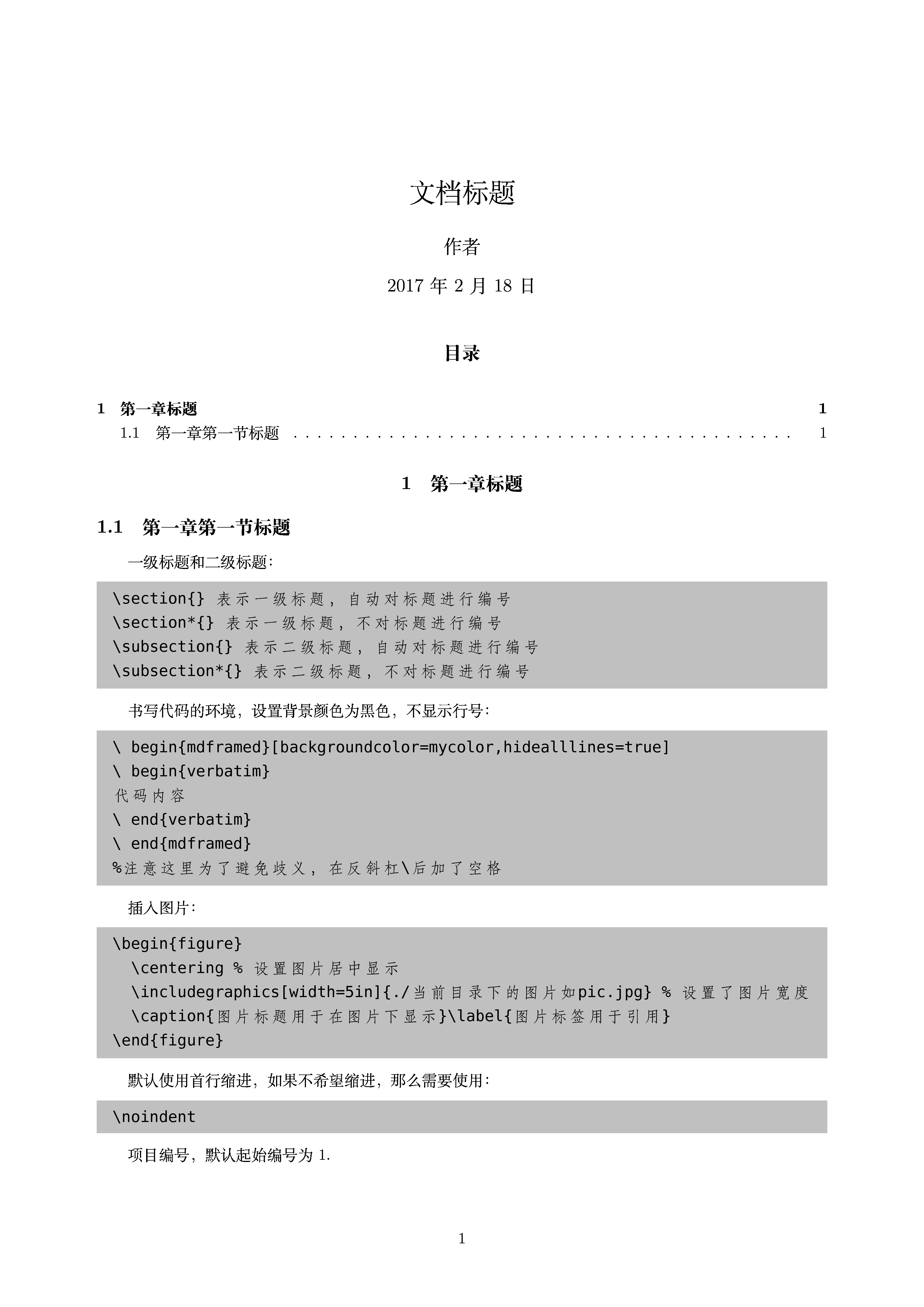
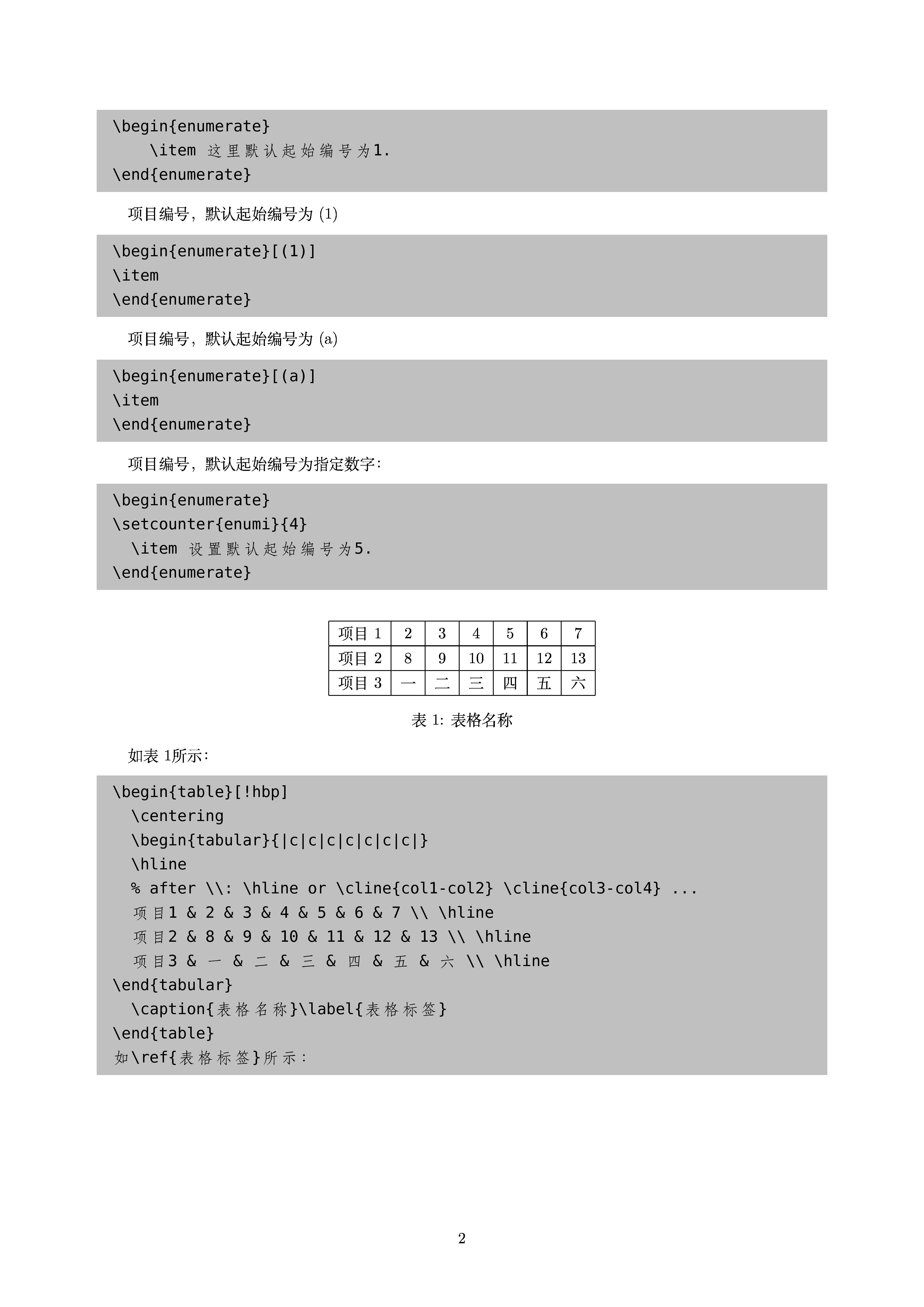
未完待续……
一份不太简短的LaTeX模板的更多相关文章
- 一份不太简短的LaTeX教程 lshort – A short introduction to LATEX 2elshort – A short introduction to LATEX 2e
Lshort started as a translation and rationalisation of a ground-breaking German-language i ...
- 【持续更新】一个简洁、易用的美赛LaTeX模板: easyMCM
目录 1 当前美赛模板通行情况的概述 2 easymcm宏包说明 2.1 与mcmthesis的关系之说明 2.2 easymcm宏包的简介 2.3 美赛模板下载地址 3 常见问题的解决方案 若您无意 ...
- 【持续更新】一个简洁、易用的美赛 LaTeX 模板: easyMCM
目录 1 当前美赛模板通行情况的概述 2 EasyMCM 宏包说明 2.1 与 mcmthesis 的关系之说明 2.2 easymcm宏包的简介 2.3 美赛模板下载地址 3 README 摘录 3 ...
- 山东大学硕士/博士研究生毕业论文--Latex模板
山东大学硕士/博士研究生毕业论文Latex模板 模板下载地址: https://github.com/Tsingke/SDU_thesis_template_for_postgraduate 封皮预 ...
- 国内大学毕业论文 LaTeX 模板集合
西北工业大学学位论文LaTeX模板 http://code.google.com/p/nwputhesis/ 西北工业大学硕博士论文LaTeX模版 http://code.google.com/p/n ...
- 国内大学毕业论文LaTeX模板集合
国内大学毕业论文LaTeX模板集合 薛瑞尼的清华大学学位论文LaTeX模板http://sourceforge.net/projects/thuthesis/ 北大论文文档 LaTeX 模板 pkut ...
- IEEE LaTeX模板使用BibTeX
IEEE LaTeX 模板使用 BibTeX 在Google Scholar获得的文献引用格式一般是BibTex的,而IEEE Transactions的模板默认用的是BibItem.目前没有什么自动 ...
- LaTeX模板 - FORMCM
LaTex 模板 - FORMCM \documentclass{mcmthesis} \mcmsetup{CTeX = true, % 使用 CTeX 套装时,设置为 true tcn = 8989 ...
- 定制一个支持中英文的简单LaTex模板
平常写汇报文档什么的,word排版有时还是比较费劲,遂定制一个简单的LaTex模板,中文默认为宋体,英文为LaTex默认字体,支持彩色高亮展示,有目录书签,有页眉展示,大致如下: LaTex代码如下: ...
随机推荐
- docker-ce-17.09 容器创建,运行,进入,删除,导入/导出
docker容器是镜像运行的一个运行实例,带有额外的可写文件层. 一.创建容器 > docker create -it centos:latest create命令新建的容器处于停止状态,可以使 ...
- andorid 三种方式的练习
layout1 线性布局 <?xml version="1.0" encoding="utf-8"?> <LinearLayout xml ...
- 当前页面刷新和动态添加控件的jquery事件绑定on
当前页面刷新(console): location.reload() 给动态添加的控件添加js事件(委托): <ul> <li>菜单一</li> <li> ...
- Eloquent Attach/Detach/Sync Fires Any Event
eloquent-attach-detach-sync-fires-any-event I have a laravel project, and I need to make some calcul ...
- [Robot Framework] SikuliLibrary的关键字执行依赖java进程,但是上次的java进程如果没有杀掉,robot framework控制台的日志出不来,怎么办?
如果在suite的setup里面杀掉java进程:AutoItLibrary.Run | taskkill /F /IM java.exe 执行sikuli的关键字会报这样的错误: Connectio ...
- 关于Spring父容器和SpringMvc子容器
在SSM项目中,会有SpringMvc容器(子容器)和Spring容器(父容器) 一共2个容器 基本规则: 子容器可以访问父容器的bean,父容器不能访问子容器的bean. 当<context: ...
- EditText输入小数
edtValue.setInputType(InputType.TYPE_CLASS_NUMBER | InputType.TYPE_NUMBER_FLAG_DECIMAL);
- CXF wsdl2java (转载)
2011-03-28 14:27 9735人阅读 评论(2) 收藏 举报 servicewebserviceinterfacejavastringserver CXF wsdl2Java 一. 简介 ...
- SpringMVC学习笔记:表单提交 参数的接收
SpringMVC可以接收原生form表单和json格式数据 有一个名为Book的model,其中的属性如下: 字符串类型的name,数字类型的price,数组类型的cover,集合类型的author ...
- C# 使用 HttpPost 请求调用 WebService
之前调用 WebService 都是直接添加服务引用,然后调用 WebService 方法的,最近发现还可以使用 Http 请求调用 WebService.这里还想说一句,还是 web api 的调用 ...