
005 RequestMapping_HiddenHttpMethodFilter 过滤器
很郁闷,这个查了很多资料,就是put与delete还是不好用。
但是看了一个文档后解决了,有些感谢这篇文档:http://blog.csdn.net/tiberroot/article/details/76615727
一:程序
1.配置过滤器
 <?xml version="1.0" encoding="UTF-8"?>

 <web-app xmlns:xsi="http://www.w3.org/2001/XMLSchema-instance"

     xmlns="http://xmlns.jcp.org/xml/ns/javaee"

     xsi:schemaLocation="http://xmlns.jcp.org/xml/ns/javaee http://xmlns.jcp.org/xml/ns/javaee/web-app_3_1.xsd"

     id="WebApp_ID" version="3.1">

     <!-- 配置过滤器 -->

     <filter>

         <filter-name>HiddenHttpMethodFilter</filter-name>

         <filter-class>org.springframework.web.filter.HiddenHttpMethodFilter</filter-class>

     </filter>

     <filter-mapping>

         <filter-name>HiddenHttpMethodFilter</filter-name>

         <url-pattern>/*</url-pattern>

     </filter-mapping>

     <!-- 配置DispatchServlet -->

     <servlet>

         <servlet-name>DispatchServlet</servlet-name>

         <servlet-class>org.springframework.web.servlet.DispatcherServlet</servlet-class>

         <init-param>

             <param-name>contextConfigLocation</param-name>

             <param-value>classpath:springmcv.xml</param-value>

         </init-param>

         <load-on-startup>1</load-on-startup>

     </servlet>

     <servlet-mapping>

         <servlet-name>DispatchServlet</servlet-name>

         <url-pattern>/</url-pattern>

     </servlet-mapping>

 </web-app>
2.index.jsp
 <%@ page language="java" contentType="text/html; charset=utf-8"

     pageEncoding="utf-8"%>

 <!DOCTYPE html PUBLIC "-//W3C//DTD HTML 4.01 Transitional//EN" "http://www.w3.org/TR/html4/loose.dtd">

 <html>

 <head>

 <meta http-equiv="Content-Type" content="text/html; charset=utf-8">

 <title>Insert title here</title>

 </head>

 <body>

     <!-- Rest URL Test -->

     <br>

     Put

     <form action="helloworld4/1" method="post">

         <input type="hidden" name="_method" value="PUT"/>

         <input type="submit" value="PUT TEST">

     </form>

     <br>

     DELETE

     <form action="helloworld3/1" method="post">

         <input type="hidden" name="_method" value="DELETE"/>

         <input type="submit" value="DELETE TEST">

     </form>

     <br>

     POST

     <form action="helloworld2" method="post">

         <input type="submit" value="POST TEST">

     </form>

     <br>

     Get

     <a href="helloworld2/1">Test Rest Get</a>

     <br><br>

 </body>

 </html>
3.RestController.java
注意点,是需要将put与delete加上注解@ResponseBody
 package com.spring.it;

 import org.springframework.stereotype.Controller;

 import org.springframework.validation.BindingResult;

 import org.springframework.web.bind.annotation.PathVariable;

 import org.springframework.web.bind.annotation.RequestMapping;

 import org.springframework.web.bind.annotation.RequestMethod;

 import org.springframework.web.bind.annotation.ResponseBody;

 @Controller

 public class RestControl {

     //Get

     @RequestMapping(value="/helloworld2/{id}",method=RequestMethod.GET)

     public String hello1(@PathVariable(value="id") Integer id) {

         System.out.println("id="+id);

         return "success";

     }

     //post

     @RequestMapping(value="/helloworld2",method=RequestMethod.POST)

     public String hello2() {

         System.out.println("post method");

         return "success";

     }

     //Delete

     @ResponseBody

     @RequestMapping(value="/helloworld3/{id}",method=RequestMethod.DELETE)

     public String hello3(@PathVariable(value="id") Integer id) {

         System.out.println("DELETE id="+id);

         return "success";

     }

     //Put

     @ResponseBody

     @RequestMapping(value="/helloworld4/{id}",method=RequestMethod.PUT)

     public String hello4(@PathVariable(value="id") Integer id) {

         System.out.println("PUT id="+id);

         return "success";

     }

 }
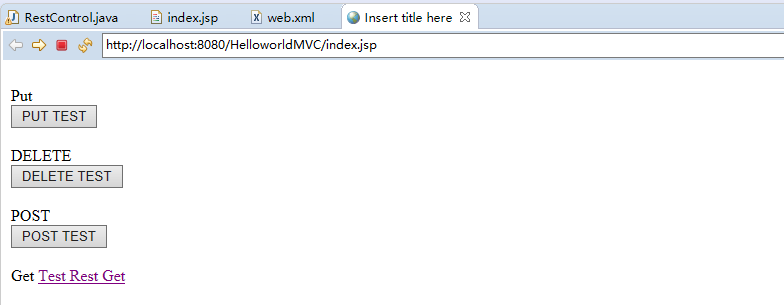
4.效果
1.介绍
这个注解表示该方法的返回结果直接写入HTTP response body中,一般在异步获取数据时使用。
在使用@RequestMapping后,返回值通常解析为跳转路径。加上@responsebody后,返回结果直接写入HTTP response body中,不会被解析为跳转路径。比如异步请求,希望响应的结果是json数据,那么加上@responsebody后,就会直接返回json数据。
@responseBody注解的作用是将controller的方法返回的对象通过适当的转换器转换为指定的格式之后,写入到response对象的body区,通常用来返回JSON数据或者是XML数据,需要注意的呢,在使用此注解之后不会再走试图处理器,而是直接将数据写入到输入流中,他的效果等同于通过response对象输出指定格式的数据。
@RequestMapping("/login")
@ResponseBody
public User login(User user){
return user;
}
User字段:userName pwd
那么在前台接收到的数据为:'{"userName":"xxx","pwd":"xxx"}'
005 RequestMapping_HiddenHttpMethodFilter 过滤器的更多相关文章
- RequestMapping_HiddenHttpMethodFilter 过滤器
[REST] 1.REST:即Representational State Transfer.(资源)表现层状态转化.是目前最流行的一种互联网软件架构.它结构清晰.符合标准.易于理解.扩展方便,所以得 ...
- HBase过滤器的使用
一.常用过滤器: 1.数据准备: Rowkey:001 Family:Quilfifier address value: 昆明市西山区 Rowkey:001 Family:Quilfifier age ...
- HBase学习之路 (十一)HBase的协过滤器
协处理器—Coprocessor 1. 起源 Hbase 作为列族数据库最经常被人诟病的特性包括:无法轻易建立“二级索引”,难以执 行求和.计数.排序等操作.比如,在旧版本的(<0.92)Hba ...
- 【转】HBase shell命令与 scan 过滤器
Hbase 常用shell命令 https://www.cnblogs.com/i80386/p/4105423.html HBase基础之常用过滤器hbase shell操作 https://www ...
- ASP.NET Core 中文文档 第四章 MVC(4.3)过滤器
原文:Filters 作者:Steve Smith 翻译:刘怡(AlexLEWIS) 校对:何镇汐 ASP.NET MVC 过滤器 可在执行管道的前后特定阶段执行代码.过滤器可以配置为全局有效.仅对控 ...
- ASP.NET Web API 过滤器创建、执行过程(二)
ASP.NET Web API 过滤器创建.执行过程(二) 前言 前面一篇中讲解了过滤器执行之前的创建,通过实现IFilterProvider注册到当前的HttpConfiguration里的服务容器 ...
- ASP.NET Web API 过滤器创建、执行过程(一)
ASP.NET Web API 过滤器创建.执行过程(一) 前言 在上一篇中我们讲到控制器的执行过程系列,这个系列要搁置一段时间了,因为在控制器执行的过程中包含的信息都是要单独的用一个系列来描述的,就 ...
- ABP(现代ASP.NET样板开发框架)系列之13、ABP领域层——数据过滤器(Data filters)
点这里进入ABP系列文章总目录 基于DDD的现代ASP.NET开发框架--ABP系列之13.ABP领域层——数据过滤器(Data filters) ABP是“ASP.NET Boilerplate P ...
- AngularJS过滤器filter-时间日期格式-渲染日期格式-$filter
今天遇到了这些问题索性就 写篇文章吧 话不多说直接上栗子 不管任何是HTML格式还是JS格式必须要在 controller 里面写 // new Date() 获取当前时间 yyyy-MM-ddd ...
随机推荐
- Oracle 11g DRCP连接方式——基本原理
学习Oracle是一个复杂.繁琐的过程.在浩如烟海的Oracle官方资料.新特性.MOS资料和各种Internal知识面前,我们总是觉得力不从心.不知所措.但是,这往往也就是我们不断坚持.积累和追寻的 ...
- webService与分布式与微服务与SOA的关系
SOA:是面向服务体系架构. webservice是SOA的一种实现技术.webservice基于两种协议:soap和rest协议.现在常用的是rest协议. web service (web 服务) ...
- Python中的ujson模块
听说ujson比json模块快了很多,特来一试: # -*- coding: utf-8 -*- import json import ujson import time def cost_time( ...
- Python中的requests模块注意事项
主要是说requests.post()方法, 参数: url : 这就不解释了 data: 如果传入的是字典类型,则字典在发出请求时会自动编码为表单形式,表单形式会将字典中的键和值进行一些操作: ...
- Java基础-IO流对象之压缩流(ZipOutputStream)与解压缩流(ZipInputStream)
Java基础-IO流对象之压缩流(ZipOutputStream)与解压缩流(ZipInputStream) 作者:尹正杰 版权声明:原创作品,谢绝转载!否则将追究法律责任. 之前我已经分享过很多的J ...
- null和System.DBNull.Value的区别
我记得之前在写一个程序的时候用到了这个知识点,当时判断的时候,有时候null可以,有时候必须是System.DBNull.Value 由于不清楚这两个的区别所以纠结了很久.查了一下,二者的区别如下: ...
- spring注解 @Scheduled(cron = "0 0 1 * * *")实现定时的执行任务
@Scheduled(cron = "0 0 1 * * *") 在使用该注解以前请做好以下准备工作,配置好相应的xm文件. 配置定时注解的步骤:http://blog.csdn. ...
- [国家集训队2012]middle
http://cogs.pro:8080/cogs/problem/problem.php?pid=1763 二分答案x 把区间内>=x的数设为1,<x的数设为-1 左端点在[a,b]之间 ...
- Spring RedisTemplate操作-ZSet操作(6)
@Autowired @Resource(name="redisTemplate") private RedisTemplate<String, String> rt; ...
- 【NOI】2017 整数(BZOJ 4942,LOJ2302) 压位+线段树
[题目]#2302. 「NOI2017」整数 [题意]有一个整数x,一开始为0.n次操作,加上a*2^b,或询问2^k位是0或1.\(n \leq 10^6,|a| \leq 10^9,0 \leq ...