
Script component 用法
在SSIS中,可以使用C#编写脚本,这是十分激动人心的事,能够使用C#代码,使得Script Component无所不能。
第一部分:组件简介
Script Component 有三种类型:Source, Destination and Transformation
1,每种类型的脚本,都有两种类型的参数:ReadOnly 和ReadWrite,在脚本中可以使用 this.Variables.VariableName 来获取或设置参数变量的值
示例:创建四个Variable,并传递给Script component


SSIS十分友好,在脚本中自动生成了一个子类,将Variable Name作为属性添加到子类中,引用Variable Name十分简单
public class ScriptMain : UserComponent
在脚本代码中,使用 this.Variables.VariableName 来获取或设置参数变量的值

2,可以为 Script component 指定connection ,如果在脚本中使用Ado.net,可以直接创建Ado.net connection manager,在脚本中,使用以下代码来引用connection
IDTSConnectionManager100 cnManager = this.Connections.Connection;

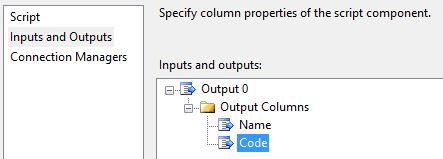
3,Script component 不仅有输入的Variable,而且还有output / input columns,设置output / input columns 以便输出或输入表数据
示例中增加两列Code和name,分别是string类型
第二部分:Source 组件示例
4,如果Script Component 作为Source,那么使用脚本获取数据之后,可以使用将数据逐行添加到Source 的输出buff中。
在将获得的数据集插入到output buff中时,SSIS使用的代码逻辑是:先向output buff中插入一行,然后为该行的字段赋值
DataRow dr=dt.Rows[0];
this.Output0Buffer.AddRow();
this.Output0Buffer.Code = dr["code"].ToString();
this.Output0Buffer.Name = dr["name"].ToString();
示例Code
    DataTable dt;

    IDTSConnectionManager100 cnManager;
    SqlConnection cnn;

    /// <summary>

    /// This method is called once, before rows begin to be processed in the data flow.

    ///

    /// You can remove this method if you don't need to do anything here.

    /// </summary>

    public override void PreExecute()

    {

        base.PreExecute();

        cnManager = this.Connections.Connection;

        cnn = (SqlConnection)cnManager.AcquireConnection(null);

        SqlCommand cmd = cnn.CreateCommand();

        cmd.CommandText = "select code,name from [dbo].[tbExcel]";

        cmd.CommandType = CommandType.Text;

        cmd.CommandTimeout = ;

        dt = new DataTable("dt");

        SqlDataAdapter sda = new SqlDataAdapter(cmd);

        sda.Fill(dt);

    }

    /// <summary>

    /// This method is called after all the rows have passed through this component.

    ///

    /// You can delete this method if you don't need to do anything here.

    /// </summary>

    public override void PostExecute()

    {

        base.PostExecute();


     cnManager.ReleaseConnection(cnn);

    }

    public override void CreateNewOutputRows()

    {

        foreach (DataRow dr in dt.Rows)

        {

            this.Output0Buffer.AddRow();

            this.Output0Buffer.Code = dr["code"].ToString();

            this.Output0Buffer.Name = dr["name"].ToString();

        }

    }
5,Script Component做为Destination,既然是作为Destination,那么肯定是有input column,用以接收上个数据源组件或转换组件的输出数据流。


示例代码如下
    SqlCommand cmd = new SqlCommand();

    DataTable dt = new DataTable("dt");

    IDTSConnectionManager100 cnManager;
    SqlConnection cnn;

    /// <summary>

    /// This method is called once, before rows begin to be processed in the data flow.

    ///

    /// You can remove this method if you don't need to do anything here.

    /// </summary>

    public override void PreExecute()

    {

        base.PreExecute();

        cnManager = this.Connections.Connection;

        cnn = (SqlConnection)cnManager.AcquireConnection(null);

        cmd.Connection = cnn;

        cmd.CommandType = CommandType.Text;

        cmd.CommandTimeout = ;

        dt.Columns.Add("code", typeof(string));

        dt.Columns.Add("name", typeof(string));

    }

    /// <summary>

    /// This method is called after all the rows have passed through this component.

    ///

    /// You can delete this method if you don't need to do anything here.

    /// </summary>

    public override void PostExecute()

    {

        base.PostExecute();

        foreach(DataRow dr in dt.Rows)

        {

            string strSql = string.Format(@"

insert into dbo.tbExcel2(code,name)

values('{0}','{1}')"

                , dr["code"].ToString(), dr["name"].ToString());

            cmd.CommandText = strSql;

            cmd.ExecuteNonQuery();

        }

        cnManager.ReleaseConnection(cnn);

    }

    /// <summary>

    /// This method is called once for every row that passes through the component from Input0.

    ///

    /// Example of reading a value from a column in the the row:

    ///  string zipCode = Row.ZipCode

    ///

    /// Example of writing a value to a column in the row:

    ///  Row.ZipCode = zipCode

    /// </summary>

    /// <param name="Row">The row that is currently passing through the component</param>

    public override void Input0_ProcessInputRow(Input0Buffer Row)

    {

        DataRow dr = dt.NewRow();

        dr["code"] = Row.code;

        dr["name"] = Row.name;

        dt.Rows.Add(dr);

    }
6,Script Component 作为 Transformation ,转换,顾名思义是将输入进行转换成符合要求的输出,所以,作为 Transformation 的Script Component 既有input columns,也有output columns。

示例代码如下,Input0Buffer 这个类中即包含了InputColumns,也包含了OutputColumns,InputColumns的Column是ReadOnly的,通过Input0Buffer 实例对OutputColumns进行赋值,转换数据流。
    /// <summary>

    /// This method is called once, before rows begin to be processed in the data flow.

    ///

    /// You can remove this method if you don't need to do anything here.

    /// </summary>

    public override void PreExecute()

    {

        base.PreExecute();

        /*

         * Add your code here

         */

    }

    /// <summary>

    /// This method is called after all the rows have passed through this component.

    ///

    /// You can delete this method if you don't need to do anything here.

    /// </summary>

    public override void PostExecute()

    {

        base.PostExecute();

        /*

         * Add your code here

         */

    }

    /// <summary>

    /// This method is called once for every row that passes through the component from Input0.

    ///

    /// Example of reading a value from a column in the the row:

    ///  string zipCode = Row.ZipCode

    ///

    /// Example of writing a value to a column in the row:

    ///  Row.ZipCode = zipCode

    /// </summary>

    /// <param name="Row">The row that is currently passing through the component</param>

    public override void Input0_ProcessInputRow(Input0Buffer Row)

    {

        Row.codeout = Row.code + "_out";

        Row.nameout = Row.name + "_out";

    }
Script component 用法的更多相关文章
- 使用Script Component源处理不规则平面文件
微软 BI 系列随笔 - SSIS 2012 高级应用 - Script Component处理不规则平面文件 场景介绍 在使用SSIS从平面文件导入源数据时,最常遇到的是以下两种情况: 导入规则的平 ...
- 微软BI 之SSIS 系列 - 使用 Script Component Destination 和 ADO.NET 解析不规则文件并插入数据
开篇介绍 这一篇文章是 微软BI 之SSIS 系列 - 带有 Header 和 Trailer 的不规则的平面文件输出处理技巧 的续篇,在上篇文章中介绍到了对于这种不规则文件输出的处理方式.比如下图中 ...
- Data Flow ->> Script Component
和Control Flow中的Script Task非常类似,不同的是Script Component是Per-Row的执行类型.打个比方,在Script Component中加入两个Output的字 ...
- 微软BI 之SSIS 系列 - 通过 ROW_NUMBER 或 Script Component 为数据流输出添加行号的方法
开篇介绍 上午在天善回答看到这个问题 - SSIS 导出数据文件,能否在第一列增加一个行号,很快就帮助解决了,方法就是在 SQL 查询的时候加一个 ROW_NUMBER() 就可以了. 后来想起在两年 ...
- 链接脚本(Linker Script)用法解析(一) 关键字SECTIONS与MEMORY
1.MEMORY关键字用于描述一个MCU ROM和RAM的内存地址分布(Memory Map),MEMORY中所做的内存描述主要用于SECTIONS中LMA和VMA的定义. 2.SECTIONS关键字 ...
- OleDb Source component 用法
OleDb Source component 主要是从DB中获取数据,传递给下游组件,OleDb Source component的强大之处在于 query data 的mode有四种,如图 Tabl ...
- <script>的用法
<script> </script> 是指 在 HTML 页面中插入一段 JavaScript
- 链接脚本(Linker Script)用法解析(二) clear_table & copy_table
可执行文件中的.bss段和.data段分别存放未赋初值的全局变量和已赋初值的全局变量,两者的特点分别为: (1).bss段:①无初值,所以不占ROM空间:②运行时存储于RAM:③默认初值为0 (2). ...
- Lookup component 用法
Lookup component 类似于Tsql的join子句, select a.* ,b.* from dbo.tis a left join dbo. tdes b on a.code=b.co ...
随机推荐
- Linux内核补丁批量自动下载工具
Linux kernel官网cgit工具不支持按变更代码进行补丁搜索,想到个办法就是把补丁都抓下来,这样可以在本地搜索.花了2个小时写了个小工具,话不多说,直接看效果: E:\docs\TOOLS\p ...
- bzoj1008快速面
快速面裸题(显然的m^n-m*(m-1)^(n-1)) 然后,,,就没有然后了 #include <cstdio> #define wzf2000 100003 long long n,m ...
- jsonp帮助你知道你关注的他或她喜欢什么歌曲
利用腾讯提供的QQ音乐API,返回一段对方在QQ音乐收藏的歌曲名称json数据,并对该json做解析,就能知道你的那个他或她喜欢听什么歌曲了,然后你就知道他/她的品位了,然后就自己看着办了,嘿嘿.我只 ...
- router路由去掉#!的踩坑记
项目中在研究去掉router#!的过程中的踩坑过程.
- sql 更新列表中最老的一条数据
今天组长给个任务说要给摄像头触发一个列表.让缓存5条数据,每次摄像头触发更新一条,丢掉最老的一条数据.原来的update是直接更新掉一条,没带缓存的.然后搞了个sql语句,是这样的: UPDATE C ...
- Essential controls for web app
AUTO-COMPLETE/AUTO-SUGGEST Auto-complete using Vaadin Offer auto-suggest or auto-complete to help yo ...
- Sql判断不为Null也不为空的写法
看到不少人写: isnull(field,'')<>'' 其中这样写最经济实惠:field>''
- qunit 前端脚本测试用例
首先引用qunit 测试框架文件 <link rel="stylesheet" href="qunit-1.22.0.css"> <scrip ...
- String对象方法扩展
/** *字符串-格式化 */ String.prototype.format = function(){ var args = arguments;//获取函数传递参数数组,以便在replace回调 ...
- Mariadb数据库设置及操作 一主多从 备份还原(实测笔记)
环境: 系统硬件:vmware vsphere (CPU:2*4核,内存2G,双网卡) 系统版本:CentOS-7-x86_64-Minimal-1611.iso 数据库版本信息 : 10.1.20- ...