
autofac JSON文件配置
autofac是比较简单易用的IOC容器。下面我们展示如何通过json配置文件,来进行控制反转。
需要用到以下程序集。可以通过nugget分别安装
Microsoft.Extensions.Configuration.dll
Microsoft.Extensions.Configuration.Json
Autofac.Configuration.dll
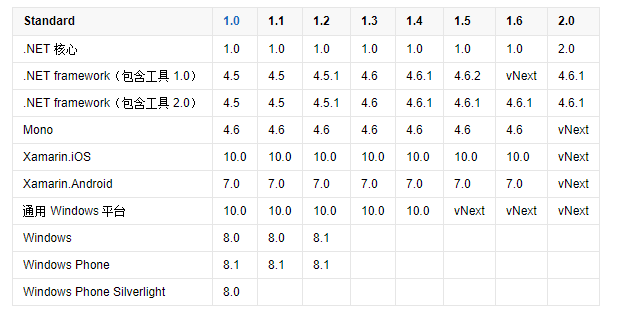
注意,项目目标框架最好设置为.NET Framework 4.6.1及以上。因为Microsoft.Extensions.Configuration.dll,依赖.NETStandard2.0
下表列出了 .NET Standard 的所有版本及其支持的平台
AutofacExt帮助类
using Autofac;

using Autofac.Configuration;

using Microsoft.Extensions.Configuration;

namespace autofacConsole

{

    public static class AutofacExt

    {

        private static IContainer _container;

        public static void InitAutofac()

        {

            // Add the configuration to the ConfigurationBuilder.

            var config = new ConfigurationBuilder();

            config.AddJsonFile("autofac.json");

            // Register the ConfigurationModule with Autofac.

            var module = new ConfigurationModule(config.Build());

            var builder = new ContainerBuilder();

            builder.RegisterModule(module);

            // Set the dependency resolver to be Autofac.

            _container = builder.Build();

        }

        /// <summary>

        /// 从容器中获取对象

        /// </summary>

        /// <typeparam name="T"></typeparam>

        public static T GetFromFac<T>()

        {

            return _container.Resolve<T>();

            //   return (T)DependencyResolver.Current.GetService(typeof(T));

        }

        public static T GetFromFac<T>(string name)

        {

            return _container.ResolveNamed<T>(name);

        }

    }

}
客户端调用
public interface IOutput

    {

        void Write(string content);

    }

public class ConsoleOutput : IOutput

    {

        public void Write(string content)

        {

            Console.WriteLine(content);

        }

    }

class Program

    {

        static void Main(string[] args)

        {

           AutofacExt.InitAutofac();

            var writer =AutofacExt.GetFromFac<IOutput>();

            writer.WriteDate();

            Console.ReadKey();

        }

    }
json配置文件配置
Autofac.json
{

  "defaultAssembly": "autofacConsole",

  "components": [

    {

      "type": "autofacConsole.ConsoleOutput, autofacConsole",

      "services": [

        {

          "type": "autofacConsole.IOutput,autofacConsole"

        }

      ],

      "instanceScope": "single-instance",

      "injectProperties": true

    }

  ]

}
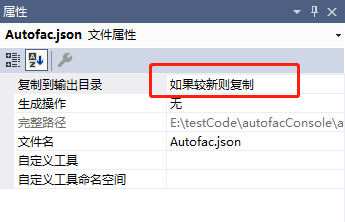
设置为如果较新则复制
参考资料:
https://github.com/autofac/Autofac
https://autofac.readthedocs.io/en/latest/getting-started/index.html
https://autofac.readthedocs.io/en/latest/configuration/xml.html
autofac JSON文件配置的更多相关文章
- 让EFCore更疯狂些的扩展类库(一):通过json文件配置sql语句
前言 EF通过linq和各种扩展方法,再加上实体模型,编写数据库的访问代码确实是优美.舒服,但是生成的sql不尽如意.性能低下,尤其是复杂些的逻辑关系,最终大家还是会回归自然,选择能够友好执行sql语 ...
- .NetCore获取json文件配置内容
.netcore中的数据配置及内容用了json文件代替了之前framework的xml文件,那么json中的数据该怎么获取呢?下面讲解json文件在.net core中的获取方法. 首先,新建一个.n ...
- 【ASP.NET Core快速入门】(五)命令行配置、Json文件配置、Bind读取配置到C#实例、在Core Mvc中使用Options
命令行配置 我们通过vs2017创建一个控制台项目CommandLineSample 可以看到现在项目以来的是dotnet core framework 我们需要吧asp.net core引用进来,我 ...
- 菜鸟入门【ASP.NET Core】5:命令行配置、Json文件配置、Bind读取配置到C#实例、在Core Mvc中使用Options
命令行配置 我们通过vs2017创建一个控制台项目CommandLineSample 可以看到现在项目以来的是dotnet core framework 我们需要吧asp.net core引用进来 ...
- 微信小程序自学第一课:工程目录结构与.json文件配置
注册成为开发者 地址: https://mp.weixin.qq.com/cgi-bin/wx 开发者工具下载地址 https://mp.weixin.qq.com/debug/wxadoc/dev/ ...
- .net core - 配置管理 - json文件配置
Json 文件配置 public class Startup { public Startup(IHostingEnvironment env) { var builder = new Configu ...
- iis配置js支持读取json文件配置
默认情况下,iis不支持解析.json文件,这就需要我们自己在iis下配置方法一:iis配置1.点击开始菜单选择控制面板: 2.控制面板内点击管理工具,选择Internet信息服务(IIS)管理器. ...
- 微信小程序 app.json文件配置
https://developers.weixin.qq.com/miniprogram/dev/index.html 起步 https://developers.weixin.qq.com/min ...
- package.json文件配置信息
1.概述 每个项目的根目录下面,一般都有一个package.json文件,定义了这个项目所需要的各种模块,以及项目的配置信息(比如名称.版本.许可证等元数据).npm install命令根据这个配置文 ...
随机推荐
- SQL Server修改表结构后批量更新所有视图
最近修改了数据库表结构,数据同步的时候出了问题,发现很多数据明明已经修改,但是通过视图筛选出来的还是原来的数据,所以怀疑应该是视图缓存了数据,在园子里找到下面的博文,在这里做个记录备忘. 原文链接:h ...
- 学习了django对于sqlite3进行了了解,谈谈看法
学习了django对于sqlite3进行了了解,谈谈看法 由于django默认使用的是sqlite3,写了几个建表语句, 然后数据做下迁移,其实就是建表语句的执行. 一直对sqlite3没有一个直观的 ...
- libtrace 安装 使用 修改
下载 https://github.com/LibtraceTeam/libtrace/releases 解压 进入目录 依赖 sudo apt install libpcap0.8-dev -y a ...
- vue轮播(完整详细版)
轮播组件vue <swiper :options="swiperOption" class='swiper-box'> <swiper-slide v-f ...
- 跟我学算法- tensorflow VGG模型进行测试
我们使用的VGG模型是别人已经训练好的一个19层的参数所做的一个模型 第一步:定义卷积分部操作函数 mport scipy.io import numpy as np import os import ...
- $(window).scrollTop() 获取当前的鼠标位置 offset.left()指定标签在html中的坐标 offset.top() 指定标签在html中的坐标position() 指定标签相对父(relative)标签的坐标
<!DOCTYPE html> <html lang="en"> <head> <meta charset="UTF-8&quo ...
- js获取当前项目根路径URL (转自CSDN 红领巾-sunlight)
/** * //获取当前项目根路径 * @return {TypeName} */ function getRootPath(){ //获取当前网址,如: http://localhost:8083/ ...
- 中国大陆被SCI收录的较高影响力期刊
1.清华主办的期刊Nano Research 清华新闻网2012年9月10日电:据汤森路透公司公布的2011年SCI期刊影响因子,清华大学主办的期刊Nano Research(纳米研究)的影响因子为6 ...
- linux shell脚本编程笔记(三): 三种引号的区别
双引号.单引号.反引号的区别 测试用例: OPDATE=`date -d '-1 day' +%Y%m%d` ) do FILEDATE=`date -d "-$i day" +% ...
- curl模拟多线程抓取网页(优化)
通过上篇文章清楚了通过curl_multi_*函数可以一次请求多个url,但是也留下了问题,就是结果要等所有数据请求结束一起返回,才能逐个处理数据.优化代码,使先成功请求的url先返回处理结果,而不是 ...