
[PY3]——内置数据结构(1)——列表及其常用操作
列表及其常用操作_xmind图
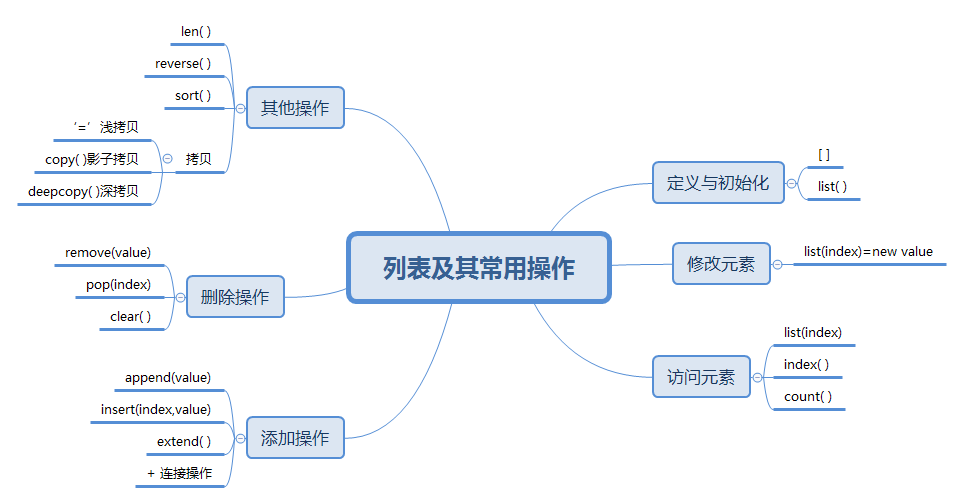
about列表
列表是一个序列,用于顺序存储数据
列表分为两种:ArrayList(用数组实现)、LinkedList(用链表实现)
定义与初始化
#list()          使用工厂函数list定义一个空列表

#[]              使用中括号定义一个空列表

#[1,2,3]         使用中括号定义有初始值的列表

#list(可迭代对象) 把可迭代对象转换为一个列表

In [1]: lst=list();print(lst)

[]

In [2]: lst=[];print(lst)

[]

In [3]: lst=[1,2,3];print(lst)

[1, 2, 3]

In [4]: lst=list(range(1,10));print(lst)

[1, 2, 3, 4, 5, 6, 7, 8, 9]
修改列表元素
# 直接使用索引操作即可 list[index]=new value

In [2]: lst=[1,2,3,2,4,3,5]

In [3]: lst[4]=3

In [4]: print(lst)

[1, 2, 3, 2, 3, 3, 5]
访问列表元素
1. list(index) 通过索引访问元素,索引规则为:
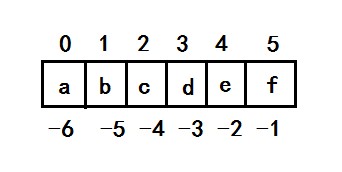
#索引从0开始

In [5]: print(lst[0])

1

#负数索引从-1开始

In [6]: print(lst[-1])

9

In [7]: print(lst[-2])

8

#当索引(正负都是)超出范围,会报错IndexError

In [6]: print(lst[10])

IndexError: list index out of range
2. index()
# index()主要用于查找列表中某个值的索引

In [3]:help(lst.index)

index(...) method of builtins.list instance

    L.index(value, [start, [stop]]) -> integer -- return first index of value.

    Raises ValueError if the value is not present.

In [3]: lst=[1,2,3,2,1]

# 返回要查找的value的第一个索引

In [4]: lst.index(2)

Out[4]: 1

# start参数指定从哪个索引开始查找

In [5]: lst.index(2,2)

Out[5]: 3

# stop参数指定从到哪个索引结束,且[start,stop]的范围中不包含stop

# 当value不能在[start,stop]的范围查找到,则报错ValueError

In [6]: lst.index(2,2,3)

ValueError: 2 is not in list

# 若想缺省start值,可将其设为0(start的默认值为0,stop的默认值为-1)

In [7]: lst.index(2,0,3)

Out[7]: 1

# start和stop可以是负索引,但总是从左往右查找

In [8]: lst.index(2,-4,-1)

Out[8]: 1

# 并且要注意:如果stop<start,就相当于在空列表中查找一个元素,则抛出ValueError

In [9]: lst.index(2,-1,-4)

ValueError: 2 is not in list
3. count()
# count()返回某个value值在列表中出现的次数

In [14]: help(lst.count)

Help on built-in function count:

count(...) method of builtins.list instance

    L.count(value) -> integer -- return number of occurrences of value

In [15]: lst.count(2)

Out[15]: 2

In [16]: lst.count(10)

Out[16]: 0
添加列表元素
1. append() 用于在list末尾添加一个元素
# 原地修改list,返回结果为none

In [5]: help(lst.append)

Help on built-in function append:

append(...) method of builtins.list instance

    L.append(object) -> None -- append object to end

In [1]: lst=[1,2,3,2,3,3,5]

In [2]: lst.append(9)

In [3]: print(lst)

[1, 2, 3, 2, 3, 3, 5, 9]
2. insert() 用于在指定索引位置添加元素
# 原地修改list,返回结果为none

In [12]: help(lst.insert)

insert(...) method of builtins.list instance

    L.insert(index, object) -- insert object before index

In [13]: lst=[1,2,3,2,3,3,5,9]

# 正数索引:实际是使得index位置上的元素为我们所添加的,后面的元素依次往后挪

In [14]: lst.insert(1,11);print(lst)

[1, 11, 2, 3, 2, 3, 3, 5, 9]

In [15]: lst.insert(0,'a');print(lst)

['a', 1, 11, 2, 3, 2, 3, 3, 5, 9]

# 负数索引:实际是在index的前一个位置添加元素

In [16]: lst.insert(-1,'-a');print(lst)

['a', 1, 11, 2, 3, 2, 3, 3, 5, '-a', 9]

# 当index超出索引范围,正数索引会在最后一个位置添加元素

In [17]: lst.insert(100,'');print(lst)

['a', 1, 11, 2, 3, 2, 3, 3, 5, '-a', 9, '']

# 当index超出索引范围,负数索引会在第0个位置添加元素

In [18]: lst.insert(-100,'-100');print(lst)

['-100', 'a', 1, 11, 2, 3, 2, 3, 3, 5, '-a', 9, '']

# 比较append和insert:  append的时间复杂度是O(1):常数时间,效率和数据规模无关  insert的时间复杂度是O(n):线性时间,效率和数据规模有关
3. extend()
# extend的参数是一个可迭代对象,在list末尾添加此可迭代对象

#原地修改list,返回结果为none

In [1]: help(lst.extend)

extend(...) method of builtins.list instance

    L.extend(iterable) -> None -- extend list by appending elements from the iterable

In [1]: lst=[1,2,3]

In [2]: lst.extend([4,5,6]);print(lst)

[1, 2, 3, 4, 5, 6]

In [3]: lst.extend(range(0,4));print(lst)

[1, 2, 3, 4, 5, 6, 0, 1, 2, 3]
4. + list的连接操作
# 连接操作不修改list本身,返回一个新的list

In [9]: lst=[1,2,3]

In [10]: lst+[4,5,6]

Out[10]: [1, 2, 3, 4, 5, 6]

In [11]: print(lst)

[1, 2, 3]

In [12]: lst2=[4,5,6]

In [13]: lst+lst2

Out[13]: [1, 2, 3, 4, 5, 6]
删除列表元素
1. remove() 根据指定的value元素值删除元素,返回none
# 原地删除,返回为none

In [1]: help(lst.remove)

remove(...) method of builtins.list instance

    L.remove(value) -> None -- remove first occurrence of value.

    Raises ValueError if the value is not present.

In [2]: lst=[0,1,2,3,2,4,5,6]

# 删除list中值为4的元素

In [6]: lst.remove(4);print(lst)

[0, 1, 2, 3, 2, 5, 6]

# list中有两个相同的value时,删除第一个出现的

In [7]: lst.remove(2);print(lst)

[0, 1, 3, 2, 5, 6]

# 当value不存在,则抛出ValueError

In [8]: lst.remove(10);print(lst)

ValueError: list.remove(x): x not in list
2. pop() 根据index索引删除元素,返回被删除的元素
In [10]: help(lst.pop)

pop(...) method of builtins.list instance

    L.pop([index]) -> item -- remove and return item at index (default last).

    Raises IndexError if list is empty or index is out of range.

# pop()不指定索引时,随机删除列表的一个元素,直到list为空

In [36]: lst=[1,0,9,8,2,6,9]

In [37]: lst.pop()

Out[37]: 9

In [38]: lst.pop()

Out[38]: 6

In [39]: lst.pop()

Out[39]: 2

In [40]: lst.pop()

Out[40]: 8

In [41]: lst.pop()

Out[41]: 9

In [42]: lst.pop()

Out[42]: 0

In [43]: lst.pop()

Out[43]: 1

In [44]: lst.pop()

IndexError: pop from empty list

# pop(index)指定index时,删除该索引对应的值

In [45]: lst=[1,0,9,8,2,6,9]

In [46]: lst.pop(0)

Out[46]: 1

In [47]: lst.pop(-1)

Out[47]: 9

# pop()和pop(index)比较:pop()传递index参数时,时间复杂度是O(n)      不传递index参数时,时间复杂度是O(1)
3. clear() 清空一个列表
In [16]: help(lst.clear)

clear(...) method of builtins.list instance

    L.clear() -> None -- remove all items from L

In [17]: print(lst)

[1, 2]

In [18]: lst.clear()

In [19]: print(lst)

[]
其他常用操作
1. len( )
# 求list长度

In [20]: lst=list(range(0,6))

In [21]: len(lst)

Out[21]: 6
2. reverse ( )
# 反转列表

In [23]: help(lst.reverse)

reverse(...) method of builtins.list instance

    L.reverse() -- reverse *IN PLACE*

In [24]: print(lst)

[0, 1, 2, 3, 4, 5]

In [25]: lst.reverse()

In [26]: print(lst)

[5, 4, 3, 2, 1, 0]
3. sort( )
# 对列表排序

In [27]: help(lst.sort)

sort(...) method of builtins.list instance

    L.sort(key=None, reverse=False) -> None -- stable sort *IN PLACE*

In [28]: lst=[1,2,3,2,7,8]

In [29]: lst.sort()

In [30]: print(lst)   #默认为正序

[1, 2, 2, 3, 7, 8]

In [31]: lst.sort(reverse=True);print(lst)  #设置reverse=True为逆序

[8, 7, 3, 2, 2, 1]

# key=None 实际是可以自定义的一个函数参数(python的函数可以作为函数参数使用)
keys=[('x',3),('z',6),('y',1)]
keys.sort(key=lambda x:x[0])
print(keys)
[('x', 3), ('y', 1), ('z', 6)]
4. 拷贝
# 赋值操作‘=’是引用传递 也叫浅拷贝

In [32]: lst1=[0,1,2]

In [33]: lst2=lst1

In [34]: print(lst2)

[0, 1, 2]

In [35]: lst2[2]=3

In [36]: print(lst1,lst2)   #浅拷贝是lst1跟着变了

[0, 1, 3] [0, 1, 3]

# copy()是影子拷贝

In [37]: help(lst.copy)

copy(...) method of builtins.list instance

    L.copy() -> list -- a shallow copy of L

def copy(lst):         # copy()的实现

    tmp = []

    for i in lst:

        tmp.append(i)

    return tmp

In [38]: lst1=[0,1,2]

In [39]: lst2=lst1.copy()

In [40]: print(lst2)

[0, 1, 2]

In [41]: lst2[2]=3

In [42]: print(lst1,lst2)

[0, 1, 2] [0, 1, 3]

In [43]: lst1=[0,[1,2,3],9]

In [44]: lst2=lst1.copy()

In [47]: print(lst2)

[0, [1, 2, 3], 9]

In [49]: lst2[1][1]=5

In [50]: print(lst2)

[0, [1, 5, 3], 9]

In [51]: print(lst1)

[0, [1, 5, 3], 9]

# deepcopy()深拷贝

In [52]: lst1=[0,[1,2,3],9]

In [53]: import copy

In [54]: lst2=copy.deepcopy(lst1)

In [55]: print(lst2)

[0, [1, 2, 3], 9]

In [56]: lst2[1][1]=5

In [57]: print(lst2)

[0, [1, 5, 3], 9]

In [58]: print(lst1)

[0, [1, 2, 3], 9]
5. 复制一个列表
lst=[1,2,3]

copy_lst=lst[:]

print(copy_lst)

[1, 2, 3]
[PY3]——内置数据结构(1)——列表及其常用操作的更多相关文章
- [PY3]——内置数据结构(6)——集合及其常用操作
集合及其常用操作Xmind图 集合的定义 # set( ) # {0,1,2} //注意不能用空的大括号来定义集合 # set(可迭代对象) In [1]: s=set();type ...
- [PY3]——内置数据结构(7)——字典及其常用操作
字典及其常用操作Xmind图 关于字典 字典是一种key-value结构 字典是无序的 字典的定义 # {}大括号可以直接定义一个空字典 In [1]: d={};type(d) Out[1]: di ...
- [PY3]——内置数据结构(3)——字符串及其常用操作
字符串及其常用操作xmind图 字符串的定义 1. 单引号/双引号 In [1]: s1='hello world' In [2]: s1="hello world" 2. 三对单 ...
- [PY3]——内置数据结构(2)——元组及其常用操作
定义和初始化 #tuple() 使用工厂函数tuple定义一个空元组 #() 使用圆括号定义一个空元组 #(1,2,3) 使用圆括号定义有初始值的元组 #tuple(可迭代对象) 把可迭代对象转换为一 ...
- Python基础语法-内置数据结构之列表
列表的一些特点: 列表是最常用的线性数据结构 list是一系列元素的有序组合 list是可变的 列表的操作, 增:append.extend.insert 删:clear.pop.remove 改:r ...
- [PY3]——内置数据结构(9)——线性结构与切片/命名切片slice()
线性结构的总结 列表list 元组tuple 字符串str bytes bytearray的共同点: 都是顺序存储.顺序访问的: 都是可迭代对象: 都可以通过索引访问 线性结构的特征: 可迭代 ...
- [PY3]——内置数据结构(8)——解构与封装
### 解构的理解与用法 ### 解构是python很有特色的一个功能,被很多语言借鉴(例如ES6) # 元素按照顺序赋值给变量 In [31]: lst=list(range(5)) In [32] ...
- Python内置数据结构之列表list
1. Python的数据类型简介 数据结构是以某种方式(如通过编号)组合起来的数据元素(如数.字符乃至其他数据结构)集合.在Python中,最基本的数据结构为序列(sequence). Python内 ...
- [PY3]——内置数据结构(5)——字符串编码
py2和py3中关于字符串的最大区别? python2中只有 unicode类型 而python3中有 string bytes两种类型 关于string和bytes的区分? 1.str是文本序列.b ...
随机推荐
- Linux 批量管理工具
pssh/pscp(Python) ansible(Python) saltstack(Python) chef puppet(Ruby) fabric(Python)
- sqlhelper写调用存储过程方法
public static object Proc(string ProcName, SqlParameter[] parm) { conn.Open(); //最后一个参数为输出参数 parm[pa ...
- Android 多线程基础
需要注意几个概念:Runnable,Thread,Handler. 1. Runnable只是一个接口,里面包含run()函数.所以Runnable本身不会开启线程. 2. Thread实现Runna ...
- Cookie背景了解
Cookie的复数形态是Cookies, 英文的意思是小甜饼,小饼干. 类型为小型文本文件, 指某些网站为了辨别用户身份储存在用户本地中断上的数据. 是前网景公司的员工 卢-蒙特利在1993年3月发明 ...
- 使用html2canvas截图并用jspdf打印的问题
之前的方案确实可以打印出a4的大小的pdf,但是也呈现了诸多问题,因为这种方法是截图然后再进行打印的,所以打印出来的效果是模糊的,思前想后决定放弃了这种方式. 最终还是决定使用浏览器自带的打印方法. ...
- clickonce联机模式
发布时选择该程序只能联机使用,这样本地就不会进行安装. 参考地址:https://blog.csdn.net/dqs78833488/article/details/52513948
- Code Chef IMPO(计算几何+扫描线+积分)
题面 传送门 前置芝士 扫描线,积分求面积 题解 我怎么老是忘了积分可以求面积-- 首先,这两个投影的最小的\(x\)坐标和最大的\(x\)坐标必须相等,否则肯定无解 我们考虑一种方法,枚举\(x\) ...
- [Scala随用随学] —— sealed声明的作用
今天在看MLlib的源码时,看到Vector的声明是sealed trait,很好奇这个sealed有什么作用,与是搜到了这个文章: http://www.cnblogs.com/rollenholt ...
- lucene索引的更新和删除
索引的删除: IndexReader和IndexWriter都由删除索引的功能,但这两者是有区别的, 使用IndexReader删除索引时,索引会马上被删除,其有两种方法,可以删除索引deleteDo ...
- vue $emit 父组件与子组件之间的通信(父组件向子组件传参)
1.首先新建一个子页面为 env.vue的文件(名字这里大家可以自取) 2.然后把子页面引入父页面,代码如图: import env from '@/components/common/env' ex ...