
Day21-自定义分页
一. 先简单来个示例
1.1 在urls.py中增加1条,user_list
from django.conf.urls import url,include

from django.contrib import admin

from app01 import views

urlpatterns = [

    url(r'^tpl_1/', views.tpl_1),

    url(r'^tpl_2/', views.tpl_2),

    url(r'^tpl_3/', views.tpl_3),

    url(r'^tpl_4/', views.tpl_4),

    url(r'^user_list/', views.user_list),

]
1.2 在views.py中写user_list函数 (后端)
LIST=[]

for i in range(100):

    LIST.append(i)

def user_list(request):

    current_page=request.GET.get('p')

    current_page=int(current_page)

    start=(current_page-1)*10

    end=current_page*10

    data=LIST[start:end]

    return render(request,'user_list.html',{'li':data})
1.3 写user_list.html模板 (前端)
<!DOCTYPE html>

<html lang="en">

<head>

    <meta charset="UTF-8">

    <title>Title</title>

</head>

<body>

    <ul>

        {% for item in li %}

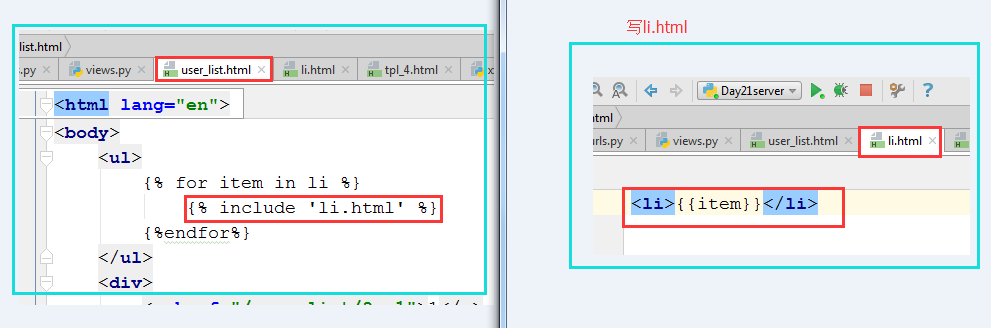
            {% include 'li.html' %}

        {%endfor%}

    </ul>

    <div>

        <a href="/user_list/?p=1">1</a>

        <a href="/user_list/?p=2">2</a>

        <a href="/user_list/?p=3">3</a>

    </div>

</body>

</html>
1.4 写li.html
1.5 效果

二,上述的缺点:不知道该写多少个a标签,尝试把分页信息写到后端然后传给前端
views.py
LIST=[]

for i in range(100):

    LIST.append(i)

    page_str='''

        <a href="/user_list/?p=1">1</a>

        <a href="/user_list/?p=2">2</a>

        <a href="/user_list/?p=3">3</a>

    '''

def user_list(request):

    current_page=request.GET.get('p')

    current_page=int(current_page)

    start=(current_page-1)*10

    end=current_page*10

    data=LIST[start:end]

    return render(request,'user_list.html',{'li':data,'page_str':page_str})
user_list.html修改如下:
<!DOCTYPE html>

<html lang="en">

<head>

    <meta charset="UTF-8">

    <title>Title</title>

</head>

<body>

    <ul>

        {% for item in li %}

            {% include 'li.html' %}

        {%endfor%}

    </ul>

    <div>

        {{page_str}}

    </div>

</body>

</html>
效果:
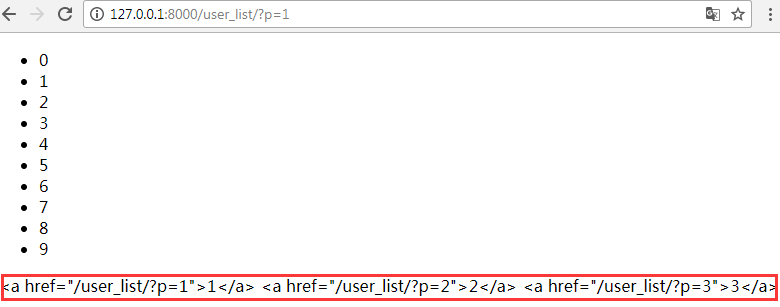
这是出于安全的考虑,所有传来的字符串都认为是不安全的。如果想让其正常显示,需要加入safe,如下:
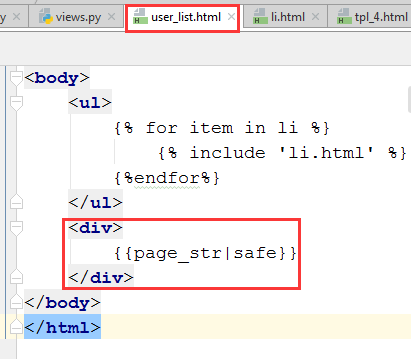
现在就可以正常显示了

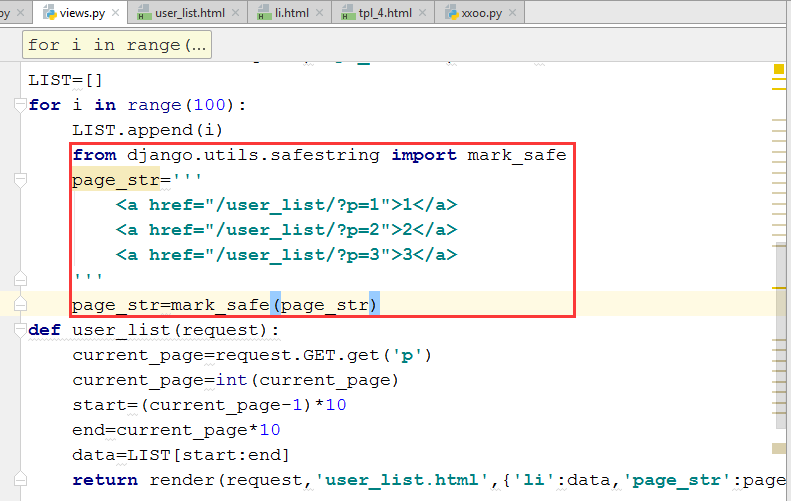
三,另外一种方法:把字符串在后台包装一下,声明它是安全的。
四,根据内容的多少,自动实现分页
最终效果:

粘贴核心程序如下及部分说明:
count,y=divmod(all_count,10)-------取商和余数
page_str="".join(page_list)------以空格相连
page_str=mark_safe(page_str) ----------声明它们是安全的
urls.py
urlpatterns = [

    url(r'^tpl_1/', views.tpl_1),

    url(r'^tpl_2/', views.tpl_2),

    url(r'^tpl_3/', views.tpl_3),

    url(r'^tpl_4/', views.tpl_4),

    url(r'^user_list/', views.user_list),

]
views.py
from django.shortcuts import render,HttpResponse

from django.urls import reverse

# Create your views here.

def tpl_1(request):

    user_list=[1,2,3,4]

    return render(request,'tpl_1.html',{'u':user_list})

def tpl_2(request):

    name='root'

    return render(request,'tpl_2.html',{'name':name})

def tpl_3(request):

    status='已删除'

    return render(request,'tpl_3.html',{'status':status})

def tpl_4(request):

    name='AAABBBIYMFD12345'

    return render(request,'tpl_4.html',{'name':name})

from django.utils.safestring import mark_safe

LIST=[]

for i in range(100):

    LIST.append(i)

def user_list(request):

    current_page=request.GET.get('p')

    current_page=int(current_page)

    start=(current_page-1)*10

    end=current_page*10

    data=LIST[start:end]

    all_count = len(LIST)

    count,y=divmod(all_count,10)

    if y:

        count=count+1

    page_list=[]

    for i in range(1,count+1):

        if i==current_page:

            temp='<a class="page active" href="/user_list/?p=%s">%s</a>' %(i,i)

        else:

            temp='<a class="page" href="/user_list/?p=%s">%s</a>' % (i, i)

        page_list.append(temp)

    page_str="".join(page_list)

    page_str=mark_safe(page_str)

    return render(request,'user_list.html',{'li':data,'page_str':page_str})
user_list.html
<!DOCTYPE html>

<html lang="en">

<head>

    <meta charset="UTF-8">

    <title>Title</title>

    <style>

        .pagination .page{

            display:inline-block;

            padding:5px;

            background-color:cyan;

            margin:5px;

        }

        .pagination .page.active{

            background-color:brown;

            color:white;

        }

    </style>

</head>

<body>

    <ul>

        {% for item in li %}

            {% include 'li.html' %}

        {%endfor%}

    </ul>

    <div class="pagination">

        {{page_str}}

    </div>

</body>

</html>
五,把分页写全,每页显示11条数据(当前选中页+前5+后5)
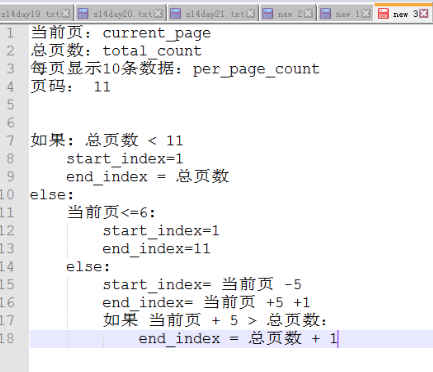
显示效果:

代码:
views.py
from django.shortcuts import render,HttpResponse

from django.urls import reverse

# Create your views here.

def tpl_1(request):

    user_list=[1,2,3,4]

    return render(request,'tpl_1.html',{'u':user_list})

def tpl_2(request):

    name='root'

    return render(request,'tpl_2.html',{'name':name})

def tpl_3(request):

    status='已删除'

    return render(request,'tpl_3.html',{'status':status})

def tpl_4(request):

    name='AAABBBIYMFD12345'

    return render(request,'tpl_4.html',{'name':name})

from django.utils.safestring import mark_safe

LIST=[]

for i in range(200):

    LIST.append(i)

def user_list(request):

    current_page=request.GET.get('p')

    current_page=int(current_page)

    per_page_count=10

    start=(current_page-1)*per_page_count

    end=current_page*per_page_count

    data=LIST[start:end]

    all_count = len(LIST)

    total_count,y=divmod(all_count,per_page_count)

    if y:

        total_count=total_count+1

    page_list=[]

    if total_count<11:

        start_index=1

        end_index=total_count+1

    else:

        if current_page<=6:

            start_index=1

            end_index=11+1

        else:

            start_index=current_page-5

            end_index=current_page+5+1

            if (current_page+5)>total_count:

                end_index=total_count+1

                start_index=total_count-10

    for i in range(start_index,end_index):

        if i==current_page:

            temp='<a class="page active" href="/user_list/?p=%s">%s</a>' %(i,i)

        else:

            temp='<a class="page" href="/user_list/?p=%s">%s</a>' % (i, i)

        page_list.append(temp)

    page_str="".join(page_list)

    page_str=mark_safe(page_str)

    return render(request,'user_list.html',{'li':data,'page_str':page_str})
把具体的页面数用变量代替,这样就可以让用户自己选择每页显示的数目了。
from django.shortcuts import render,HttpResponse

from django.urls import reverse

# Create your views here.

def tpl_1(request):

    user_list=[1,2,3,4]

    return render(request,'tpl_1.html',{'u':user_list})

def tpl_2(request):

    name='root'

    return render(request,'tpl_2.html',{'name':name})

def tpl_3(request):

    status='已删除'

    return render(request,'tpl_3.html',{'status':status})

def tpl_4(request):

    name='AAABBBIYMFD12345'

    return render(request,'tpl_4.html',{'name':name})

from django.utils.safestring import mark_safe

LIST=[]

for i in range(200):

    LIST.append(i)

def user_list(request):

    current_page=request.GET.get('p')

    current_page=int(current_page)

    per_page_count=10

    pager_num = 5

    start=(current_page-1)*per_page_count

    end=current_page*per_page_count

    data=LIST[start:end]

    all_count = len(LIST)

    total_count,y=divmod(all_count,per_page_count)

    if y:

        total_count=total_count+1

    page_list=[]

    if total_count<pager_num:

        start_index=1

        end_index=total_count+1

    else:

        if current_page<=(pager_num+1)/2:

            start_index=1

            end_index=pager_num+1

        else:

            start_index=current_page-(pager_num-1)/2

            end_index=current_page+(pager_num+1)/2

            if (current_page+(pager_num-1)/2)>total_count:

                end_index=total_count+1

                start_index=total_count-pager_num+1

    for i in range(int(start_index),int(end_index)):

        if i==current_page:

            temp='<a class="page active" href="/user_list/?p=%s">%s</a>' %(i,i)

        else:

            temp='<a class="page" href="/user_list/?p=%s">%s</a>' % (i, i)

        page_list.append(temp)

    page_str="".join(page_list)

    page_str=mark_safe(page_str)

    return render(request,'user_list.html',{'li':data,'page_str':page_str})
完善功能,加上上一页,下一页的功能。
from django.shortcuts import render,HttpResponse

from django.urls import reverse

# Create your views here.

def tpl_1(request):

    user_list=[1,2,3,4]

    return render(request,'tpl_1.html',{'u':user_list})

def tpl_2(request):

    name='root'

    return render(request,'tpl_2.html',{'name':name})

def tpl_3(request):

    status='已删除'

    return render(request,'tpl_3.html',{'status':status})

def tpl_4(request):

    name='AAABBBIYMFD12345'

    return render(request,'tpl_4.html',{'name':name})

from django.utils.safestring import mark_safe

LIST=[]

for i in range(200):

    LIST.append(i)

def user_list(request):

    current_page=request.GET.get('p')

    current_page=int(current_page)

    per_page_count=10

    pager_num = 5

    start=(current_page-1)*per_page_count

    end=current_page*per_page_count

    data=LIST[start:end]

    all_count = len(LIST)

    total_count,y=divmod(all_count,per_page_count)

    if y:

        total_count=total_count+1

    page_list=[]

    if total_count<pager_num:

        start_index=1

        end_index=total_count+1

    else:

        if current_page<=(pager_num+1)/2:

            start_index=1

            end_index=pager_num+1

        else:

            start_index=current_page-(pager_num-1)/2

            end_index=current_page+(pager_num+1)/2

            if (current_page+(pager_num-1)/2)>total_count:

                end_index=total_count+1

                start_index=total_count-pager_num+1

    prev='<a class="page" href="/user_list/?p=%s">上一页</a>'%(current_page-1)

    page_list.append(prev)

    for i in range(int(start_index),int(end_index)):

        if i==current_page:

            temp='<a class="page active" href="/user_list/?p=%s">%s</a>' %(i,i)

        else:

            temp='<a class="page" href="/user_list/?p=%s">%s</a>' % (i, i)

        page_list.append(temp)

    nex='<a class="page" href="/user_list/?p=%s">下一页</a>'%(current_page+1)

    page_list.append(nex)

    page_str="".join(page_list)

    page_str=mark_safe(page_str)

    return render(request,'user_list.html',{'li':data,'page_str':page_str})
但是第一页没有“上一页”的功能,最后一页没有“下一页”的功能。
nex='<a class="page" href="javascript:void(0);">下一页</a>' 这里的 href="javascript:void(0);" 表示什么也不做的意思。

href="#” 也可以表示什么都不做的意思。
from django.shortcuts import render,HttpResponse

from django.urls import reverse

# Create your views here.

def tpl_1(request):

    user_list=[1,2,3,4]

    return render(request,'tpl_1.html',{'u':user_list})

def tpl_2(request):

    name='root'

    return render(request,'tpl_2.html',{'name':name})

def tpl_3(request):

    status='已删除'

    return render(request,'tpl_3.html',{'status':status})

def tpl_4(request):

    name='AAABBBIYMFD12345'

    return render(request,'tpl_4.html',{'name':name})

from django.utils.safestring import mark_safe

LIST=[]

for i in range(200):

    LIST.append(i)

def user_list(request):

    current_page=request.GET.get('p')

    current_page=int(current_page)

    per_page_count=10

    pager_num = 5

    start=(current_page-1)*per_page_count

    end=current_page*per_page_count

    data=LIST[start:end]

    all_count = len(LIST)

    total_count,y=divmod(all_count,per_page_count)

    if y:

        total_count=total_count+1

    page_list=[]

    if total_count<pager_num:

        start_index=1

        end_index=total_count+1

    else:

        if current_page<=(pager_num+1)/2:

            start_index=1

            end_index=pager_num+1

        else:

            start_index=current_page-(pager_num-1)/2

            end_index=current_page+(pager_num+1)/2

            if (current_page+(pager_num-1)/2)>total_count:

                end_index=total_count+1

                start_index=total_count-pager_num+1

    if current_page==1:

        prev='<a class="page" href="javascript:void(0);">上一页</a>'

    else:

        prev = '<a class="page" href="/user_list/?p=%s">上一页</a>' % (current_page - 1)

    page_list.append(prev)

    for i in range(int(start_index),int(end_index)):

        if i==current_page:

            temp='<a class="page active" href="/user_list/?p=%s">%s</a>' %(i,i)

        else:

            temp='<a class="page" href="/user_list/?p=%s">%s</a>' % (i, i)

        page_list.append(temp)

    if current_page==total_count:

        nex='<a class="page" href="javascript:void(0);">下一页</a>'

    else:

        nex = '<a class="page" href="/user_list/?p=%s">下一页</a>' % (current_page + 1)

    page_list.append(nex)

    page_str="".join(page_list)

    page_str=mark_safe(page_str)

    return render(request,'user_list.html',{'li':data,'page_str':page_str})
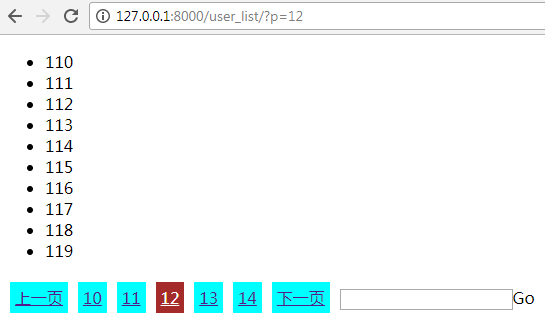
增加跳转到多少页的功能。写个input框,再加个按钮,绑定事件。
location.href:其实就是跳转的意思。 比如<a href=" www.hao123.com "></a> 这个a连接可以跳转到 www.hao123.com 上去。
那么location.href = ' www.hao123.com ',同样是跳转到 www.hao123.com 上去。
jump="""
<input type='text'/><a onclick='jumpTo(this,"/user_list/?p=");'>Go</a>
<script>
function jumpTo(ths,base){
var val=ths.previousSibling.value; //由当前的a标签,获取到前一个input标签,然后得到input标签的内容。
location.href=base+val; //字符串拼接成:,"/user_list/?p=3" 的样子,然后做跳转。
}
</script>
"""
page_list.append(jump)
写成这样也是可以的
jump='''
<input type='text'/><a onclick='jumpTo(this);'>Go</a>
<script>
  function jumpTo(ths){
    var val=ths.previousSibling.value;
    location.href="/user_list/?p="+val;
      }
</script> '''
from django.shortcuts import render,HttpResponse

from django.urls import reverse

# Create your views here.

def tpl_1(request):

    user_list=[1,2,3,4]

    return render(request,'tpl_1.html',{'u':user_list})

def tpl_2(request):

    name='root'

    return render(request,'tpl_2.html',{'name':name})

def tpl_3(request):

    status='已删除'

    return render(request,'tpl_3.html',{'status':status})

def tpl_4(request):

    name='AAABBBIYMFD12345'

    return render(request,'tpl_4.html',{'name':name})

from django.utils.safestring import mark_safe

LIST=[]

for i in range(200):

    LIST.append(i)

def user_list(request):

    current_page=request.GET.get('p')

    current_page=int(current_page)

    per_page_count=10

    pager_num = 5

    start=(current_page-1)*per_page_count

    end=current_page*per_page_count

    data=LIST[start:end]

    all_count = len(LIST)

    total_count,y=divmod(all_count,per_page_count)

    if y:

        total_count=total_count+1

    page_list=[]

    if total_count<pager_num:

        start_index=1

        end_index=total_count+1

    else:

        if current_page<=(pager_num+1)/2:

            start_index=1

            end_index=pager_num+1

        else:

            start_index=current_page-(pager_num-1)/2

            end_index=current_page+(pager_num+1)/2

            if (current_page+(pager_num-1)/2)>total_count:

                end_index=total_count+1

                start_index=total_count-pager_num+1

    if current_page==1:

        prev='<a class="page" href="javascript:void(0);">上一页</a>'

    else:

        prev = '<a class="page" href="/user_list/?p=%s">上一页</a>' % (current_page - 1)

    page_list.append(prev)

    for i in range(int(start_index),int(end_index)):

        if i==current_page:

            temp='<a class="page active" href="/user_list/?p=%s">%s</a>' %(i,i)

        else:

            temp='<a class="page" href="/user_list/?p=%s">%s</a>' % (i, i)

        page_list.append(temp)

    if current_page==total_count:

        nex='<a class="page" href="javascript:void(0);">下一页</a>'

    else:

        nex = '<a class="page" href="/user_list/?p=%s">下一页</a>' % (current_page + 1)

    page_list.append(nex)

    jump="""

    <input type='text'/><a onclick='jumpTo(this,"/user_list/?p=");'>Go</a>

    <script>

        function jumpTo(ths,base){

            var val=ths.previousSibling.value;

            location.href=base+val;

        }

    </script>

    """

    page_list.append(jump)

    page_str="".join(page_list)

    page_str=mark_safe(page_str)

    return render(request,'user_list.html',{'li':data,'page_str':page_str})
效果:
六。把分页的功能写到一个类里面,以后用这个类来做操作就可以了。
__init__(self,current_page,data_count,per_page_count=10,pager_num=7---------接收用户传来的参数并且封装值。
self.current_page=current_page---------开始封装功能
def start(self): 写2个方法
def end(self):写2个方法

per_page_count=10,pager_num=7: 因为这两个值不常修改,所以我们可以给它们写上默认值。
page_obj=Page(current_page,len(LIST)) : 实例化一个类
if self.total_count() < self.pager_num: 这里的total_count是一个类,调用的时候,应该加上括号。
当想访问类里面的方法,但是又不想加括号的话,可以在父类里面写上 @property
views.py
from django.shortcuts import render,HttpResponse

from django.urls import reverse

# Create your views here.

def tpl_1(request):

    user_list=[1,2,3,4]

    return render(request,'tpl_1.html',{'u':user_list})

def tpl_2(request):

    name='root'

    return render(request,'tpl_2.html',{'name':name})

def tpl_3(request):

    status='已删除'

    return render(request,'tpl_3.html',{'status':status})

def tpl_4(request):

    name='AAABBBIYMFD12345'

    return render(request,'tpl_4.html',{'name':name})

class Page:

    def __init__(self,current_page,data_count,per_page_count=10,pager_num=7):

        self.current_page=current_page

        self.data_count=data_count

        self.per_page_count=per_page_count

        self.pager_num=pager_num

    @property

    def start(self):

        return (self.current_page-1)*self.per_page_count

    @property

    def end(self):

        return self.current_page*self.per_page_count

    @property

    def total_count(self):

        v, y = divmod(self.data_count, self.per_page_count)

        if y:

            v = v + 1

        return v

    def page_str(self,base_url):

        page_list = []

        if self.total_count < self.pager_num:

            start_index = 1

            end_index = self.total_count + 1

        else:

            if self.current_page <= (self.pager_num + 1) / 2:

                start_index = 1

                end_index = self.pager_num + 1

            else:

                start_index = self.current_page - (self.pager_num - 1) / 2

                end_index = self.current_page + (self.pager_num + 1) / 2

                if (self.current_page + (self.pager_num - 1) / 2) > self.total_count:

                    end_index = self.total_count + 1

                    start_index = self.total_count - self.pager_num + 1

        if self.current_page == 1:

            prev = '<a class="page" href="javascript:void(0);">上一页</a>'

        else:

            prev = '<a class="page" href="%s?p=%s">上一页</a>' % (base_url,self.current_page - 1)

        page_list.append(prev)

        for i in range(int(start_index), int(end_index)):

            if i == self.current_page:

                temp = '<a class="page active" href="%s?p=%s">%s</a>' % (base_url,i, i)

            else:

                temp = '<a class="page" href="%s?p=%s">%s</a>' % (base_url,i, i)

            page_list.append(temp)

        if self.current_page == self.total_count:

            nex = '<a class="page" href="javascript:void(0);">下一页</a>'

        else:

            nex = '<a class="page" href="%s?p=%s">下一页</a>' % (base_url,self.current_page + 1)

        page_list.append(nex)

        jump = """

        <input type='text'/><a onclick='jumpTo(this,"%s?p=");'>Go</a>

        <script>

            function jumpTo(ths,base){

                var val=ths.previousSibling.value;

                location.href=base+val;

            }

        </script>

        """%(base_url,)

        page_list.append(jump)

        page_str = "".join(page_list)

        page_str = mark_safe(page_str)

        return page_str

from django.utils.safestring import mark_safe

LIST=[]

for i in range(200):

    LIST.append(i)

def user_list(request):

    current_page=request.GET.get('p')

    current_page=int(current_page)

    page_obj=Page(current_page,len(LIST))

    data=LIST[page_obj.start:page_obj.end]

    page_str=page_obj.page_str("/user_list/")

    return render(request,'user_list.html',{'li':data,'page_str':page_str})
精简版本
views.py
from django.shortcuts import render,HttpResponse

from django.utils.safestring import mark_safe

# Create your views here.

class Page:

    def __init__(self,current_page,data_count,per_page_count=10,pager_num=7):

        self.current_page=current_page

        self.data_count=data_count

        self.per_page_count=per_page_count

        self.pager_num=pager_num

    @property

    def start(self):

        return (self.current_page - 1) * self.per_page_count

    @property

    def end(self):

        return self.current_page*self.per_page_count

    @property

    def total_count(self):

        v, y = divmod(self.data_count,self.per_page_count)

        if y:

            v = v+ 1

        return v

    def page_str(self):

        page_list = []

        if self.total_count < self.pager_num:

            start_index = 1

            end_index = self.total_count + 1

        else:

            if self.current_page <= (self.pager_num + 1) / 2:

                start_index = 1

                end_index = self.pager_num + 1

            else:

                start_index = self.current_page - (self.pager_num - 1) / 2

                end_index = self.current_page + (self.pager_num + 1) / 2

                if (self.current_page + (self.pager_num - 1) / 2) > self.total_count:

                    end_index = self.total_count + 1

                    start_index = self.total_count - self.pager_num + 1

        if self.current_page == 1:

            prev = '<a class="page" href="javascript:void(0)">上一页</a>'

        else:

            prev = '<a class="page" href="/user_list/?p=%s">上一页</a>' % (self.current_page - 1)

        page_list.append(prev)

        for i in range(int(start_index), int(end_index)):

            if i == self.current_page:

                temp = '<a class="page active" href="/user_list/?p=%s">%s</a>' % (i, i)

            else:

                temp = '<a class="page" href="/user_list/?p=%s">%s</a>' % (i, i)

            page_list.append(temp)

        if self.current_page == self.total_count:

            nex = '<a class="page" href="javascript:void(0);">下一页</a>'

        else:

            nex = '<a class="page" href=/user_list/?p=%s>下一页</a>' % (self.current_page + 1)

        page_list.append(nex)

        jump = '''

            <input type='text'/><a onclick='jumpTo(this,"/user_list/?p=");'>Go</a>

            <script>

                function jumpTo(ths,base){

                    var val=ths.previousSibling.value;

                    location.href=base+val;

                }

            </script>

        '''

        page_list.append(jump)

        page_str = mark_safe("".join(page_list))

        return page_str

LIST=[]

for i in range(200):

    LIST.append(i)

def user_list(request):

    current_page=request.GET.get('p')

    current_page=int(current_page)

    page_obj=Page(current_page,len(LIST))

    data=LIST[page_obj.start:page_obj.end]

    page_str=page_obj.page_str()

    return render(request,'user_list.html',{'data':data,'page_str':page_str})
def page_str(self,base_url): 把url也当做参数写到函数里面,这样就可以根据需求变化了。

views.py
from django.shortcuts import render,HttpResponse

from django.utils.safestring import mark_safe

# Create your views here.

class Page:

    def __init__(self,current_page,data_count,per_page_count=10,pager_num=7):

        self.current_page=current_page

        self.data_count=data_count

        self.per_page_count=per_page_count

        self.pager_num=pager_num

    @property

    def start(self):

        return (self.current_page - 1) * self.per_page_count

    @property

    def end(self):

        return self.current_page*self.per_page_count

    @property

    def total_count(self):

        v, y = divmod(self.data_count,self.per_page_count)

        if y:

            v = v+ 1

        return v

    def page_str(self,base_url):

        page_list = []

        if self.total_count < self.pager_num:

            start_index = 1

            end_index = self.total_count + 1

        else:

            if self.current_page <= (self.pager_num + 1) / 2:

                start_index = 1

                end_index = self.pager_num + 1

            else:

                start_index = self.current_page - (self.pager_num - 1) / 2

                end_index = self.current_page + (self.pager_num + 1) / 2

                if (self.current_page + (self.pager_num - 1) / 2) > self.total_count:

                    end_index = self.total_count + 1

                    start_index = self.total_count - self.pager_num + 1

        if self.current_page == 1:

            prev = '<a class="page" href="javascript:void(0)">上一页</a>'

        else:

            prev = '<a class="page" href="%s?p=%s">上一页</a>' % (base_url,self.current_page - 1)

        page_list.append(prev)

        for i in range(int(start_index), int(end_index)):

            if i == self.current_page:

                temp = '<a class="page active" href="%s?p=%s">%s</a>' % (base_url,i, i)

            else:

                temp = '<a class="page" href="%s?p=%s">%s</a>' % (base_url,i, i)

            page_list.append(temp)

        if self.current_page == self.total_count:

            nex = '<a class="page" href="javascript:void(0);">下一页</a>'

        else:

            nex = '<a class="page" href=%s?p=%s>下一页</a>' % (base_url,self.current_page + 1)

        page_list.append(nex)

        jump = '''

            <input type='text'/><a onclick='jumpTo(this,"%s?p=");'>Go</a>

            <script>

                function jumpTo(ths,base){

                    var val=ths.previousSibling.value;

                    location.href=base+val;

                }

            </script>

        '''%(base_url)

        page_list.append(jump)

        page_str = mark_safe("".join(page_list))

        return page_str

LIST=[]

for i in range(200):

    LIST.append(i)

def user_list(request):

    current_page=request.GET.get('p')

    current_page=int(current_page)

    page_obj=Page(current_page,len(LIST))

    data=LIST[page_obj.start:page_obj.end]

    page_str=page_obj.page_str("/user_list/")

    return render(request,'user_list.html',{'data':data,'page_str':page_str})
写在这里太长了,我们可以把它们挪到别处。新建utils文件夹----新建pagination.py文件
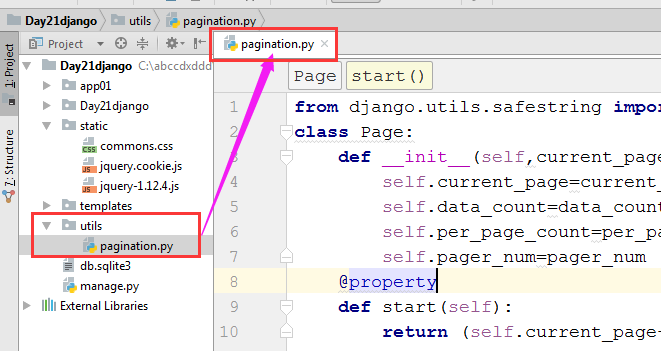
pagination.py
from django.utils.safestring import mark_safe

class Page:

    def __init__(self,current_page,data_count,per_page_count=10,pager_num=7):

        self.current_page=current_page

        self.data_count=data_count

        self.per_page_count=per_page_count

        self.pager_num=pager_num

    @property

    def start(self):

        return (self.current_page-1)*self.per_page_count

    @property

    def end(self):

        return self.current_page*self.per_page_count

    @property

    def total_count(self):

        v, y = divmod(self.data_count, self.per_page_count)

        if y:

            v = v + 1

        return v

    def page_str(self,base_url):

        page_list = []

        if self.total_count < self.pager_num:

            start_index = 1

            end_index = self.total_count + 1

        else:

            if self.current_page <= (self.pager_num + 1) / 2:

                start_index = 1

                end_index = self.pager_num + 1

            else:

                start_index = self.current_page - (self.pager_num - 1) / 2

                end_index = self.current_page + (self.pager_num + 1) / 2

                if (self.current_page + (self.pager_num - 1) / 2) > self.total_count:

                    end_index = self.total_count + 1

                    start_index = self.total_count - self.pager_num + 1

        if self.current_page == 1:

            prev = '<a class="page" href="javascript:void(0);">上一页</a>'

        else:

            prev = '<a class="page" href="%s?p=%s">上一页</a>' % (base_url,self.current_page - 1)

        page_list.append(prev)

        for i in range(int(start_index), int(end_index)):

            if i == self.current_page:

                temp = '<a class="page active" href="%s?p=%s">%s</a>' % (base_url,i, i)

            else:

                temp = '<a class="page" href="%s?p=%s">%s</a>' % (base_url,i, i)

            page_list.append(temp)

        if self.current_page == self.total_count:

            nex = '<a class="page" href="javascript:void(0);">下一页</a>'

        else:

            nex = '<a class="page" href="%s?p=%s">下一页</a>' % (base_url,self.current_page + 1)

        page_list.append(nex)

        jump = """

        <input type='text'/><a onclick='jumpTo(this,"%s?p=");'>Go</a>

        <script>

            function jumpTo(ths,base){

                var val=ths.previousSibling.value;

                location.href=base+val;

            }

        </script>

        """%(base_url,)

        page_list.append(jump)

        page_str = "".join(page_list)

        page_str = mark_safe(page_str)

        return page_str
views.py中的调用方法
from django.shortcuts import render,HttpResponse

from django.urls import reverse

# Create your views here.

def tpl_1(request):

    user_list=[1,2,3,4]

    return render(request,'tpl_1.html',{'u':user_list})

def tpl_2(request):

    name='root'

    return render(request,'tpl_2.html',{'name':name})

def tpl_3(request):

    status='已删除'

    return render(request,'tpl_3.html',{'status':status})

def tpl_4(request):

    name='AAABBBIYMFD12345'

    return render(request,'tpl_4.html',{'name':name})

from utils import pagination

LIST=[]

for i in range(200):

    LIST.append(i)

def user_list(request):

    current_page=request.GET.get('p')

    current_page=int(current_page)

    page_obj=pagination.Page(current_page,len(LIST))

    data=LIST[page_obj.start:page_obj.end]

    page_str=page_obj.page_str("/user_list/")

    return render(request,'user_list.html',{'li':data,'page_str':page_str})
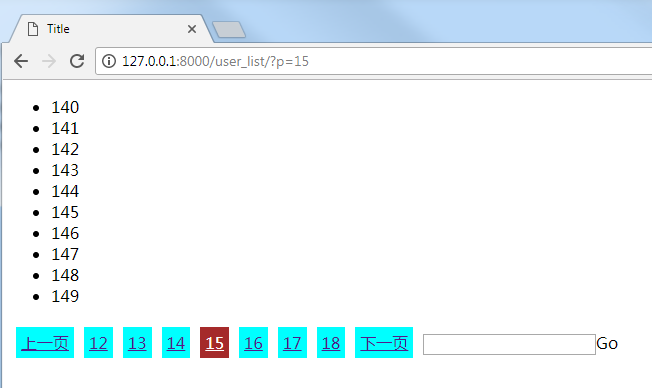
最终效果同上
七,在浏览器中让用户自己选择每页显示的条数
Day21-自定义分页的更多相关文章
- [Python自学] day-21 (1) (请求信息、html模板继承与导入、自定义模板函数、自定义分页)
一.路由映射的参数 1.映射的一般使用 在app/urls.py中,我们定义URL与视图函数之间的映射: from django.contrib import admin from django.ur ...
- asp.net webform 自定义分页控件
做web开发一直用到分页控件,自己也动手实现了个,使用用户自定义控件. 翻页后数据加载使用委托,将具体实现放在在使用分页控件的页面进行注册. 有图有真相,给个直观的认识: 自定义分页控件前台代码: & ...
- Python之路【第十九篇】自定义分页实现(模块化)
自定义分页 1.目的&环境准备 目的把分页写成一个模块的方式然后在需要分页的地方直接调用模块就行了. 环境准备Django中生成一个APP并且注册,配置URL&Views 配置URL ...
- C# DataGridView自定义分页控件
好些日子不仔细写C#代码了,现在主要是Java项目,C#.Net相关项目不多了,有点手生了,以下代码不足之处望各位提出建议和批评. 近日闲来无事想研究一下自定义控件,虽然之前也看过,那也仅限于皮毛,粗 ...
- MVC下分页的自定义分页一种实现
1.引言 在MVC开发中我们经常会对数据进行分页的展示.通过分页我们可以从服务端获取指定的数据来进行展示.这样既节约了数据库查询的时间也节约了网络传输的数据量.在MVC开发中使用的比较多的应该是MVC ...
- Django自定义分页、bottle、Flask
一.使用django实现之定义分页 1.自定义分页在django模板语言中,通过a标签实现; 2.前段a标签使用<a href="/user_list/?page=1"> ...
- Mvc自定义分页控件
MVC开发分页常常使用第三方控件,生成的分页HTML带有版权申明,虽然免费,但是总有的别扭.于是,某日,楼主闲来蛋疼,折腾了个自定义分页控件: 先来展示下效果图: 1>当分页不超过10页的时候, ...
- MVC自定义分页
MVC自定义分页 之前我发表了一篇MVC无刷新分页的文章,里面用的是MvcPager控件,但是那个受那个控件限制,传值只能用PagedList,各方面都受到了限制,自由度不够高,现在还是做MVC无刷新 ...
- PHPCMS快速建站系列之自定义分页函数
内容分页的实现方法:{pc:content action="lists" catid="$catid" order="id DESC" nu ...
- 基于Entity Framework的自定义分页,增删改的通用实现
简介 之前写个一个基于Dapper的分页实现,现在再来写一个基于Entity Framework的分页实现,以及增删改的通用实现. 代码 还是先上代码:https://github.com/jinwe ...
随机推荐
- day2 CSS- 选择器
1.CSS 语法 css是英文Cascading Style Sheets的缩写,称为层叠样式表 2.css的四种引入方式 1.行内式 行内式是在标记的style属性中设定CSS样式.这种方式没有体现 ...
- request,logging,ConfigParser——接口框架
做一个将参数和用例分开放置,并且输出log的接口测试框架 我的框架如下所示 Log文件用来设置log输出文件,需要时可以在用例内调用输出,config用来填写一切需要的参数信息,jiekou_post ...
- appium自动化环境搭建
1.java开发环境JDK 2.android SDK(platform/platform tools/tools/build tools) 3.python下载安装(pip) 4.appium下载安 ...
- Redis的数据类型以及每种数据类型的使用场景
人就是很奇怪的动物,很简单的问题往往大家都容易忽略,当我们在使用分布式缓存Redis的时候,一个最简单的问题Redis的数据类型以及每种数据类型的使用场景是什么? 是不是觉得这个问题很基础?我也这么觉 ...
- LeetCode--147.对链表进行插入排序
题目描述: 插入排序的动画演示如上.从第一个元素开始,该链表可以被认为已经部分排序(用黑色表示). 每次迭代时,从输入数据中移除一个元素(用红色表示),并原地将其插入到已排好序的链表中. 插入排序算法 ...
- 深入react技术栈解读
1. react实现virtual DOM ,如果要改变页面的内容,还是需要执行DOM操作,比原生操作DOM多了virtualDOM的操作(计算,对比等), 应该是更耗性能??? 2. react特点 ...
- LeetCode 36. Valid Sudoku (C++)
题目: Determine if a 9x9 Sudoku board is valid. Only the filled cells need to be validated according t ...
- 老司机带你解读jQuery插件开发流程
jquery插件开发模式 jquery插件一般有三种开发方式: 通过$.extend()来扩展jQuery 通过$.fn 向jQuery添加新的方法 通过$.widget()应用jQuery UI的部 ...
- 第13章 学习shell script
由于博客园中dollar符号有别的意义,所以文中的dollar符号使用¥表示 第一个script [root@localhost script]# cat -n sh01.sh #!/bin/bash ...
- 防御 XSS 的七条原则
本文将会着重介绍防御XSS攻击的一些原则,需要读者对于XSS有所了解,至少知道XSS漏洞的基本原理,如果您对此不是特别清楚,请参考这两篇文章:<Stored and Reflected XSS ...