
iOS UI-应用管理(使用Cell模板)
一、Model
 //

 //  BWApp.h

 //  IOS_0112_应用管理

 //

 //  Created by ma c on 16/1/12.

 //  Copyright (c) 2016年 博文科技. All rights reserved.

 //

 #import <Foundation/Foundation.h>

 @interface BWApp : NSObject

 @property (nonatomic, copy) NSString *size;

 @property (nonatomic, copy) NSString *download;

 @property (nonatomic, copy) NSString *name;

 @property (nonatomic, copy) NSString *icon;

 //标记是否被下载过

 @property (nonatomic, assign) BOOL isDownloaded;

 - (instancetype)initWithDict:(NSDictionary *)dict;

 + (instancetype)appWithDict:(NSDictionary *)dict;

 @end

 //

 //  BWApp.m

 //  IOS_0112_应用管理

 //

 //  Created by ma c on 16/1/12.

 //  Copyright (c) 2016年 博文科技. All rights reserved.

 //

 #import "BWApp.h"

 @implementation BWApp

 - (instancetype)initWithDict:(NSDictionary *)dict

 {

     if (self = [super init]) {

         [self setValuesForKeysWithDictionary:dict];

     }

     return self;

 }

 + (instancetype)appWithDict:(NSDictionary *)dict

 {

     return [[self alloc] initWithDict:dict];

 }

 @end
二、View
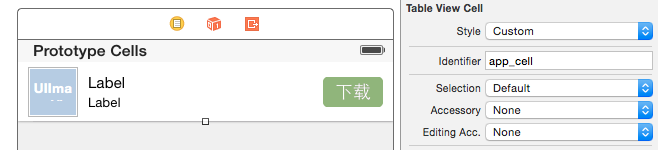
 #import <UIKit/UIKit.h>

 @class BWAppCell;

 @protocol appCellDelegate <NSObject>

 - (void)btnDownloadClick:(BWAppCell *)appCell;

 @end

 @class BWApp;

 @interface BWAppCell : UITableViewCell

 @property (nonatomic, strong) BWApp *app;

 @property (nonatomic, strong) id<appCellDelegate> delegate;

 @end

 //

 //  BWAppCell.m

 //  IOS_0112_应用管理

 //

 //  Created by ma c on 16/1/12.

 //  Copyright (c) 2016年 博文科技. All rights reserved.

 //

 #import "BWAppCell.h"

 #import "BWApp.h"

 @interface BWAppCell ()

 @property (weak, nonatomic) IBOutlet UIImageView *appIcon;

 @property (weak, nonatomic) IBOutlet UILabel *appName;

 @property (weak, nonatomic) IBOutlet UILabel *appDesc;

 @property (weak, nonatomic) IBOutlet UIButton *appDownload;

 - (IBAction)appDownload:(id)sender;

 @end

 @implementation BWAppCell

 - (void)setApp:(BWApp *)app

 {

     _app = app;

     //给子控件设置数据

     self.appIcon.image = [UIImage imageNamed:_app.icon];

     self.appName.text = _app.name;

     self.appDesc.text = [NSString stringWithFormat:@"大小:%@ | 下载量:%@",_app.size,_app.download];

     //更新下载按钮状态

     if (app.isDownloaded) {

         self.appDownload.enabled = NO;

     }

     else

         self.appDownload.enabled = YES;

 }

 #pragma mark - 下载按钮点击事件

 - (IBAction)appDownload:(id)sender {

     //1.禁用按钮

     self.appDownload.enabled = NO;

     //已经被点击过了

     self.app.isDownloaded = YES;

     if ([self.delegate respondsToSelector:@selector(btnDownloadClick:)]) {

         [self.delegate btnDownloadClick:self];

     }

 }

 - (void)awakeFromNib {

     // Initialization code

 }

 - (void)setSelected:(BOOL)selected animated:(BOOL)animated {

     [super setSelected:selected animated:animated];

     // Configure the view for the selected state

 }

 @end
三、Controller
 //

 //  ViewController.m

 //  IOS_0112_应用管理

 //

 //  Created by ma c on 16/1/12.

 //  Copyright (c) 2016年 博文科技. All rights reserved.

 //

 #import "ViewController.h"

 #import "BWApp.h"

 #import "BWAppCell.h"

 @interface ViewController ()<appCellDelegate>

 @property (nonatomic, strong) NSArray *appArray;

 @end

 @implementation ViewController

 #pragma mark - appCellDelegate代理方法

 - (void)btnDownloadClick:(BWAppCell *)appCell

 {

     //1.创建一个Label

     UILabel *lblMsg = [[UILabel alloc] initWithFrame:CGRectMake(, (self.view.frame.size.height - )/, , )];

     lblMsg.text = @"正在下载...";

     lblMsg.textAlignment = NSTextAlignmentCenter;

     lblMsg.backgroundColor = [UIColor blackColor];

     lblMsg.textColor = [UIColor redColor];

     //设置透明度

     lblMsg.alpha = 0.0;

     //设置圆角

     lblMsg.layer.cornerRadius = ;

     lblMsg.layer.masksToBounds = YES;

     //[self.view addSubview:lblMsg];

     [[[UIApplication sharedApplication] keyWindow] addSubview:lblMsg];

     //动画方式显示Label

 //    [UIView animateWithDuration:1.0 animations:^{

 //        lblMsg.alpha = 0.6;

 //    }];

     [UIView animateWithDuration:1.0 animations:^{

         lblMsg.alpha = 0.6;

     } completion:^(BOOL finished) {

         //动画执行完毕以后

         //再开启一个新动画

         [UIView animateWithDuration:1.0 delay:0.5 options:UIViewAnimationOptionCurveLinear animations:^{

             lblMsg.alpha = ;

         } completion:^(BOOL finished) {

             [lblMsg removeFromSuperview];

         }];

     }];

 }

 #pragma mark - 懒加载

 - (NSArray *)appArray

 {

     if (_appArray == nil) {

         NSString *path = [[NSBundle mainBundle] pathForResource:@"apps_full.plist" ofType:nil];

         NSArray *arrDict = [NSArray arrayWithContentsOfFile:path];

         NSMutableArray *arrModel = [NSMutableArray array];

         for (NSDictionary *dict in arrDict) {

             BWApp *app = [BWApp appWithDict:dict];

             [arrModel addObject:app];

         }

         _appArray = arrModel;

     }

     return _appArray;

 }

 #pragma mark - viewDidLoad

 - (void)viewDidLoad {

     [super viewDidLoad];

     //NSLog(@"%@",self.appArray);

     self.tableView.rowHeight = ;

 }

 #pragma mark - 数据源方法

 - (NSInteger)numberOfSectionsInTableView:(UITableView *)tableView

 {

     return ;

 }

 - (NSInteger)tableView:(UITableView *)tableView numberOfRowsInSection:(NSInteger)section

 {

     return self.appArray.count;

 }

 - (UITableViewCell *)tableView:(UITableView *)tableView cellForRowAtIndexPath:(NSIndexPath *)indexPath

 {

     //1.获取数据模型

     BWApp *model = self.appArray[indexPath.row];

     //2.通过storyboard中cell模板创建单元格

     static NSString *ID = @"app_cell";

     BWAppCell *cell = [tableView dequeueReusableCellWithIdentifier:ID];

     //3.设置数据

     cell.app = model;

     cell.delegate = self;

     //4.返回数据

     return cell;

 }

 - (void)didReceiveMemoryWarning {

     [super didReceiveMemoryWarning];

     // Dispose of any resources that can be recreated.

 }

 @end
iOS UI-应用管理(使用Cell模板)的更多相关文章
- [Xcode 实际操作]一、博主领进门-(1)iOS项目的创建和项目模板的介绍
目录:[Swift]Xcode实际操作 本文将演示iOS项目的创建和项目模板的介绍. [Create a new Xcode project]创建一个新的项目. 在弹出的模板窗口中,显示了所有的项目模 ...
- iOS ARC内存管理
iOS的内存管理机制,只要是iOS开发者,不管多长的时间经验,都能说出来一点,但是要深入的理解.还是不简单的.随着ARC(自动管理内存)的流行.iOS开发者告别了手动管理内存的复杂工作.但是自动管理内 ...
- Unity3d:UI面板管理整合进ToLua
本文基于 https://github.com/chiuan/TTUIFramework https://github.com/jarjin/LuaFramework_UGUI 进行的二次开发,Tha ...
- 理解 iOS 的内存管理
远古时代的故事 那些经历过手工管理内存(MRC)时代的人们,一定对 iOS 开发中的内存管理记忆犹新.那个时候大约是 2010 年,国内 iOS 开发刚刚兴起,tinyfool 大叔的大名已经如雷贯耳 ...
- iOS10 UI教程管理层次结构
iOS10 UI教程管理层次结构 iOS10 UI教程管理层次结构,在一个应用程序中,如果存在多个层次结构,就需要对这些层次结构进行管理.在UIView类中提供了可以用来管理层次结构的方法,让开发者可 ...
- [IOS]IOS UI指南
[IOS]IOS UI指南 众所周知,IOS的界面设计,越来越流行,可以说都形成了一个标准,搜集了一些资料,供自己以后学习使用! iOS Human Interface Guidelines (中文翻 ...
- IOS UI 第八篇:基本UI
实现图片的滚动,并且自动停止在每张图片上 - (void)viewDidLoad{ [super viewDidLoad]; UIScrollView *scrollView = [[U ...
- iOS之内存管理(ARC)
iOS的内存管理,相信大家都不陌生,之前是使用的MRC,由开发人员手动来管理内存,后来使用了ARC,来由系统管理内存.本文主要讲讲Autorelease,Core Foundation对象在内存管理方 ...
- 国外IOS UI指南
国外IOS UI指南 众所周知,IOS的界面设计,越来越流行,可以说都形成了一个标准,搜集了一些资料,供自己以后学习使用! iOS Human Interface Guidelines (中文翻译) ...
随机推荐
- Javascript计算星座
今天看群里一哥们折腾得挺热乎,手痒随便写了一个DEMO,供初学者参考. 重点,写程序先定注释,明确思路后再写具体代码. //星座定义 var constellations = [ {"Sta ...
- 以jar包的形式来使用前端的各种框架、组件。
springboot(二):web综合开发 - 纯洁的微笑博客 http://www.ityouknow.com/springboot/2016/02/03/spring-boot-web.html ...
- mysql 数据操作 单表查询 where约束 工作模式
select name,age from employee where id >7; 1.首先先找到表 from employee 2.表存在 mysql拿着约束条件 去表里 看依次匹配数 ...
- nmon 命令
nmon 命令 用途 以交互方式显示本地系统统计信息并以记录方式记录系统统计信息. 语法 交互方式: nmon [ -h ] nmon [ -s < seconds >] [ -c < ...
- ZOHO 免费小型企业邮箱和个人邮箱
Zoho Mail 提供免费小型企业邮箱注册.精简版只能添加一个域到您的机构帐号,最多允许10用户.如果您想添加多个域,您可以升级到标准版.10用户免费,5 GB /每用户,5 GB (共享). 除了 ...
- 实现linux下的ls
实现linux下的ls ls的使用 ls -a 列出文件下所有的文件,包括以"."开头的隐藏文件(linux下文件隐藏文件是以.开头的,如果存在..代表存在着父目录). ls -l ...
- F题:等差区间(RMQ||线段树)
原题大意:原题链接 题解链接 给定一个长为n的数组元素和q次区间[l,r]询问,判断区间[l,r]内元素排序后能否构成等差数列 #include<cmath> #include<c ...
- VS2010/MFC编程入门之二十二(常用控件:按钮控件Button、Radio Button和Check Box)
言归正传,鸡啄米上一节中讲了编辑框的用法,本节继续讲解常用控件--按钮控件的使用. 按钮控件简介 按钮控件包括命令按钮(Button).单选按钮(Radio Button)和复选框(Check Box ...
- R之内存管理
引言 R的内存管理机制究竟是什么样子的?最近几日在讲一个分享会,被同学问到这方面的问题,可是到网上去查,终于找到一篇R语言内存管理不过讲的不清不楚的,就拿memory.limit()函数来说,是在wi ...
- STM32的中断系统
STM32的中断系统 STM32具有十分强大的中断系统,将中断分为了两个类型:内核异常和外部中断.并将所有中断通过一个表编排起来,下面是stm32中断向量表的部分内容: 上图-3到6这个区域被标黑了, ...