
iOS 录音功能的实现
这两天也调了一下ios的录音,原文链接:http://www.iphoneam.com/blog/index.php?title=using-the-iphone-to-record-audio-a-guide&more=1&c=1&tb=1&pb=1
这里ios的录音功能主要依靠AVFoundation.framework与CoreAudio.framework来实现
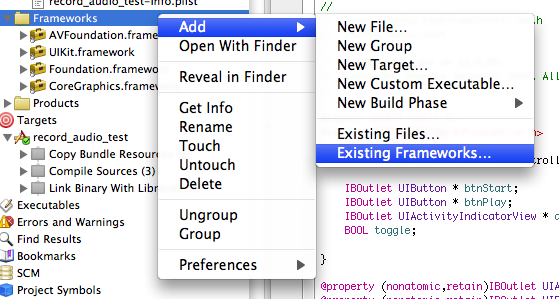
在工程内添加这两个framework
我这里给工程命名audio_text
在生成的audio_textViewController.h里的代码如下
- #import <UIKit/UIKit.h>
- #import <AVFoundation/AVFoundation.h>
- #import <CoreAudio/CoreAudioTypes.h>
- @interface audio_textViewController : UIViewController {
- IBOutlet UIButton *bthStart;
- IBOutlet UIButton *bthPlay;
- IBOutlet UITextField *freq;
- IBOutlet UITextField *value;
- IBOutlet UIActivityIndicatorView *actSpinner;
- BOOL toggle;
- //Variable setup for access in the class
- NSURL *recordedTmpFile;
- AVAudioRecorder *recorder;
- NSError *error;
- }
- @property (nonatomic,retain)IBOutlet UIActivityIndicatorView *actSpinner;
- @property (nonatomic,retain)IBOutlet UIButton *bthStart;
- @property (nonatomic,retain)IBOutlet UIButton *bthPlay;
- -(IBAction)start_button_pressed;
- -(IBAction)play_button_pressed;
- @end
audio_textViewController.m
- #import "audio_textViewController.h"
- @implementation audio_textViewController
- - (void)viewDidLoad {
- [super viewDidLoad];
- //Start the toggle in true mode.
- toggle = YES;
- bthPlay.hidden = YES;
- //Instanciate an instance of the AVAudioSession object.
- AVAudioSession * audioSession = [AVAudioSession sharedInstance];
- //Setup the audioSession for playback and record.
- //We could just use record and then switch it to playback leter, but
- //since we are going to do both lets set it up once.
- [audioSession setCategory:AVAudioSessionCategoryPlayAndRecord error: &error];
- //Activate the session
- [audioSession setActive:YES error: &error];
- }
- /*
- // The designated initializer. Override to perform setup that is required before the view is loaded.
- - (id)initWithNibName:(NSString *)nibNameOrNil bundle:(NSBundle *)nibBundleOrNil {
- self = [super initWithNibName:nibNameOrNil bundle:nibBundleOrNil];
- if (self) {
- // Custom initialization
- }
- return self;
- }
- */
- /*
- // Implement loadView to create a view hierarchy programmatically, without using a nib.
- - (void)loadView {
- }
- */
- /*
- // Implement viewDidLoad to do additional setup after loading the view, typically from a nib.
- - (void)viewDidLoad {
- [super viewDidLoad];
- }
- */
- /*
- // Override to allow orientations other than the default portrait orientation.
- - (BOOL)shouldAutorotateToInterfaceOrientation:(UIInterfaceOrientation)interfaceOrientation {
- // Return YES for supported orientations
- return (interfaceOrientation == UIInterfaceOrientationPortrait);
- }
- */
- - (IBAction) start_button_pressed{
- if(toggle)
- {
- toggle = NO;
- [actSpinner startAnimating];
- [bthStart setTitle:@"停" forState: UIControlStateNormal ];
- bthPlay.enabled = toggle;
- bthPlay.hidden = !toggle;
- //Begin the recording session.
- //Error handling removed. Please add to your own code.
- //Setup the dictionary object with all the recording settings that this
- //Recording sessoin will use
- //Its not clear to me which of these are required and which are the bare minimum.
- //This is a good resource: http://www.totodotnet.net/tag/avaudiorecorder/
- NSMutableDictionary* recordSetting = [[NSMutableDictionary alloc] init];
- [recordSetting setValue :[NSNumber numberWithInt:kAudioFormatAppleIMA4] forKey:AVFormatIDKey];
- [recordSetting setValue:[NSNumber numberWithFloat:[freq.text floatValue]] forKey:AVSampleRateKey];
- [recordSetting setValue:[NSNumber numberWithInt: [value.text intValue]] forKey:AVNumberOfChannelsKey];
- //Now that we have our settings we are going to instanciate an instance of our recorder instance.
- //Generate a temp file for use by the recording.
- //This sample was one I found online and seems to be a good choice for making a tmp file that
- //will not overwrite an existing one.
- //I know this is a mess of collapsed things into 1 call. I can break it out if need be.
- recordedTmpFile = [NSURL fileURLWithPath:[NSTemporaryDirectory() stringByAppendingPathComponent: [NSString stringWithFormat: @"%.0f.%@", [NSDate timeIntervalSinceReferenceDate] * 1000.0, @"caf"]]];
- NSLog(@"Using File called: %@",recordedTmpFile);
- //Setup the recorder to use this file and record to it.
- recorder = [[ AVAudioRecorder alloc] initWithURL:recordedTmpFile settings:recordSetting error:&error];
- //Use the recorder to start the recording.
- //Im not sure why we set the delegate to self yet.
- //Found this in antother example, but Im fuzzy on this still.
- [recorder setDelegate:self];
- //We call this to start the recording process and initialize
- //the subsstems so that when we actually say "record" it starts right away.
- [recorder prepareToRecord];
- //Start the actual Recording
- [recorder record];
- //There is an optional method for doing the recording for a limited time see
- //[recorder recordForDuration:(NSTimeInterval) 10]
- }
- else
- {
- toggle = YES;
- [actSpinner stopAnimating];
- [bthStart setTitle:@"开始录音" forState:UIControlStateNormal ];
- bthPlay.enabled = toggle;
- bthPlay.hidden = !toggle;
- NSLog(@"Using File called: %@",recordedTmpFile);
- //Stop the recorder.
- [recorder stop];
- }
- }
- - (void)didReceiveMemoryWarning {
- // Releases the view if it doesn't have a superview.
- [super didReceiveMemoryWarning];
- // Release any cached data, images, etc that aren't in use.
- }
- -(IBAction) play_button_pressed{
- //The play button was pressed...
- //Setup the AVAudioPlayer to play the file that we just recorded.
- AVAudioPlayer * avPlayer = [[AVAudioPlayer alloc] initWithContentsOfURL:recordedTmpFile error:&error];
- [avPlayer prepareToPlay];
- [avPlayer play];
- }
- - (void)viewDidUnload {
- // Release any retained subviews of the main view.
- // e.g. self.myOutlet = nil;
- //Clean up the temp file.
- NSFileManager * fm = [NSFileManager defaultManager];
- [fm removeItemAtPath:[recordedTmpFile path] error:&error];
- //Call the dealloc on the remaining objects.
- [recorder dealloc];
- recorder = nil;
- recordedTmpFile = nil;
- }
- - (void)dealloc {
- [super dealloc];
- }
- @end
最后在interface builder里面绘制好界面,如
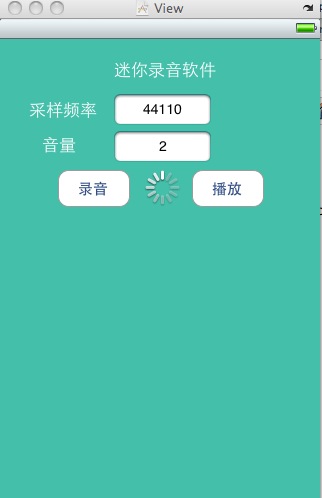
设置下按键的属性

基本就ok了,可以开始录音了。
OSStatus error = AudioSessionInitialize(NULL, NULL, NULL, NULL);
UInt32 category = kAudioSessionCategory_PlayAndRecord;
error = AudioSessionSetProperty(kAudioSessionProperty_AudioCategory, sizeof(category), &category);
AudioSessionAddPropertyListener(kAudioSessionProperty_AudioRouteChange, NULL, self);
UInt32 inputAvailable = 0;
UInt32 size = sizeof(inputAvailable);
AudioSessionGetProperty(kAudioSessionProperty_AudioInputAvailable, &size, &inputAvailable);
AudioSessionAddPropertyListener(kAudioSessionProperty_AudioInputAvailable, NULL, self);
AudioSessionSetActive(true);
2.在录制声音开始的时候先把播放声音stop,加入
UInt32 category = kAudioSessionCategory_PlayAndRecord;
AudioSessionSetProperty(kAudioSessionProperty_AudioCategory, sizeof(category), &category);
这样做应该会让你的录制启动速度显著加快的。
iOS 录音功能的实现的更多相关文章
- iOS中调用系统录音功能及其播放
最近做的项目中,用到了录音的功能,简单记录一下. 我的想法是:通过重写button的点击事件,来达到录音的目的. /*----------------------------------[录音]--- ...
- IOS开发实现录音功能
导入框架: ? 1 #import <AVFoundation/AVFoundation.h> 声明全局变量: ? 1 2 3 4 5 @interface ViewController ...
- ios中录音功能的实现AudioSession的使用
这个星期我完成了一个具有基本录音和回放的功能,一开始也不知道从何入手,也查找了很多相关的资料.与此同时,我也学会了很多关于音频方面的东西,这也对后面的录音配置有一定的帮助.其中参照了<iPhon ...
- iOS 使用AVAudioPlayer开发录音功能
最近要做一个类似对讲的功能,所以需要用到录音上传,然后再播放的功能. 一.音频格式分析 因为之前没研究过音频这块,所以很多音频格式都是第一次见. AAC: AAC其实是"高级音频编码(adv ...
- 一篇对iOS音频比较完善的文章
转自:http://www.cnblogs.com/iOS-mt/p/4268532.html 感谢作者:梦想通 前言 从事音乐相关的app开发也已经有一段时日了,在这过程中app的播放器几经修改我也 ...
- iOS开发之微信聊天工具栏的封装
之前山寨了一个新浪微博(iOS开发之山寨版新浪微博小结),这几天就山寨个微信吧.之前已经把微信的视图结构简单的拖了一下(IOS开发之微信山寨版),今天就开始给微信加上具体的实现功能,那么就先从微信的聊 ...
- IOS开发之音频--录音
前言:本篇介绍录音. 关于录音,这里提供更为详细的讲解网址:http://www.cnblogs.com/kenshincui/p/4186022.html#audioRecord ,并且该博客有更 ...
- Unity3D 实现简单的语音聊天 [iOS版本]
现在很多手机游戏中的聊天系统都加入语音聊天的功能,相比于传统的文字聊天,语音聊天在MMORPG中显得尤为重要,毕竟直接口头交流总比你码字快得多了,也更直观些. 实现语音聊天的方法很多,U3D中有不少第 ...
- 李洪强iOS开发之-环信05_EaseUI 使用指南
李洪强iOS开发之-环信05_EaseUI 使用指南 EaseUI 使用指南 简介 EaseUI 封装了 IM 功能常用的控件(如聊天会话.会话列表.联系人列表).旨在帮助开发者快速集成环信 SDK. ...
随机推荐
- 找你妹+ipad+wifi,回顾那年的经典游戏
昨天,不是从前天同事拿平板给我后,就没睡过一个安稳觉. 先是看电视看得爽歪了,再就是昨天晚上的游戏之夜.IPAD比較老.连系统都不好更新了.就用了留存的应用. 打开酷我看看有什么音乐推荐,听到一首&l ...
- Maven学习:项目之间的关系
Maven不仅可以定义一个项目中各个模块之间的关系,还可以更延伸一步定义项目与项目之间的关系. 定义父子项目的好处还是挺多的.
- linux下tree命令详解
linux下tree命令详解linux下的tree就比较强大了,但一般系统并不自带这个命令,需要手动下载安装:sudo apt-get install tree .文件很小,只有31K,但功能可强大了 ...
- 转 Linux调优方案,sysctl.conf的设置
$ /proc/sys/net/core/wmem_max最大socket写buffer,可参考的优化值:873200 $ /proc/sys/net/core/rmem_max最大socket读bu ...
- mysql客户端(Navicat)远程登录操作遇到问题1142 - XXX command denied to ×××
新建的dbtest用户,访问新建立的TestDB数据库每次都提示1142错误(已经对数据库TestDB赋予了所有权限) 解决方法: Mysql命令: GRANT SELECT ON mysql.* T ...
- @Configuration和@Bean的用法和理解
spring Boot提倡约定优于配置,如何将类的生命周期交给spring 1.第一种自己写的类,Controller,Service. 用@controller @service即可 2.第二种,集 ...
- linux profile\bashrc\bash_profile之间的区别和联系
/etc/profile 每个用户,首次登录时被执行: /etc/bashrc 每个运行bash shell的用户都执行此文件,当bsh被打开时,该文件被读取: ~/.bash_profile 专用于 ...
- php -- 检查是否存在
1.检查变量是否存在:isset() 2.检查常量是否存在:defined() 3.检查方法是否存在:function_exists() 4.检查类是否存在:class_exists()
- linux -- Linux下的五个查找命令:grep、find、locate、whereis、which
1.grep grep(General Regular Expression Parser,通用规则表达式分析程序)是一种强大的文本搜索工具,它能使用正则表达式搜索文本,并把匹配的行打印出来. 它的使 ...
- Sublime Text 3安装清爽主题(著名的Soda Theme)
Sublime Text是一款强大的编辑器,不但拥有众多强大的功能,还拥有很多漂亮的主题以及大量的插件可供配置使用. 本文主要描述Sublime Text 3安装清爽的主题,默认的深色主题Monoka ...